Utilizziamo i cookie per offrirti un servizio migliore e analizzare il traffico. Per saperne di più sui cookie, consulta la nostra Dichiarazione sui cookie. Continuando a navigare sul nostro sito web, accetti il nostro uso dei cookie.

Accetta
Gestisci

Impostazioni dei cookie

Utilizziamo i cookie per offrirti un servizio migliore e analizzare il traffico. Per saperne di più sui cookie, consulta la nostra Dichiarazione sui cookie.

Essenziale

Il nostro sito web si affida a questi cookie per un corretto funzionamento.

Funzionalità

Questi cookie sono utilizzati per conservare le tue preferenze, come la selezione della lingua.

Statistiche

I cookie ci permettono di ottenere informazioni sui nostri visitatori e migliorare la loro navigazione.

Pubblicità

Cookie utilizzati per tracciare le conversioni per le piattaforme pubblicitarie.

Conferma

La distribuzione gratuita di X‑VPN Premium sta avvenendo ora sul nostro subreddit!

La distribuzione gratuita di X‑VPN Premium sta avvenendo ora sul nostro subreddit!
Entra Ora

How to watch Disney+ with X-VPN?

Ultima modifica il 2023-12-11

Disney+ (pronounced "Disney Plus")  is an on-demand streaming service created by The Walt Disney Company. On Disney+, you can find many exciting series from Marvel, as well as enjoy cute animations from Disney.

Disney+ is available in more than 100 regions across the Middle East, Europe, Asia, and Africa. Although Disney+ is available in many regions, cross-region usage may encounter problems.

At this time, X-VPN can help you:

Step 1: Subscribe to X-VPN. Better to choose all platform plan so you can use X-VPN premium and Disney+ on your mobile, PC, TV and so on.

Step 2: Connect to servers for Disney+ in X-VPN:

-US Disney+: US-Video-D+ server
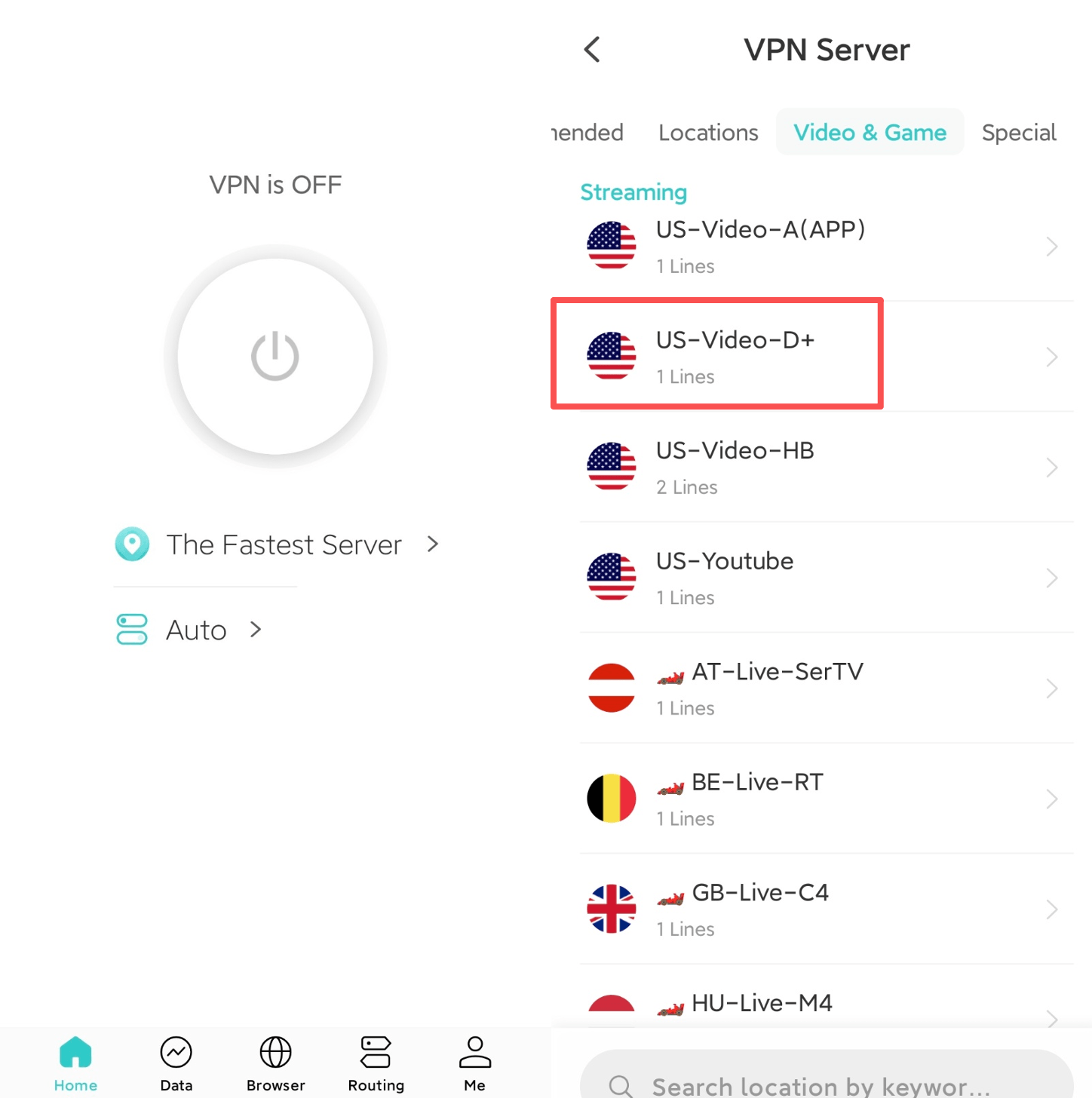
-Asia Disney+ (like Korea): SG-Video-D+ server. This server is temporarily offline and will be back soon.

Step 3: Quit and reopen Disney+ and enjoy it.

If you still access Disney+ after trying the above steps, here are some advice:

1. Try all branches of Disney+ servers, like the US-Video-D+-1 server.

2. Clean your browser (Chrome or Safari) or Disney+ APP cache. It's better to open private mode in your Safari or use Private Browser if you use Android version of X-VPN.

3. Contact Online Support team in X-VPN and we will check for you.

Questo articolo è stato utile?

Grazie per il tuo feedback!

Perché questo articolo non è stato utile?