How to watch Netflix with X-VPN?
Ultima modifica il 2026-09-04
Netflix is a subscription-based streaming media platform. As of July 22, 2026, Netflix has 325 million+ subscribers.
On Netflix, you can see videos from different countries, such as "naruto shippuden", "Harry Potter", etc.
But even if you have a Netflix subscription, you may have problems with some of the videos not being available for viewing.
X-VPN can help you remove all obstacles to watching Netflix!
Step 1: Subscribe to X-VPN so that you can use all servers of X-VPN. It is recommended that you choose an all-platform subscription so that you can use Netflix on your phone, PC, TV, and so on.
Step 2: Open X-VPN, find the Netflix server you need and then connect. (For example, if you want to watch US Netflix content, you can try the US-Video-N or United States server.)
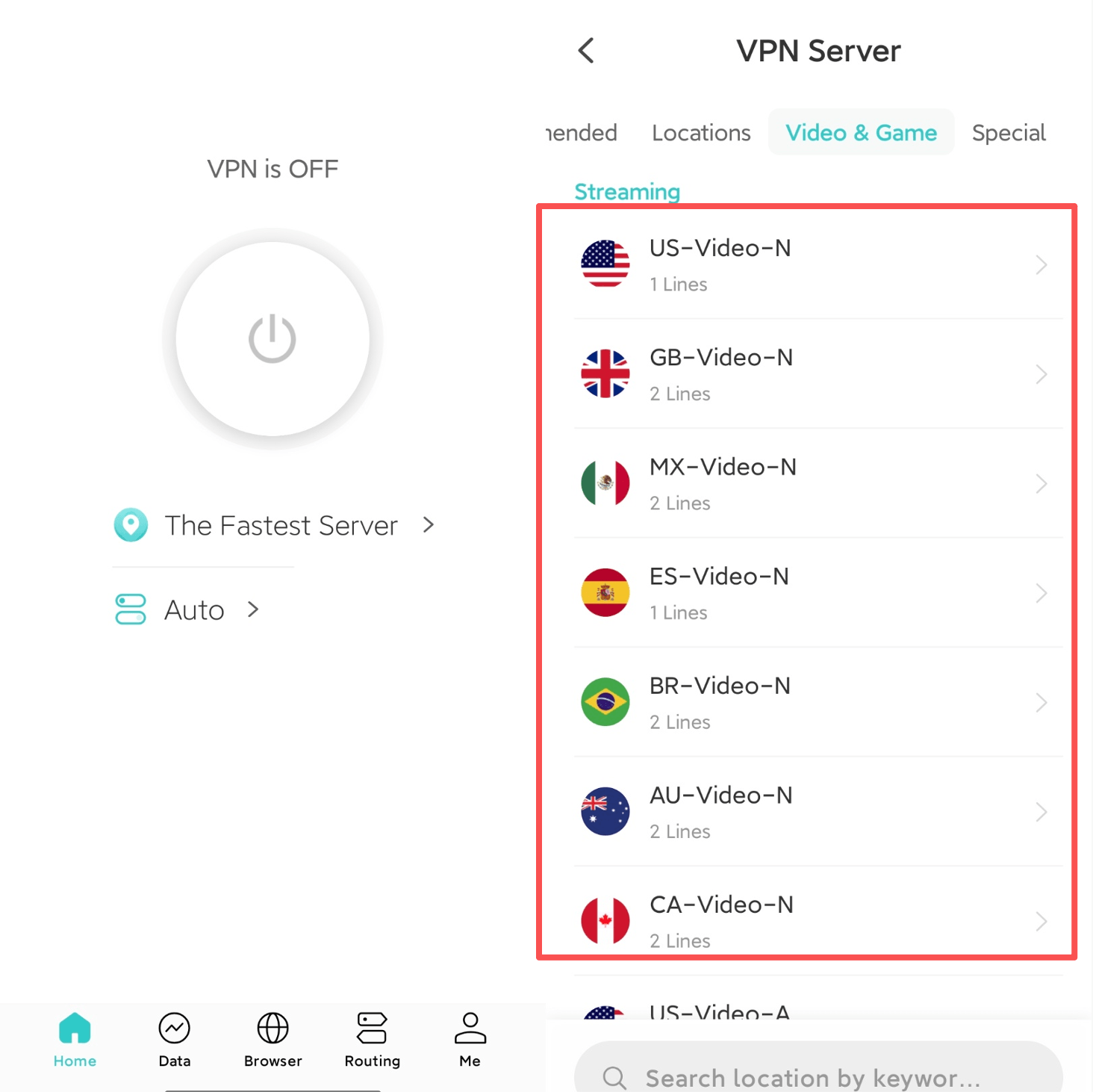
Step 3: Restart your browser or Netflix app. Then just enjoy!
If you have tried the above methods but still can't use Netflix, don't worry, the following methods might help.
1. Connect all branches of the Netflix servers in your country.
2. Clear your browser cache. It is better to turn on the private mode in your browser.
Still not work? Please contact us.
Questo articolo è stato utile?
Grazie per il tuo feedback!
Perché questo articolo non è stato utile?