What is Web Protection feature?
Ultima modifica il 2026-09-10
How to Use Web Protection
With Web Protection, you can help make your browsing experience safer and more private by blocking tracking traffic and malicious website traffic.
Where can I find Web Protection?
You can find Web Protection in the X-VPN app:
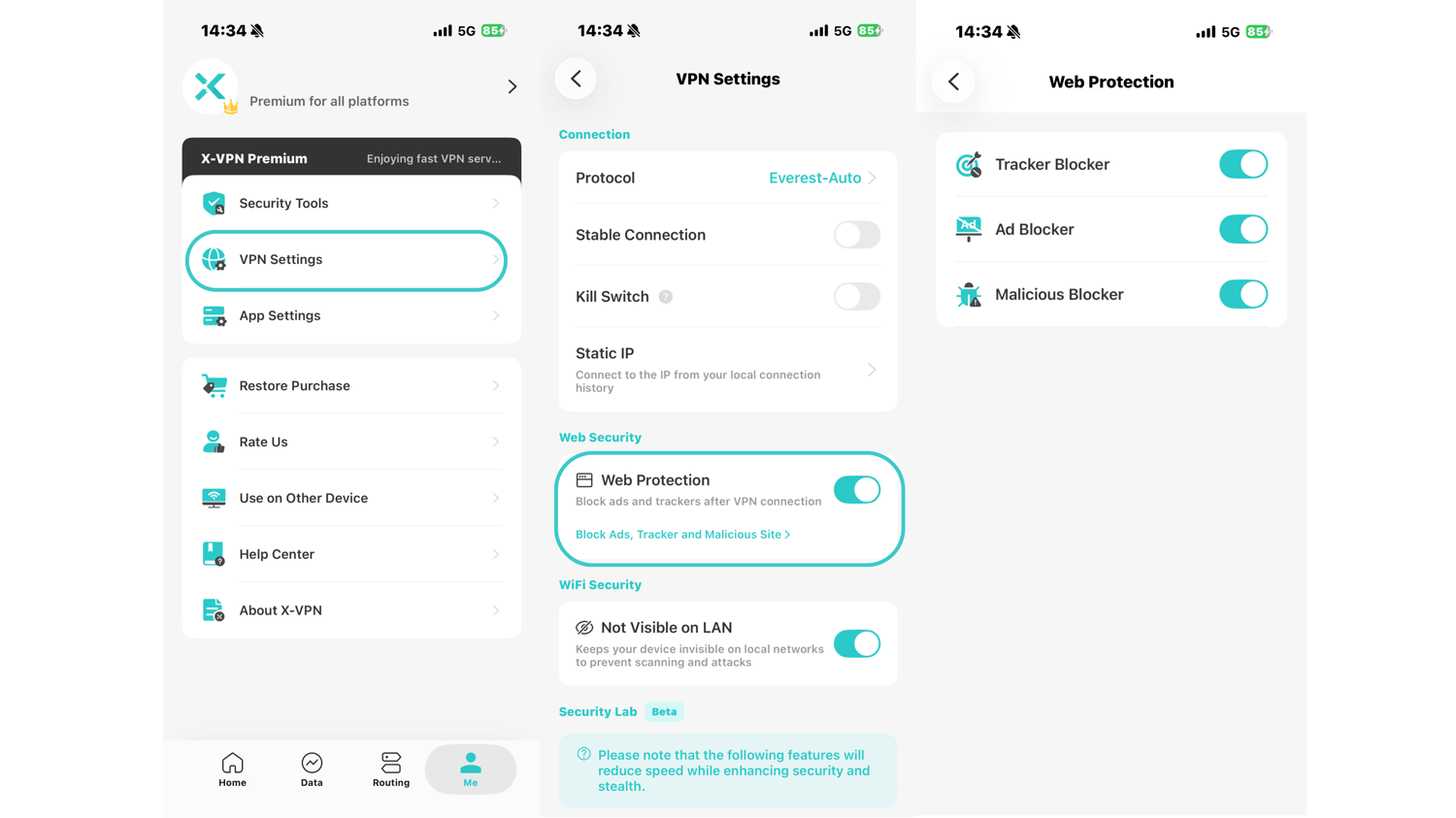
Me → VPN Settings → Web Protection
Open Web Protection to manage the available protection options.
What does Web Protection do?
After enabling Web Protection, you can choose whether to turn on the following features:
Tracker Blocker: Automatically blocks tracker traffic to help reduce online tracking.
Malicious Blocker: Automatically blocks traffic from malicious websites to help protect you from potentially harmful content.
Ad Blocker: Clear away distractions, lighten the pages you visit, and reduce exposure to risky ads.
You can enable or disable each option based on your needs.
Questo articolo è stato utile?
Grazie per il tuo feedback!
Perché questo articolo non è stato utile?