What VPN Protocols Does X-VPN Support?
Ultima modifica il 2026-09-04
X-VPN provides multiple VPN protocol options, including our self-developed Everest protocol system, open-source protocol options such as WireGuard, V2Ray, and OpenVPN, and public standard protocol options such as L2TP where available. These protocols are designed to help X-VPN adapt to different network environments, giving users a secure, stable, and reliable VPN connection for everyday browsing, streaming, and gaming.
X-VPN Supported Protocols
X-VPN currently supports the following protocol options:
Everest-based protocol options
X-VPN’s Everest-based protocol options include:
- Everest-UDP
- Everest-TCP
- Everest-TCP-2
- Everest-TCP-3
- Everest-HTTP
- Everest-HTTP-2
- Everest-HTTP-3
- Everest-TLS
- Everest-TLS-2
- Everest-TLS-3
- Everest-SMTP
- Everest-FTP
- Everest-QUIC
These options allow X-VPN to adapt to different network conditions. For example, UDP-based options may be suitable for speed, TCP-based options may help with stability, and TLS, HTTP, or QUIC-based options may perform better in certain unstable networks.
Other supported protocol options
In addition to Everest-based protocols, X-VPN also supports:
These protocol options give users more flexibility when choosing how to connect. Availability may vary depending on the device, app version, platform, and network environment.
How Do I Choose A Protocol In The X-VPN App?
You can choose your preferred protocol directly in the X-VPN app. Whether you use X-VPN on desktop, mobile, routers, or other supported devices, the app clearly displays each protocol by its actual name, making it easier for you to understand and select the option you want.
The way to change protocols may vary slightly depending on your device:
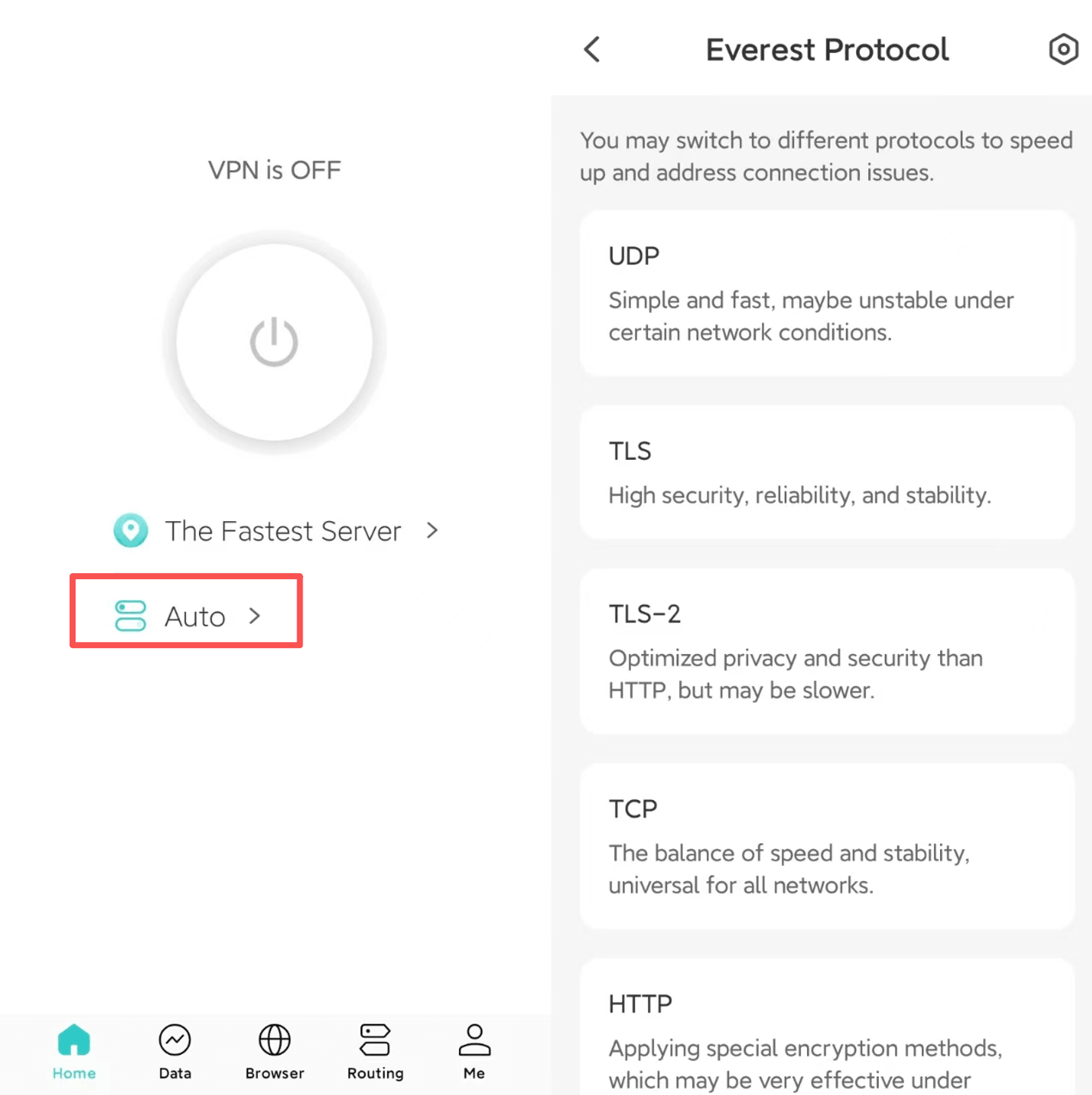
- On mobile, open the X-VPN app and you will see the protocol option on the main screen. Tap it to choose or change your protocol.
- On desktop, open the X-VPN app and go to Settings > VPN Settings > Protocol to select a protocol.
- On routers, you can choose a protocol from your account page.
- On other supported platforms, the process is similar. You can find the protocol option in the app or account settings.
If you are not sure which protocol is best for your situation, you can visit our VPN Protocols page to learn more about how each protocol works and when to use it.
Questo articolo è stato utile?
Grazie per il tuo feedback!
Perché questo articolo non è stato utile?