A VPN app and a VPN browser extension can look similar from the outside. Both connect to a virtual private network, and both can change the IP address that websites see. That makes it easy to assume they’re doing the same job.
They aren’t. A browser extension usually protects the browser, while a VPN app protects much more of the device. That difference matters on computers, but even more on phones and tablets, where so much of daily life happens in apps instead of browser tabs.
Table of Contents
What a VPN Browser Extension Actually Does
A VPN extension is usually a browser-level privacy tool that runs inside Chrome, Firefox, Edge, or other browsers to route traffic through a private network. That can hide your IP address from websites, help with regional access, and add privacy when you’re surfing the web on a desktop or laptop.
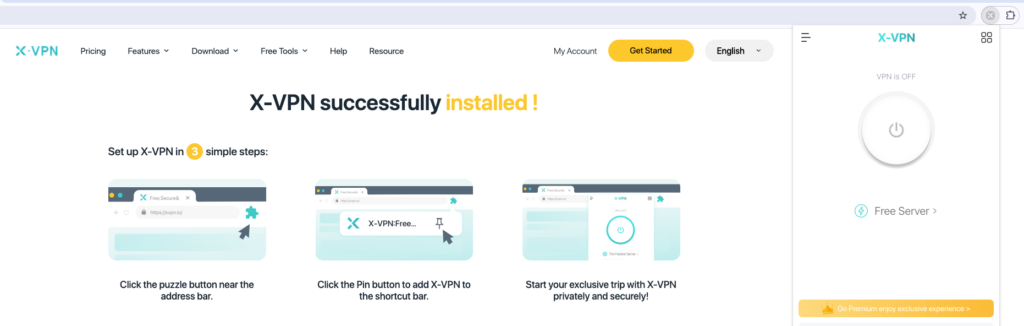
For example, X-VPN’s Chrome extension installs quickly, is easy to access, and useful when your privacy needs are centered on the browser. If you’re reading websites, checking a webmail account, or using a browser-based streaming service, an extension can be convenient.
The limitation is the scope of VPN protection. Browser traffic is only one slice of what your device sends online. If you open a separate app, that app may not use the browser extension at all. An extension doesn’t automatically protect your email app, game launcher, cloud backup tool, messaging app, or operating system updates.
That doesn’t make extensions bad. It just means they don’t safeguard privacy as broadly as many people assume. A VPN extension is a browser-specific tool, not a replacement for full-device VPN protection.
What a Full VPN App Protects

A full VPN app works at the device level. Instead of only handling one browser, it creates a secure connection for internet traffic across the device. That’s the key difference. The VPN app can protect browsers, apps, and background services, depending on the platform, settings, and how the app is configured.
For a deeper look at what’s happening underneath, you might want to explore how a VPN tunnel works. The simple version is that your traffic is encrypted and routed through a VPN server before reaching the open internet.
That device-level approach makes more sense considering the way people actually use phones, tablets, and laptops. Your device isn’t just loading web pages. It’s constantly maintaining app connections and background services, even when you’re not watching them closely.
That background traffic is exactly where the full VPN app matters. A browser extension may protect the tab in front of you, but the app is designed to protect more of the device activity you don’t see.
Why Mobile VPN Extensions Are Rare
On a desktop computer, VPN extensions make more sense because the browser is still a central workspace. Chrome, Firefox, Edge, and Safari can handle many of the tasks that require apps on mobile devices: email, documents, shopping, streaming, banking, and research. In that environment, a browser-only tool can still cover a meaningful share of activity.
Mobile is different. Most major mobile browsers don’t support VPN extensions the way desktop browsers do. Chrome on mobile doesn’t use the standard Chrome Web Store extension model, and while Safari on iPhone and iPad supports extensions in general, that doesn’t mean VPN browser extensions are common or equivalent to desktop options. Firefox on Android is one of the few notable exceptions with mobile add-on support.
That means mobile users often lack a strong VPN extension choice in the first place. There may be third-party browsers with built-in VPN features, but those are usually limited privacy tools. They can be useful, but they don’t replace a real VPN app running at the system level.
The mobile comparison is lopsided by design. On a phone or tablet, a browser extension is rare, restricted, or irrelevant to most of what you do. A dedicated VPN app is usually the practical option because it matches the way mobile devices actually connect.
Why the Difference Matters More on Mobile
The case for a VPN app gets stronger when you think about a normal day on your phone. You might check the weather, open a banking app, send messages, scroll social media, stream music, use maps, upload photos, read email, and tap a link in an in-app browser without opening your main browser once.
That’s the problem with relying on browser-only protection. Even if a mobile VPN extension is available, it only helps when you’re using the browser, leaving apps with personal and financial details unprotected.
For iPhone and Android users, the better fit is usually a dedicated mobile VPN app that secures the internet connection across the operating system, browser, and apps. Protecting a single browser session may put everything else at risk.
Mobile life is app-first, not browser-first. That’s the core of the issue. A desktop browser extension can be useful because computer activity still often runs through the browser. On phones and tablets, the browser is just one app among many.
What Can Slip Past a Browser Extension
A browser extension can work exactly as intended and still leave plenty of traffic outside its protection. On a computer, desktop apps and system services may connect outside the browser. On a phone or tablet, the gap is even larger because messaging, payments, maps, games, streaming, and background sync can all operate independently.
There are also browser-specific issues to consider. WebRTC, or Web Real-Time Communication, can sometimes expose IP information in certain browser contexts, especially for voice and video features. That’s why tools like a WebRTC leak test exist. It gives users a quick way to check whether the browser is exposing information they didn’t expect.
The same idea applies to DNS, or Domain Name System, requests. If DNS queries don’t follow the protected route, they can reveal what services you’re trying to reach. A quick DNS leak test can help confirm whether requests are following the protected route.
A full VPN app doesn’t make every privacy problem disappear, but it starts from a stronger position. The fewer routes around protection, the less you have to keep track of manually.
Public Wi-Fi, Travel, and Streaming Are App-First Problems
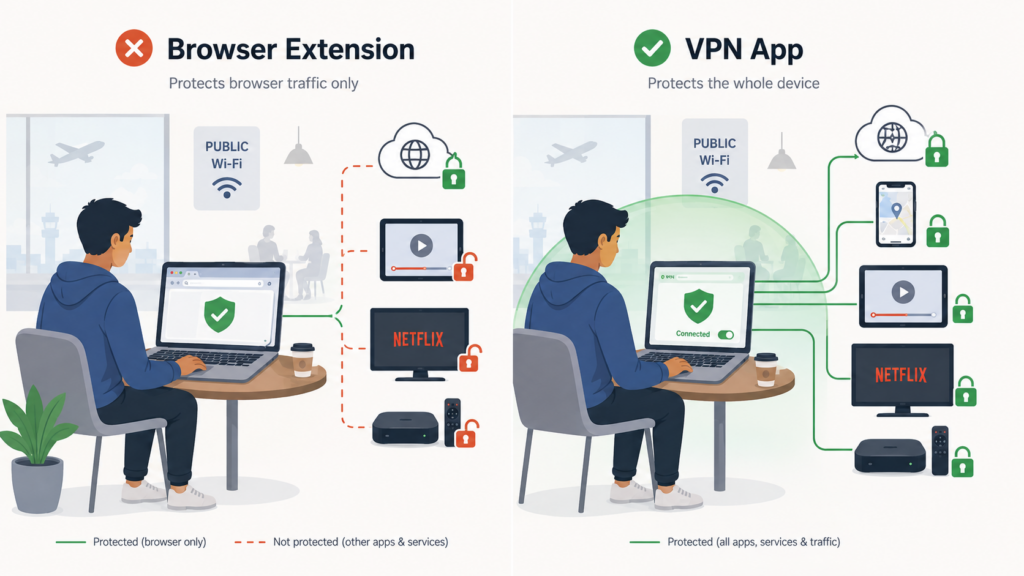
Browser extensions can be handy for quick browsing, but the situations where people most need VPN protection are rarely browser-only. Public Wi-Fi is the obvious example. At airports, hotels, cafes, campuses, and coworking spaces, your whole device is connecting to a network you don’t control.
That means more than browser tabs are involved. Background apps and system services may still be active, even if the only thing you’re looking at is a browser tab. A browser extension can’t protect all of that if the traffic never passes through the browser.
This is why a full VPN app is the safer default. The protection needs to follow the app, not just the browser tab. The many and varied risks of public networks, from snooping to evil twin hotspots, are exactly why a VPN can be so useful while traveling.
Streaming creates a similar split. If you’re watching in a desktop browser, an extension may be enough. If you’re watching through a phone app, tablet app, smart TV app, or streaming box, a browser extension doesn’t help that traffic.
When a Browser Extension Is Enough
A browser extension can still be the right tool when your needs are narrow. If you’re on a desktop or laptop and mostly want to protect browser activity, change your visible location for websites, or avoid routing your whole device through a VPN, an extension can be a clean solution.
It can also be useful when you want different behavior in different browsers. For example, you might keep one browser connected through a VPN extension for research or streaming, while another browser or desktop app stays on your normal connection. That kind of setup can be convenient when you understand the boundary.
The key is intent. A browser extension is enough when browser traffic is what you mean to protect. It isn’t enough to cover every app, every background service, and every connection your device makes.
The extension is like a glove, not a hazmat suit. It’s precise and useful, but it shouldn’t be mistaken for full-device coverage or nuanced protection that you can customize.
When You Should Use the Full VPN App
Use the full VPN app when you want the simplest answer to privacy problems. That’s true for public Wi-Fi, travel, mobile use, remote work, and any situation where you don’t want to think about which app is protected and which one isn’t.
A full VPN app also gives you access to features that browser extensions usually can’t match as well. Depending on the service and platform, that can include a kill switch, protocol choices, server controls, split tunneling, obfuscation, and more comprehensive leak protection.
A kill switch is especially important because it can block traffic if the VPN connection drops unexpectedly. That way, your device doesn’t quietly fall back to an unprotected connection.
This is also where dedicated VPN apps tend to outperform built-in browser VPNs from third-party mobile browsers. Built-in tools may be convenient, but they’re usually designed around the browser experience and often have fewer server choices, fewer protocol options, and less device-level control. A full VPN app is designed around the device.
If privacy matters beyond one tab, use the app. That rule is especially reliable on phones and tablets.
Can You Use Both Together?
You can sometimes use a VPN app and a browser extension together, but stacking tools doesn’t automatically make a setup better. In some cases, it adds convenience. In others, it adds confusion.
If the VPN app is already protecting your device, the browser extension may be redundant. It might still be useful if you want browser-specific controls, a different server location in one browser, or a quick way to change just the browser’s behavior. However, that’s an advanced preference that most users don’t need.
There can also be performance tradeoffs. Routing traffic through multiple layers may slow browsing or create connection oddities. If a site behaves strangely, you may have to figure out whether the issue is coming from the browser extension, the VPN app, the browser itself, or the site.
Two VPN tools aren’t automatically twice as private. For most people, the question is simply: do you need browser-only protection or device-level protection? Once you answer that, the right tool becomes much clearer.
Final thoughts
The difference between a VPN app and a VPN browser extension is more significant on mobile. A browser extension can be useful on a desktop or laptop when your goal is to protect browser activity. It can change the IP address websites see, make browsing more private, and offer a quick way to route one browser through a VPN service.
Mobile users usually need the app. Most major mobile browsers don’t support VPN extensions the way desktop browsers do. Firefox is a rare exception, and third-party browsers with built-in VPN features often lack the depth of dedicated VPN apps. More importantly, phones and tablets are app-first devices, so browser-only protection misses too much of daily use.
It helps to understand what a VPN hides, because it reinforces how VPN protection depends on what traffic actually passes through the protected route.
A VPN app secures all network traffic by default and offers more options. If you want to protect a browser session, a browser extension can be enough. If you want protection that better matches how your phone, tablet, or computer actually works, the full VPN app is usually the better choice.
FAQs
Do VPN browser extensions work on mobile?
Usually not in the same way they do on a desktop. Most major mobile browsers don’t support VPN extensions as a normal feature. Firefox on Android is a rare exception, while Safari supports extensions on iPhone and iPad in general, but that doesn’t make full VPN-style browser extensions common or equivalent to dedicated VPN apps.
Is a browser with a built-in VPN good enough?
It can help with browser activity, but it usually doesn’t match a dedicated VPN app. Built-in browser VPNs or proxy tools are often limited to that browser and may lack the protocol choices, kill switch behavior, server selection, leak protection, and device-wide coverage found in dedicated VPN apps.
Should I use a VPN app or browser extension?
Use a browser extension if you only need browser-level protection on a desktop or laptop. Use the VPN app if you want broader protection across apps, background services, public Wi-Fi, travel, streaming apps, or mobile devices.