Free Link Checker: Is This Link Safe?
Use a URL checker to test any link, see if a website is safe, and avoid phishing or malware before you click
Automatic Link Checker for Every Search
X-VPN can scan search results in real time and label each link with a green shield or red warning, no more entering URLs by hand.
30-Day Money Back,100% success
How to Use the Free Link Checker Tool
If you're not sure whether a URL is a true link or a fake one from scammers, run it through the checker first
01
Enter the Link
Enter or copy the link from your email, message, or browser.

02
Tap Check Link
Paste it into the link checker and tap "Check Link".
03
Get the Result
Read the result and follow the safety advice.
Turn "I'm not sure about this link" into a quick, clear yes-or-no answer
Why Use a Link Checker Before You Click


Catch Scams Before Open Them
Paste links from emails, messages, or social apps and spot phishing pages before they ever load in your browser.

Lower Risks of Malware
Check unknown links before you click, so you're less likely to land on sites that hide malware, fake installers, or shady downloads.

Double Check Unfamiliar Pages
Not sure if a website is legit? Run the URL through the checker first to reduce the chance of entering passwords or card details on a fake site.

Get Simple, Clear Advice
Every result comes with a short explanation and next steps, so you know whether to visit the page, or ignore it.
Automatic Search Engine Link Checker
No more copying and pasting every link, X-VPN marks risky search results for you on Google and Bing automatically
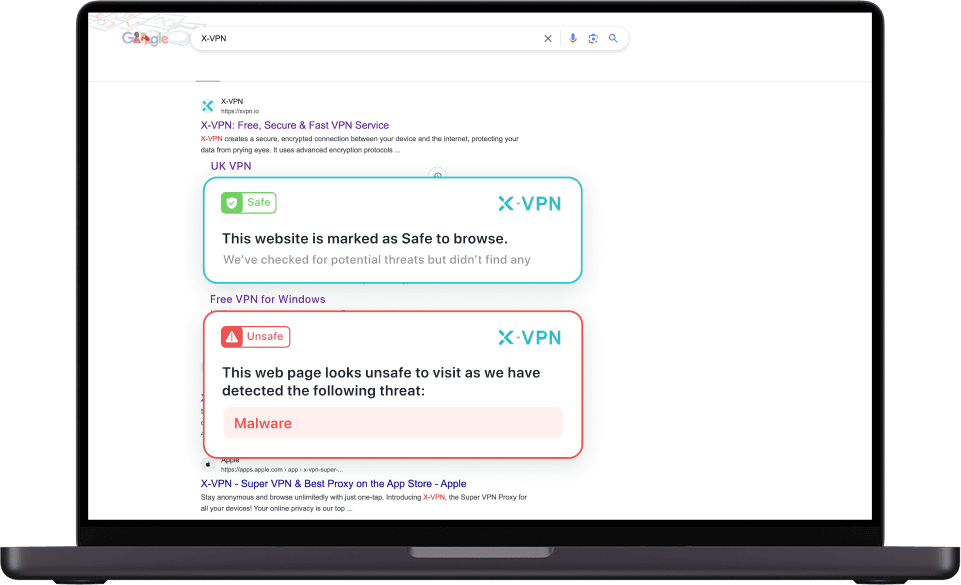

Safety Icons & Avoid Risky Clicks
X-VPN adds clear safety icons next to every search result and flags suspicious or malicious pages before you click, so you can spot safe links at a glance and avoid phishing or malware sites.

Zero Extra Steps
No extra steps, enable Search Engine Protection in Security > Browser Protection, then search as usual while X-VPN quietly checks links in real time. No need to connect the VPN.
Get X-VPN for Automatic Check
Note: This feature is now available on Windows and Mac
Free Link Checker vs. Automatic Search Protection
Use the online link checker when you only need to check one link. Turn on Browser Protection to stay safe from malicious URLs every time you search.
Browser Protection
HOTHow You Use It
Search and Browse As Usual
Paste or Enter a Link and Run a Scan
Where It Works
Supported Desktop Browsers with X-VPN
Any Device with a Browser
How Much It Covers
Many Links in Your Search Results
One Link per Check
Safe Browsing
Lower Risk of Malware
Enable Once and Forget
Blocks Ads and Malware
Blocks Tracker and Cookie
Scans Dark Web
Free to Use
Best For
Everyday Protection Without Copy and Paste
One-Off Checks From Email or Chats
Frequently asked questions
How Do I Check If This Link is Safe?
Paste the URL into the free X-VPN Link Checker and hit “Check link.” We’ll quickly scan it against known phishing, malware, and scam sources and return a clear result so you can decide whether to open it or not. Remember that no tool can guarantee 100% safety, so avoid entering passwords or payment details on unfamiliar sites even if a link looks safe.
What Does the X-VPN Link Checker Actually Check?
The link checker compares the URL against lists of malicious and phishing websites. It uses the same security intelligence that powers X-VPN’s Safe Browsing and Malicious Website Blocker features, which are designed to stop dangerous websites and harmful downloads.
Is the X-VPN Online Link Checker Really Free?
Yes. The online link checker is free to use and doesn’t require an account or subscription. If you want always-on protection, ad blocking, and automatic link checks in your browser, those are part of X-VPN’s premium Safe Browsing features.
How Is the Online Link Checker Different From Automatic Search Protection?
The free link checker is for one-off checks: you paste or enter a suspicious URL and get a quick answer. Automatic search protection, included in X-VPN Safe Browsing, scans many results on Google and Bing in real time and shows safety icons next to each link, and can also block many known malicious websites while you browse. Safe Browsing further adds ad and tracker blocking, download protection, and other tools for everyday use.
How Can I Spot a Suspicious URL By Myself?
A few quick red flags:
The domain name looks slightly wrong (for example, arnazon.com instead of amazon.com).
The link is shortened or looks random, and you weren’t expecting it.
The message around the link pressures you to act immediately or threatens account closure.
The site asks for passwords, payment details, or ID information out of nowhere.
Whenever you’re not sure a URL is genuine, treat it as suspicious and run it through the link checker before you click.

30-day money-back guarantee
Our VPN is powerful and easy to use.
If we don't meet your expectations, we'll refund your payment.
100% Success.
Get X-VPN© LIGHTNINGLINK NETWORKS PTE. LTD. All Rights Reserved