What Can You Use X-VPN MCP For?
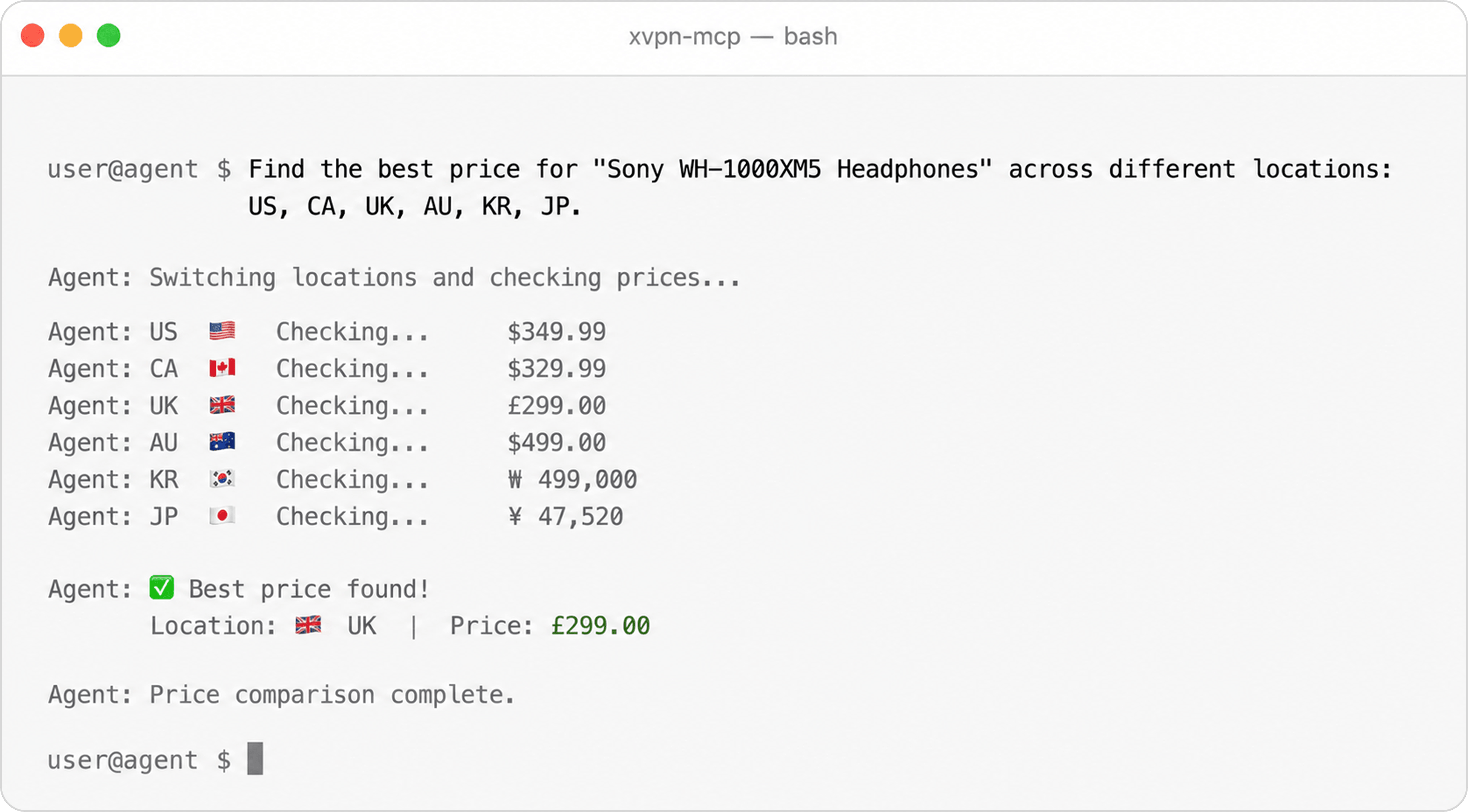
X-VPN MCP allows your AI agent to connect to VPN locations, check IP status, switch regions, and complete region-aware web tasks through MCP.
We use cookies to provide you a better service and analyze traffic. To find out more about cookies, please see our Cookie Declaration. By continuing to browse our website, you agree to our use of cookies.
We use cookies to provide you a better service and analyze traffic, To find out more about cookies, please see our Cookie Declaration.
Our website relies on these cookies for proper functionality.
These cookies are utilized to retain your preferences, such as language selection.
Cookies enable us to gain insights into our visitors and enhance their browsing.
Cookies that are used to track conversions for ads platforms.
Connect X-VPN MCP to AI coding tools and agents that support MCP, including Claude Code, Codex, Gemini CLI, Cursor, Continue.dev, Windsurf, Google Antigravity, and more.





Use it with your favorite MCP-compatible tools and let your agent access VPN actions directly inside your workflow.
Free to start
Try X-VPN MCP without creating an account.
Lightweight
No app interface. Just a simple command-line setup.
Agent-native
Connect your AI client. Let your agent use VPN tools.
Run one command, connect your AI client, and start using VPN tools from your agent.
sh <(curl -sSf https://app.xvpncdn.com/rpc788pbdq/install.sh)
Try prompts like these with your AI agent:
Use X-VPN MCP to check this website from the United States, Germany, and Japan. Summarize the differences.
Connect to the UK and check whether this page shows local pricing, currency, and shipping information.
Research public creator content about this topic from Japan, Korea, and the United States. Compare the common hooks and content angles.
Check search results for this keyword from Singapore and Australia. Compare which brands appear most often.
Test this checkout page from Canada and Germany. Tell me if the currency, tax message, or shipping options change.
X-VPN MCP allows your AI agent to connect to VPN locations, check IP status, switch regions, and complete region-aware web tasks through MCP.

Compare search results, AI answers, brand mentions, and competitor visibility across regions.
Check language, pricing, redirects, and regional content from different VPN locations.
Explore public creator content, local trends, and KOL activity in different countries.
Test location-based website behavior, access rules, and regional bugs more efficiently.
Repeat the same web checks across multiple locations and track changes over time.
Build your own location-aware AI tasks with X-VPN MCP and share what you’d like to see next.
VPN MCP is still new, and we’re building it around real AI-agent workflows.
If you have an idea for how X-VPN MCP could be useful, or if you have a suggestion or feature request, we’d love to hear from you.


X-VPN MCP is a command-line MCP tool that lets compatible AI agents use VPN features such as checking IP status, connecting to VPN locations, and switching regions.
No. X-VPN MCP is installed from the command line and used through an MCP-compatible AI client.
Yes. X-VPN MCP is free to install and start using immediately — no account, payment, or sign-up required. Premium tiers with additional server locations and higher bandwidth are available for power users.
X-VPN MCP operates a strict no-logs policy — no traffic content, connection timestamps, or IP addresses are ever stored or shared. Independent third-party verification of this policy is currently in progress.
No. X-VPN MCP is built for AI-agent workflows. The X-VPN app is for full-device VPN protection.
Yes, when allowed through your MCP client setup. Your agent can switch VPN locations when a task requires a different region.
Yes — join our feedback group and tell us what you use X-VPN MCP for, what's working, and what features you'd like to see. Selected members will receive a free Premium X-VPN MCP account.
No. X-VPN MCP is built for AI-agent workflows. The X-VPN app is for full-device VPN protection.