

IPsec usually shows up in one of a few places. In the protocol menu of a VPN app, sitting next to WireGuard and OpenVPN. Or in an email from IT, saying the old company VPN is being retired and this is what replaces it.
So what is an IPsec VPN? The short answer: IPsec is a set of rules for encrypting internet traffic, and an IPsec VPN is a VPN built on those rules.
Everything after that is where it gets confusing, and there’s one reason for it: IPsec was designed in the 1990s, and the internet it was designed for isn’t the one we use now. It’s been patched and extended ever since to keep up, which is what makes it look so complicated today. This guide sorts out which parts still matter to you and which you can ignore.
Table of Contents
What is IPsec?
Before getting to IPsec, there’s something else to cover first: the Internet Protocol. This is the part of the internet that moves data from one place to another. It was built to deliver, with no protection, so anything it carries travels in the open and can be read by whoever handles it on the way. IPsec is the set of standards added later to close that gap. The name is those two ideas stuck together: Internet Protocol, plus security.
So IPsec isn’t a single VPN protocol, and it isn’t the name of a VPN. It’s that set of standards, the ones that make the Internet Protocol safer to send data over.
The difference is easier to see side by side:
IPsec is the group of standards.
IPsec VPN is a VPN built using them.
IKEv2/IPsec is the option you’ll see in VPN apps. It’s one particular way of putting IPsec to work, and it’s close to the only one still in everyday use.
Most explanations spend their time on the first two. The third is the one you’ll actually deal with.
What IPsec actually does for you
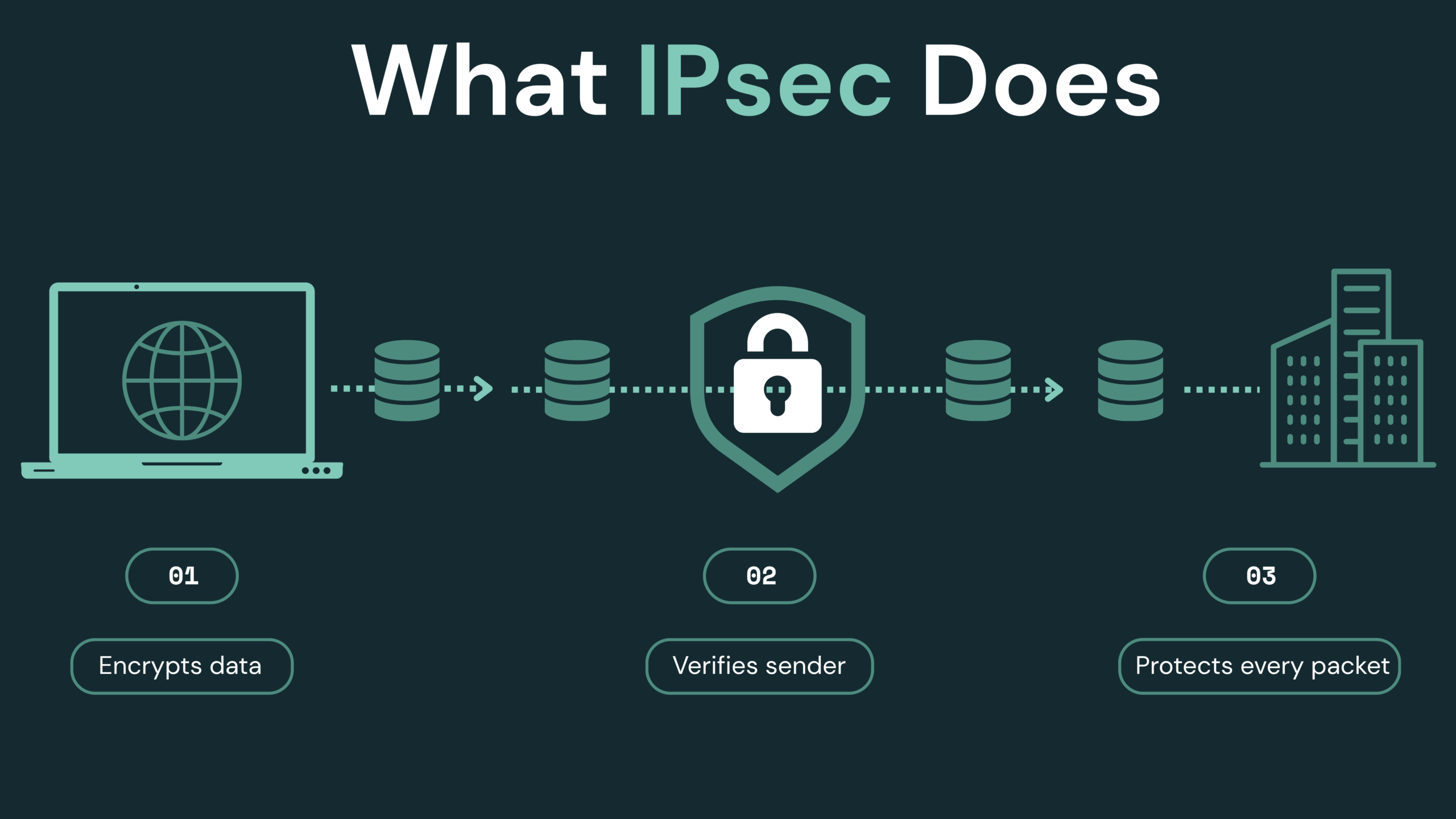
So back to IPsec. What does it actually do? It handles two jobs.
The first is encryption. Data leaving your device gets scrambled, so anyone handling it on the way, your internet provider included, sees a jumble of characters they can’t unscramble. That keeps your data private.
The second is verification. IPsec confirms that data really came from the device it claims to have come from, and that nothing was altered in transit. That keeps the data intact.
Different parts of IPsec handle these two jobs, which is why some guides present them as a choice you need to make. You’ll usually see the two listed side by side, one that only verifies data and one that encrypts it as well, with a line underneath saying the second is more secure. It stopped being a real choice years ago, though plenty of articles still describe it as one.

💡 One thing to note is that IPsec also works packet by packet, on every piece of data your device sends, so it isn’t limited to what happens in a browser. Which traffic goes through the tunnel depends on how the VPN is set up.
Why IPsec feels more complicated than it should
As for why IPsec feels so complicated, that goes back to when it was built. It comes from the mid-1990s, and the internet back then was a far simpler place than it is now.
The assumption at the time was that any two devices could reach each other directly, each with its own public address, and that everything in between would pass data along without touching it or looking at what kind of data it was.
💡 That middle part is worth explaining. Data doesn’t travel straight from one device to another. It gets handed along by equipment in between, mostly routers, each one passing it toward where it’s headed.
None of those assumptions hold now. At home, your router rewrites addresses as data goes out. Away from home, hotel and office networks filter by traffic type, letting some through and dropping the rest. And phones move between Wi-Fi and mobile data several times a day.
IPsec’s original design accounted for none of this, and it was never rebuilt around it. Each time a new situation came up, another layer went on top so connections would still go through.
That’s where the odd names you’ll run into come from: the extra port numbers, and the components other articles describe. Most of it wasn’t there at the start. It was added to keep IPsec working in a world it wasn’t built for.
IKEv2: the part of IPsec you’ll actually see
IPsec is a group of standards, and one of them handles everything that has to be settled before any data moves. That one is IKE, short for Internet Key Exchange. It’s also the name you’ll see inside a VPN app, listed there as IKEv2/IPsec.
In more detail, IKE is what settles which encryption method the connection will use, whether each side is really who it claims to be, and which keys will encrypt and decrypt everything that follows. Once IKE has worked all of that out, it hands the job off to the parts of IPsec that carry your data.
IKE has two versions, IKEv1 and IKEv2. Some guides describe these two versions as two stages in how IKE works, but that’s wrong. They’re two versions of the same thing, seven years apart, and IKEv2 was written to replace IKEv1. Any given connection uses one or the other.
The mix-up probably comes from the fact that IKEv1 does have two internal stages, known as Phase 1 and Phase 2. IKEv2 has no such structure at all.
IKEv1 has also been retired by now. Major VPN clients have dropped support for it and it isn’t recommended for new setups, which leaves IKEv2/IPsec as close to the only version still in general use.
IKEv2 has one more feature worth knowing about. If you use a VPN on your phone, it can hold a connection together when the network underneath it changes. Say you leave the house: your phone drops Wi-Fi and switches over to mobile data, and the VPN tunnel stays up instead of dying and asking you to reconnect. This comes from an optional part of IKEv2 called MOBIKE, so it depends on your app and its servers supporting it. When they do, it’s a real convenience.
IPsec’s weak spot: why your VPN fails on hotel Wi-Fi
IKE has to finish its preparation before the rest of IPsec can start moving your data, and that preparation travels over specific port numbers: UDP 500, or UDP 4500 on networks that use NAT.
Those port numbers are labels. Every piece of data crossing a network carries one, saying what kind of traffic it is, and the equipment along the way reads it to decide what to do with the data. Web traffic carries one label, email traffic carries another, and IPsec carries its own.
IPsec’s labels were fixed when the standards were written. Every IPsec connection uses the same ones, and anyone can look them up. That makes an IPsec connection easy to recognize. Network equipment doesn’t have to break the encryption or read anything inside the packet, since reading the label is enough to identify IPsec traffic. It also means IPsec is easy to block.
By now you can probably see why a VPN running on IPsec so often fails to connect at an airport or a hotel. Their Wi-Fi usually allows web browsing and email and drops everything else, so when your VPN connects over IPsec, the network reads the label, finds it isn’t on the allowed list, and the connection never gets made. Home routers with parental controls or content filtering work the same way on a smaller scale, and mobile networks are sometimes stricter than home connections.
If you want a VPN to work in places like these, you can switch it to a different protocol. OpenVPN is the one to reach for, since it can travel the way ordinary web traffic does and gets let through on that basis. WireGuard is unlikely to help here. It only uses UDP and does not include built-in obfuscation, so restrictive networks may still identify and block it, even though it does not rely on one fixed port.
Two choices other guides say you have to make: AH vs ESP and tunnel vs transport mode
In other articles about IPsec, you’ll run into two more parts described as choices you need to make. Neither one is really a decision you have to make anymore.
AH and ESP
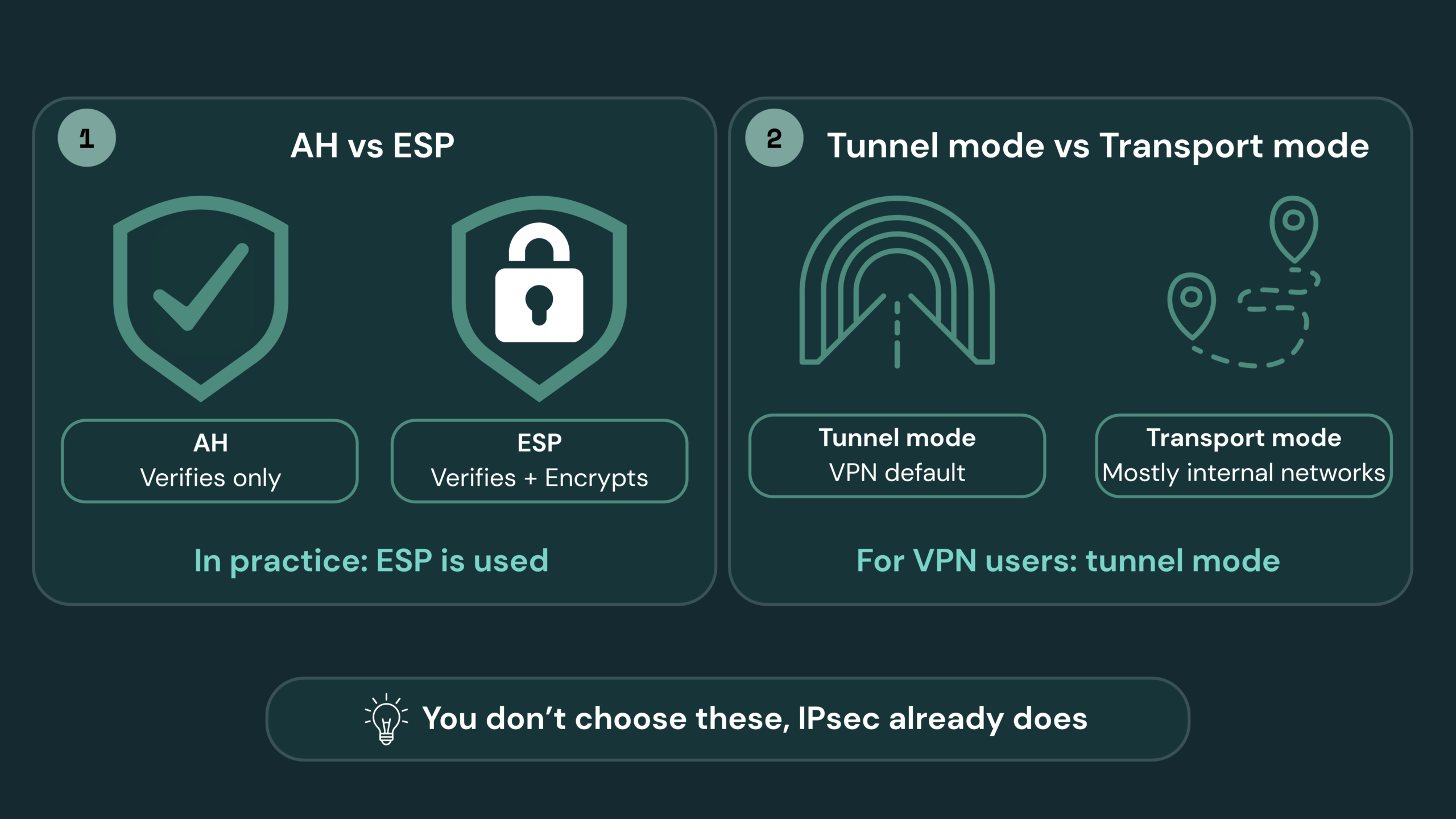
The encryption and verification jobs mentioned earlier are handled by different components of IPsec, and those components have names:
AH handles verification only.
ESP handles verification and encryption together.
Separated out like that, it looks like something you’d pick between, and that’s how most articles about IPsec present it. In practice there’s nothing left to pick. When data leaves your network, your home router rewrites the address information in it, and AH’s verification covers that address information. AH has no way to tell a router doing its normal job apart from someone tampering with the data along the way, so once the address changes, verification fails and the connection drops.
That means AH doesn’t work on an ordinary home network, which rules it out in nearly every situation. IPsec connections use ESP instead. And if verification without encryption is all you need, ESP can do that on its own, which leaves AH with even less reason to exist.
Tunnel mode and transport mode
Then the second pair. Data travels in one of two modes:
Tunnel mode: the original packet is wrapped whole inside a new packet carrying a new address.
Transport mode: the contents are protected, but the original address information stays as it is.
If you’re using a VPN, you’re in tunnel mode. Transport mode is mainly used for specific setups inside private networks, and it usually isn’t among the options a VPN app gives you.
In short, neither pair is worth committing to memory. Knowing the names is enough. Then when you come across a comparison table built around them, you’ll know there’s no choice you need to make, because it’s all been decided for you already.
Is an IPsec VPN still worth using in 2026?
On phones and personal devices, IPsec is no longer the mainstream choice. WireGuard is faster, and it has already become the default protocol in most consumer VPN apps. The only real arguments left for IPsec are staying connected when the network changes, and being built into the operating system, and those aren’t enough to make it a first choice anymore.
In companies, the situation is the reverse. For years, SSL VPN was the default for remote work, but the past decade hasn’t been kind to it. The same components turned up critical vulnerabilities again and again, and plenty of those were being exploited before a patch existed. The NSA and CISA in the United States advise organizations to prefer standards-based IPsec with IKEv2 over SSL/TLS VPNs built on custom code, and Norway’s national cyber security centre went further, telling organizations to phase SSL VPN out entirely. Fortinet has removed SSL VPN tunnel mode from FortiOS 7.6.3 and later, leaving IPsec as the migration path for its customers.
Taken together, IPsec is a thirty-year-old technology in an odd position: on its way out on mobile devices, and strongly recommended by governments for company networks.
So should you choose IKEv2/IPsec?
The question people ask first is usually which protocol is safest, and the honest answer is that safety isn’t the deciding factor here. IKEv2/IPsec, WireGuard, and OpenVPN are all considered secure when they’re set up properly, and any of them will keep your traffic private on a network you don’t trust. What separates them is how they behave, not how strong they are.
That’s also why most apps have an automatic setting, and why leaving it alone is a reasonable choice rather than a lazy one. The app is picking based on things you can’t easily see, and switching when a connection isn’t working.
If you’d rather choose for yourself:
IKEv2/IPsec if you’re mostly on a phone and moving between Wi-Fi and mobile data through the day. It reconnects less often, and being built into the operating system tends to keep it light.
WireGuard if you want the fastest option and you’re on a network that doesn’t interfere with it.
OpenVPN if you’re somewhere that blocks the others, like a hotel or an airport.
And if you’re setting this up to reach a company network, the decision isn’t yours to make. IT picks the protocol, and for the reasons in the last section, IPsec is increasingly what they pick.
FAQ
Is IPsec safe?
Yes, when it’s IKEv2. Cybersecurity agencies in the United States and Norway have both advised organizations to use IPsec with IKEv2 rather than SSL/TLS-based VPNs, partly because IPsec is an open standard with a smaller attack surface. IKEv1 is the exception. It was formally retired in 2023 and shouldn’t be used.
Is IKEv2 the same as IPsec?
Not quite. IKEv2 is one part of IPsec, the part that handles everything before your data starts moving. When an app lists IKEv2/IPsec, it means IKEv2 negotiates the connection and IPsec protects the data. The two names get used interchangeably in practice, since IKEv2 is the only version still in general use. This is also why looking for an IPsec app, or an IPsec setting, usually turns up nothing. IPsec isn’t something you install.
What’s the difference between an IPsec VPN and an SSL VPN?
They work at different levels. IPsec protects traffic packet by packet, at the network level. SSL VPNs sit higher up: some only give browser-based access to selected applications, while full tunnel versions carry ordinary network traffic much like an IPsec VPN does. IPsec is an open standard and SSL VPN products are usually proprietary, which is part of why several national cybersecurity agencies now recommend IPsec for remote access.
IPsec vs OpenVPN vs WireGuard: which one should I use?
All three are secure. WireGuard is the fastest and simplest, and it’s the default in most consumer apps now. IKEv2/IPsec holds a connection together when your phone changes networks and uses less battery. OpenVPN is the slowest of the three but the most likely to work on a restrictive network.
Does IPsec slow down my connection?
Slightly. IPsec adds roughly 50 to 80 bytes to every packet, so a little less of your own data fits into each one. On a normal connection you won’t notice. A well-built VPN client handles the adjustment for you, and it isn’t something you need to configure.
Do I need to open ports for IPsec?
Not if you’re using a VPN app. You don’t need to set up inbound port forwarding on your router, because your provider handles the server side. It only comes up if you’re running your own IPsec server, and it’s easy to get wrong there, since in its original form the part of IPsec that carries your data isn’t a port-based service at all.
Why does IPsec use two port numbers?
UDP 500 is where the setup negotiation happens. UDP 4500 exists because of home routers. Routers use port numbers to track which device a piece of data belongs to, and the part of IPsec that carries your data has no port number of its own, so it can’t get back to you unaided. Port 4500 wraps it in something the router can follow, which is how nearly every home connection ends up working.
Does IKEv2 use less battery?
Sometimes. IKEv2 is built into iOS, Android, Windows, and macOS, so turning it on uses the system’s own implementation rather than code bundled inside an app, and that tends to be lighter on the processor. It isn’t a guarantee, though. WireGuard was designed to be efficient too, and real battery use depends on your device, your app, and how good your signal is.
What are the disadvantages of IPsec?
Two, mainly. It’s easy for a network to identify, which is why it often fails on hotel and airport Wi-Fi, and it adds a little overhead to every packet. Neither one is about the encryption itself. Newer protocols like WireGuard are faster and simpler, which is why most consumer apps default to them now.
What is the difference between VPN and IPsec VPN?
A VPN is the general idea, an encrypted connection between your device and a server somewhere else. IPsec is one of several sets of rules for building that connection, alongside WireGuard and OpenVPN. So an IPsec VPN is a VPN, just one built a particular way.