Can Apps and Trackers Bypass Your VPN? What to Watch Out for?
Learn how trackers slip past tunnels via DNS, WebRTC, or IPv6 leaks—and simple steps to protect your privacy with X-VPN.



We all know it, your phone knows everything about you. Your bank, your messages, your location, even your face. That’s exactly why Android vs iOS security matters: it’s what stands between you and becoming transparent to everyone else.
For years, the answer was clear: iOS wins. But in 2026, that gap has narrowed. Google’s Pixel line now offers seven years of security updates. Android’s AI-powered scam detection has, in some areas, outpaced Apple’s. So which one actually keeps you safer? Let’s find out.
Security Factor | iOS | Android | Winner |
|---|---|---|---|
Hardware security | Secure Enclave; consistent | Titan M on Pixel; varies by brand | iOS |
Encryption | Full-disk; default on all devices | Standard on modern devices; varies on budget | iOS |
Secure boot | Yes; hardware-enforced | Yes; varies by manufacturer | iOS |
Lost phone protection | Find My + Stolen Device Protection | Find My Device + Theft Protection | iOS slightly |
App store review | Strict manual review | Automated + Play Protect | iOS |
Sideloading | Not allowed (except EU) | Allowed by default | iOS |
App permissions | Granular, strict defaults | Granular, more transparent | Even |
Malware exposure | Lower | Higher, especially via APKs | iOS |
Anti-malware tools | Not allowed on App Store | Available via Google Play | Android |
Updates | Simultaneous across all devices | Excellent on Pixel/Samsung; mixed elsewhere | iOS |
Privacy controls | Strong; strict by default | More configurable | iOS |
System-level privacy tools | Mail Privacy, Private Relay, Hide My Email | Privacy Dashboard, auto-reset | iOS |
Open-source transparency | No | Yes (AOSP) | Android |
Account security | Apple ID + 2FA + Passkeys | Google Account + 2FA + Passkeys | Even |
Cloud backup encryption | Apple holds keys (E2EE opt-in) | E2EE by default | Android |
Scam protection | Strong | Strong; sometimes better on Pixel | Depends |
Phishing protection | Built-in database | Built-in database | Even |
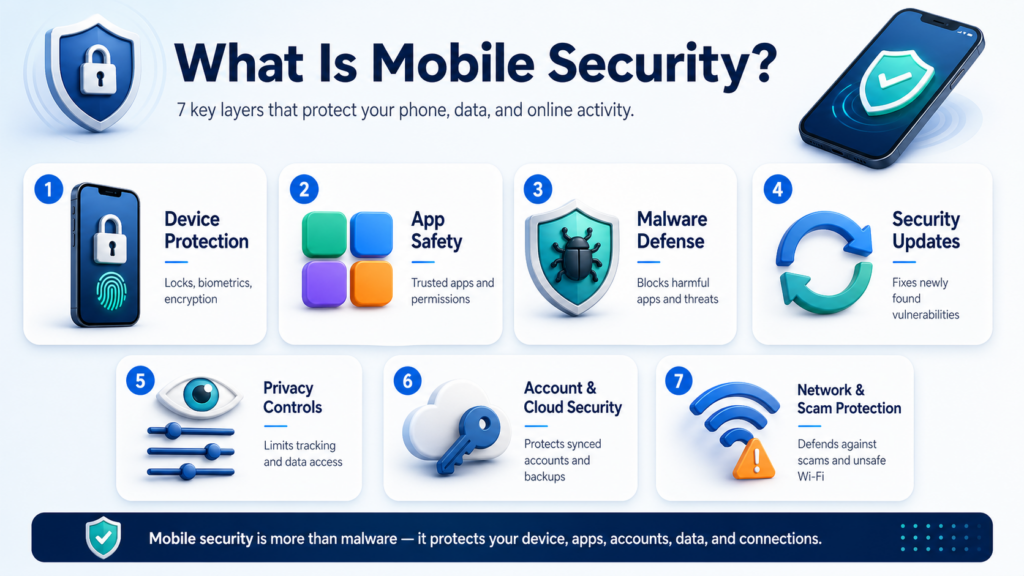
Mobile security is bigger than whether your phone can catch a virus. A secure phone protects your device, your apps, your accounts, your data, and your online activity. That’s why we look at mobile security across seven distinct dimensions:
Device protection is your first line of defense. It covers screen locks, biometrics like Face ID and fingerprint, data encryption, and what happens to your data if your phone is lost or stolen.
App safety is where most everyday risks live. Every app you install gets access to parts of your phone. So whether those apps are safe, legitimate, and properly reviewed determines how much risk you’re exposed to.
Malware defense is about how well your phone detects and blocks mobile threats, like spyware, banking trojans, and fake apps, before they cause damage.
Security updates show how quickly a phone can respond to new threats. No software is perfect, and vulnerabilities are discovered all the time. The longer your phone goes without updates, the more known security holes stay open for attackers to exploit.
Privacy controls determine how much your apps, your operating system, and companies like Apple and Google can collect about you.
Account and cloud security are easy to overlook. Your phone can be perfectly secure, but if your Apple ID or Google Account gets compromised, everything synced to the cloud is at risk.
Network and scam protection covers threats that don’t require hacking your phone at all. A convincing scam text, a fake banking website, or an unsecured public Wi-Fi connection can be just as damaging.

Using a VPN on public Wi-Fi can help protect your connection from common network risks.
That’s the full picture of mobile security. Now let’s see where Android vs iOS security stands on each one.
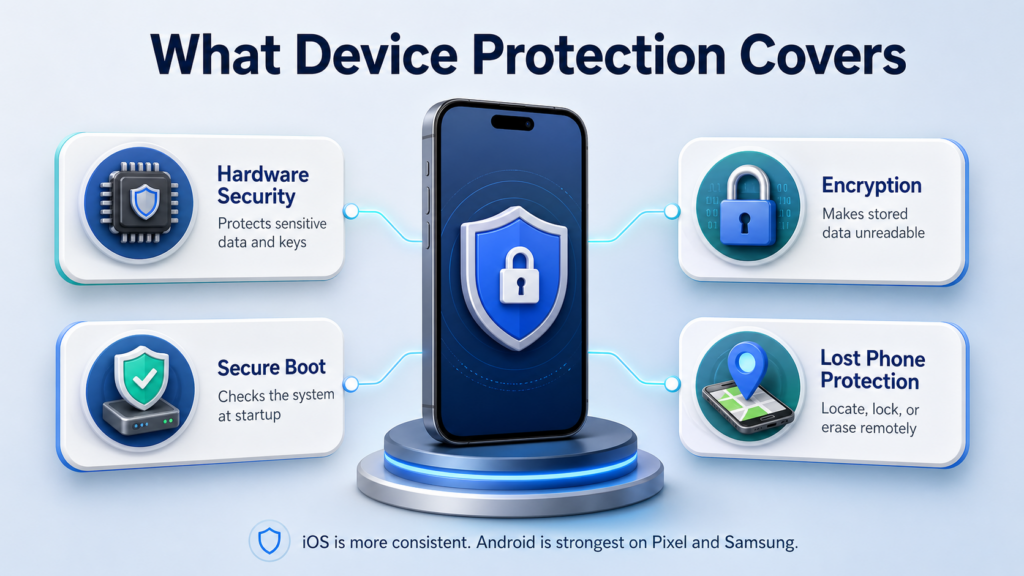
On iOS, hardware security is built around the Secure Enclave, a dedicated security subsystem inside Apple chips, applied to every iPhone beyond the 5s. Secure Enclave stores and protects your most sensitive data, including Face ID, Touch ID, encryption keys, saved passwords, and Apple Pay. It keeps this data isolated from the rest of the system. Even if an attacker has physical access to your phone, that data stays locked inside the chip.
On Android, the picture depends on which device you have. Google Pixel phones use the Titan security chip, and Samsung Galaxy devices use Knox Vault. Both offer strong, hardware-backed protection comparable to Secure Enclave. But outside of these flagship devices, hardware security becomes inconsistent. Many budget and mid-range Android phones rely on software-based security instead, which is often easier to bypass.
Encryption converts everything stored on your phone into unreadable data. Without the correct credentials, the data is useless.
Both iOS and Android encrypt data by default. On an iPhone, encryption is tied directly to the Secure Enclave at the hardware level. There is nothing to set up or enable. On Android, all devices running Android 10 and above are required to use file-based encryption by default, with file contents encrypted using AES-256. So the encryption standard itself is consistent across Android devices.
One thing worth noting: the chip that stores your encryption keys follows the same pattern as hardware security. On an iPhone, it is always the Secure Enclave. On Android, it depends on the device.
Every time you power on your phone, Secure Boot runs a check to make sure the operating system has not been tampered with. If something looks wrong, the device will refuse to boot normally.
Apple builds this into the hardware on every iPhone, with no way to disable it. Android calls its version Verified Boot, and it works well on most modern devices. But it lets users unlock the bootloader if they want to, which bypasses these protections. It’s a technical step that most people will never take, but the fact that it’s possible is worth noting.
Losing your phone is bad enough. Losing everything on it is worse. Both iOS and Android have built-in tools to help you locate, lock, or erase your device remotely. And in 2026, the gap between them has narrowed significantly.
On iOS, Find My can locate your device in real time, lock it remotely, and wipe all data if needed. What makes it particularly strong is offline tracking. Even if your phone has no SIM card or Wi-Fi connection, it can still be located through a network of hundreds of millions of nearby Apple devices. Apple also added Stolen Device Protection, which requires Face ID verification and adds a one-hour delay before anyone can change critical settings like your Apple ID password. It is specifically designed for situations where someone steals your phone and tries to force you to unlock it.
On Android, Find My Device received a major upgrade in 2024. It now supports offline tracking through a similar crowdsourced network, bringing it much closer to Find My in terms of coverage. Android also introduced Theft Protection, which uses AI to detect sudden suspicious movements, like your phone being snatched, and locks the device automatically.
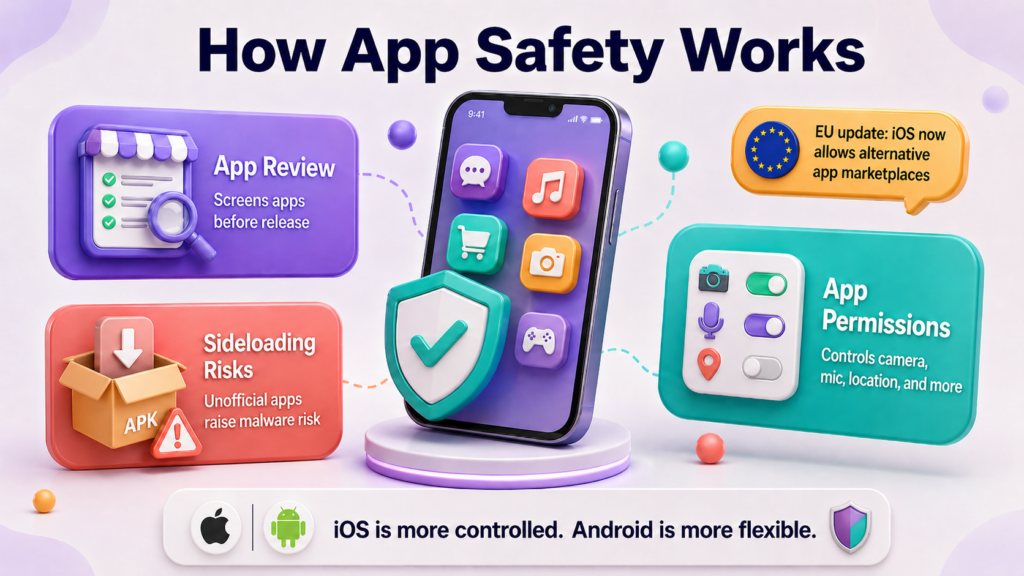
Apple reviews every app manually before it appears on the App Store. The process checks for security issues, privacy violations, and content compliance. It is slow by design. A malicious app has a much harder time making it through. That does not mean nothing slips past, but the barrier is genuinely high.
Google takes a different approach. Google Play relies more heavily on automated scanning through Google Play Protect, which checks apps before and after installation. The review process is faster, and historically, more malicious apps have made it through. That said, Play Protect runs continuously in the background and can disable harmful apps remotely even after they have been installed.


Sideloading means installing apps outside the official app store, usually from the web, third-party stores, or direct APK files. For most iPhone users, apps still come through the App Store, which keeps app distribution more tightly controlled. On Android, users can install APK files directly, bypassing Google Play entirely. This is one of the biggest sources of Android malware.

iOS is no longer completely closed everywhere. In the EU, the Digital Markets Act has pushed Apple to allow alternative app marketplaces and other app distribution options. Apple still uses a Notarization process to screen apps for baseline security risks, but this is not the same as full App Store review. For users in Europe, the gap between iOS and Android on app distribution has narrowed.
Both platforms give you control over what your apps can access. On an iPhone, every app has to ask before touching your camera, microphone, location, or contacts. App Tracking Transparency goes a step further, requiring apps to request permission before tracking your activity across other apps and websites. Most people tap “Ask App Not to Track” without thinking twice.
Android’s permission system is just as granular, and in some ways more transparent. The Privacy Dashboard shows a full timeline of which apps accessed what, and when. One-time permissions let you grant temporary access without committing to anything permanent. Unused app permissions reset automatically over time.
Android is a significantly bigger target for malware than iOS. Part of that is market share: Android runs on roughly 72% of smartphones worldwide as of March 2026, which makes it a more attractive platform for attackers. But the bigger factor is sideloading. Most Android malware spreads exactly this way.
The numbers reflect it. A 2025 Malwarebytes report found that Android mobile threats increased by 151%, spyware by 147%, and SMS-based malware by 692%. These are not theoretical risks. They are active, widespread, and growing.
While a VPN can’t remove malware from an Android phone, using a free VPN for Android can help protect the network side of mobile security.
So does that mean iPhone users are safe from malware? Not exactly.
Large-scale malware outbreaks on iOS are rare, because the closed ecosystem makes mass distribution almost impossible. The malware that does exist on iOS tends to be highly targeted. Sophisticated spyware like Pegasus is used against journalists, political figures, and activists. These are not the kinds of attacks ordinary users need to worry about.
However, jailbroken iPhones are a different story. Removing Apple’s restrictions opens the door to the same risks Android users face.
Even on a non-jailbroken iPhone, network-level risks still exist. A free VPN for iPhone can add protection when you connect to public Wi-Fi or browse on unfamiliar networks.
Given that both platforms face malware risks, can you at least install something to stop it? This is where things get interesting.
Android users can install third-party security apps, such as Malwarebytes and Bitdefender, to add an extra layer of protection on top of Google Play Protect. iPhone users, however, cannot do this. Apple doesn’t allow genuine malware scanners to be listed on the App Store because iOS sandboxing prevents any app from scanning other apps. What you find labeled as “security apps” on the App Store are mostly VPNs and password managers.
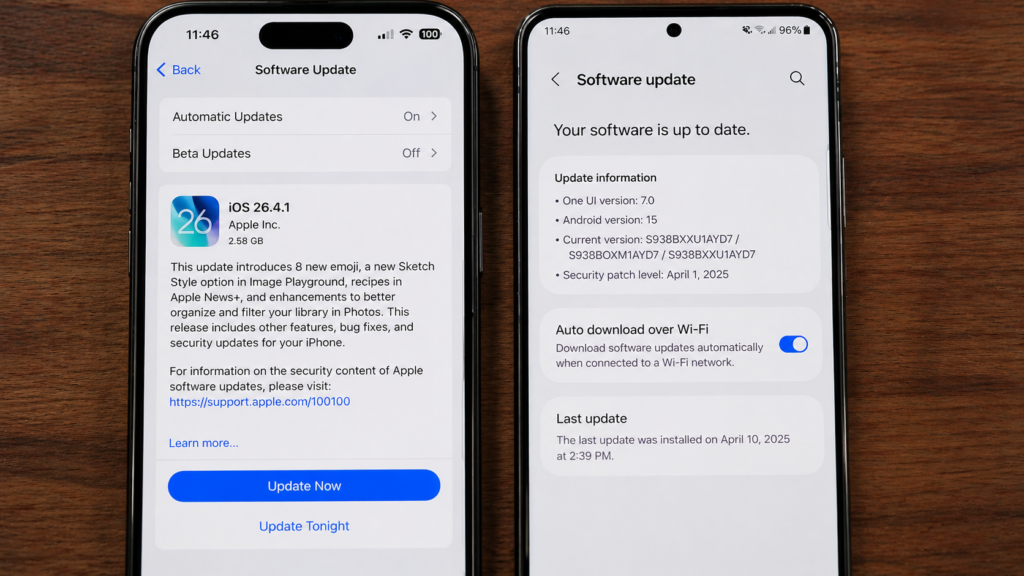
When Apple releases a security update, every supported iPhone gets it on the same day. Whether you have an iPhone 16 or an iPhone 11, the update arrives simultaneously. Within weeks, the vast majority of users are on the latest version.
Android has closed this gap on flagship devices. Google’s Pixel 10 and Samsung’s Galaxy S26 both come with seven years of OS and security updates, matching or exceeding Apple’s typical support window. On these phones, the update experience is genuinely competitive with iOS.
The problem is that Android is not just Pixel and Samsung. There are hundreds of brands and thousands of models, and every manufacturer decides when, or whether, to roll out updates. Mid-range and budget brands are often slow, inconsistent, or simply do not bother.
According to Malwarebytes, more than 30% of Android devices still run outdated operating systems with no security patches. A phone in this state is actively exposed to known vulnerabilities that are being exploited.
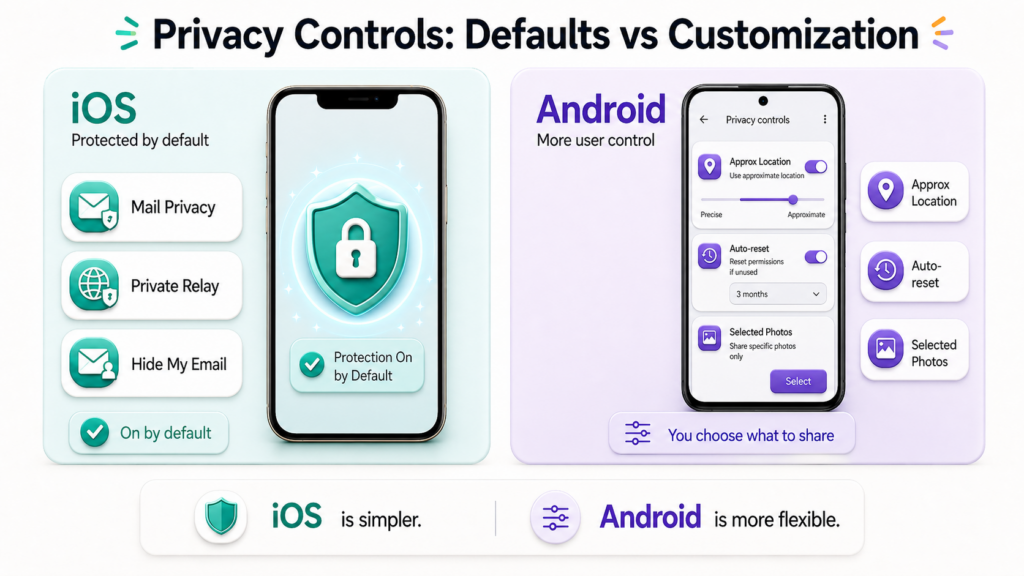
iOS takes a “strict by default” approach to privacy. Beyond the app permissions covered earlier, Apple has built several system-level privacy features that work automatically, with no setup required.
Mail Privacy Protection hides when you open an email and masks your IP address from senders. Marketers can no longer tell whether you read their emails or where you are. iCloud Private Relay routes your Safari traffic through two separate relays, so neither Apple nor your network provider can see what sites you visit. Hide My Email generates random email addresses that forward to your real inbox, letting you sign up for services without ever revealing your actual email.
The common thread is that these features are on by default. You do not need to enable them, configure them, or even know they exist for them to work.
Where iOS leans on strict defaults, Android leans on giving users control. The Privacy Dashboard, mentioned above, is just the surface.
Android lets you give apps an approximate location instead of precise GPS, useful for weather or news apps that do not need to know your exact street. Auto-reset permissions revoke access from apps you have not used in a few months, so old apps cannot quietly keep tracking you. You can also restrict apps to photos you specifically select, rather than granting access to your entire library.
The trade-off is real. Android gives you more knobs to turn, but you have to actually turn them. But iOS protects you out of the box.
This is one area where Android has a clear advantage.
Android’s core code, called AOSP (Android Open Source Project), is open source. Anyone, including independent security researchers, can inspect it. iOS is closed source.
Also, because AOSP is open, anyone can take that code and build their own version of Android. That is exactly what GrapheneOS does. It is a privacy-focused operating system built on AOSP, with Google’s tracking stripped out and stronger sandboxing added on top. Privacy-conscious users can install it on a Pixel device and replace the stock OS entirely. The iPhone has no equivalent. You cannot replace iOS without jailbreaking, and even then, you cannot install a fully custom OS.
Both Apple ID and Google Account face the same kinds of threats: phishing pages that mimic the real login screens, credential reuse after data breaches, weak passwords, and accounts without two-factor authentication enabled. Also, both platforms offer the same core protections: 2FA, passkeys, suspicious login alerts, and the ability to review and revoke active sessions. So, on these basics, there is no meaningful difference between them.
This is where the two platforms actually diverge, and the result might surprise you. By default, iCloud backups are encrypted, but Apple holds the keys, which means Apple can technically access them. Apple offers Advanced Data Protection to enable end-to-end encryption, but it is opt-in, and most users never turn it on.
Android takes the opposite approach. Backups are end-to-end encrypted by default, with the key tied to your device PIN or password. Even Google cannot access them. On cloud backup encryption, Android’s default is genuinely stronger than iOS.
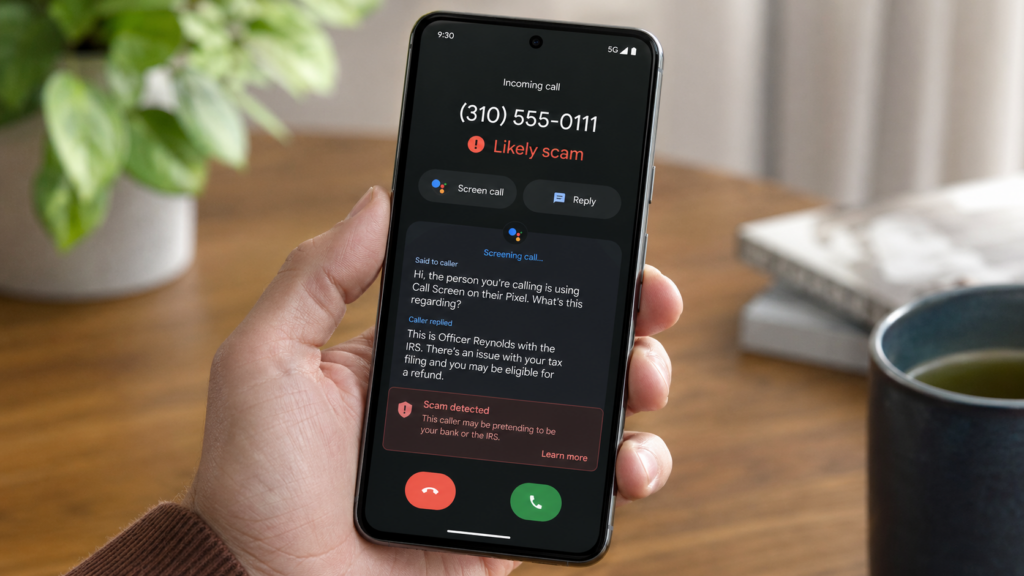
Scam calls and texts have become one of the most common mobile threats in 2026, and Pixel users genuinely have an edge here. Pixel’s Call Screen uses Google Assistant to answer unknown calls on your behalf, asking the caller to identify themselves before the call ever rings through. More recently, Pixel 9 introduced real-time AI scam detection during phone calls. If a caller starts using known scam patterns (“This is the IRS,” “Your account has been compromised”), the phone warns you mid-conversation. Google Messages also filters spam texts by default.
iOS has its own protections, but they are less aggressive. Silence Unknown Callers mutes calls from numbers not in your contacts, and iMessage filters unknown senders into a separate tab. What iOS does not have is real-time AI analysis of call content.
On phishing protection, the platforms are roughly even. Both Safari and Chrome include built-in safe browsing that warns you before opening known phishing sites. Interestingly, both rely on the same underlying Google Safe Browsing database. That is, the real variable is which browser you use, not which OS you are on.
Whether you use an iPhone or Android phone, a few simple habits make a bigger difference than the platform itself.
For both platforms:
For iPhone users:
For Android users:
I’ve used an iPhone as my main phone for years, currently on the 16 Pro after going through the XR, 13, and 14 Pro. I’ve also kept an Android in rotation the whole time, most recently a Pixel 9 Pro, with a Samsung Galaxy S23 before that.
On Android, the issue I noticed most wasn’t dramatic malware attacks. It was the everyday noise. Ads pushed in places they shouldn’t be, weird redirects in the browser, and apps I didn’t remember installing showing up after tapping the wrong link or downloading something through a sketchy source. None of it ever broke the device, but it always left me wondering how much was actually happening in the background.
The iPhone has been a different experience. No mystery app installs. No surprise pop-ups. No browser redirects. The phone behaves the way I expect it to. After four iPhones across nearly seven years, I have never had a single moment where I wondered if something had quietly installed itself.
Is that because iOS is fundamentally more secure? Partly. The closed ecosystem, strict app review, and lack of sideloading genuinely do block most of the everyday risks Android users face. But it’s also because iOS makes fewer choices available, leaving fewer ways to mess things up.
So if I were recommending a phone purely on security: for most everyday users, it’s the iPhone. The defaults are stronger, the ecosystem is more controlled, and you don’t need to think about security to be reasonably safe. However, if you’re a more technical user who wants flexibility, a Pixel or Samsung flagship running the latest Android is worth a try. The gap on these specific devices is genuinely small.
In most cases, yes. iOS has stronger default protections, simultaneous security updates across all devices, and a closed app ecosystem that blocks most everyday threats.
Yes, though “malware” is the more accurate term. Android devices can be infected by spyware, banking trojans, fake apps, and adware. Most Android malware spreads through APK files installed outside Google Play, malicious apps that occasionally slip through Google Play, and phishing links. If you stick to Google Play, keep your phone updated, and avoid sideloading, the risk drops significantly.
Yes. iPhones are not immune to attacks. Most iPhone hacks fall into two categories: highly targeted spyware like Pegasus used against journalists and political figures, and attacks on jailbroken devices that have bypassed Apple’s restrictions. For the average user who keeps their iPhone updated and doesn’t jailbreak, the practical risk is very low. But “very low” is not the same as “impossible.”
Article by
Aria Penelope Hart is a writer with 5+ years of experience in technology content. She specializes in VPNs, cybersecurity, and online privacy, creating search‑optimized, accurate, and reader‑friendly resources. Her work combines deep industry knowledge with a focus on producing clear, trustworthy content that helps readers stay informed and secure online.

© LIGHTNINGLINK NETWORKS PTE. LTD. All Rights Reserved