

TL; DR
A proxy and a VPN can both hide your real IP address from the websites you visit, but they do not protect you in the same way.
Proxy: a middleman for specific traffic (often one browser or one app). It usually doesn’t encrypt your traffic, so protection is limited.
VPN: an encrypted tunnel designed to protect your connection more broadly (often across your device), not just one app.

Quick Pick
– Just need a light “IP swap” for one thing → proxy.
– Need privacy/security (especially on public Wi-Fi) → VPN.
– Do not assume either one makes you fully anonymous. Your IP address is only one part of your online identity.
– Here is a video explain proxy vs vpn and how to set up X-VPN on PC and use it for unblocking content.
Table of Contents
What is a Proxy Server?
A proxy server forwards your internet requests to websites on your behalf, so the site sees the proxy’s IP rather than your real one. In other words, it can hide your IP-based location and identity from the websites you visit, but usually only for specific apps or browsers traffic, and typically without encryption.
If you’ve ever used a proxy site to view something blocked at school or work, that’s the idea: your traffic gets rerouted through a third-party server, so the destination thinks the request is coming from somewhere else.
That’s why proxies can feel like a quick win, but they come with clear trade-offs. Most proxies don’t protect your data. What you send and receive is still visible to your ISP, the proxy provider, or anyone snooping on the network. And proxies usually don’t cover all your apps, just the one you’ve set it up for, like your browser. They’re useful for basic tasks, like getting around region blocks. But for anything sensitive, like logging into accounts or using public Wi-Fi, a proxy isn’t enough.
Pros
Cons
What is a VPN?
A VPN (virtual private network) encrypts all the internet traffic on your device and routes it through a secure server, hiding both your data and your IP address.
In plain terms, it doesn’t just make you look like you’re browsing from somewhere else, it locks up your entire connection so that no one, not even your internet provider, can see what you’re doing.
Unlike a proxy, a VPN protects your whole device, like browser and apps with encryption. Whether you’re checking email or watching a stream, your connection can always stay private and secure.
This makes VPNs useful not just for accessing blocked content, but for protecting sensitive activity: logging into accounts, transferring work files, or simply browsing without being tracked.
Pros
Cons
Proxy vs. VPN: A Side-by-Side Breakdown
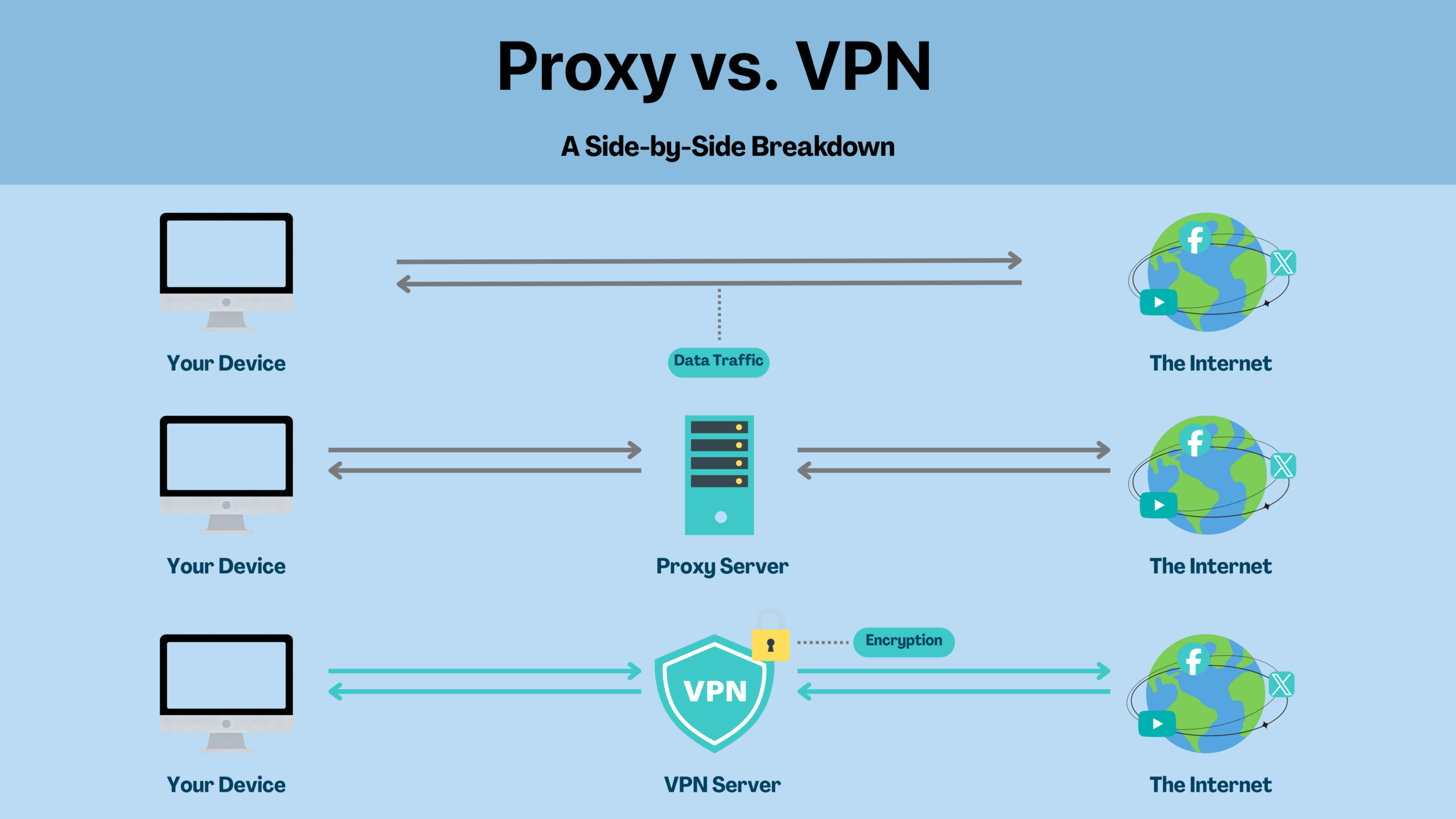
Both proxies and VPNs can hide your IP address, but that’s where the overlap ends. The table below shows how different they are in terms of protection, coverage, and practical use.
Feature | Proxy | VPN |
|---|---|---|
Hide Your IP From a Website | ✅ | ✅ |
Encrypt Your Internet Traffic | ❌ | ✅ |
Protect Entire Device | ❌ (usually just one app/browser) | ✅ |
Protects Public Wi-Fi Use | ❌ | ✅ |
Blocks ISP Tracking | ❌ | ✅ |
Avoid Broswer/Device Fingerpriting | ❌ | ❌ |
Bypasses Geo-Blocks | ⚠️ Sometimes | ✅ More reliably |
Good for Streaming | ⚠️ Often unstable | ✅ Optimized servers |
Speed Impact | ✅ Faster (no encryption) | ⚠️ Slight slowdown (due to encryption) |
Best For | Light browsing, low-risk use | Privacy, security, streaming, travel |
Encryption and Privacy
Proxies rarely encrypt your data, meaning your online activity can still be seen by your ISP or anyone snooping. VPNs encrypt everything, making your connection unreadable to outsiders, especially important on public Wi-Fi or when handling private information.
Coverage: One Browser vs. Whole Device
A proxy only works for the browser or app you set it up on. Everything else, your email app, downloads, background activity, still uses your real IP. A VPN protects your entire device automatically, no extra setup per app required.
Setup and Ease of Use
Proxies often need to be configured manually, you’ll have to input server addresses or change browser settings, which can be error-prone. VPNs usually come with a simple app: tap once, and you’re connected.
Speed: Fast Isn’t Always Better
Because proxies don’t encrypt your data, they’re often faster, but that speed comes at the cost of security. VPNs add a layer of encryption, which can slightly slow things down, especially on slower networks.
That said, many modern VPNs are optimized for performance. Unless you’re using an old device or a poor-quality VPN, the speed difference is often small and well worth the privacy gain.
Use Cases
If you’re just looking to access a blocked site quickly and aren’t worried about privacy, a proxy might do the trick. But for serious use, like logging into bank accounts, avoiding ISP tracking, or safely browsing abroad, a VPN is the safer, smarter choice.
Important: Changing Your IP Does Not Make You Fully Anonymous
As the comparison table above shows, a proxy or VPN can change the IP address that websites see, but your IP is only one signal. Websites and platforms may also look at browser fingerprints, cookies, account behavior, DNS requests, WebRTC leaks, device settings, and location mismatches.
That means a proxy may help with simple IP masking, but it should not be treated as complete privacy protection. A VPN gives you stronger connection-level protection, especially through encryption and whole-device coverage, but it also does not make you invisible online.
When Should You Use a Proxy (and When You Really Shouldn’t)?
If you’re just trying to access a blocked website, like a news page at school or a social media post at work, a residential proxy might do the trick. It’s quick, lightweight, and gives you basic IP masking.
But that’s pretty much the limit.
As soon as your activity involves private accounts, personal data, or public networks, proxies fall short. They don’t encrypt your connection, they don’t protect your other apps, and they don’t stop your ISP, employer, or even the proxy provider itself from seeing what you’re doing.
Use a Proxy if You
- Just want to mask your IP for light browsing.
- Only care about accessing public or non-sensitive content.
- Are using one browser or app, and don’t need full-device coverage.
- Want something that’s usually faster for non-sensitive activities (no encryption overhead).
Use a VPN if You
- Want full-device protection, not just your browser.
- Need to encrypt all your internet traffic, not just hide your IP.
- Use public Wi-Fi or travel and want to stay private.
- Stream content from different regions and need reliable geo-unblocking.
- Don’t want your ISP or network tracking your online activity.
- Log in to bank accounts, transfer files, or do anything personal or sensitive.
How to Choose the Right Proxy and VPN
Proxies and VPNs are often compared, but choosing one isn’t just about picking a side, it’s about knowing which tool fits your situation and how to use it safely.
Not all VPNs or proxies are built the same. If you plan to use either, it’s worth knowing what to look for.
What to Look For in a Proxy
Transparency Policy
Avoid free proxies that log or sell your data.
HTTPS Support
Some proxies support encrypted web traffic (not all do).
Reputation
Check if the provider is known and trustworthy.
Proxy Type
Use HTTP proxies for basic web access.
Use SOCKS5 if you need app-level routing (e.g., for games or P2P)
Avoid open/public proxies, they’re risky and often exploited.
What to Look For in a VPN
Encryption Standard
Look for strong encryption like AES-256. It ensures your internet traffic is unreadable to anyone trying to intercept it.
Audited No-Logs Policy
A reliable VPN should have an audited no-logs policy that clearly states it doesn’t log, track, or store your online activity. If the policy is vague, missing, or unsupported by independent verification, that’s a red flag.
For example, X-VPN currently has a no-logs policy that has been independently audited by a third party, giving users confidence that their privacy is properly protected.
Server Coverage
Choose a VPN with servers in the regions you actually need, this matters for speed, stability, and accessing local content.
Device & Platform Support
A good VPN should work across all major platforms with simple apps, so you don’t have to configure each device manually.
Speed & Performance
Encryption adds overhead, but a quality VPN should still offer reliable speeds for streaming, browsing, and remote work.
Privacy Controls
Features like a kill switch, DNS protection, or split tunneling give you more control over how and when your traffic is protected.
The Bottom Line
If your goal is short-term access or IP spoofing for low-risk tasks, a proxy might work.
If you’re dealing with personal accounts, private data, or public networks, use a VPN.
FAQ
Is a VPN the same as a proxy?
No. Both can hide your IP address, but they work very differently. A proxy routes specific app or browser traffic without encryption. A VPN encrypts your entire internet connection and protects all apps on your device.
Can I use a VPN and a proxy at the same time?
Technically, yes, but it rarely helps. Using both together often slows down your connection without adding meaningful protection. In most cases, just using a reliable VPN is enough.
What’s a proxy site?
A proxy site is a website that acts as a proxy server, letting you access other websites through it, usually to bypass blocks or hide your IP. Many are free, but often come with ads, slow speeds, or privacy risks.
Is a VPN better than a proxy for streaming?
Yes. Most VPNs are designed to bypass geo-blocks reliably, while proxies are hit or miss. VPNs also provide better speed and stability for video playback, especially across platforms.
Are free proxies safe?
Often not. Many free proxies log your activity, inject ads, or even sell your data. If you’re going to use a proxy, choose one with a transparent privacy policy, or consider using a VPN instead.
Will a VPN slow down my internet?
A VPN may slightly reduce your speed due to encryption and routing, but modern VPNs are optimized for performance. For most users, the speed difference is small and worth the added privacy.
Which is more private: VPN or proxy?
A VPN is more private. It encrypts all traffic, hides your activity from your ISP and Wi-Fi network, and usually follows an audited no-logs policy. Proxies generally don’t encrypt and may log your browsing data.