What Is a VPN? The Ultimate Guide for Beginners!
Everything you need to know about VPNs in the simplest way possible.



If you’ve ever opened Reddit and thought, “I really don’t want this showing up anymore,” you’re not alone. Old searches, past comments, and viewing history can resurface at the worst times.
This guide explains how to delete Reddit history properly by breaking it into clear categories, then walking you through the exact cleanup steps for each one—on both mobile and desktop.

While deleting Reddit history helps clean up what’s already there, it doesn’t change how your activity is tracked going forward. That’s why some users pair account cleanup with privacy tools like X-VPN, which can help limit IP-based tracking while browsing Reddit—without affecting what you post or delete.

If you only have 30 seconds, start here:
One important expectation-setting line: clearing local history mainly cleans up what’s stored on your device, not the posts/comments that other people can still find.
Clearing local history mainly removes data stored on your device. It does not delete posts or comments that other people can still find.
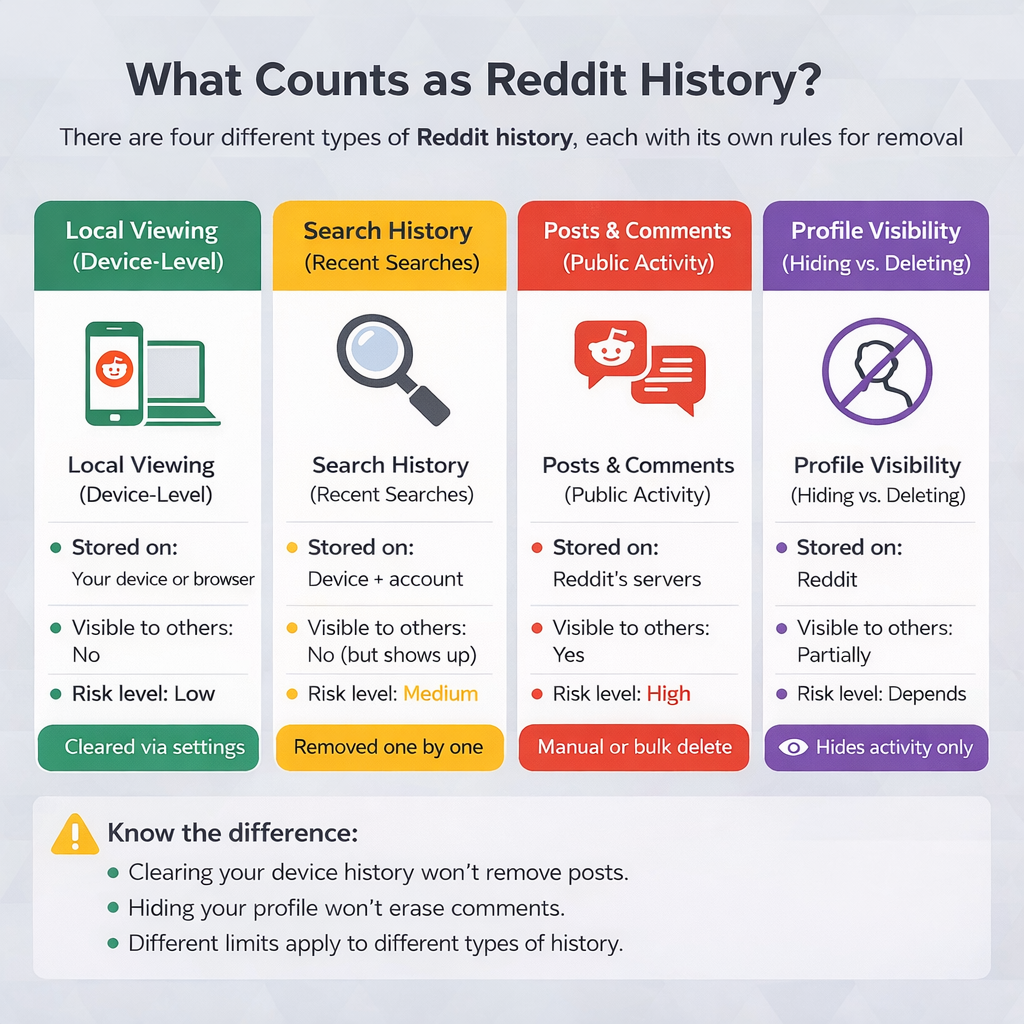
This is what Reddit stores locally on your phone or in your browser—recently viewed posts, “continue browsing” suggestions, and convenience data meant to personalize your feed.
These are the search terms that appear when you tap or click Reddit’s search bar.
This is your real footprint—everything you’ve posted or commented publicly.
Reddit lets you control what appears on your profile page, but this affects presentation, not whether the content still exists in subreddits.
Why this matters:
Each type of Reddit history requires a different cleanup method. Clearing local history won’t remove posts. Hiding your profile won’t delete comments. Once you understand the difference, cleanup becomes much less frustrating.
This is the easiest and lowest-risk cleanup. It’s especially useful if you:
If your only concern is what shows up on your device, this step alone may already be enough.
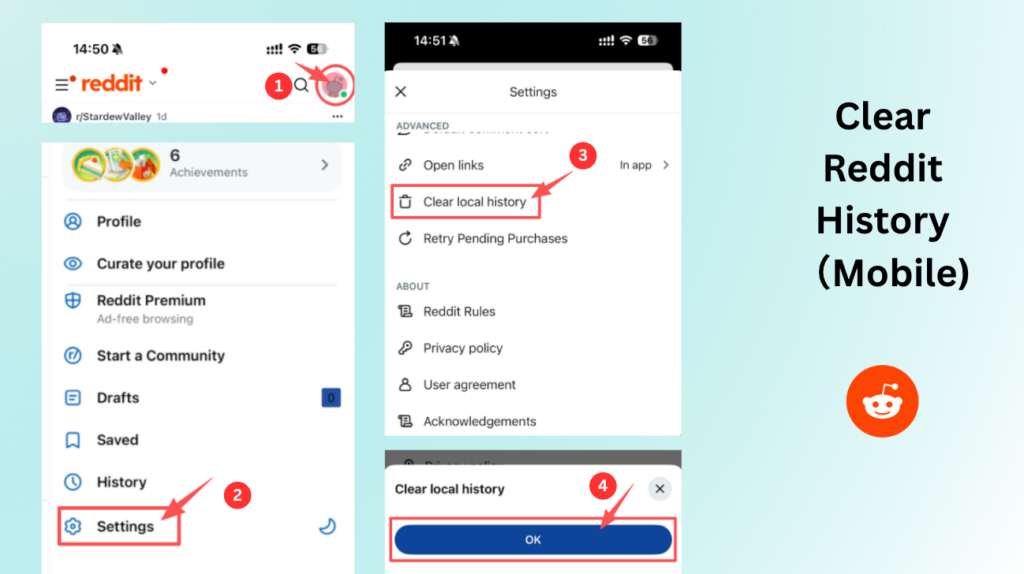
What this does:
Removes locally stored viewing data on that device.
What it doesn’t do:
Does not delete searches, posts, or comments.
Tip: If you use Reddit on multiple devices, repeat this on each one.
Clearing your Reddit history on desktop is very similar to how it works on a mobile device. First, log in to your account, click your profile icon, select Settings, go to Privacy or Privacy & Security, click Clear history, and then confirm.
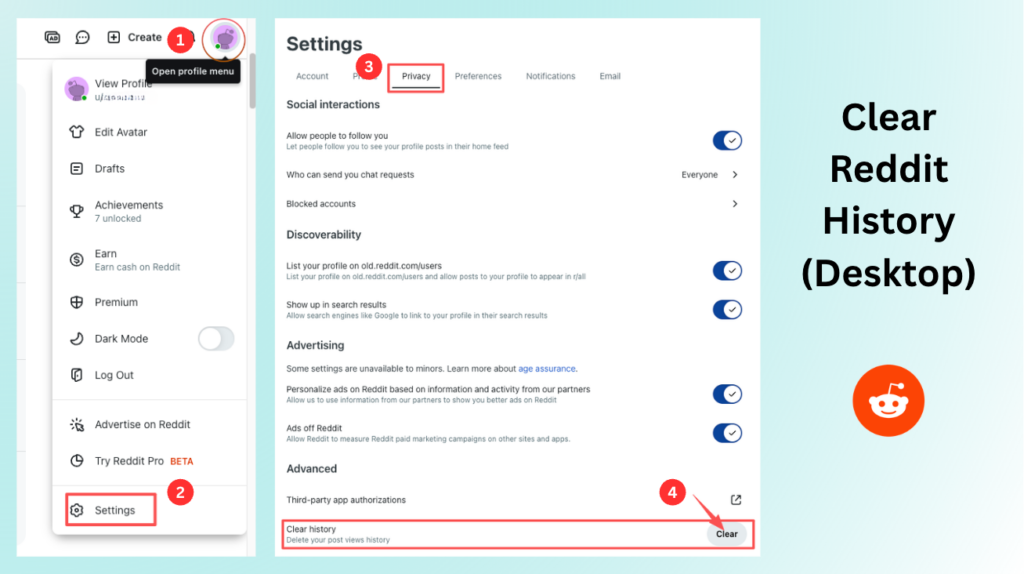
If clearing history doesn’t achieve your goal, it may be because Reddit relies heavily on your browser to store local data on desktop. In that case, clearing Reddit’s site data is usually the most effective way to remove device-level traces.
This removes login sessions, preferences, and locally cached Reddit data.
Some users see a “Recent posts” panel with a Clear option. Use it if present—but treat it as secondary to clearing site data.

Search history is often the first thing people want gone. Even though it’s private, it can reveal a lot in a single glance—especially on shared devices.
Reddit usually requires manual removal, one search at a time.
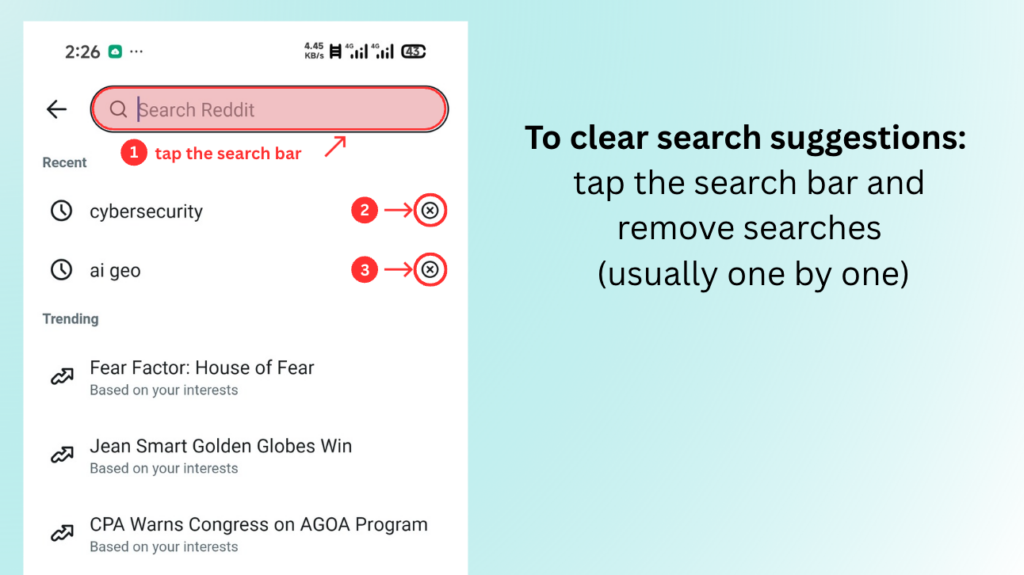
If your goal is simply to hide awkward suggestions, this step alone may be all you need.
If privacy is your main concern, this is the most important section.
Posts and comments:
If this feels overwhelming, that’s normal. Most people don’t realize how much content they’ve accumulated until they scroll their own history.
If you only have a small amount to remove, manual deletion is fine. If you have hundreds or thousands of items, consider bulk methods later.
For sensitive content:
This doesn’t erase screenshots, but it reduces what survives in quotes or cached snippets.
Sometimes the goal isn’t full deletion—it’s preventing casual profile browsing from revealing everything.
Profile curation helps with presentation, not removal.
Profile curation is the process of selecting, organizing, and controlling what others see on your online profile
Use this as a supplement—not a replacement—for deletion.
Deletion helps, but it’s not a time machine.
✅ Removes content from your profile
✅ Removes it from subreddit feeds
✅ Reduces casual discovery
✅ Over time, reduces search visibility
❌ Screenshots or reposts
❌ Quotes in other threads
❌ Third-party archives
❌ Old search snippets until refreshed
Understanding this upfront prevents false expectations.


If you’re searching how to delete Reddit history, the most important step is identifying which type of history you actually want to remove.
Once you match the method to the history type, Reddit cleanup becomes manageable—and far less stressful.
No. Posts and comments often remain unless you delete them first.
Only for local viewing history. Public content requires manual or bulk deletion.
Small history: manual deletion.
Large history: bulk tools (edit-then-delete is usually best).
Article by
Nate Cipher is a privacy-focused tech writer at xvpn.io, specializing in online security, VPN technologies, and digital privacy education.