

GTA 6 is now available to preload on PS5 and Xbox Series X|S! Rockstar says you’ll need up to 212 GB of free space to preload GTA 6, though the exact GTA 6 download size may vary by device. Your GTA 6 download time depends on the speed your console can maintain and whether the download is interrupted. This article explains how to check your storage, estimate download time, and troubleshoot slow downloads.
Table of Contents
GTA 6 Download Size: PS5, Xbox and Storage Requirements
GTA 6 Download Size on PS5 and Xbox Series X|S
Early preload reporting places the main download at around 210 GB on both platforms:
Platform | Reported preload download |
|---|---|
PS5 | Approximately 209.75 GB |
Xbox Series X|S | Approximately 209.86 GB |
The download size may vary by region and game version. For example, Game*Spark reported a PS5 preload size of 208.725 GB in Japan, compared with 209.913 GB reported elsewhere. This may be related to language data or region-specific content adjustments.
How to Check Storage Space on PS5 and Xbox
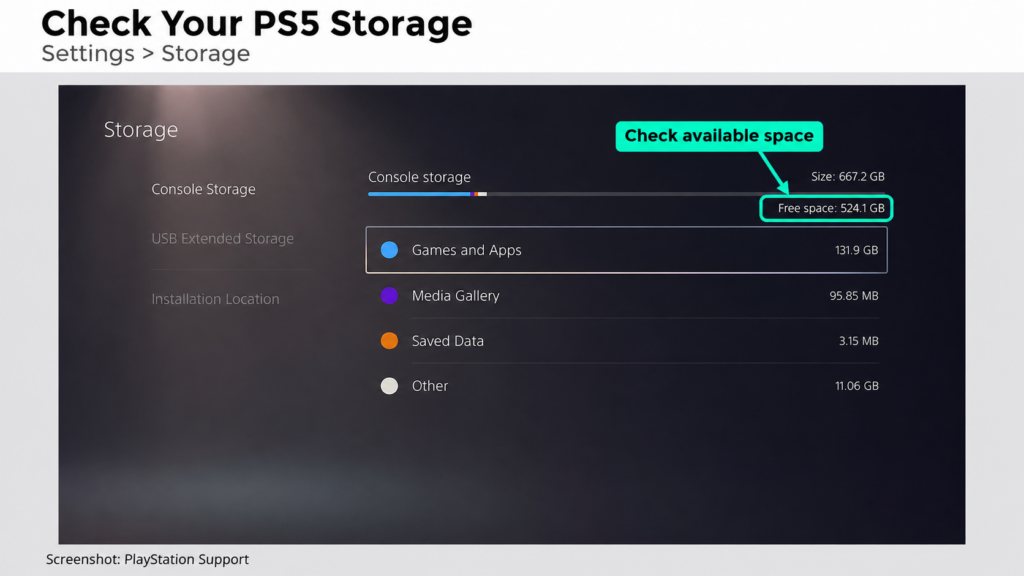
Before downloading, check the available space on the drive where GTA 6 will be installed.
PS5: Open Settings > Storage to check your available space. If you have a compatible M.2 SSD installed, go to Settings > Storage > Installation Location to confirm where new games will be installed.
Xbox: Open Profile & system > Settings > System > Storage devices to check the available space on your selected drive.
GTA 6 Download Time: How Long Will It Take?
Estimated GTA 6 Download Times by Speed
The table below estimates how long a 210 GB download would take at different sustained download speeds.
Sustained download speed | Estimated time for 210 GB |
|---|---|
10 Mbps | 46 hours 40 minutes |
25 Mbps | 18 hours 40 minutes |
50 Mbps | 9 hours 20 minutes |
100 Mbps | 4 hours 40 minutes |
300 Mbps | 1 hour 33 minutes |
500 Mbps | 56 minutes |
1,000 Mbps | 28 minutes |
How to Check Your Download Speed on PS5 and Xbox
Your console may download games more slowly than the speed advertised in your broadband plan. Even its built-in speed test can give a different result from the speed you see while downloading GTA 6.
On PS5:
- Open Settings > Network > Connection Status.
- Select Test Internet Connection.
- Note the reported download speed.
- Open the control center and inspect Downloads/Uploads to check the game’s actual progress.
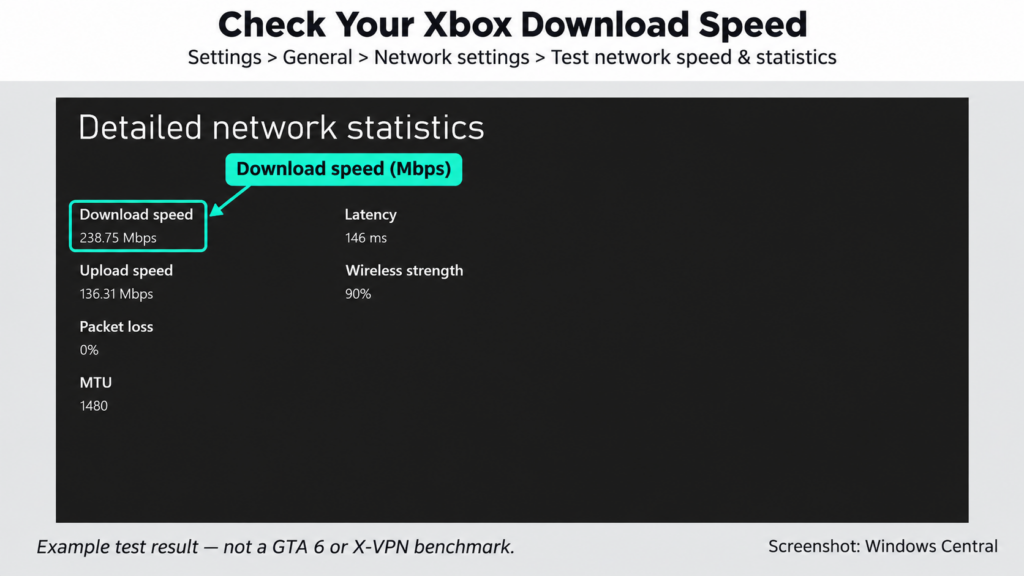
On Xbox Series X|S:
- Press the Xbox button and open Profile & system > Settings.
- Go to General > Network settings.
- Select Test network speed & statistics.
- Check GTA 6 in the download queue to compare the test result with the active transfer.
Pay attention to the units: Mbps means megabits per second, while MB/s means megabytes per second. To convert Mbps to MB/s, divide by 8. For example, 100 Mbps works out to about 12.5 MB/s.
How to Increase GTA 6 Download Speed
Your console may download games more slowly than the speed advertised in your broadband plan. Even its built-in speed test can give a different result from the speed you see while downloading GTA 6.
Use Ethernet or Improve Your Wi-Fi Connection
A wired connection can significantly improve signal stability; if your Wi-Fi signal is weak or prone to frequent disconnections, you can connect your device to the router using an Ethernet cable.
On PS5, connect the cable, then go to Settings > Network > Settings > Set Up Internet Connection > Set Up Wired LAN > Connect.
If you’re using Wi-Fi, keep your console close to the router with as few obstacles between them as possible. At close range, 5 GHz is usually faster; farther away or through several walls, 2.4 GHz may work better.
You can manually select the Wi-Fi band on PS5. Go to Settings > Network > Settings > Set Up Internet Connection, highlight your network, press the Options button on your controller, and select Wi-Fi Frequency Bands.
Reduce Competing Downloads and Network Traffic
Temporarily pause other large downloads, video streaming, and similar bandwidth-heavy activities on your home network. Available bandwidth is shared across devices using the connection at the same time. When other devices use more of it, less is available for your console.
Xbox users can also check whether a running game is affecting download speed. Go to My games & apps > Manage > Queue and select Suspend my game if the option appears. Alternatively, highlight the running game on the Home screen, press Menu, and select Quit.
Check Your Download Progress
A small completed download does not mean the full game has downloaded. Around the preload opening, one Xbox user reported downloading only a 328 MB file. Compare your installed size with the platform figures above. If it is only a few hundred megabytes, check for available updates.
Before leaving your console, make sure the full download can continue:
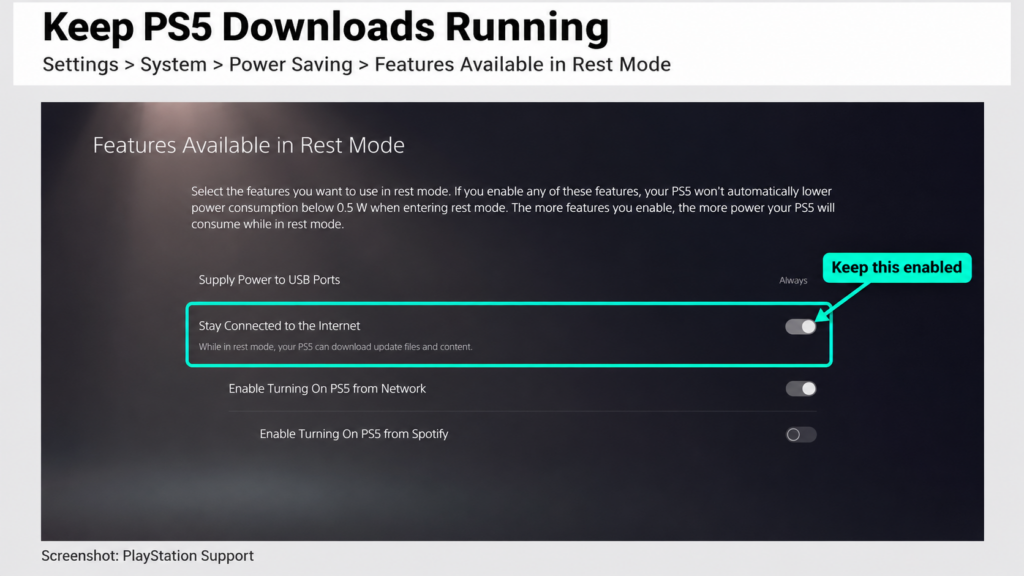
- PS5: Enable Settings > System > Power Saving > Features Available in Rest Mode > Stay Connected to the Internet.
- Xbox: Follow Rockstar’s preload guidance: enable automatic updates and leave the console on or in sleep mode.
Use a VPN
A VPN may help shorten GTA 6 download times if your ISP throttles certain types of traffic or your connection is affected by network congestion. By encrypting your traffic and sending it through a VPN server, it can help bypass certain ISP restrictions or avoid congested network routes.
However, how much of a difference it makes depends on the VPN’s performance. Encryption and additional routing can introduce overhead, so a fast, efficient VPN is important for maintaining download speeds.
X-VPN’s high-speed VPN uses the Talaria protocol to minimize this overhead. In internal tests, Talaria kept speed loss below 5% on 100 Mbps and 1 Gbps connections and delivered strong performance in high-bandwidth environments. This makes X-VPN worth considering for large downloads like GTA 6.
Keep your GTA 6 download moving with X-VPN’s speed-optimized Talaria protocol.
Don’t Let Slow Downloads Be Your Final Boss

30-Day Money Back,100% success
Skip the Download with Xbox Cloud Gaming
If you don’t want to wait for a 210 GB download, cloud gaming offers another option.
Xbox Cloud Gaming lets you play GTA 6 by streaming it from Microsoft’s servers, without downloading the full game to your console. Starting November 19, GTA 6 will support cloud gaming on Xbox One and Xbox Series X|S.
To use it, you’ll need to purchase GTA 6 separately and have access to cloud playtime through an eligible Xbox Game Pass plan or purchased cloud gaming hours. Then go to My games & apps > Full library > Owned games, select GTA 6, and choose Play with Cloud Gaming.
Keep in mind that cloud gaming also requires a stable internet connection, as slow or unstable networks may cause lag or reduced visual quality. In terms of performance, GTA 6 cloud streaming uses Xbox Series S graphics settings. As for availability, the service is limited to Xbox One and Xbox Series X|S, with Xbox Cloud Gaming supported in countries such as the US, UK, Canada, and Australia. You can check Xbox’s supported regions to see whether the service is available in your country.
Final Thoughts
Downloading GTA 6 can take a while given its large file size, but a little preparation can make the process smoother. Before starting, check your console’s available storage and estimate the download time based on your actual internet speed. Once the download begins, make sure you’re downloading the full game and keep your console connected to avoid interruptions.
If downloads are slower than expected, using Ethernet, reducing other network activity, or switching to a high-speed VPN like X-VPN may help. Alternatively, cloud gaming offers a way to skip the large download altogether, where supported.
FAQs
How many GB is GTA 6 going to be?
GTA 6 requires up to 212 GB of free storage on PS5 and Xbox Series X|S, according to Rockstar Games. The actual download size is around 210 GB, although it may vary slightly by console, game version, and region.
How long does GTA 6 take to download?
A 210 GB GTA 6 download takes approximately 4 hours and 40 minutes at 100 Mbps, or 56 minutes at 500 Mbps under ideal conditions. Actual download times depend on your connection speed, network congestion, and server performance. Using Ethernet and reducing other network activity can help speed things up.
Will GTA 6 really be 750 GB?
No. Despite online rumors suggesting GTA 6 could require 750 GB, Rockstar has confirmed that the game needs up to 212 GB of available storage. You won’t need to clear 750 GB just to download the game.
Is GTA 6 actually 600 GB?
No, GTA 6 is not a 600 GB download. Its confirmed storage requirement is up to 212 GB for PS5 and Xbox Series X|S. While future updates may increase the total space needed, there’s currently no official indication that it will reach 600 GB.
What is the GTA 6 download size on Xbox Series S?
Rockstar Games recommends up to 212 GB of free storage for GTA 6 on Xbox Series X|S. The exact download size may differ between consoles, so check your available storage before starting the preload.
When is GTA 6 coming to PC?
Rockstar Games hasn’t announced a release date for GTA 6 on Windows PC. The game launches on PS5 and Xbox Series X|S on November 19, 2026, with no PC version confirmed yet. Based on Rockstar’s previous release patterns, some gaming publications expect a PC launch in 2027 or 2028, but this remains speculation.