

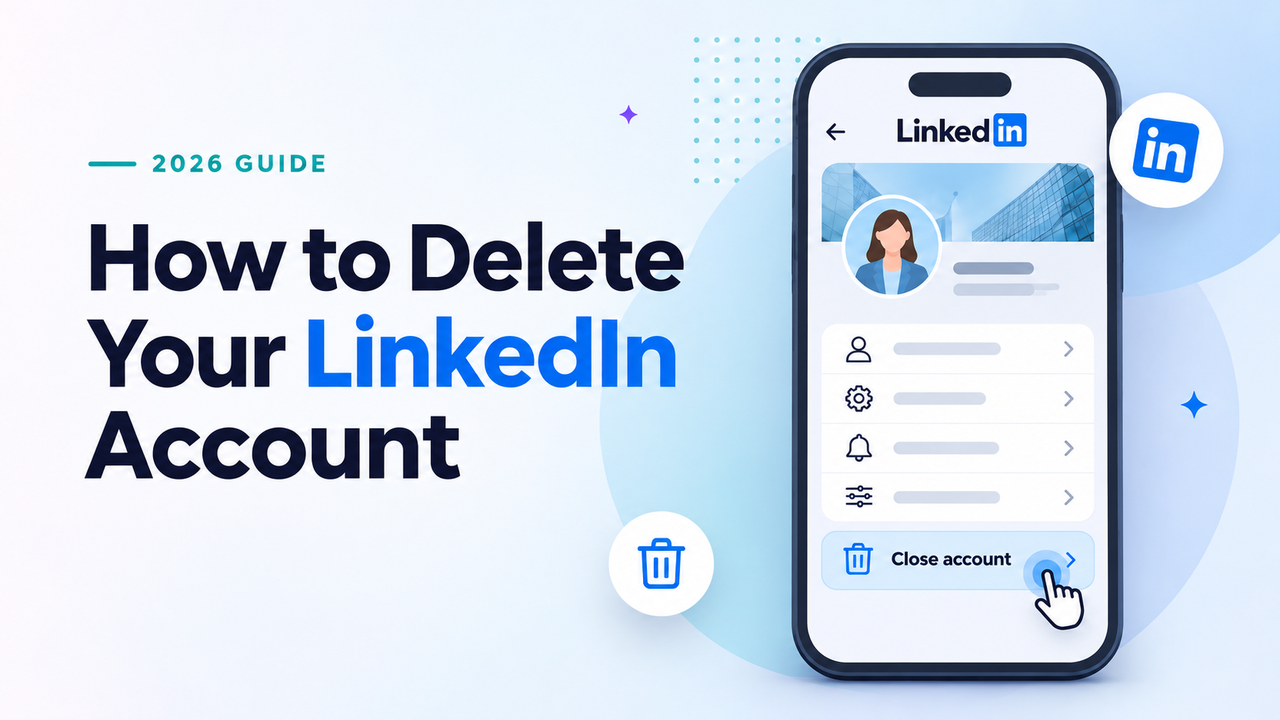
Ready to leave LinkedIn? You can close your account from a browser or the mobile app in just a few minutes. Before you do, make sure you’ve saved any contacts, messages, or other information you want to keep.
Quick answer: How to close your LinkedIn account
Open Settings & Privacy → Account preferences → Account management → Close account. Choose a reason, enter your password, and complete the confirmation. If you’re using the app, start by tapping your profile picture, then Settings.
If you haven’t backed up your data or cancelled Premium, read the checklist below first. Uninstalling the app alone does not delete your account.
Table of Contents
Before You Delete LinkedIn Account: 4 Things to Do First
Closing your account means losing access to your profile, connections, messages, and other LinkedIn information. You may not need every step below, but checking now is easier than trying to recover something later.
1. Download a copy of your data
On a desktop browser, open Me → Settings & Privacy → Data privacy → Download your data. LinkedIn says the data-download feature is currently unavailable on mobile.
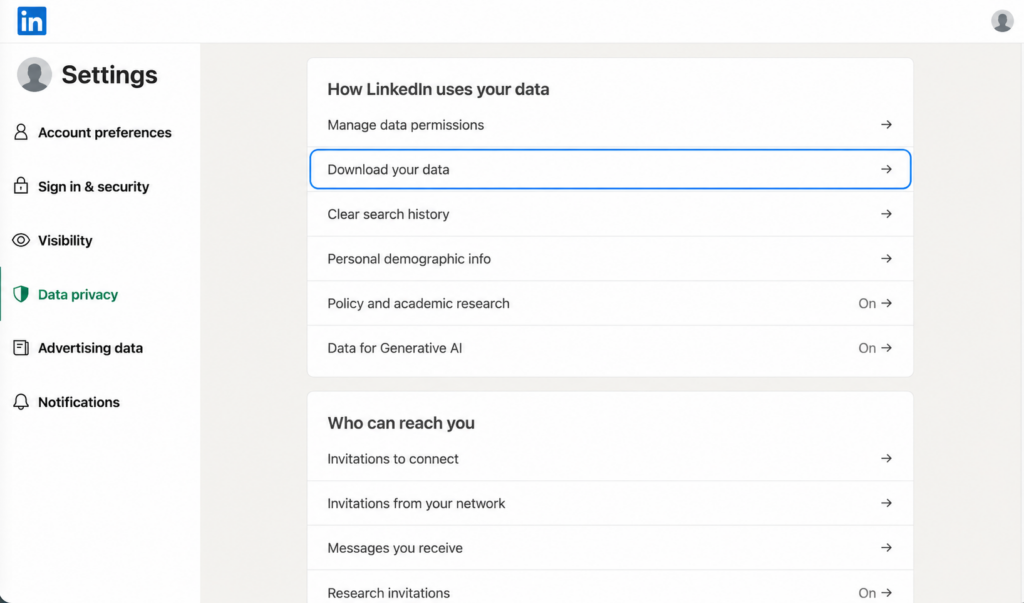
You can request a larger archive if you want a fuller record, including available connections and messages, or select specific data if you only need certain categories. LinkedIn’s overview says larger archives are generally emailed within 24 hours, while its detailed category list allows up to 48 hours for some files. Smaller requests may arrive within minutes.
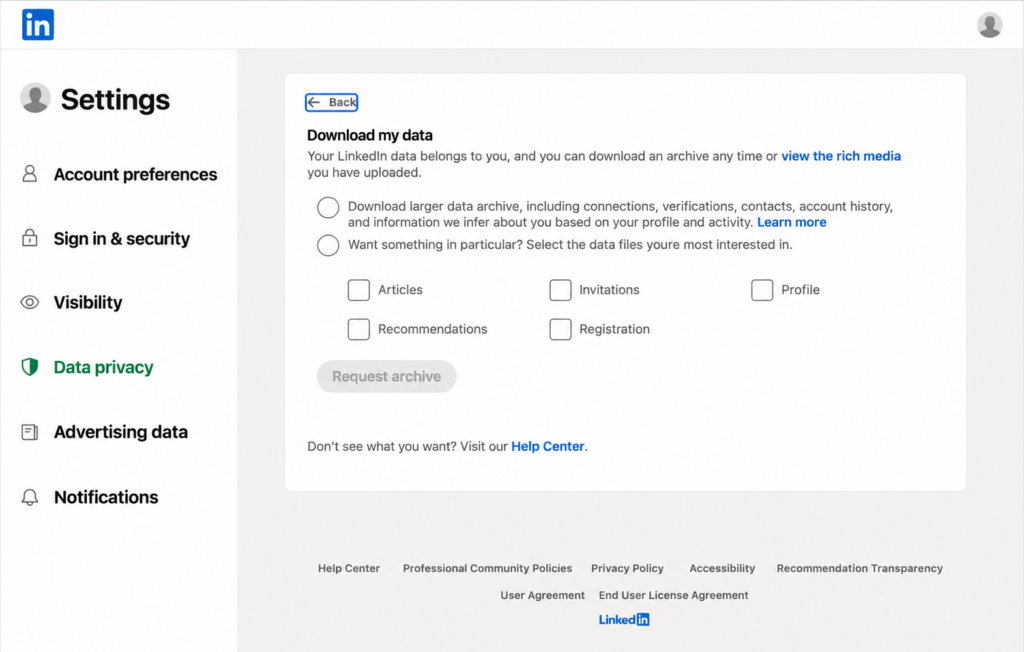
Choose your files and select Request archive. Once LinkedIn emails the link, download and save the files: the link stays active for 72 hours. Wait until you have what you need before closing your account.
Some exported files are in CSV format and can be opened in Excel or Google Sheets. A connections export may not contain every contact’s email address, because members control whether that address can be included.
2. Cancel LinkedIn Premium
If you have an active Premium subscription, resolve it before closing your Basic account. The cancellation steps depend on whether you subscribed directly through LinkedIn, the Apple App Store, or Google Play. Follow LinkedIn’s Premium cancellation instructions for your purchase method.
For a paid subscription, Premium features generally remain active through the current billing cycle. Cancelling a free trial works differently. LinkedIn recommends cancelling at least one day before the next billing date to avoid another charge.
3. Transfer Pages, Groups, and work licenses
If you’re the only admin of a company Page or you manage a LinkedIn Group, arrange a handover before leaving. An employer-managed Recruiter, Learning, or Sales Navigator license can also prevent account closure until the appropriate administrator removes or reassigns it.
4. Decide whether you want a break instead
Not sure about leaving for good? Hibernating your account hides your profile while allowing you to return later. Account closure is intended to be permanent, although LinkedIn can reopen most accounts closed for less than 14 days.
How to Delete Your LinkedIn Account on Desktop
Make sure you’re signed in to the LinkedIn account you want to close. These steps work in a desktop web browser.
- Click Me (your profile picture) at the top of LinkedIn.
- Select Settings & Privacy from the menu.
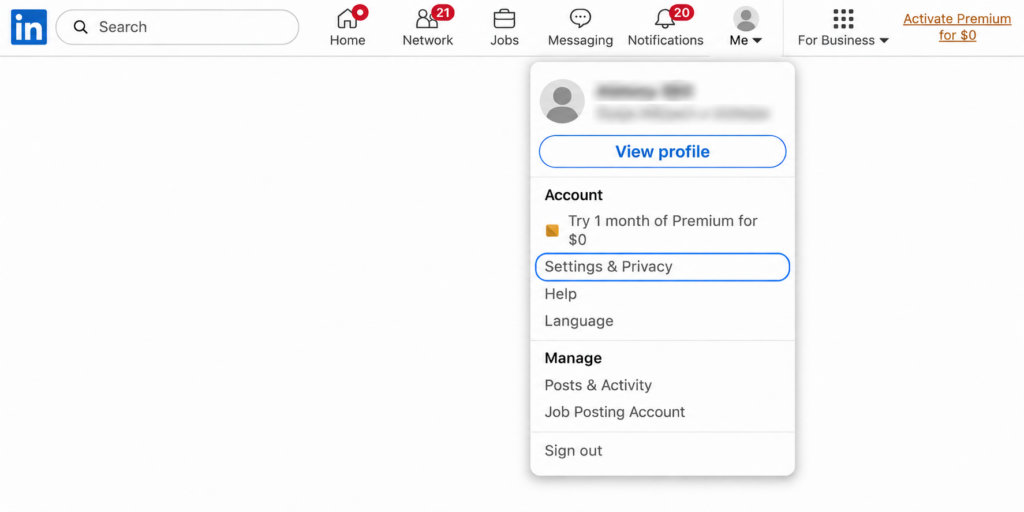
- Choose Account preferences from the settings sidebar.
- Scroll to Account management and choose Close account. Depending on your interface, you may see Close and delete account.
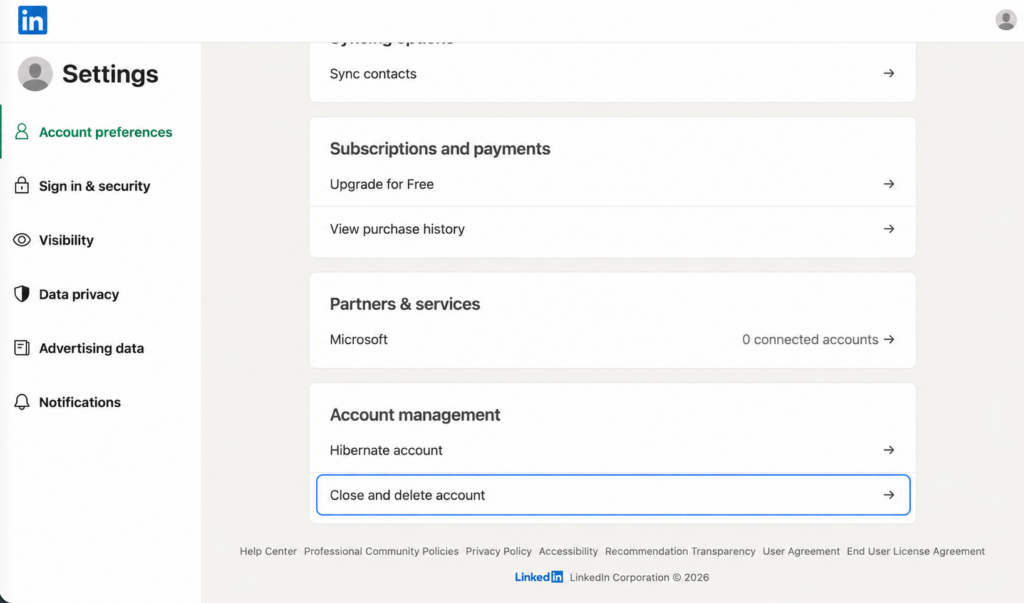
- Continue through any confirmation prompts.
- Choose a reason for leaving and click Next.
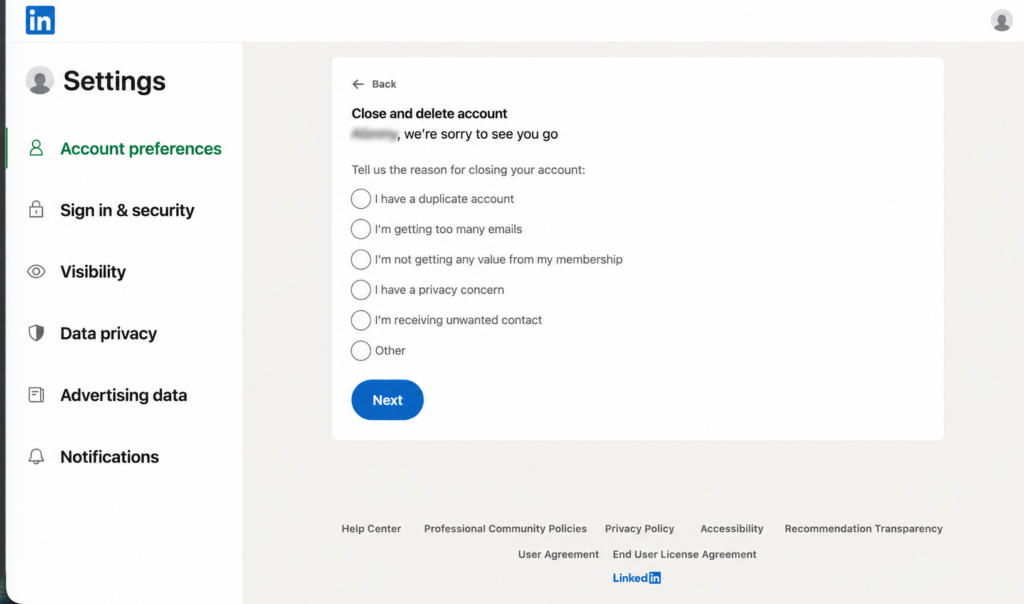
- Enter your password and choose any email-unsubscribe option offered to you.
- Click Close account and finish the final confirmation.
Tip: If you have more than one LinkedIn account, double-check which one is signed in before confirming.
How to Delete LinkedIn on iPhone or Android
The iOS and Android apps follow the same basic route. Menu layouts may look slightly different depending on your app version.
- Open the LinkedIn app and tap your profile picture.
- Tap Settings.
- Choose Account preferences.
- Under Account management, tap Close account.
- Tap Continue.
- Pick a reason for leaving and tap Next.
- Enter your password and tap Done to complete the process.
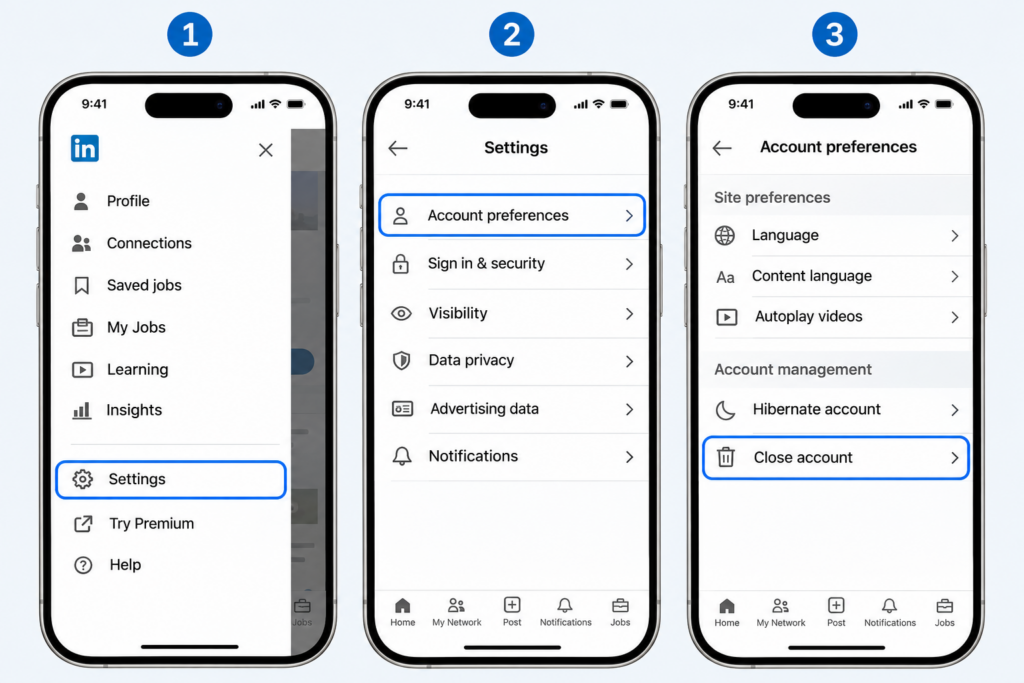
Illustrated navigation guide, not a live capture of the current LinkedIn app. Refer to the text steps if your menus look different.
Important: Deleting the LinkedIn app from your phone does not close the account. You must finish the account-closure steps in LinkedIn.
If you signed up using Google, Apple, or Microsoft, LinkedIn also recommends unlinking that third-party sign-in connection through the provider’s settings after closure.
Not Ready to Leave for Good? Hibernate Instead
Hibernation hides your LinkedIn profile from other members and from LinkedIn search, but keeps your account available for a future return. Existing messages, posts, and comments can remain visible under “A LinkedIn member.”
- Open Settings & Privacy.
- Go to Account preferences → Account management → Hibernate account.
- Choose a reason, enter your password, and confirm Hibernate account.
You can reactivate by signing in 24 hours after hibernating. LinkedIn says a Premium plan is automatically cancelled when you hibernate; if you purchased via Apple, you must also complete cancellation with Apple to prevent future billing. See LinkedIn’s hibernation instructions.
| What changes? | Hibernate | Close account |
|---|---|---|
| Profile shown to others | No | Generally no within 24 hours |
| Return later | Sign in after 24 hours | Usually reopen within 14 days only |
| Previous messages | Remain, shown as “A LinkedIn member” | Some sent content may remain with recipients |
If your main issue is too many emails or alerts, try Settings & Privacy → Notifications first. You might not need to close or hibernate your account.
What Happens After You Delete Your LinkedIn Account?
Closing the account, losing profile visibility, and LinkedIn’s data-deletion process happen on different timelines.
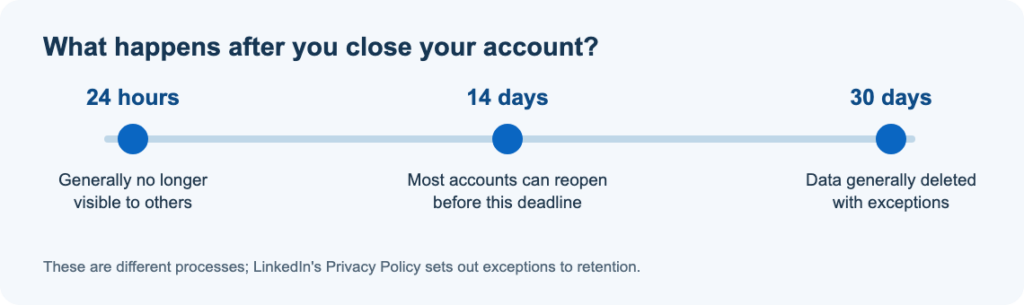
Under LinkedIn’s Privacy Policy, section 4.3, closed-account information generally stops being visible to others within 24 hours and is generally deleted within 30 days. LinkedIn may retain some information longer for legal, security, fraud-prevention, or other stated reasons.
Can you undo it? In most cases, LinkedIn can reopen an account closed for less than 14 days. Sign in with your old account details or use the link in your closure email. Even if reopened, endorsements, recommendations, pending or ignored invitations, followings, and group memberships cannot be recovered. Accounts closed for more than 14 days cannot be reopened.
Can others still see anything? Messages you sent may remain in other members’ inboxes. Information copied elsewhere may also persist. Your profile can continue to appear temporarily in search engines until their results update.
Deleting LinkedIn Isn’t the End of Your Digital Footprint
If privacy is your reason for leaving, remember that LinkedIn can’t remove copies of your professional information held by other websites. After closing your account, consider these separate cleanup steps:
- Check people-search sites. Search for your name on services such as Spokeo, Whitepages, or BeenVerified and use each site’s opt-out process for any listing you find.
- Refresh an outdated Google result. If Google still shows a LinkedIn page that no longer exists or has significantly changed, use Google’s Refresh Outdated Content tool. It updates Google Search; it does not remove a live page from the web.
- Review connected accounts. If you used LinkedIn to sign in to another service, set up a separate login where needed and disconnect the old connection.
What about using a VPN?
A VPN is useful for a different privacy task: protecting future network connections. It can replace the public IP address a website sees with the VPN server’s IP address and encrypt traffic between your device and that server. Services such as X-VPN offer this kind of connection protection, including when you use public Wi-Fi.
However, a VPN cannot erase old LinkedIn profiles, remove data from people-search sites, or hide your identity from websites where you sign in. Deal with those records through the relevant deletion or removal process.
Can’t Delete Your LinkedIn Account? Common Fixes
| What’s stopping you? | What to try |
|---|---|
| LinkedIn asks you to resolve Premium billing | Follow the official Premium cancellation steps for your subscription method. |
| Your account is tied to Recruiter, Learning, or Sales Navigator | Ask the employer or enterprise administrator to remove your license or enterprise association, then try again. |
| You own a Group or manage a Page | Transfer the relevant ownership or admin responsibility. |
| You cannot sign in | Use LinkedIn’s account recovery or password reset process first. |
| You need to close a deceased member’s account | Use LinkedIn’s official deceased-member request process instead of attempting to sign in. |
If the issue persists after completing the required actions, contact LinkedIn Help. Avoid third-party phone numbers promising to close the account for you.
Before You Leave LinkedIn
If you want fewer notifications, change those settings. If you want to take a break, consider hibernation. If you’re ready to close the account, save what you need first and follow the desktop or app instructions above.
Afterward, check whether outdated search results or listings elsewhere still contain details you want removed.
Frequently Asked Questions
Is deleting LinkedIn the same as deactivating it?
No. LinkedIn calls temporary deactivation hibernation. It hides your profile but lets you return later. Closing your account starts the deletion process.
How long does it take to delete a LinkedIn account?
The steps typically take only a few minutes. Profile visibility, account reopening, and data deletion follow separate timelines: generally 24 hours, less than 14 days, and generally 30 days, respectively, subject to exceptions.
Can I recover my LinkedIn account after deleting it?
In most cases, yes, if you closed it less than 14 days ago. Some data cannot be restored even if the account is reopened.
Will LinkedIn notify my connections?
LinkedIn’s account-closure documentation does not describe a general notification sent to all your connections. Once the profile is no longer visible, other members will not be able to view it as before.
Do I have to cancel LinkedIn Premium first?
You must resolve an active Premium membership before closing your Basic account. The right cancellation steps depend on where you purchased the subscription.
Can I reuse my email address for a new LinkedIn account?
You may be able to after LinkedIn releases the email from the closed account, but do not assume a fixed waiting period. If the email is still shown as in use, follow LinkedIn’s account-access or support instructions.
Official sources
- LinkedIn Help: Close and delete your account
- LinkedIn Help: Reopen your account
- LinkedIn Help: Download your data
- LinkedIn Help: Cancel Premium
- LinkedIn Help: Hibernate your account
- LinkedIn Privacy Policy, §4.3
- Google: Refresh Outdated Content
*Information checked November 3, 2026. Interface appearance may vary by account and app version.