

Installing a VPN app on your phone or computer is straightforward. But if you have a house full of smart TVs, game consoles, streaming sticks, tablets, and smart home gear, installing and managing apps individually starts to sound less convenient.
There’s another option. Instead of protecting each device separately, you can install the VPN on your router and send everything connected to your Wi-Fi through the encrypted tunnel.
Both approaches use a VPN to encrypt internet traffic and replace your public IP address with the VPN server’s address. The difference is where that protection begins.
A router VPN gives you automatic coverage, while VPN apps give you more control. For many homes, the best setup is actually a combination of both.
Table of Contents
How a VPN on Your Router Works
Normally, your router connects phones, tablets, computers, TVs, and other devices to your internet service provider. Each device sends traffic through the router and out to the internet.
When the router itself connects to a VPN, that changes the path. Internet traffic from devices using that connection goes from the device to the router, through the encrypted VPN tunnel, and then to the internet.
That makes the router a central VPN gateway. You don’t need to remember to open an app on every connected device, and gadgets that don’t support VPN software can still benefit.
Everything behind the VPN router can share the same protected connection. That makes router-level protection particularly attractive for homes with dozens of connected devices.
There’s one important requirement. Your router needs to support a VPN client and a protocol that your VPN provider offers.
X-VPN currently supports WireGuard, OpenVPN, and L2TP/IPsec on compatible routers, although the exact options vary by router model. Check your VPN’s router setup page to find instructions that match your hardware.
The Biggest Advantage Is Coverage
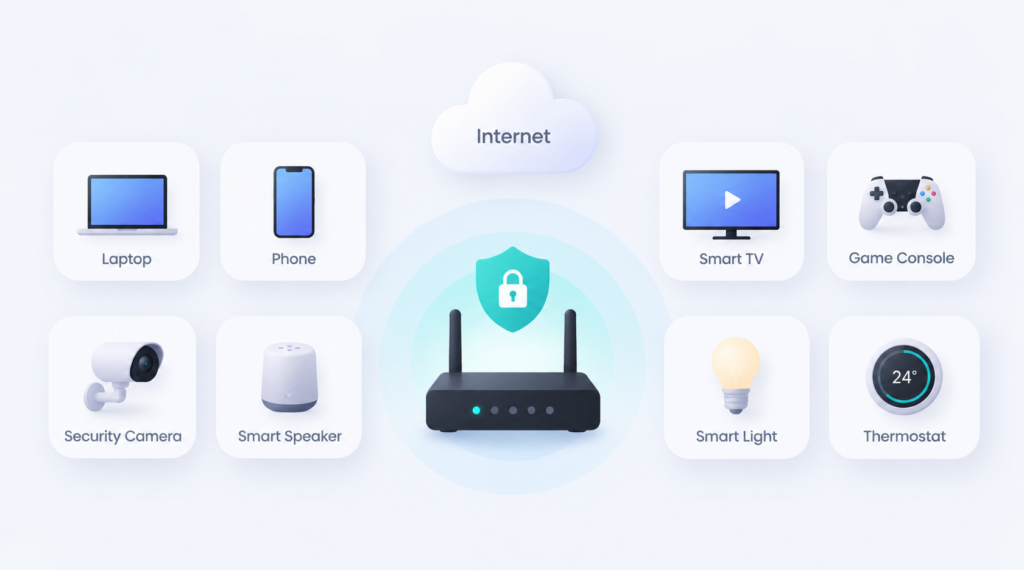
You might be surprised by the number of internet-connected devices in your home. Besides phones, tablets, and computers, you might have televisions, streaming boxes, speakers, security cameras, lights, appliances, thermostats, and game consoles.
Some of those devices have VPN apps, but many don’t. For example, PlayStation, Xbox, Nintendo Switch, and various smart home products aren’t designed to run traditional VPN apps.
There are workarounds. For example, X-VPN lets a PlayStation 4/5 or Nintendo Switch connect through a proxy server created by its mobile app when the phone and console are on the same Wi-Fi network. Similar methods can work with some consoles, but they add another setup step. For multiple gaming devices, X-VPN recommends running the VPN on the router for a more stable connection.
A VPN router solves compatibility and stability problems because the individual device doesn’t have to understand anything about VPNs. It connects to Wi-Fi normally while the router handles the tunnel. Router protection is especially useful for devices that can’t protect themselves.
It also takes care of temporary devices. If a friend or relative joins your Wi-Fi, their phone or laptop can use the VPN connection without installing anything. The same applies when you buy another smart home gadget. Connect it to the protected network and it joins the VPN automatically.
That’s a nice change from discovering six months later that the smart TV in the bedroom was never protected because you forgot about it.
VPN Apps Offer Much More Control
The simplicity of a VPN router also creates its biggest limitation. Everyone connected through that router will generally use the server and configuration you’ve selected.
Suppose you’re streaming through a server in Canada while someone else wants a U.S. connection for another service. With one router-level tunnel, changing the server affects everyone using it.
VPN apps let each device make its own choice. Your laptop could connect through Toronto, your phone through New York, and a tablet could temporarily disconnect from the VPN altogether. Per-device apps let every user choose the connection that works best at that moment.
Apps also make changing protocols, activating a kill switch, or switching servers much easier. Instead of signing into your router’s administration page and changing a configuration, you usually tap a button.
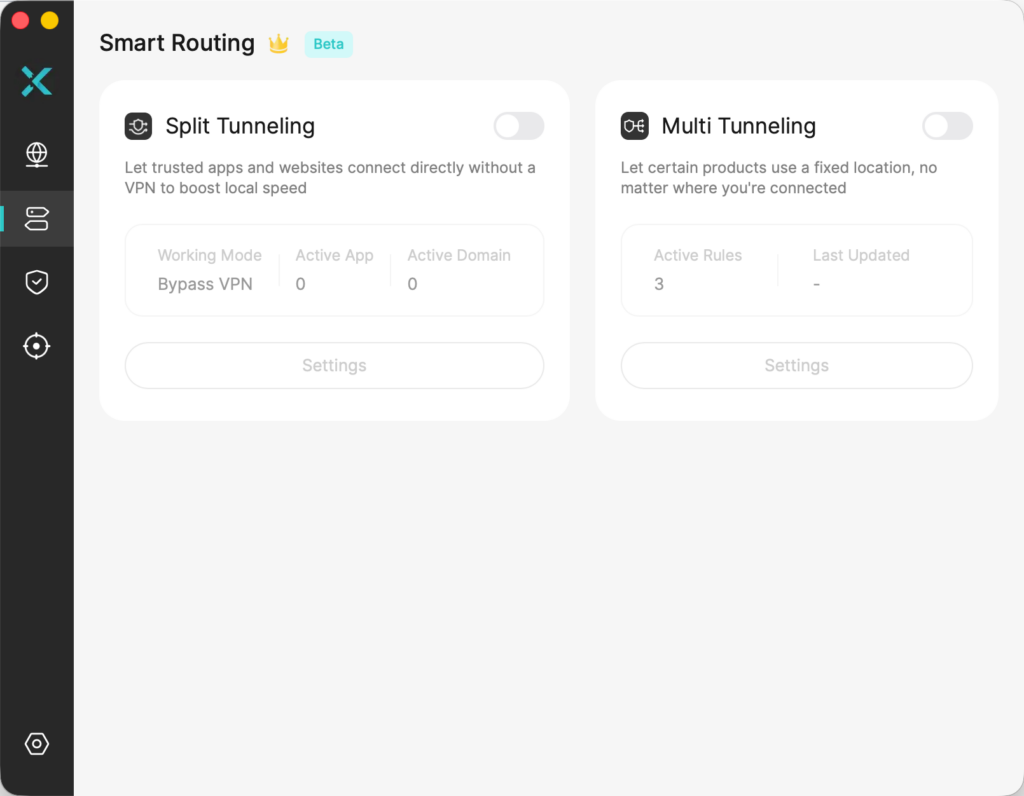
Features such as split tunneling are generally easier to understand and manage in a VPN app as well. Split tunneling lets selected apps or websites bypass the VPN while everything else remains protected.
Some advanced routers have similar routing controls, but setup varies considerably. For most people, an app is much simpler.
Which Option Is Faster?
A VPN always adds some processing and routing overhead because your traffic has to be encrypted, sent through a VPN server, and decrypted again. Whether a router or device app is faster depends on the hardware doing that work.
Modern phones and computers have powerful processors that can handle VPN encryption efficiently. A budget router might have far less processing power, particularly if it’s several years old.
If the router’s processor can’t encrypt data quickly enough, your VPN speed could be limited even though your internet service and VPN server are capable of much faster transfers. Older routers running OpenVPN are particularly likely to encounter this limitation.
Newer hardware and efficient protocols like WireGuard can narrow the difference significantly. A capable router might handle a typical home internet connection without becoming a meaningful bottleneck.
Router VPN speed depends heavily on the router itself. That’s why replacing a perfectly good router with VPN-capable hardware deserves more thought if you have gigabit internet or another high-speed connection.
Running the VPN directly on a modern phone, tablet, or laptop removes the router’s VPN processing from the equation. That’s generally the safer choice when maximum speed matters.
Server distance and congestion remain important either way. Choosing a nearby VPN server location will usually give you a better starting point for low latency and high throughput.
Gaming and Streaming Make the Choice More Interesting
Smart TVs and game consoles are two of the strongest arguments for running a VPN on your router. A streaming device might not have a VPN app available, and game consoles generally don’t support standard VPN clients without workarounds. Putting the VPN on the router solves both problems without unusual network configurations.
It also makes location changes available to every device on the network. If your router connects to a server in another region, a television or console will generally see the VPN server’s public IP address instead of your home connection.
If several TVs and streaming sticks benefit from the same server location, putting that connection on the router can save a lot of repetitive setup. But there’s a downside for gaming. Competitive games are very sensitive to latency, and routing traffic through a distant VPN server can add extra milliseconds. With a router VPN, a gamer might be stuck with the server selected for the rest of the house.
Gaming often benefits from selective routing. If a router VPN adds latency, you may want the console to use a direct connection while other devices continue through the VPN. On a gaming PC, a VPN app usually makes this easier because you can disconnect, switch servers, or use split tunneling without changing everyone else’s connection.
A Router VPN Doesn’t Follow You Outside Your Home

There’s an easy limitation to overlook when everything works perfectly at home. The VPN is running on the router, not on the phone or laptop.
The moment you leave your Wi-Fi network, the VPN privacy it provides stays behind. Your phone switches to cellular data when you walk out the door. Your laptop might connect to an unprotected public Wi-Fi network at an airport, hotel, library, or cafe. Neither connection passes through your home router.
A router VPN protects a network, while an app protects the device wherever it goes. That’s a major advantage for VPN apps on phones, tablets, and laptops. You can leave them enabled at home, move to cellular data, connect to public Wi-Fi, and continue using the same VPN without thinking about which router you’re connected to.
If you travel frequently, there’s another possibility. A small travel router can create your own protected Wi-Fi network in a hotel or rental property. Your devices connect to the travel router while it connects through the hotel’s internet service.
That’s particularly handy when you’re carrying several devices, but I still wouldn’t rely on it as the only VPN solution for a phone or laptop that regularly leaves the room.
Setup and Maintenance Favor VPN Apps
Setting up a VPN app is typically quick and easy. You just download it, sign in, and tap Connect. Router installation takes more work.
Depending on the router and protocol, you might need to download a configuration file, enter VPN credentials, select a server, and add the connection through the router’s administration interface.
For some models that might not be difficult, but router menus vary. Instructions for an ASUS router can look completely different from those for TP-Link, Netgear, GL.iNet, or a router running OpenWRT.
Updating settings also takes more effort. If you want to change countries with a VPN app, that might take two taps. On a router, you could need to load another configuration or change the VPN profile.
Once you install VPN apps on each device, changes are usually much easier than reconfiguring a router VPN.
If you rarely change servers, however, that relationship reverses. A router VPN can be wonderfully low maintenance. Turn on the television, connect a new smart plug, or hand a guest your Wi-Fi password and there’s no additional VPN setup required.
Privacy Protection Is Similar, but the Boundaries Differ
Whether the tunnel begins on your phone or at the router, the basic privacy model is the same. Traffic sent through the VPN is encrypted between the VPN client and VPN server, and websites see the VPN server’s public IP address instead of your normal public address.
The important difference is where traffic enters that tunnel.
With an app, encryption begins on the device. With a router VPN, traffic travels across your local network to the router before entering the VPN tunnel.
On your secure home Wi-Fi, that usually isn’t a big concern because Wi-Fi itself should already be protected with WPA2 or preferably WPA3 encryption.
A VPN still doesn’t make devices invisible. Websites and apps can identify you through account logins, cookies, device fingerprints, location permissions, and other information that doesn’t depend on your IP address. Changing where the VPN runs doesn’t change what a VPN can and can’t hide.
The router approach also shouldn’t replace basic network security. Keep the router firmware updated, use a strong administrator password, protect Wi-Fi with modern encryption, and consider a separate guest network for visitors and untrusted smart home devices.
Can You Use a Router VPN and VPN Apps Together?
You can, although running both simultaneously isn’t always useful. If your router is already connected to a VPN and you activate another VPN on your laptop, that laptop’s traffic could pass through two separate VPN tunnels. That might provide an additional layer of routing, but it can also reduce speed, increase latency, and occasionally create connection problems.
There are more useful ways to combine the two approaches.
You could leave the router VPN active for smart TVs, consoles, smart home products, and guest devices, while keeping VPN apps installed on phones and laptops for travel. At home, those apps can remain disconnected when the router already provides the connection.
Another option is to maintain two Wi-Fi networks if your hardware allows it. One can route through the VPN while another connects directly to the internet. Moving a device between them effectively becomes a simple form of network-level split tunneling.
A hybrid setup lets the router handle coverage while apps handle mobility and individual choices. That avoids forcing one configuration on every device while still giving gadgets without VPN support an easy path into the tunnel.
Router VPN vs VPN Apps at a Glance
Consideration | VPN on router | VPN on each device |
|---|---|---|
Coverage | Protects compatible traffic from connected devices automatically | Protects only devices with the VPN installed |
Smart TVs and IoT | Excellent for devices without VPN apps | Depends on app availability |
Game consoles | Useful because consoles don’t normally run VPN clients | Usually requires another method |
Server switching | Changes can affect the whole network | Easy to change separately on every device |
Split tunneling | Possible on some routers but can be complicated | Usually much easier |
Speed | Can be limited by router processing power | Modern phones and computers are usually powerful VPN clients |
Travel | Protection stays with the router | VPN follows the device |
Guests | Can be protected automatically | Guests need their own VPN |
Setup | More technical initially | Usually very easy |
Daily maintenance | Minimal once configured | Managed separately on each device |
The distinction becomes fairly clear when you look at the two approaches side by side. The router wins on coverage and convenience, while apps win on flexibility and mobility.
Which VPN setup is best?
If you only have a phone, tablet, computer, and perhaps a streaming device with its own VPN app, installing the VPN separately is probably easier. You gain fine control, fast server switching, straightforward troubleshooting, and protection when you leave home.
The router option becomes increasingly attractive as your network grows. Smart TVs, consoles, streaming sticks, IoT devices, security cameras, and guest devices can all join without needing their own VPN software.
For a family or a smart home, you might want to consider a hybrid setup. Let the router take care of devices that stay home and either can’t run a VPN app or don’t need frequent server changes. Keep VPN apps installed on phones, tablets, and laptops where mobility, speed, split tunneling, and server selection matter more.
You don’t really have to choose between a VPN router and VPN apps. Used together, they solve different parts of the same problem.
A router is excellent at quietly protecting a network full of devices. An app is better at protecting you when you leave that network. Combining those strengths gives you coverage without sacrificing control.
FAQs
Does installing a VPN on my router protect every device?
It can protect internet traffic from devices routed through the VPN connection, including many devices that can’t run VPN software themselves. However, router configuration matters, and advanced routing rules or separate networks can allow some traffic to bypass the VPN.
Do I still need VPN apps if my router has a VPN?
They’re useful on portable devices. Your router VPN only protects you while you’re connected through that router. A VPN app can continue protecting your phone, tablet, or laptop when you switch to cellular data, public Wi-Fi, or another network.
Is a VPN router slower than a VPN app?
Not necessarily. Performance depends heavily on the router’s processor, VPN protocol, internet speed, and server. A powerful modern router using WireGuard can provide good speeds, while older or inexpensive hardware can become a bottleneck. Running the VPN on a modern phone or computer generally provides more processing power.
Can I use my phone hotspot as a temporary VPN for another device?
Sometimes, but don’t assume a phone’s VPN automatically protects devices connected to its hotspot. On many phones, tethered traffic can bypass the VPN tunnel even while the phone itself is protected. X-VPN explains the issue in more detail in its guide to VPN protection for phone hotspots. The safest approach is to test the connected device’s public IP address and confirm it matches the VPN server. For reliable temporary protection, run the VPN directly on the connected device or use a travel router that supports VPN connections.