

GTA 6 is available through Xbox Cloud Gaming and PlayStation Cloud Streaming, so you can play without downloading the full game. Supported devices include Xbox One, Xbox Series X|S, PS5, PS5 Pro, and PlayStation Portal.
PC and mobile players can also stream GTA 6 from their own console using Remote Play. The setup, costs, and network requirements vary depending on how you choose to play.
Table of Contents
GTA 6 Cloud Gaming: Supported Devices
You don’t need the latest console to play GTA 6. Xbox One users can stream the game on their existing console, while PS Portal owners can play without a PS5.
Outside of Xbox and PlayStation, GTA 6 isn’t currently available on cloud gaming services such as GeForce NOW, Boosteroid, Amazon Luna, or Shadow PC.
Device | GTA 6 Cloud Gaming | GTA 6 Remote Play |
|---|---|---|
Xbox One | ✅ | ❌ |
Xbox Series X/S | ✅ | ✅ |
PS5 / PS5 Pro | ✅ | ✅ |
PlayStation Portal | ✅ | ✅ |
Windows PC | ❌ | ✅ |
Mac | ❌ | ✅ |
Android | ❌ | ✅ |
iPhone / iPad | ❌ | ✅ |
Smart TV | ❌ | ✅ |
Handheld Gaming PC | ❌ | ✅ |

Cloud gaming lets you play GTA 6 without installing the game. Xbox players can stream free with ads, use their Game Pass hours, or purchase additional cloud playtime, while PlayStation players need a PS Plus Premium subscription. Remote Play is free to use, but you’ll need GTA 6 installed on your Xbox Series X|S or PS5. Before installing the game, check the GTA 6 download size & time.
How to Play GTA 6 on Xbox Cloud Gaming
To stream GTA 6 on Xbox, you’ll need to own the digital version of the game and have access to cloud gaming.
Step 1: Purchase GTA 6 and Get Cloud Access
Buy GTA 6 from the Xbox Store. The Standard Edition costs $79.99 in the US.
Xbox Game Pass Essential, Premium, and Ultimate include 5, 10, and 15 hours of cloud playtime per month, respectively. You can also buy additional cloud hours or use ad-supported cloud gaming without a Game Pass subscription in the US. Ad-supported sessions have time limits.
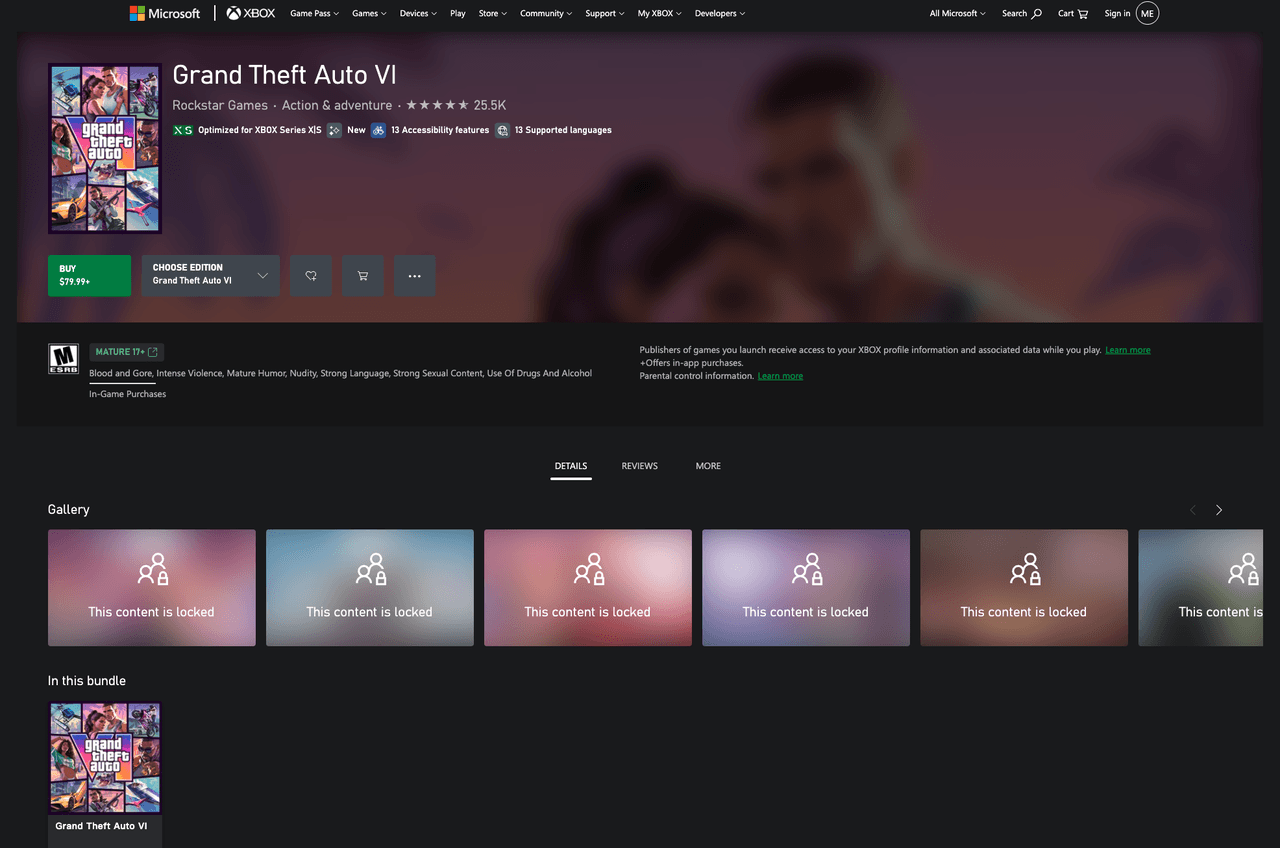
Step 2: Find GTA 6 on Your Xbox
Press the Xbox button on your controller to open the guide menu. Use the search function to find Grand Theft Auto VI.
Step 3: Open GTA 6 in the Microsoft Store
Select Manage, followed by See in Microsoft Store.
Step 4: Select Play With Cloud
Choose Play With Cloud to launch GTA 6. The game runs on Xbox’s cloud servers and streams directly to your console, so you can start playing without waiting for a full download.
GTA 6 uses Xbox Series S graphics settings when played through Xbox Cloud Gaming. For smoother gameplay and fewer interruptions, connect your console to your router using an Ethernet cable.

How to Play GTA 6 on PlayStation Cloud Streaming
PlayStation Plus Premium gives you access to cloud streaming on PS5, PS5 Pro, and PS Portal. You can stream GTA 6 straight from your digital game library once you’ve purchased it from the PlayStation Store.
PlayStation Cloud Streaming is currently available in 31 countries, including the US, Canada, the UK, Japan, and South Korea. You can check the full list of supported countries on PlayStation’s official website.
How to Play GTA 6 on PS5 and PS5 Pro
Step 1: Buy the digital Standard Edition of GTA 6 from the PlayStation Store for $79.99. You’ll also need PlayStation Plus Premium, which costs $19.99 on the monthly plan in the US.
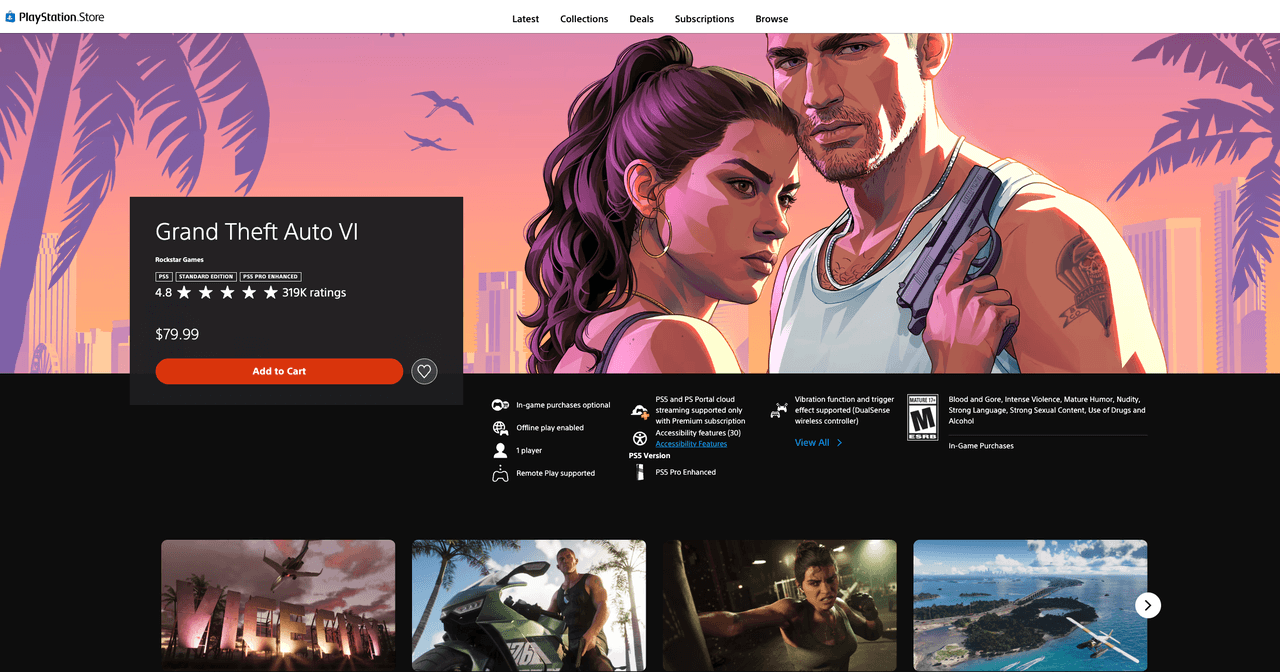
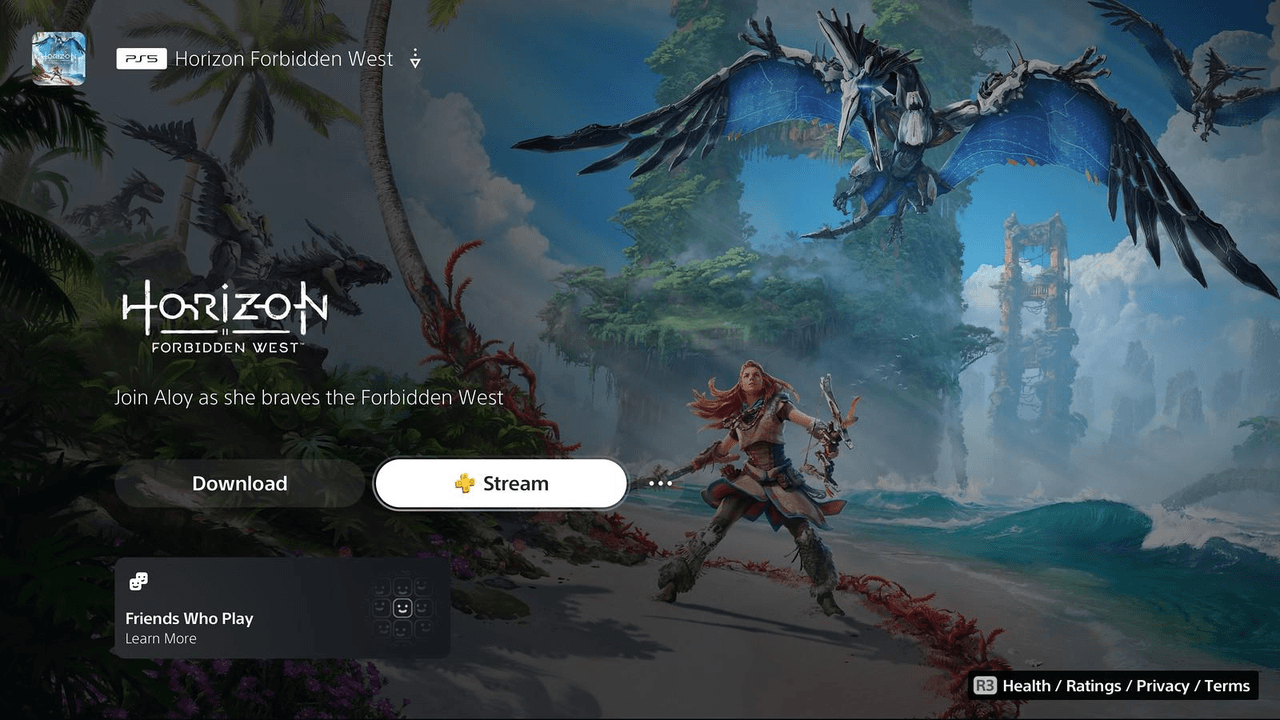
Step 2: Open Game Library from your PS5 home screen and find Grand Theft Auto VI.
Step 3: Open the game page and select Stream to start playing.
How to Play GTA 6 on PlayStation Portal
Unlike Remote Play, cloud streaming on PS Portal doesn’t require a PS5. You’ll need a digital copy of GTA 6, an active PS Plus Premium subscription, and an adult PlayStation account.
Step 1: Connect your PS Portal to Wi-Fi and sign in to the PlayStation account you used to purchase GTA 6.
Step 2: Open the Cloud Streaming tab in the upper-left corner of the home screen.
Step 3: Open Streaming Games in Your Library and find Grand Theft Auto VI.
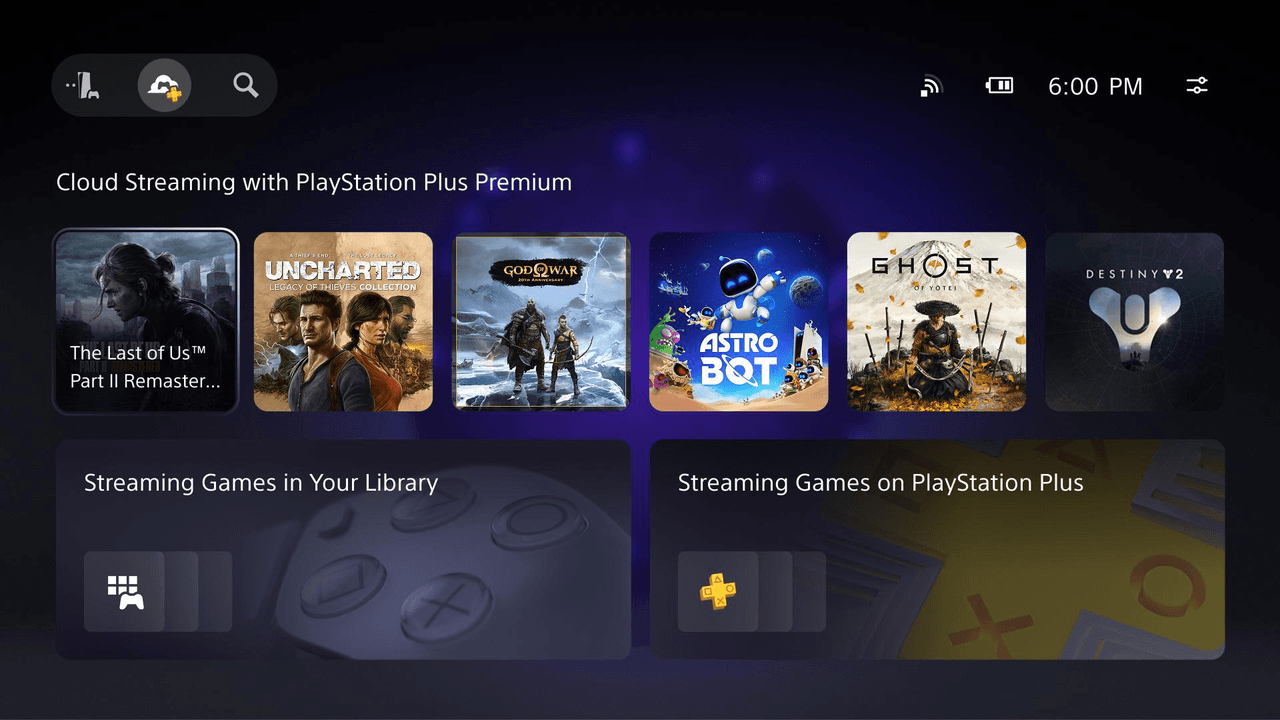
Step 4: Select Stream to launch the game.
How to Play GTA 6 on PC and Mobile With Remote Play
With Remote Play, you can stream GTA 6 from your Xbox Series X|S or PS5 to your computer, phone, or tablet. Since the game runs on your console, you don’t need a high-end gaming PC or a powerful smartphone.
Set Up Xbox Remote Play
Make sure GTA 6 is installed on your Xbox Series X|S and your console is connected to the internet, then follow these steps:
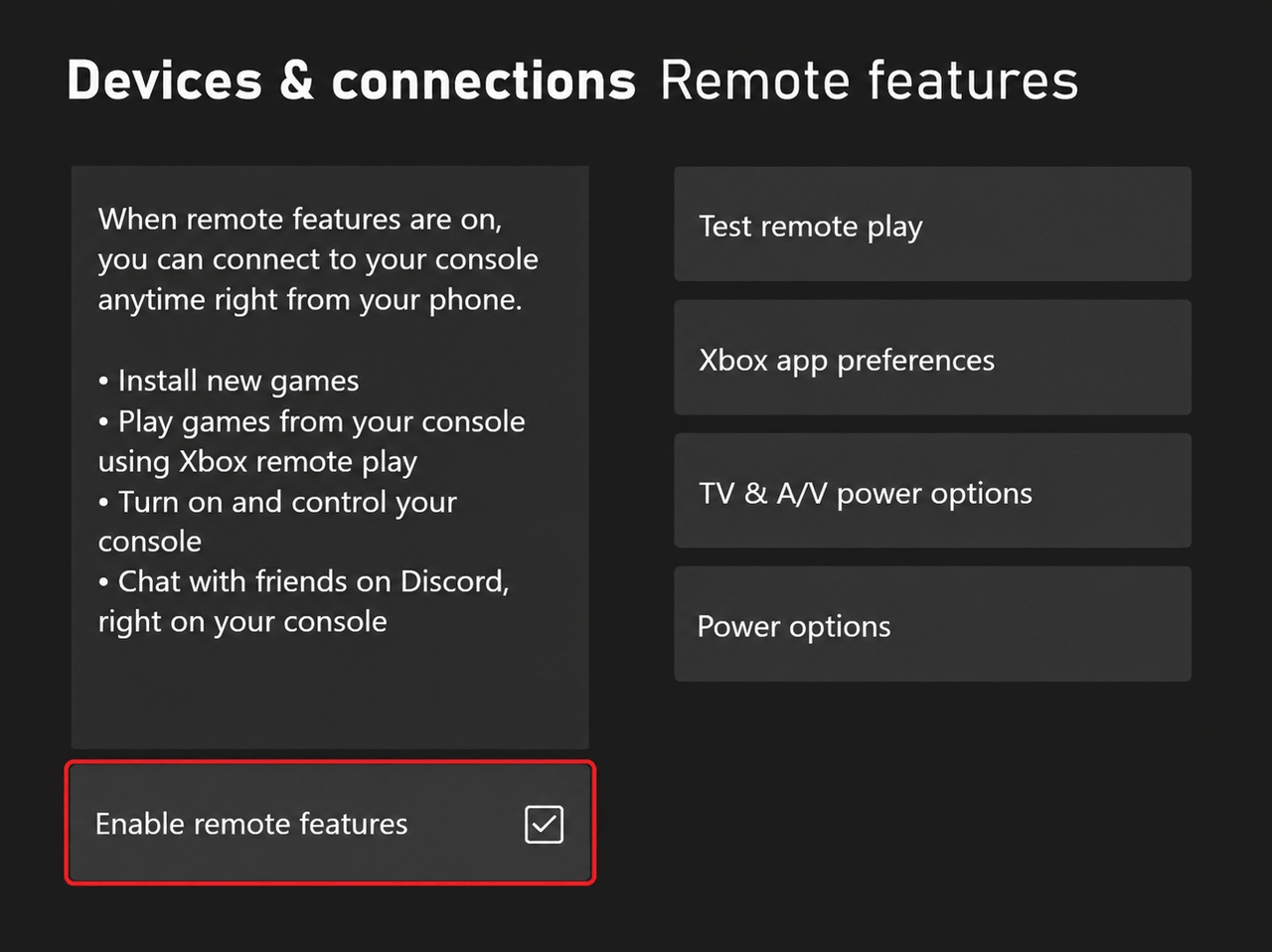
Step 1: On your Xbox, go to Settings > Devices & connections > Remote features.
Step 2: Turn on Enable remote features. You can also select Test remote play to check your connection.
Step 3: Sign in with the same Microsoft account you use on your Xbox, then connect from your preferred device:
- PC or compatible handheld gaming PC: Open the Xbox app, select your profile icon, and go to Accessories & remote play. Find your console and select Remote play.
- Android or iPhone/iPad: Visit play.xbox.com/remoteplay in your browser, select your console, and choose Remote Play on This Device.
Step 4: Launch GTA 6 and start playing.
Set Up PS Remote Play
You can stream GTA 6 from your PS5 to a Windows PC, Mac, Android phone, iPhone, or iPad. Make sure GTA 6 is installed on your PS5 and the console is turned on or in rest mode.
Step 1: On your PS5, go to Settings > System > Remote Play and turn on Enable Remote Play.
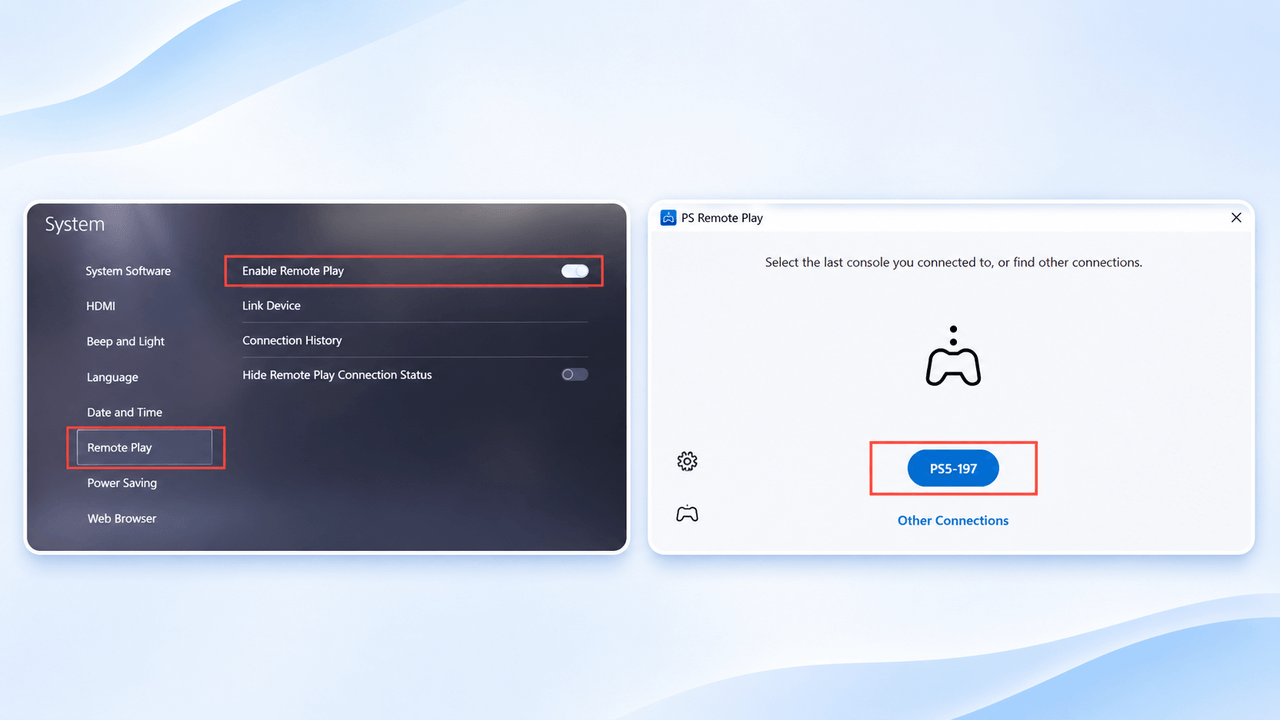
Step 2: To connect while your PS5 is in rest mode, go to Settings > System > Power Saving > Features Available in Rest Mode. Enable Stay Connected to the Internet and Enable Turning On PS5 from Network.
Step 3: Download the PS Remote Play app and sign in with the same PlayStation account you use on your PS5.
Step 4: Connect a compatible controller, or use the on-screen controls if you’re playing on a mobile device. Select PS5 in the app and launch GTA 6 once connected.
How to Improve Your GTA 6 Cloud Gaming Experience
If GTA 6 looks blurry, stutters, or responds slowly to controller inputs, start by checking your network connection and streaming settings. If delays persist, try these steps to reduce ping in games.
- Check your internet speed: Xbox recommends a connection of at least 20 Mbps for cloud gaming on consoles. On PlayStation, internet speed requirements vary depending on your device and streaming resolution:
Streaming Resolution | PS5 Recommended Speed | PS Portal Minimum Speed |
|---|---|---|
720p | 13 Mbps | 7 Mbps |
1080p | 23 Mbps | 13 Mbps |
1440p | 38 Mbps | Not supported |
4K | 52 Mbps | Not supported |
- Use Ethernet or 5 GHz Wi-Fi: Connect your Xbox or PS5 to your router using an Ethernet cable whenever possible. If you’re using Wi-Fi, switch to the 5 GHz band and stay within range of your router.
- Adjust your streaming resolution: On PS5, try lowering the streaming resolution from 4K to 1080p. PS Portal users can switch to 720p under Quick Menu > Max Resolution and restart the streaming session to apply the change.
- Reduce other network activity: Pause large downloads, automatic updates, and other bandwidth-heavy activities while playing.
- Use a VPN to reduce ISP throttling: A VPN encrypts your traffic, making it harder for your ISP to selectively throttle your gaming connection. With high-bandwidth servers, you can also enjoy a smoother cloud gaming experience during peak hours.
Enjoy Smoother GTA 6 Cloud Gaming
Get ready for GTA 6 with X-VPN, offering up to 25 Gbps of server bandwidth and support for PCs, mobile devices, routers, and gaming consoles. Whether you’re tearing through the streets of Vice City or outrunning the cops, X-VPN is built to keep up with the action.
Conclusion
Cloud gaming makes GTA 6 accessible to more players. You can stream it on an Xbox One without upgrading your console or play on PS Portal without owning a PS5. Remote Play also lets you continue playing on your computer, phone, or tablet using your existing console.
For the best experience, keep your connection stable and choose a streaming resolution that matches your network speed to enjoy GTA 6 with fewer interruptions.
FAQs
Is GTA 6 cloud gaming free?
No, GTA 6 costs $79.99 for the Standard Edition in the US. Once you own the game, you can use Xbox’s ad-supported cloud gaming option in supported markets without paying for a Game Pass subscription. PlayStation cloud streaming requires PS Plus Premium.
Can I play GTA 6 on Xbox Cloud Gaming without Game Pass?
Yes. You can purchase cloud gaming hours separately. Xbox currently offers 10 hours for $3.99, 25 hours for $7.99, and 50 hours for $11.99 in the US.
Is GTA 6 included in PlayStation Plus?
No. PS Plus Premium gives you access to cloud streaming, but you’ll still need to purchase GTA 6 separately from the PlayStation Store.
Can I play GTA 6 on PlayStation Portal without a PS5?
Yes. With a digital copy of GTA 6 and a PS Plus Premium subscription, you can stream the game directly from PlayStation’s cloud servers to your PS Portal.
Can I play GTA 6 through cloud gaming on PS4?
PS4 doesn’t support GTA 6 cloud streaming. However, you can use PS Remote Play on your PS4 to stream the game from a PS5.
Will GTA 6 come to GeForce NOW?
Rockstar hasn’t announced a PC release date for GTA 6, and the game isn’t currently available on GeForce NOW. Support will depend on the PC release and whether the game is added to NVIDIA’s cloud gaming service.
Why is GTA 6 not showing up on cloud gaming?
First, make sure you’re using a supported device and have purchased the digital version of GTA 6. On Xbox, check your cloud gaming access. On PlayStation, confirm that your PS Plus Premium subscription is active. You should also check regional availability and whether the service is experiencing an outage.
Can I use a VPN for GTA 6 cloud gaming?
Yes. You can connect your console through a VPN-enabled router or share a VPN connection from your computer. Try a nearby X-VPN server if network congestion is causing lag.