


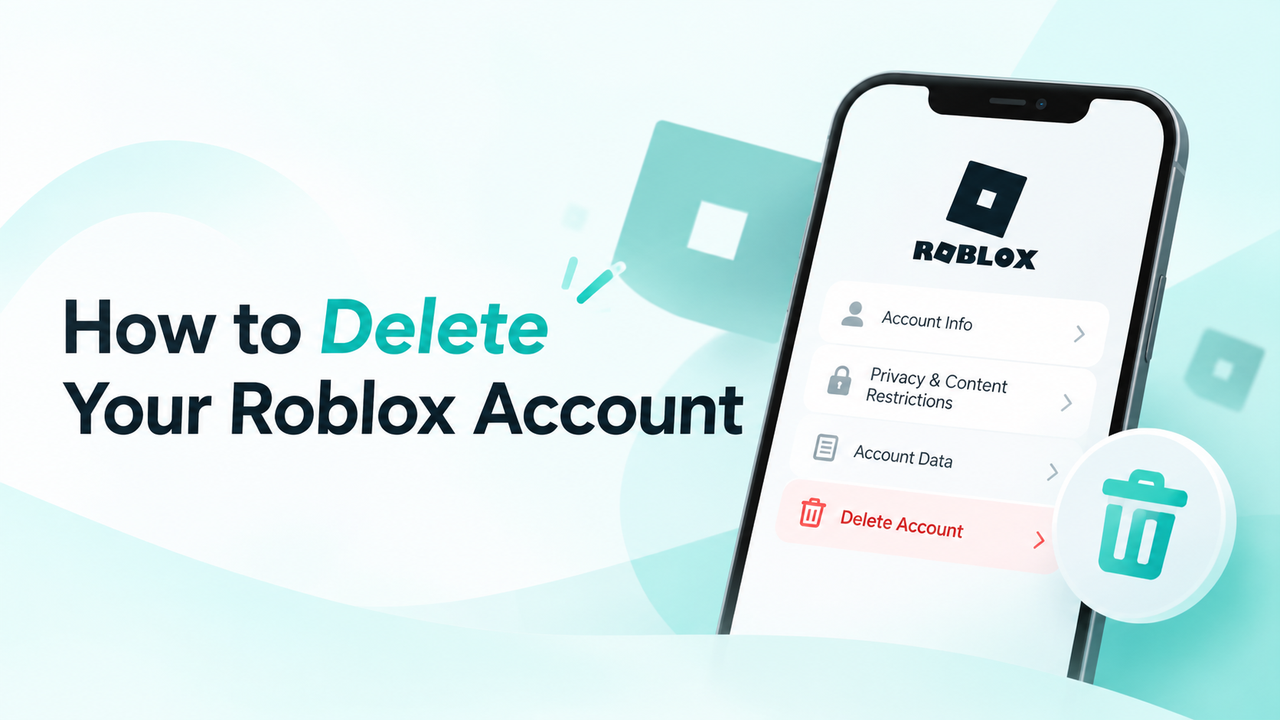
You can request permanent deletion of your Roblox account through privacy settings or the official Roblox Support form. The process is straightforward, but you may need to verify your identity before Roblox completes your request.
Quick Steps:
Step 1. Sign into Roblox and open Settings.
Step 2. Go to Privacy & content restrictions, then Account data, deactivation & deletion.
Step 3. Select Delete account and follow the instructions.
Step 4. Verify your identity and complete the deletion process.
Table of Contents
Things to Do Before Deleting Your Roblox Account
Before submitting your account deletion request, it’s worth taking care of a few things:
- Check your email: Make sure your Roblox account has a verified email address you can access. You’ll use it to confirm your identity before your account can be deleted.
- Save your account data: If you want to keep a copy of your personal information, request it through Roblox’s privacy settings before deleting your account.
- Cancel active subscriptions: Check whether you have any ongoing subscriptions and cancel them through the platform where you purchased them.

💡If you’re considering deleting your child’s account over safety concerns, our guide to Roblox safety for kids covers the privacy settings and parental controls worth checking first.
How to Delete Your Roblox Account via Settings
The simplest way to delete your Roblox account is through privacy settings. You can also reach out to support, but that method takes longer. You’ll need a verified email address either way to confirm the deletion request.
Step 1. Log in to Roblox and open Settings.
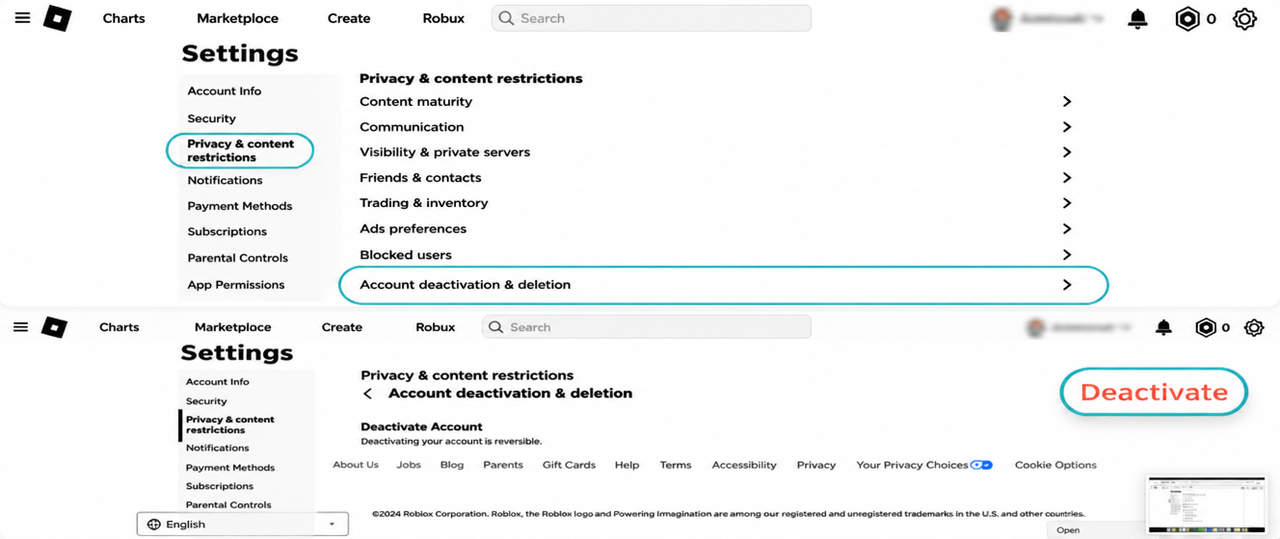
Step 2. Select Privacy & content restrictions.
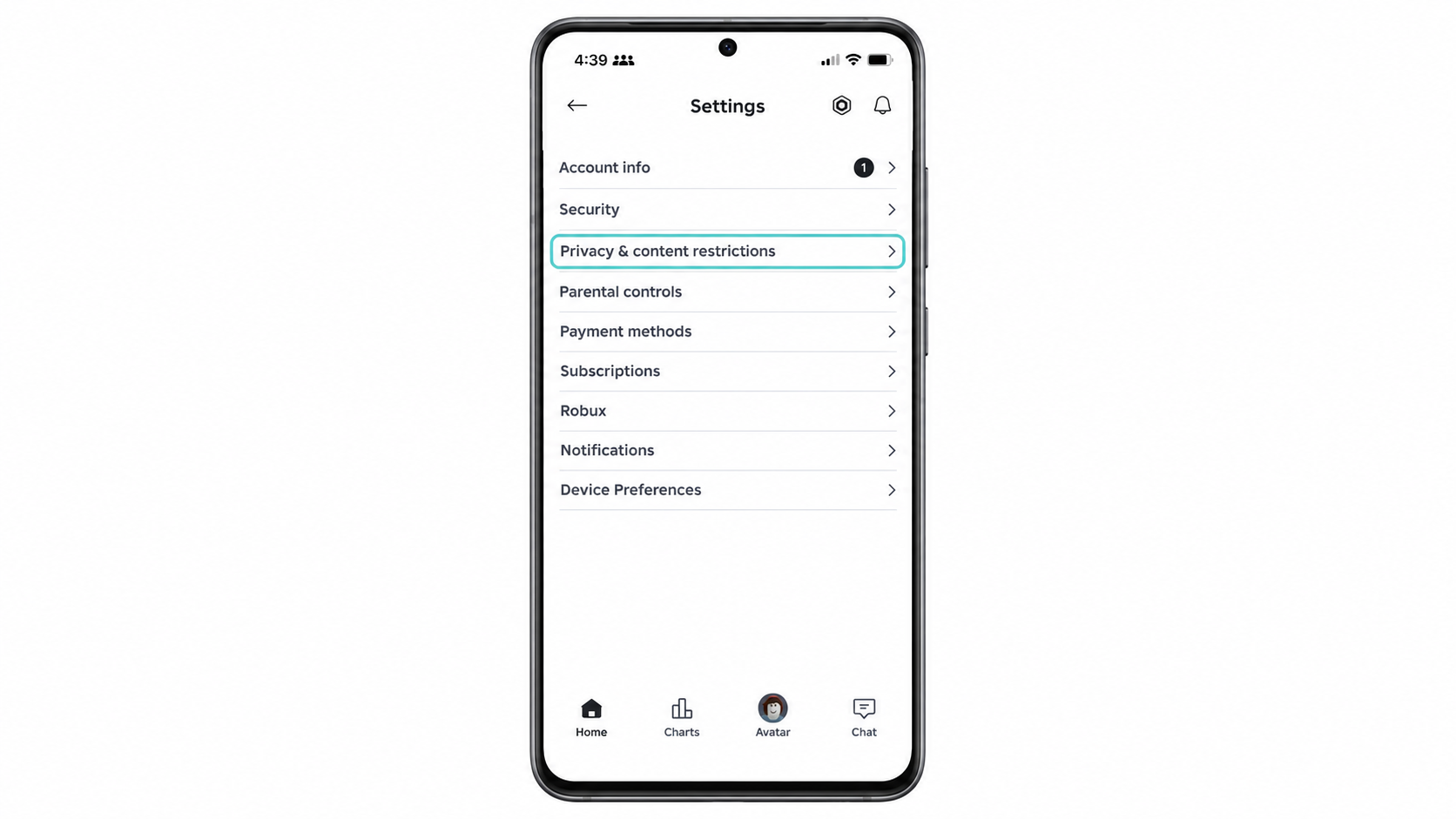
Step 3. Choose Account data, deactivation & deletion.
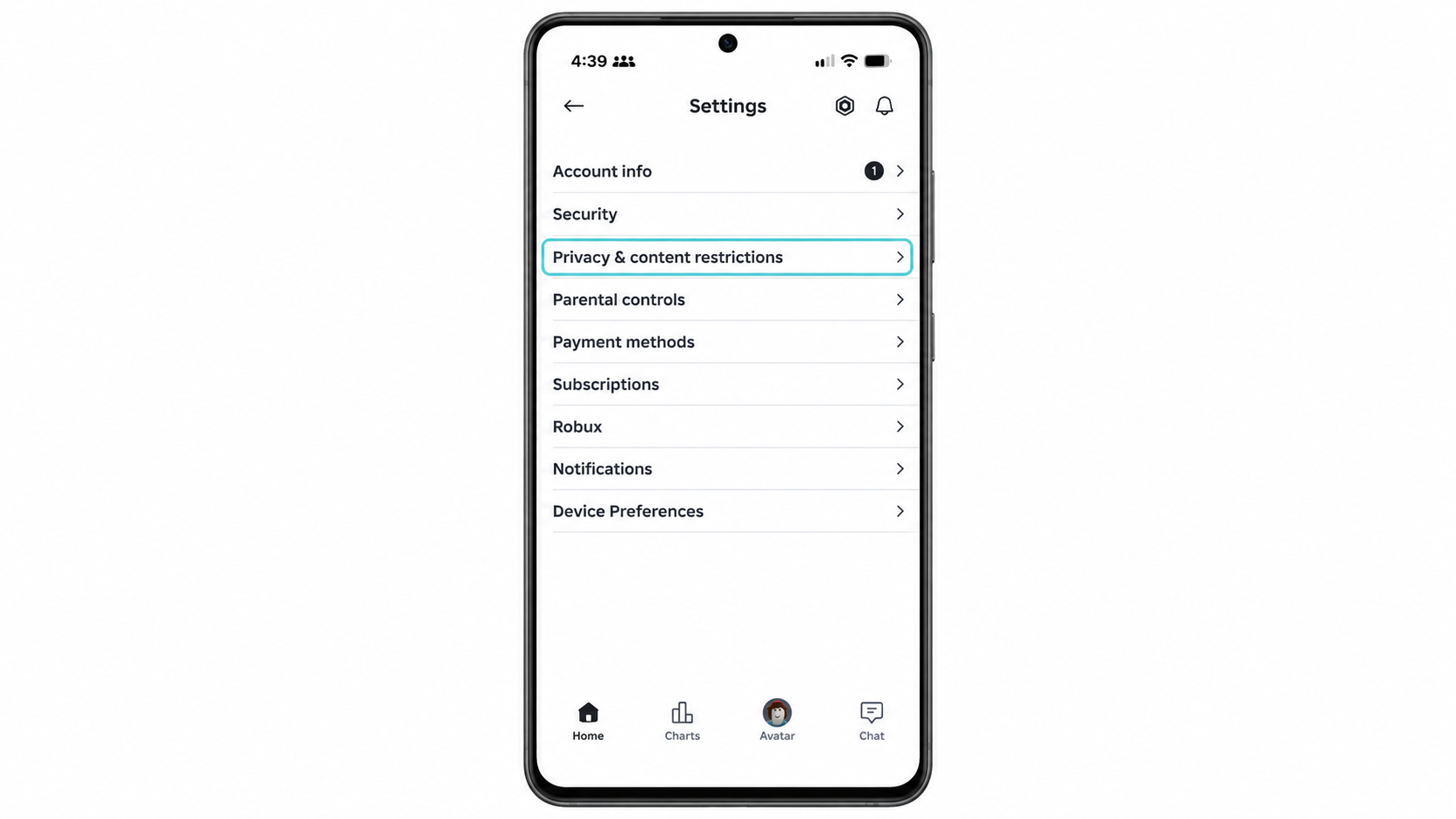
Step 4. Choose Delete account, then select Delete to confirm.

Step 5. Check your email and follow the instructions from Roblox to verify your identity.
Once Roblox verifies your identity and processes the request, your account will be permanently deleted.
How to Delete Your Roblox Account via the Roblox Support Form
To submit your deletion request, you’ll need to fill out a few details in the Roblox Support form, including your contact information and the type of request. Here’s how to complete the form step by step.
Step 1. Open a browser on your phone or computer and visit the Roblox Support page.
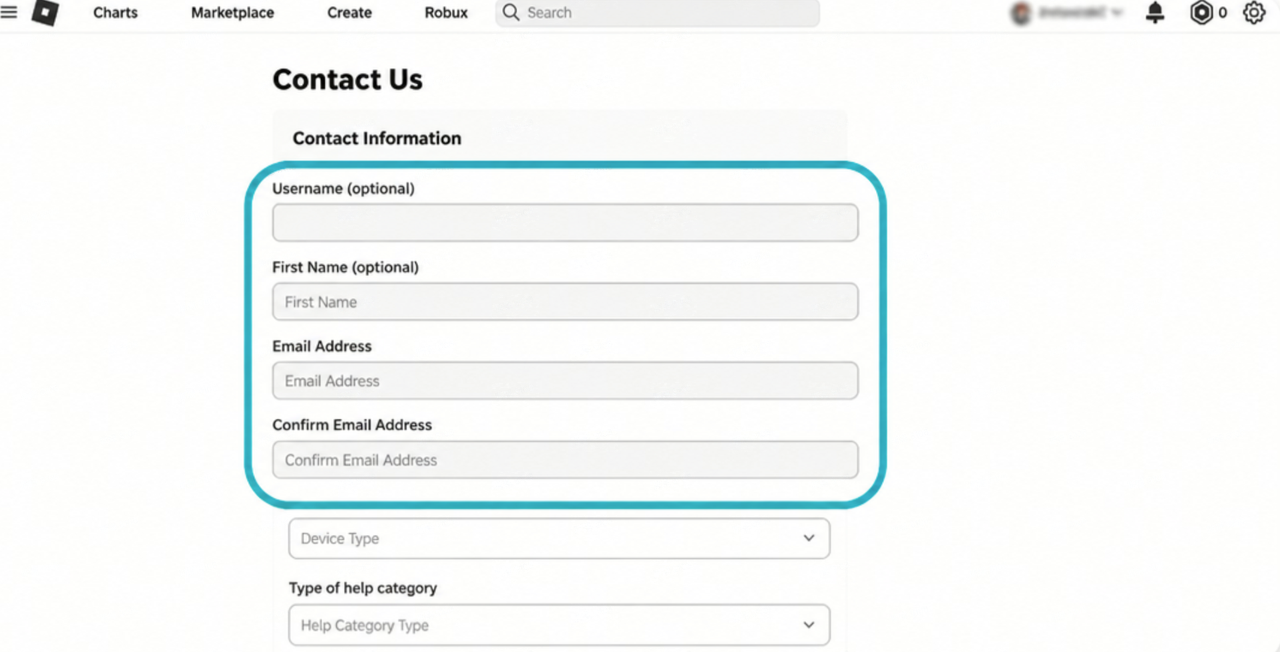
Step 2. Enter your Roblox username and email address in the contact information section. Use an email address you can access so you can receive updates about your request.
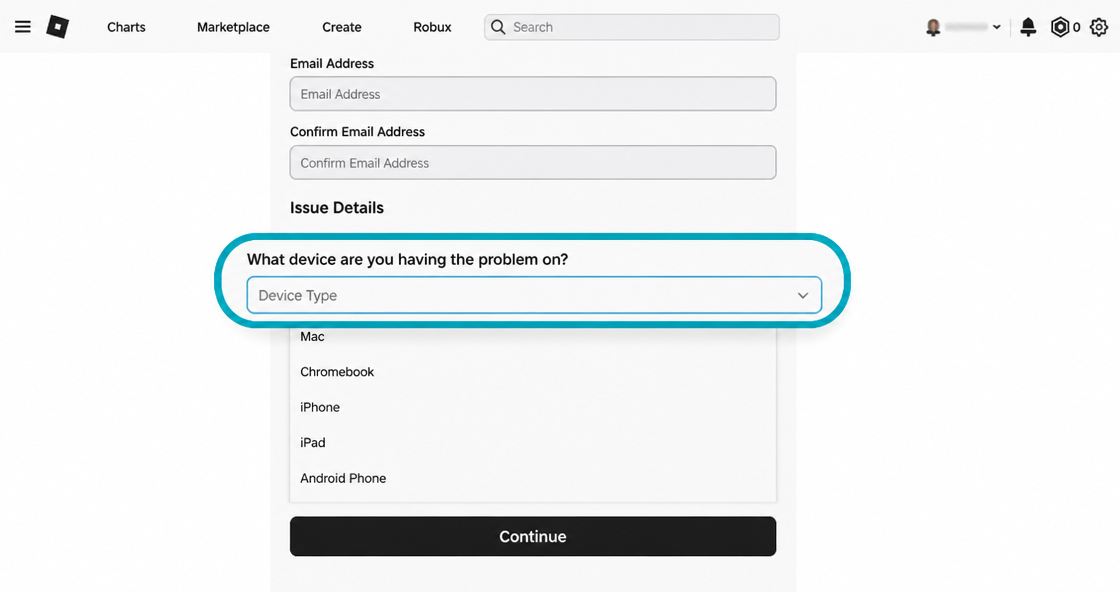
Step 3. Find the “What device are you having the problem on?” field and select the device you use to access Roblox.
Step 4. Find Type of Help Category and choose Data Privacy Requests from the dropdown menu.
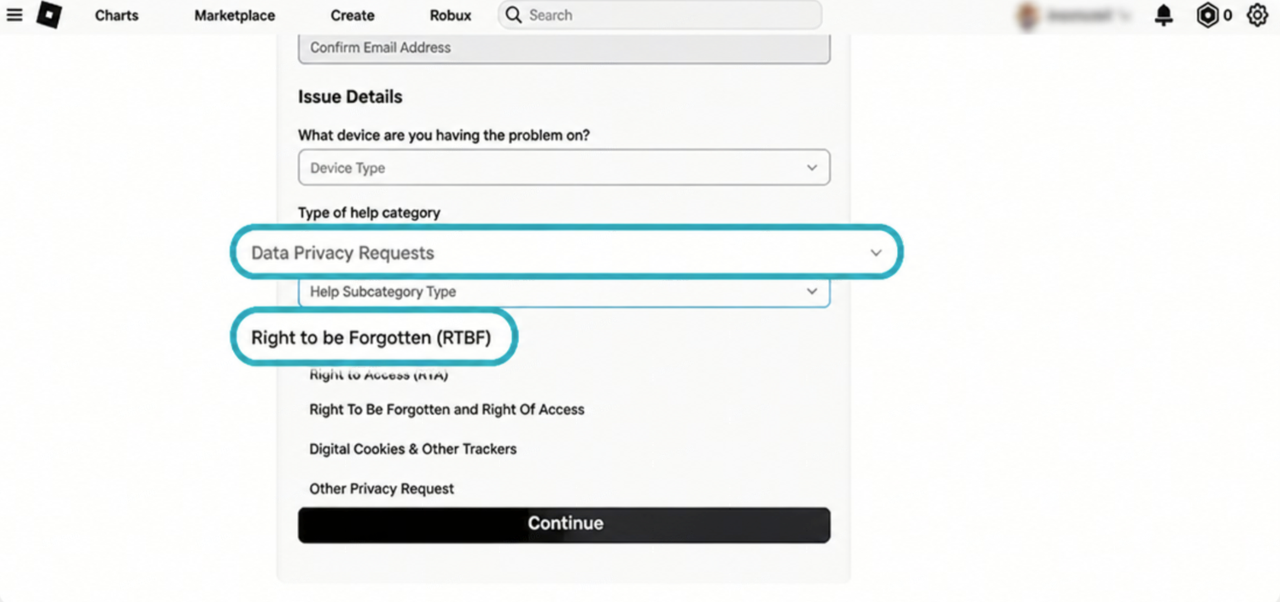
Step 5. Select Right to Be Forgotten from the next dropdown menu. This is the option for requesting the deletion of your Roblox account and associated personal data.
Step 6. In the Description of Issue box, briefly explain that you want to permanently delete your account. You can write:
“I’d like to permanently delete my Roblox account and its associated personal data.”
Step 7. Review your information and submit the form. Check your email for a response from Roblox Support, then follow the instructions to confirm your request and verify your identity.
Once Roblox verifies your identity and processes your request, your account will be permanently deleted.
What Happens After Your Roblox Account Is Deleted?
Deleting your Roblox account is permanent. Once the process is complete, you’ll lose access to your account and its associated content.
- Account Access: You can no longer log in or recover your deleted account.
- Robux: Any remaining Robux will no longer be accessible. You won’t receive a refund or be able to transfer it to a new account.
- Virtual Items: You’ll lose access to your avatar items, purchased accessories, and other content linked to your account.
- Game Progress: Your saved progress, achievements, and game data tied to the account will no longer be accessible.
- Personal Data: Roblox begins deleting your account data, although some information may be retained for legal, security, or regulatory reasons.
💡If protecting your privacy is part of why you’re leaving Roblox, our guide to protecting your digital identity offers a few more practical tips.
How to Deactivate Your Roblox Account Instead
If you just want to take a break from Roblox, you can temporarily deactivate your account instead of deleting it. Deactivation hides your profile and disables your account while keeping your Robux, virtual items, and game progress.
Here’s how to deactivate your Roblox account:
Step 1. Log in to Roblox and open Settings.
Step 2. Go to Privacy & content restrictions and open Account data, deactivation & deletion.
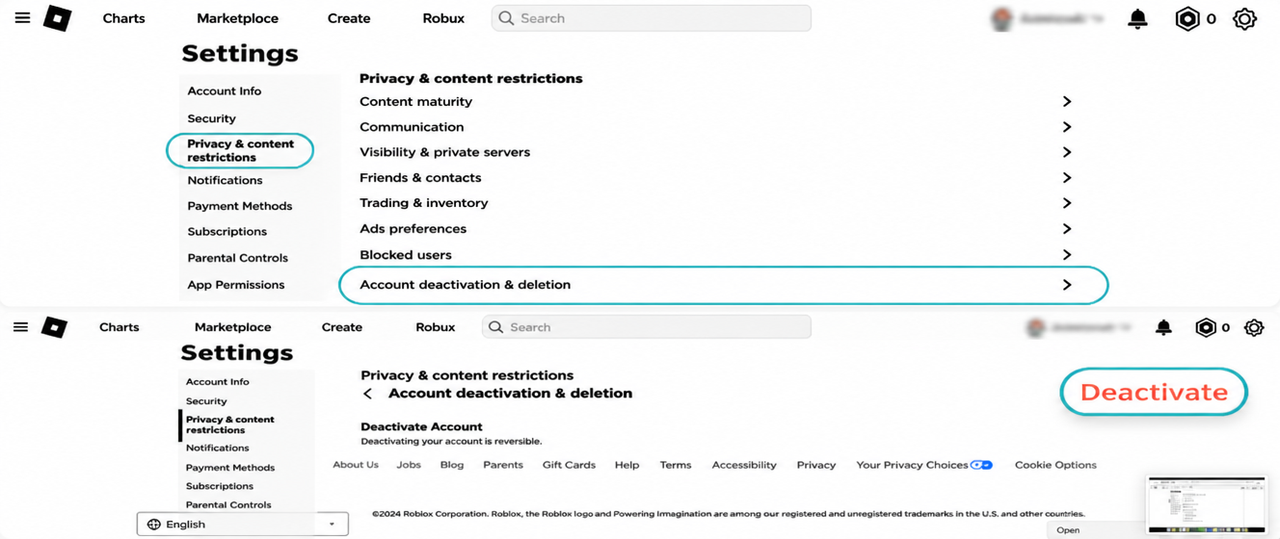
Find Roblox Account Deactivation Settings
Step 3. Find Deactivate Account and click Deactivate.
Step 4. A confirmation window will appear. Click Deactivate again to confirm your choice.
Step 5. Complete the security verification if required. Enter your verification code and select Verify to finish deactivating your account.
Best Roblox Alternatives to Try in 2026
If you’re ready to move on from Roblox, there are plenty of other games that offer creative worlds, multiplayer adventures, and fun ways to connect with friends. Here are four popular alternatives worth trying:
- Minecraft: Build your own worlds, explore new places, and survive exciting adventures. Its Creative Mode gives you endless freedom to create whatever you imagine.
- Fortnite Creative: Play games made by other players or create your own islands. It’s a great choice if you enjoy multiplayer challenges and creative gameplay.
- Blockman GO: Explore a collection of mini-games, including Bed Wars, Sky Block, and other multiplayer challenges. You can also customize your avatar and play with friends.
- PK XD: Create your own avatar, decorate your dream home, adopt pets, and explore a colorful virtual world with friends.
Enjoy Smoother and More Private Gaming
As you explore new games beyond Roblox, X-VPN helps you enjoy a smoother gaming experience while protecting your online privacy.
Conclusion
Deleting your Roblox account is straightforward once you know the right steps. You can request permanent deletion via privacy settings or through the official Roblox Support form, then follow the email instructions to verify your identity. Once your account is permanently deleted, you’ll lose access to your Robux, virtual items, and game progress.
If you simply need a break, deactivating your account lets you step away without losing everything you’ve built. Whether you’re moving on to another game or spending less time online, understanding these options helps you make the right choice for yourself.
Frequently Asked Questions
Can I Delete My Roblox Account on iPhone or Android?
Yes. The easiest way to delete your account on iPhone or Android is by using the Account data, deactivation & deletion controls in privacy settings. Another method is to open your browser and visit the Roblox Support page. Enter your account details, then select Data Privacy Requests > Right to Be Forgotten. Submit the form and follow the email instructions to verify your identity.
Can I Delete My Roblox Account Without Logging In?
Yes. If you can’t log in, visit the Roblox Support page and submit an account deletion request. Roblox will ask you to verify your identity and confirm that you own the account before processing the request.
How Long Does It Take to Delete a Roblox Account?
How Long Does It Take to Delete a Roblox Account?
Roblox doesn’t provide a fixed timeline for account deletion. The process depends on identity verification and whether additional review is needed. Keep an eye on your email for updates or further instructions from Roblox Support.
Can I Recover a Deleted Roblox Account?
No. Once your Roblox account has been permanently deleted, you can’t recover it or restore your Robux, virtual items, and game progress. If you’ve only deactivated your account, you can reactivate it anytime by logging back in.
Does Uninstalling Roblox Delete My Account?
No. Uninstalling the Roblox app only removes it from your device. Your account, Robux, virtual items, and game progress remain linked to your Roblox account. You can reinstall the app and log in again to continue playing.