


Most people don’t need to worry about VPN passthrough in 2026. It only matters for a handful of legacy VPN protocols: PPTP, L2TP, and IPsec. Modern VPN apps like X-VPN built on OpenVPN, WireGuard, or IKEv2 work fine without it.
So what is VPN passthrough? It’s a router feature that lets certain type of VPN traffic pass through your router’s firewall and NAT (Network Address Translation) without being blocked. It’s not a VPN itself, and it doesn’t encrypt anything on its own, it simply gives older VPN connections permission to leave your network properly.
Think of your router as a gate. Most traffic walks through without trouble, but a few older VPN protocols don’t carry the right “ID” the gate expects. VPN passthrough is the rule that tells the gate to let them through anyway.
Table of Contents
What Is VPN Passthrough?
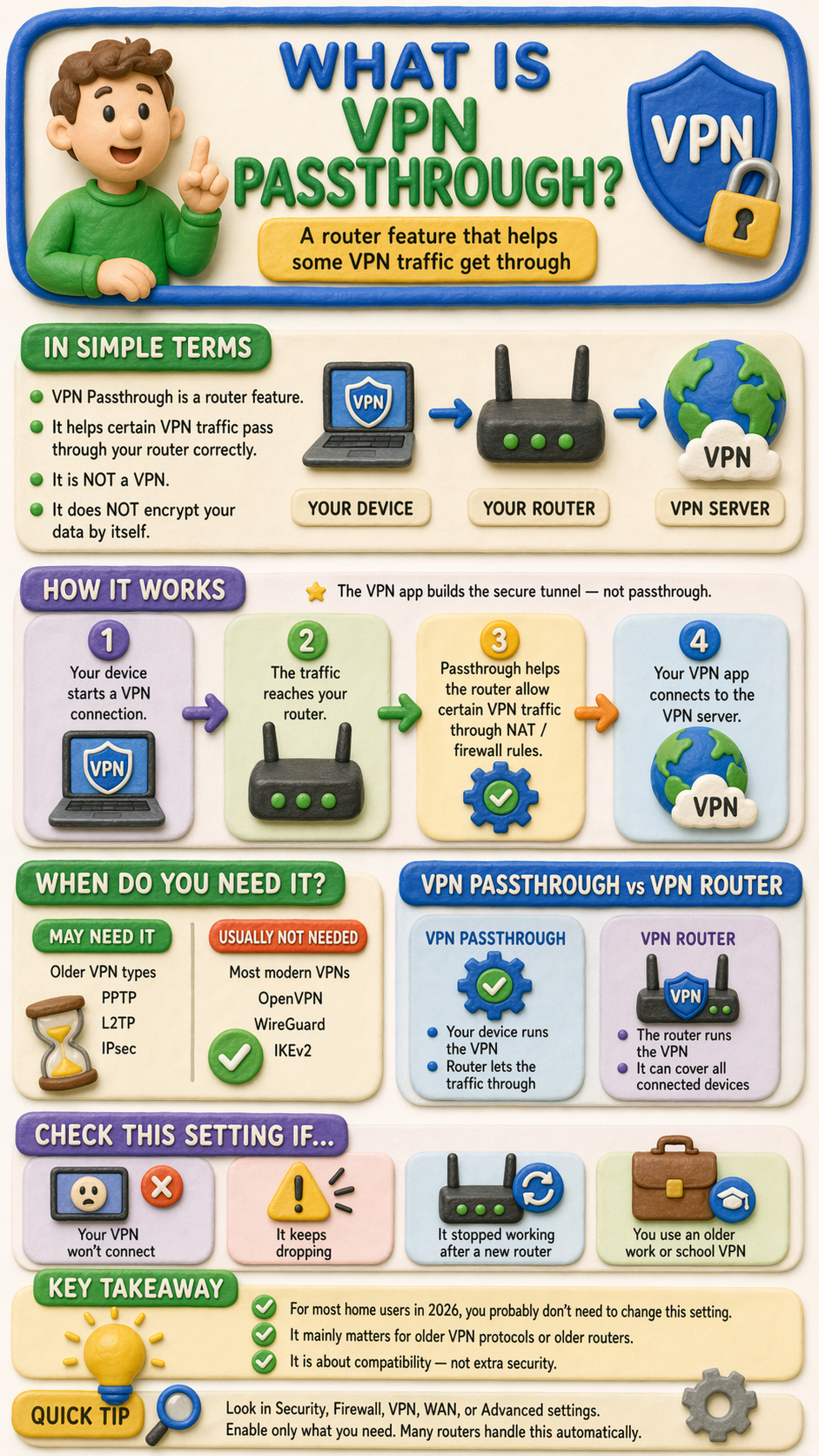
A virtual private network, or VPN, works with your router to connect to the internet. The router is like a gateway, and VPN passthrough can act like a key. Every time your laptop or phone sends data to the internet, that traffic goes through the router first. Most of the time, the router handles normal web traffic without any problem. But some VPN traffic, especially traffic created by legacy VPN standards, can be harder for the router to process correctly. VPN passthrough helps the router recognize that traffic and let it move through normally.Just as important is what VPN passthrough doesn’t do. It doesn’t create the VPN tunnel, replace your VPN app, or automatically protect every device connected to your Wi-Fi. The actual VPN connection is still made between your device and the VPN server. Passthrough only helps that connection get through the router without being blocked or dropped.
Before going deeper into how passthrough works, it’s worth asking a more important question first, because for most people in 2026, this setting isn’t actually what’s broken.
Is VPN Passthrough Really Why Your VPN Won’t Connect?
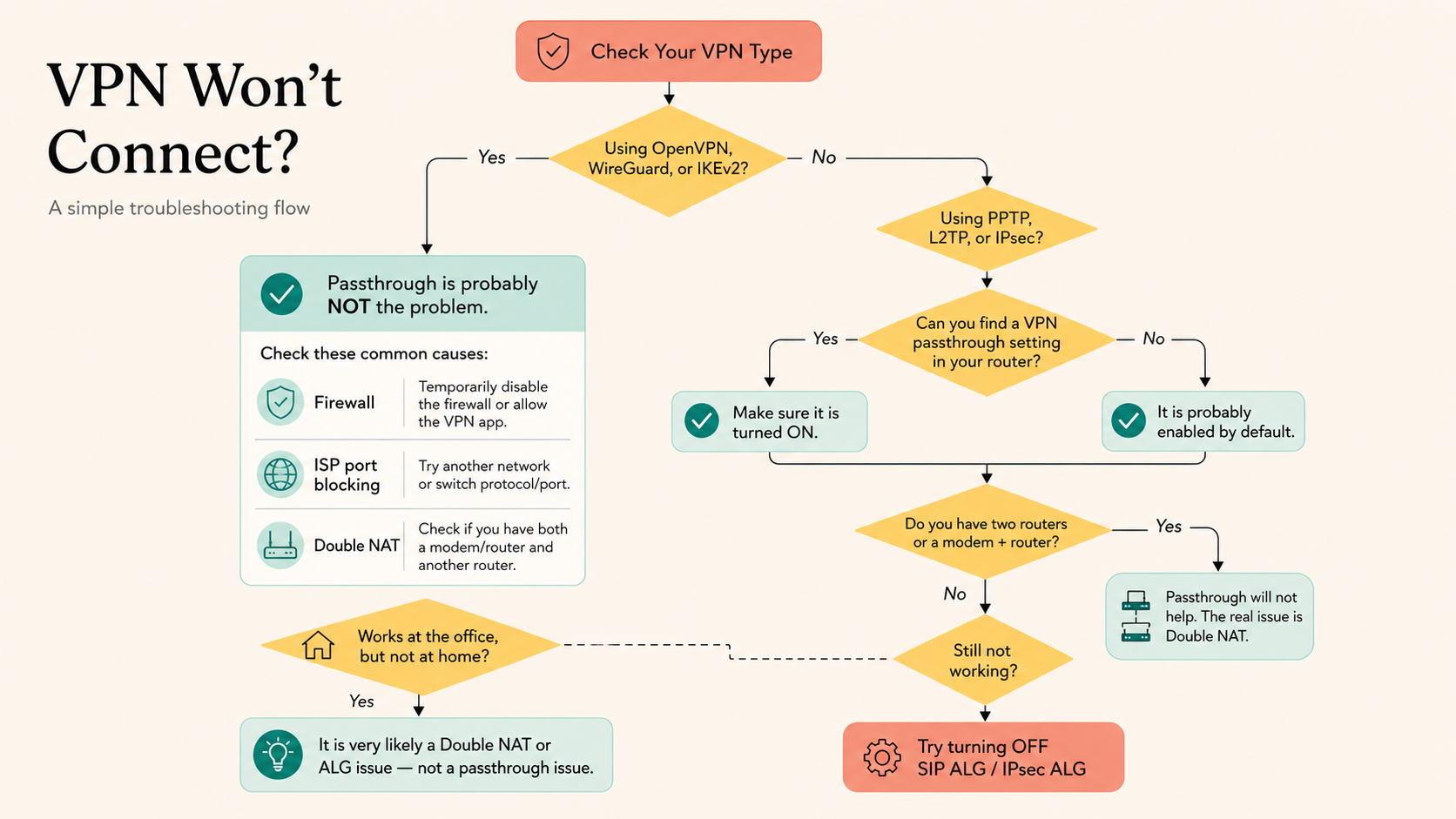
Probably not. Most people who land on a VPN passthrough article are here because their VPN keeps failing, and someone on a forum told them to check this setting. But in 2026, if you’re using a modern VPN app, passthrough is almost never the actual problem.
Here are the three real culprits that get blamed on passthrough far more often than they should.
1. Your firewall (or antivirus) is blocking the VPN
Local security software is the most common silent killer. Windows Defender Firewall, third-party antivirus suites, and corporate endpoint protection tools can all flag VPN traffic as suspicious and quietly drop it.
How to check: Temporarily disable your firewall or antivirus and try connecting again. If the VPN suddenly works, add your VPN app to the firewall’s exception list and turn protection back on. Don’t leave it disabled.
2. Your ISP is blocking VPN ports
Some networks, especially hotel Wi-Fi, school networks, workplace connections, and certain ISPs in restrictive regions, block the common ports that VPNs use, such as UDP 500, UDP 4500, or UDP 1194.
How to check: Try connecting on a phone hotspot instead. If the VPN works there but not on your home or office network, the network itself is filtering VPN traffic, not your router. Switching protocols (WireGuard, or OpenVPN over TCP port 443) often gets around it because that traffic looks like normal HTTPS.
3. You’re behind a double NAT
If your internet comes through an ISP-provided modem or gateway that you can’t put into bridge mode, and you’ve added your own router behind it, you have two routers each doing NAT. VPN traffic can survive this, but it often doesn’t, and no amount of passthrough toggling on your own router will fix it, because the problem is on the device upstream of you.
How to check: Look at your router’s WAN IP. If it starts with 192.168., 10., or 172.16–31., that’s a private address, meaning another router is sitting in front of yours. Fix it by putting the ISP device into bridge mode, or by enabling DMZ/IP passthrough on the ISP device so your router gets the public IP directly. If neither is possible, contacting your ISP is usually the only path forward.
If you’ve ruled out all three and you’re still using a legacy protocol like PPTP, L2TP, or IPsec, then passthrough is worth a look, and the rest of this guide walks you through exactly how to check and enable it.
VPN Passthrough vs. a VPN Router
This is one of the biggest points of confusion for beginners. A router with VPN passthrough isn’t the same as a VPN router. VPN passthrough simply allows your device’s VPN traffic to pass through the router. A VPN router, on the other hand, runs the VPN connection at the router level and can protect all devices connected to that network.
So if your laptop is running a VPN app and your router is just allowing that traffic through, that is VPN passthrough. But if the router itself is connected to a VPN server, that is a VPN router setup. Keeping those two ideas separate makes the whole topic much easier to understand.
Why Does VPN Passthrough Exist?
Routers are designed to organize and filter internet traffic before it leaves your network. Usually, all of this happens quietly in the background. But some older VPN standards don’t communicate with the router in a way the router can easily understand. When that happens, the router may treat the traffic as incomplete, unusual, or unsupported, and the VPN connection may fail.
This is where VPN passthrough comes in. It works as a compatibility feature that helps the router recognize certain VPN traffic and forward it correctly instead of blocking it. A lot of the technical discussion around passthrough involves NAT, which is the system routers use to manage traffic for multiple devices on one network. Protocols like PPTP, L2TP, and IPsec can run into problems with NAT, while newer protocols are designed to work with it much more smoothly.
The most beginner-friendly way to think about it is this: VPN passthrough exists because some legacy VPN methods and some routers don’t speak the same language very well. Passthrough gives them a way to work together.
How Does VPN Passthrough Work?
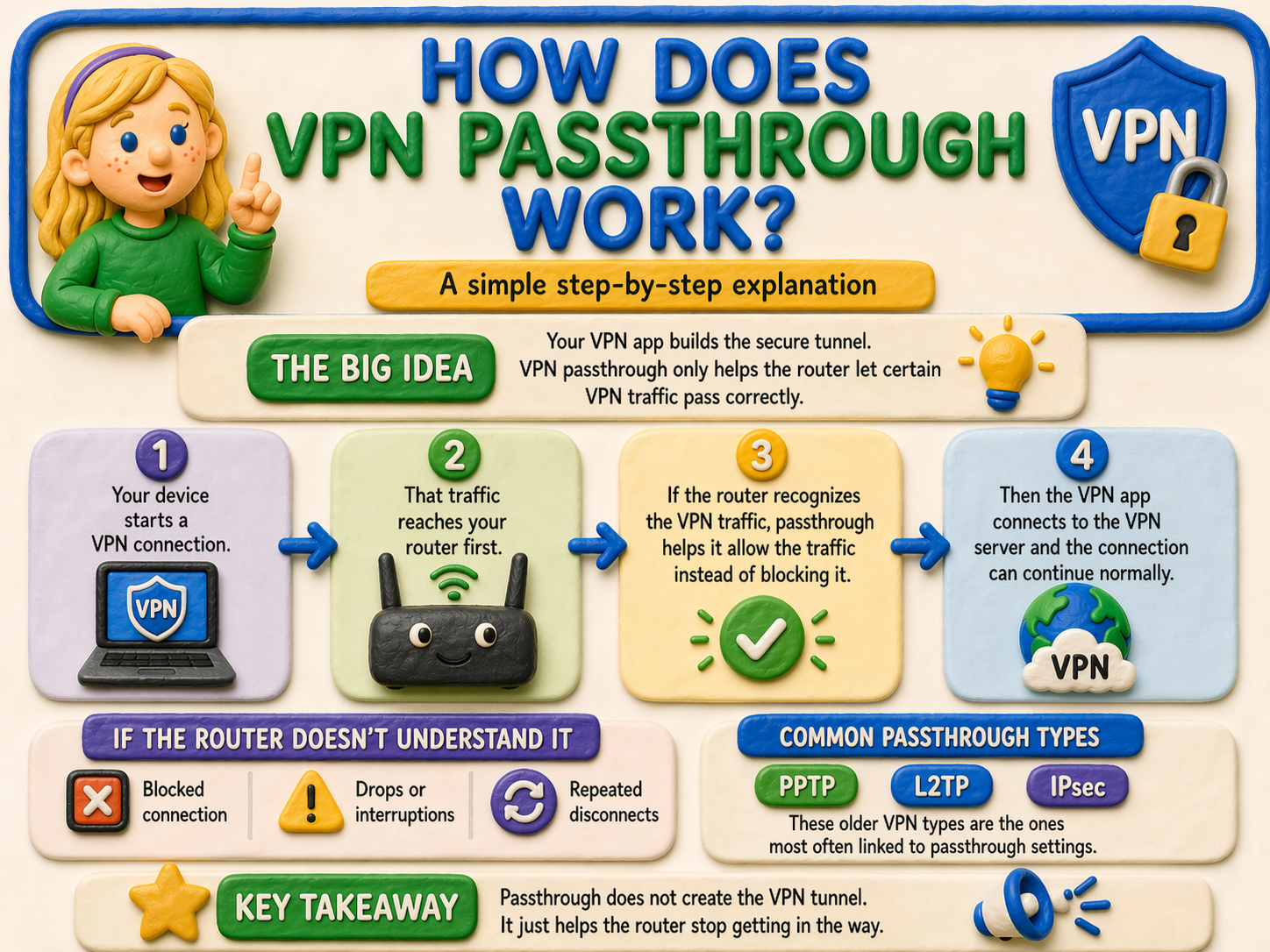
Here is the simple version. Your device tries to connect to a VPN server, and that traffic has to pass through your router first. If the router understands the type of VPN traffic being used, the connection continues normally. If it doesn’t, the router may block the traffic, interrupt it, or fail to route it properly. That can lead to failed connections, unstable sessions, or repeated disconnects.
VPN passthrough helps by giving the router special handling rules for certain legacy connection types. In other words, it tells the router how to recognize that traffic and send it to the right place instead of rejecting it. This is why some routers have separate options such as PPTP Passthrough, L2TP Passthrough, and IPsec Passthrough.
A useful mental picture is this: your VPN app builds the secure tunnel, but your router decides whether data can leave the network cleanly. Passthrough doesn’t build the tunnel, but it helps the router stop getting in the way. If you want a quick refresher on the basics, X-VPN’s guide to how a VPN works explains the bigger picture clearly.
Which VPN Protocols Usually Need Passthrough?
VPN passthrough is mostly linked to legacy protocols, especially PPTP, L2TP, and IPsec. You don’t need to memorize what each acronym stands for. The important thing is that these are older technologies, and older technologies are more likely to need extra help from a router.
By contrast, modern protocols such as OpenVPN, WireGuard, and IKEv2 are much better at working with today’s routers and NAT systems. That is why most people using a modern VPN app never need to think about VPN passthrough at all. Modern protocols can tunnel through routers without passthrough, while legacy protocols are the ones most commonly associated with it.
Do You Need VPN Passthrough Today?
For most home users in 2026, you probably don’t need VPN passthrough. Many modern routers either support NAT passthrough automatically or include it as a standard router feature. Most current VPN apps rely on protocols that rarely need special passthrough settings.
In practice, you’re most likely to run into this setting when dealing with an older router, a legacy VPN setup, or a manual business or school connection that still depends on older standards such as L2TP/IPsec. ASUS’s router documentation still describes NAT Passthrough as a compatibility feature for specific VPN traffic, while Microsoft’s documentation continues to show that NAT traversal remains relevant mainly for legacy IPsec and L2TP/IPsec scenarios.
Signs You May Need to Check VPN Passthrough
You may want to check your router’s passthrough settings if your VPN won’t connect, connects and then drops, or only stops working after you change routers. It’s also worth checking if you’re using a manual VPN configuration or an older setup such as PPTP, L2TP, or IPsec.
These are the kinds of cases where NAT and firewall handling can still matter, especially with L2TP/IPsec and IPsec traffic moving through a router. If you don’t see a passthrough toggle on a newer router, that doesn’t necessarily mean the feature is missing. Some routers simply handle it automatically in the background.
How to Enable VPN Passthrough
If you think you need VPN passthrough, log in to your router’s admin page and look for a section such as Security, Firewall, VPN, WAN, or Advanced settings. Depending on the router brand, you may see separate options for PPTP Passthrough, L2TP Passthrough, and IPsec Passthrough, or a related label such as NAT Passthrough.
Enable only the protocol you actually need, save your changes, and test the VPN connection again. Many routers already manage this automatically, so you may not find a visible toggle at all. It’s also important to keep expectations realistic. Passthrough doesn’t solve every VPN problem. If the issue comes from outdated firmware, double NAT, incompatible hardware, or the VPN app itself, changing passthrough settings may not fix it.
Is VPN Passthrough Safe?
VPN passthrough isn’t usually the real security problem. The bigger issue is that passthrough is mainly associated with VPN protocols that are no longer considered strong by modern standards. In other words, the risk isn’t the passthrough feature itself, but the risk is relying on outdated VPN technology for too long.
That is why newer protocols such as OpenVPN, WireGuard, and IKEv2 are generally the better choice today. They’re more compatible with modern routers and usually don’t need special passthrough settings in the first place. It also helps to keep expectations realistic about privacy features in general. X-VPN’s guide to what a VPN hides is a useful reminder that compatibility and privacy are related, but aren’t the same thing.
Common VPN Passthrough Myths
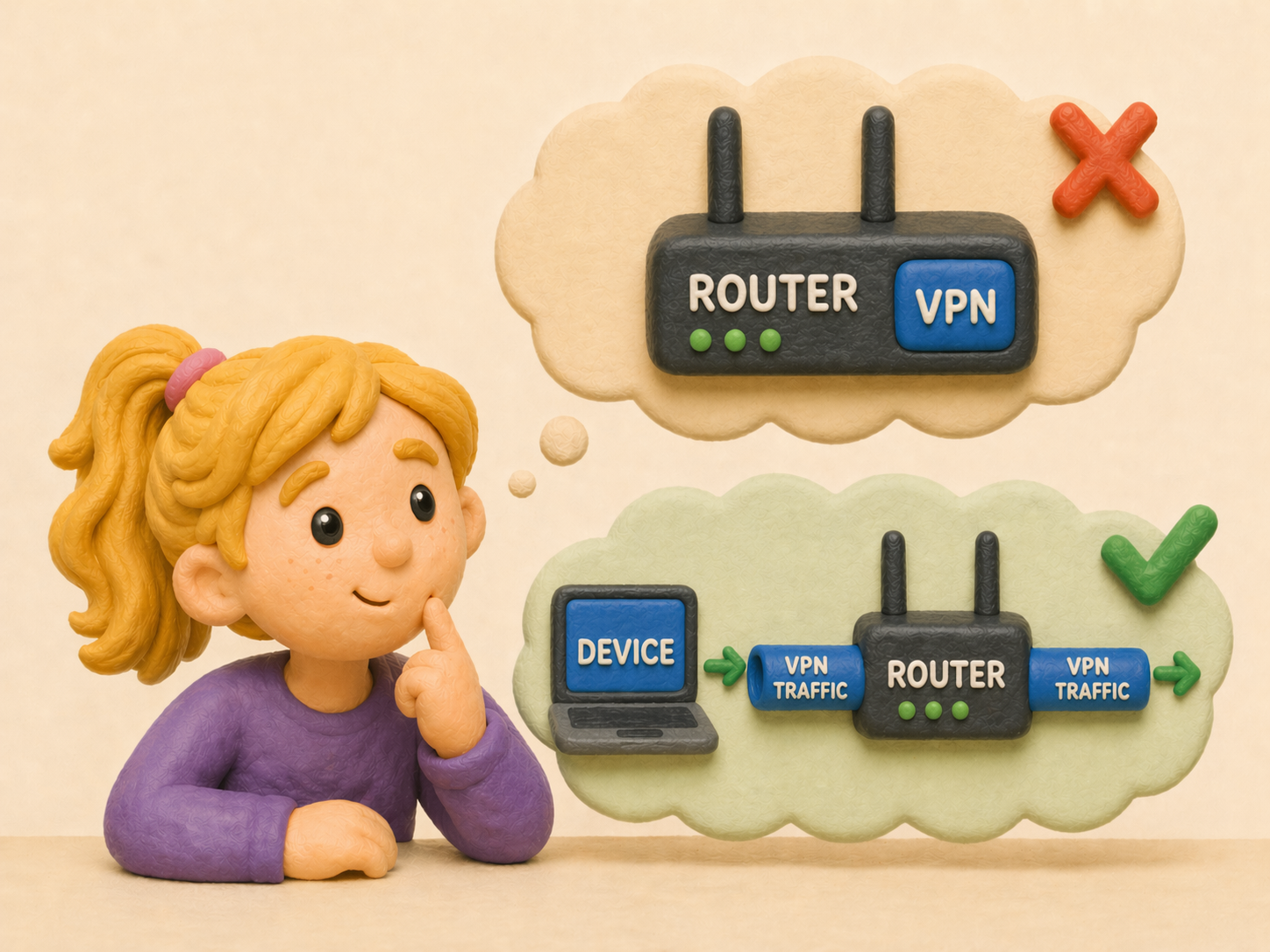
One common myth is that VPN passthrough means your router has a VPN. It does not. Passthrough only allows VPN traffic from your device to move through the router correctly. A VPN router is something different: it runs the VPN connection itself.
Another myth is that turning on passthrough makes you more secure. However, passthrough is mainly about compatibility, not stronger encryption or better privacy. Your actual protection still depends on the VPN protocol and service you are using.
A third myth is that everyone needs VPN passthrough to use a VPN. That isn’t true. Most modern VPN users will never need to change this setting manually. If you want a broader baseline, X-VPN’s beginner guide to what a VPN is helps separate core VPN features from router-specific extras like passthrough.
Quick Troubleshooting Tips
If your VPN is failing, first check which protocol it’s using. If it’s PPTP, L2TP, or IPsec, passthrough may be relevant. Then restart the router, reconnect the VPN, and confirm that the correct passthrough option is enabled if your router exposes one.
If the issue continues, update your router firmware and consider switching to a modern protocol such as OpenVPN, IKEv2, or WireGuard if your provider supports it. If your current VPN service still gives you trouble, moving to a VPN with better compatibility and more modern defaults is often the cleaner long-term fix. For a broader look at when VPN protection is actually worth using, X-VPN’s piece on whether you really need a VPN gives helpful context.
Conclusion
VPN passthrough is best understood as a compatibility feature, not a VPN service. It helps certain VPN connections, especially older ones, get through a router without being blocked by NAT or firewall behavior. It doesn’t create the VPN tunnel, and it doesn’t automatically protect every device on your network.
In 2026, the biggest takeaway is simple: you probably don’t need to worry about VPN passthrough unless you’re dealing with legacy protocols, older hardware, or a legacy work VPN setup.

FAQ
What is VPN passthrough in simple terms?
VPN passthrough is a router feature that helps certain VPN traffic get through the router correctly, especially when older protocols might otherwise be blocked by NAT or firewall rules.
Do I need VPN passthrough for OpenVPN?
Usually no. OpenVPN is a modern protocol and generally doesn’t need special passthrough settings on a home router.
Does WireGuard need VPN passthrough?
In most home setups, no. WireGuard is a newer protocol and isn’t the kind of legacy traffic that passthrough was originally designed to support.
What is the difference between VPN passthrough and a VPN router?
VPN passthrough lets a device on your network make its own VPN connection through the router. A VPN router runs the VPN connection at the router level and can cover all connected devices.
Should I turn VPN passthrough off?
If you aren’t using an older VPN protocol and don’t need it for troubleshooting, you usually don’t need to change it. Many routers already manage this automatically.
Is IPsec passthrough still useful?
Yes, in some business or legacy environments where IPsec-based connections are still in use, especially on routers that don’t handle that traffic well by default.