Intro
X-VPN recently received a report describing a DLL sideloading scenario in the Windows client that applies only to tampered, repackaged copies obtained from unofficial sources, not to users who downloaded X-VPN from our official Windows download page or Microsoft Store. Based on our own investigation, we have found no evidence that X-VPN users were targeted or compromised through this scenario, and we have deployed hardening measures in X-VPN for Windows version 77.5.3. All Windows users are encouraged to update to this version at their earliest convenience.
In the spirit of transparency and accountability, we will share the details of the report, its actual scope, and the actions we have taken.
Table of Contents
Response Timeline
- May 18, 2026 — The Howler Cell Threat Research Team at Cyderes reported the issue to X-VPN’s security team.
- May 20, 2026 — X-VPN acknowledged receipt of the report and escalated the issue for internal investigation and remediation.
- May 28, 2026 — X-VPN released version 77.5.3 for Windows, which includes the hardening measures described in this statement.
Key Findings
Based on a compliance-focused verification, we reached the following conclusions:
The official X-VPN Windows client is safe
- Users who downloaded X-VPN from our official Windows download page or Microsoft Store are not affected by the reported tampered-package scenario. The attack applies only to users who run a tampered, repackaged version of X-VPN obtained from unofficial sources, such as phishing sites, pirate forums, or unsolicited download links.
No confirmed in-the-wild exploitation of X-VPN has been identified
- Based on our own independent investigation, we have found no evidence that X-VPN users were targeted or compromised through this scenario. The reporting researchers have likewise indicated that their findings were derived from threat intelligence analysis and reverse engineering of the attacker’s infrastructure, rather than from observed victim cases.
This report does not involve any breach of X-VPN servers, infrastructure, or encryption
- The issue cannot be triggered remotely or through normal network use of X-VPN. No user data, accounts, credentials, or VPN traffic on X-VPN’s side have been compromised.
Not applicable to any other X-VPN platform
- This report concerns the Windows client only. X-VPN’s clients on other platforms, including iOS, Android, macOS, Linux, Chrome Extension, TV, Router, Chromebook, and Game Console, are built on entirely different architectures that do not use Windows DLL loading. These platforms are not affected by this report.
Additional hardening has been deployed in X-VPN for Windows version 77.5.3
- While the official X-VPN client was not at risk from this report, we have implemented additional defense-in-depth protections to strengthen the client against this category of attack. This version is now available, and all Windows users are encouraged to update.
X-VPN has classified this report as a High-severity issue, not Critical
- The classification reflects three factors: the issue cannot be triggered remotely or through normal use of X-VPN; the official X-VPN client is not affected by the attack path; and we have no confirmed evidence of in-the-wild exploitation.
The reported behavior is a known class of Windows application security issue
- It can occur in any Windows application that relies on the default DLL search behavior, and addressing it requires applying stricter DLL loading policies, which X-VPN has now implemented in version 77.5.3.
What Was Reported
Understanding DLLs
To understand what was reported, it helps to first understand how Windows programs work and the definition of DLLs.
A Windows program is rarely a single file. It typically consists of one main executable (the .exe file users double-click) along with many supporting modules called DLLs (Dynamic Link Libraries).
These DLLs come from two places:
- 1Application DLLs:Written and shipped by the software maker. These are stored in the program’s folder, alongside the main .exe file.
- 2System DLLs:Provided by Windows itself, stored in the Windows system folder.
CRYPTBASE.dllis one of these, used by countless Windows applications.
How Windows Finds A DLL When A Program Needs One
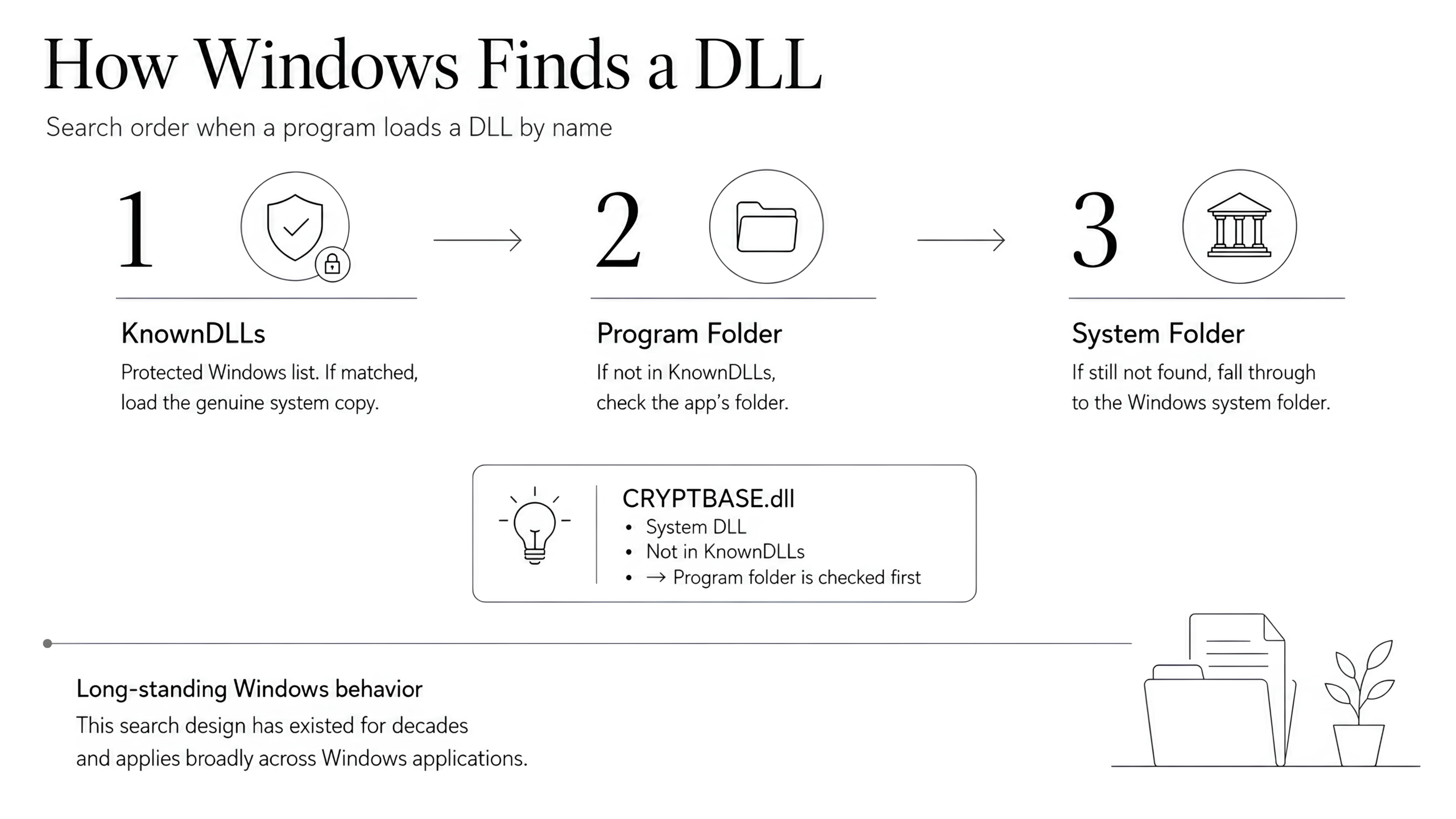
When a program needs to load a DLL by name, Windows looks for it in the following order (simplified for readability):
A small protected list maintained by Windows itself, called KnownDLLs
The program’s folder
The Windows system folder
The CRYPTBASE.dll is a system DLL, but it is not on the KnownDLLs list. This means that when a program asks for it by name, Windows will look inside the program’s folder first, and only fall through to the system folder if no file with that name is found.
This search behavior has been part of Windows by design for decades, and every Windows application, Chrome, Microsoft Office, Steam, Notepad++, X-VPN, and virtually every other program on the platform operates under it.
The Attack Scenario In The Report
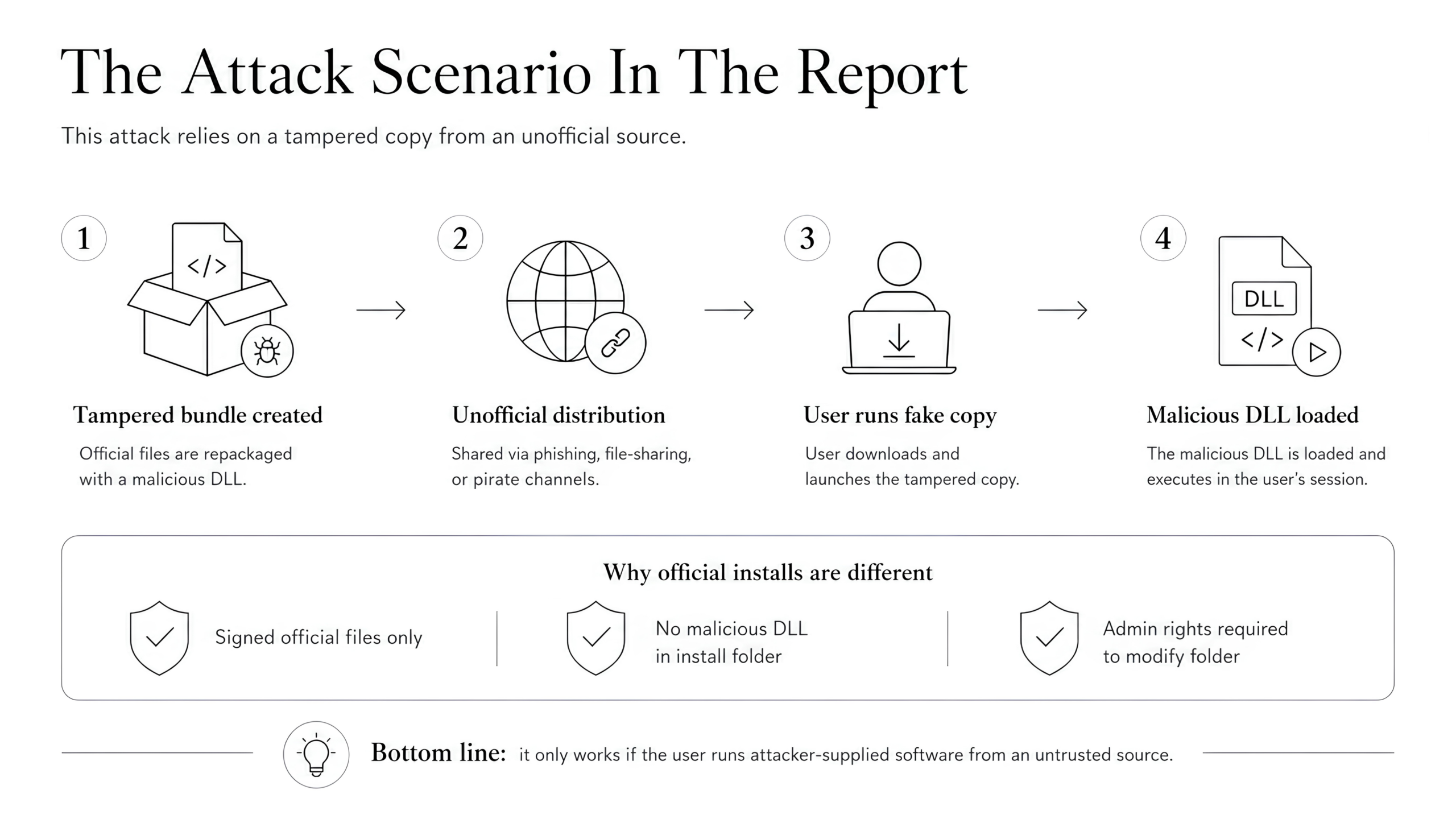
The report describes a way the lookup behavior mentioned above can be exploited to run malicious code in the context of X-VPN. Importantly, this does not target a flaw in the X-VPN client itself, it relies entirely on tricking the user into running a tampered, repackaged version of X-VPN from an unofficial source.
The attack proceeds as follows:
- An attacker takes the legitimate X-VPN program files from our official website, places a malicious
CRYPTBASE.dllinside the folder, and repackages the entire folder for distribution. - The attacker distributes this tampered bundle through unofficial channels, phishing sites, pirate forums, file-sharing links, or unsolicited messages, often disguised as a “portable” version of X-VPN.
- A user is misled into downloading and running this tampered bundle.
- When the bundled .exe launches and begins loading its DLLs, one of these DLLs eventually requests
CRYPTBASE.dllby name. Following the lookup process described above, Windows finds the attacker’s planted file inside the program’s folder and loads it. The attacker’s code executes inside the user’s session.
This entire chain depends on the user first running a tampered copy of X-VPN. For users who installed X-VPN from official sources:
- The official X-VPN installer contains only legitimate, signed files, no malicious DLLs are ever placed in the installation folder during a genuine installation.
- After installation, the X-VPN program folder is protected by Windows and requires administrator privileges to modify, which prevents ordinary processes or users from dropping a malicious DLL into it later.
The attack exploits a user who has already been deceived into running attacker-supplied software from an untrusted source.
How This Relates to X-VPN
This report concerns a CWE-427 (Uncontrolled Search Path Element) issue in the X-VPN Windows client. Like many Windows applications, X-VPN did not previously enforce strict path or signature checks when loading certain DLL dependencies, which is the underlying behavior described by CWE-427. We have addressed this in version 77.5.3 through stricter DLL loading policies, startup-time integrity verification, and hardened directory permissions. How to classify and rate this category of issue is a topic of ongoing debate in the security community, including the recent CVE-2025-56383 report against Notepad++.
What the report describes, in practice, is a malware impersonation campaign in which X-VPN is being used as a recognizable brand, alongside other legitimate software being repackaged in similar ways by the same actor, to lure victims into running tampered software.
Affected Scope
Whether a user is affected depends entirely on where their copy of X-VPN came from. The table below summarizes the scope:
How X-VPN Was Obtained | Affected? |
|---|---|
Downloaded and installed from the official X-VPN Windows download page (https://xvpn.io/download/vpn-win) | ❌ Not affected |
Downloaded from the Microsoft Store | ❌ Not affected |
Downloaded as a “portable” version from a pirate site or an unknown link | ⚠️ Potentially affected |
Received as an installer or package from an unknown sender | ⚠️ Potentially affected |
How We Fixed It
X-VPN has implemented comprehensive hardening measures in version 77.5.3 to address this class of DLL side-loading scenario in the Windows client. These hardening measures are now available in X-VPN for Windows version 77.5.3. Our hardening measures fall into two categories, addressing how each type of DLL is loaded.
1. Stricter loading of system DLLs
System DLLs such as CRYPTBASE.dll are now loaded from the Windows system folder, regardless of what files exist in the X-VPN program folder. This applies to system DLLs at every level of the loading chain. As a result, even if a malicious DLL were somehow placed inside the X-VPN program folder, the client is designed to prevent loading it in place of the legitimate system file.
2. Multi-layered protection for application DLLs
X-VPN’s own application DLLs must, by necessity, be loaded from the program folder, they are not part of Windows and have no system-path equivalent. We have implemented three independent layers of defense to help ensure these DLLs cannot be substituted or tampered with:
- Directory access controls. The X-VPN installation folder is protected by Windows file system permissions that require administrator privileges to modify. Any process attempting to write a DLL into this folder without elevated rights is blocked by the operating system.
- Hash whitelist verification at startup. Every time X-VPN launches, the client recursively scans every DLL inside its program folder and verifies it against a known-good hash list. If any DLL is not on the whitelist, or if its hash does not match the expected value, the client refuses to continue execution. This hash list is compiled directly into the X-VPN executable rather than stored as a separate file, meaning it cannot be tampered with on its own without modifying the signed X-VPN binary, which would invalidate the digital signature.
- Strict DLL load policies are enforced per process. Each X-VPN process applies hardened DLL loading rules at startup, restricting where DLLs can be loaded from and which sources are trusted.
Together, these measures help ensure that placing a malicious file inside the X-VPN program folder is itself extremely difficult to begin with, but even in the hypothetical scenario where an attacker manages to do so, the client is designed to detect the tampering and refuse to execute. We believe proactive, layered defenses are worth implementing, both to address the specific scenario described in this report and to strengthen the X-VPN Windows client against similar attack patterns more broadly.
What Users Should Do
Update to X-VPN for Windows version 77.5.3 or later.
This version includes the additional hardening measures described in this statement. You can download it from our Official Windows download page.
Always download X-VPN from official sources only
Please download X-VPN from our Official Windows download page, the Microsoft Store, or your platform’s official app store. Avoid third-party download sites, file-sharing links, or installers received via email or messaging apps.
Be cautious of “portable” or “cracked” versions of X-VPN
X-VPN does not officially distribute any portable build of our Windows client, any such package found online should be treated as untrusted.
If you suspect you may have installed X-VPN from an unofficial source
Uninstall it, and reinstall the official version from the Official Windows download page.
Our Commitment to Security
We thank the Howler Cell Threat Research Team at Cyderes for bringing this report to our attention through a responsible disclosure process. The analysis was authored by Reegun Jayapaul and Rahul Ramesh. Their research blog covering this disclosure is available now. We genuinely appreciate the time and effort the team invested in their research, and we believe coordinated disclosure of this kind benefits the entire security community.
X-VPN welcomes input from independent security researchers. If you believe you have discovered a security issue affecting any X-VPN product, we encourage you to submit your findings through our Bug Bounty Program, where valid and reproducible reports are eligible for monetary rewards that help us strengthen the security of every X-VPN client. For security concerns or unusual behavior that may not fit a formal vulnerability submission, you can also reach our security team directly at security@xvpn.io. All reports are reviewed by our security team, and we respond as quickly as possible.
Security is not a one-time effort. We will continue to invest in protecting our users through ongoing client hardening, transparent communication, and active engagement with the research community. Reports like this one help us improve, and we are committed to handling each of them with the openness and seriousness they deserve.
The trust our users place in X-VPN is something we take seriously, and earning it is an ongoing responsibility we welcome.
FAQs
Is X-VPN safe to use right now?
Yes. The official X-VPN Windows client downloaded from our Windows download page or the Microsoft Store is safe to use. The security report describes a scenario where attackers repackage X-VPN with a malicious DLL and distribute the tampered version through unofficial channels. Users who installed X-VPN from our official sources are not affected by the reported tampered-package scenario.
Has the X-VPN Windows DLL side-loading issue been addressed?
Yes. X-VPN has deployed comprehensive hardening measures against DLL side-loading and related attack patterns, starting with X-VPN for Windows version 77.5.3, which is now available. These include stricter loading rules for system DLLs (such as CRYPTBASE.dll, which are now loaded exclusively from the Windows system directory), a startup-time hash verification of every DLL inside the X-VPN installation folder, and strict DLL load policies enforced at the per-process level. The hash whitelist used for verification is embedded directly into the X-VPN executable, so it cannot be tampered with independently.
Was my X-VPN installation hacked?
Whether your X-VPN installation is affected depends on your version and how you obtained it. Three common scenarios:
Scenario 1: Running version 77.5.3 or later with a valid digital signature.
Not affected. Version 77.5.3 includes hardening that prevents this category of attack. You can verify your version inside the app and confirm the executable’s signature by right-clicking the .exe → Properties → Digital Signatures.
Scenario 2: Downloaded from an official source and installed in the default location.
Not affected. The default installation folder requires administrator privileges to modify, preventing ordinary processes from placing a malicious DLL into it.
Scenario 3: Downloaded from an official source, but running a version earlier than 77.5.3, installed to a non-default location, with other malicious software present on the device.
Under this combination, it is theoretically possible for other malicious software to have placed a tampered DLL into the X-VPN folder. We strongly recommend updating to version 77.5.3 or later, which closes this path through stricter directory permissions, DLL integrity verification, and per-process load policies.
If you are unsure which scenario applies, the safest action is to uninstall and reinstall the latest official version from xvpn.io/download/vpn-win.
What is CVE-2025-56383, and is X-VPN’s issue the same?
CVE-2025-56383 is a DLL side-loading report against Notepad++ that was formally disputed by multiple parties in the security community. The dispute centered on how to classify and rate this category of issue, given that exploitation requires an attacker to first place a malicious file inside the program’s folder — which in practice means the user has typically been deceived into running tampered software from an untrusted source.
The X-VPN report describes the same class of issue: CWE-427 (Uncontrolled Search Path Element) reflects the fact that, by default, X-VPN, like many Windows applications, did not enforce strict path or signature checks when loading certain DLL dependencies. This is a real issue that we have addressed in version 77.5.3, which introduces strict DLL loading policies, startup-time integrity verification, and hardened directory permissions to ensure DLL dependencies are loaded only from trusted locations. Rather than focusing on how the underlying issue is classified across the industry, we have prioritized delivering protections that meaningfully reduce risk for our users.
How do I report a security issue to X-VPN?
Security researchers and users can report security issues to X-VPN through two channels:
– For formal vulnerability reports eligible for monetary rewards: submit through our Bug Bounty Program
– For general security concerns, suspicious behavior, or questions: email our security team at security@xvpn.io
All reports are reviewed by our security team, and we respond as quickly as possible.