Intro
Recently, Fluid Attacks reported a local privilege escalation vulnerability (CVE-2026-2638) through responsible disclosure, affecting X-VPN macOS website versions 77.0 through 77.5. We took the report seriously, reproduced the issue internally, and released the fix in X-VPN macOS website version 77.5.1. Our internal review confirmed that the issue was not in X-VPN’s VPN tunnel, encryption protocol, account system, or server infrastructure, and that no other X-VPN platforms or versions outside the affected macOS website range were impacted. No in-the-wild exploitation has been observed. Users of affected versions should update as soon as possible.
In the spirit of transparency and accountability, we will share the details of the vulnerability, its scope, and the actions we have taken.
Table of Contents
Our Key Findings
CVE-2026-2638 is a local privilege escalation vulnerability affecting X-VPN macOS website (the standalone macOS version downloaded from xvpn.io) versions 77.0-77.5. A local privilege escalation issue means that, under specific local conditions, a user or process with limited permissions on the same device could gain administrator-level access. X-VPN has fixed this issue in X-VPN macOS website version 77.5.1 and later.
The vulnerability originated in X-VPN macOS website version’s Download Protection feature (found under Security → Browser Protection → Download Protection), which scans downloaded files, quarantines those that appear unsafe, and restores them on request. Because quarantining and restoring files involves writing to locations protected by macOS system permissions, parts of this feature run with administrator-level permissions.
CVE-2026-2638 was a flaw in how this administrator-level part of the feature verified file identity across the scan, quarantine, and restore stages, which could allow a malicious local program to redirect a privileged operation to a file other than the one it was meant for. A detailed explanation is provided in What Is CVE-2026-2638.
This was not a remote network attack and did not affect X-VPN’s VPN tunnel, encryption protocol, account system, or server infrastructure. The Mac App Store version of X-VPN and X-VPN for Windows, iOS, Android, Linux, Router, TV, Chrome Extension, Chromebook, and Game Consoles were not affected.
Users running X-VPN macOS website versions 77.0-77.5 should update to version 77.5.1 or later now.
The key facts are summarized below:
Item | Official Statement |
|---|---|
CVE ID | CVE-2026-2638 |
Status | Fixed |
Affected Versions | X-VPN macOS website version 77.0–77.5 |
Fixed Version | X-VPN macOS website version 77.5.1 and later |
Not Affected Version | X-VPN Mac App Store version/ Windows/ iOS/ Android/ Linux/ Router/ TV/ Chrome Extension/ Chromebook/ Game Consoles |
Vulnerability Type | Local Privilege Escalation |
Severity | CVSS v4.0 score 7.3, High |
Exploitation Status | Based on currently available data, we are not aware of any in-the-wild exploitation of this issue; no related user reports have been received |
User Action | Update X-VPN macOS website version to version 77.5.1 and later |
What Is CVE-2026-2638?
To explain how CVE-2026-2638 could be exploited, it helps to first look at how Download Protection normally works.
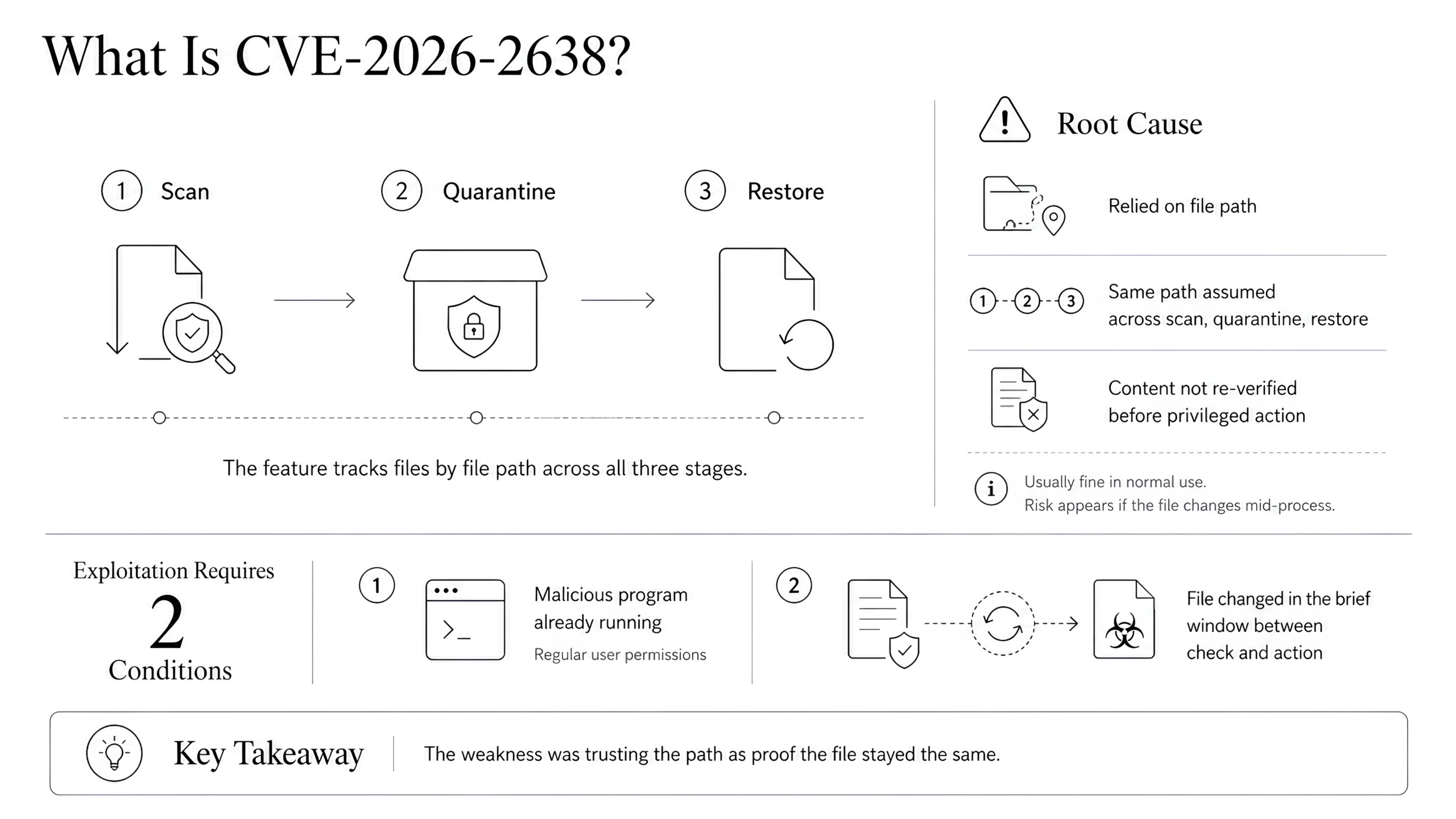
X-VPN macOS website version’s Download Protection feature follows a three-stage process: it scans new download files, quarantines files that look suspicious, and restores them when a restore action is requested. To identify which file it is working on at each stage, the feature tracks the file by its location on the Mac: its file path. The vulnerability stemmed from this: the feature trusted the file path alone to keep pointing to the same file across all three stages, without independently re-verifying the file’s actual content.
In normal use, that is a fair assumption, file paths do not usually change between operations. But under two specific conditions, this assumption could be exploited:
1
2
The first condition raises a natural question: where would such a malicious program come from in the first place? This is worth briefly addressing, because the answer also shows what CVE-2026-2638 itself is, and is not, responsible for.
Where The Malicious Program Comes From
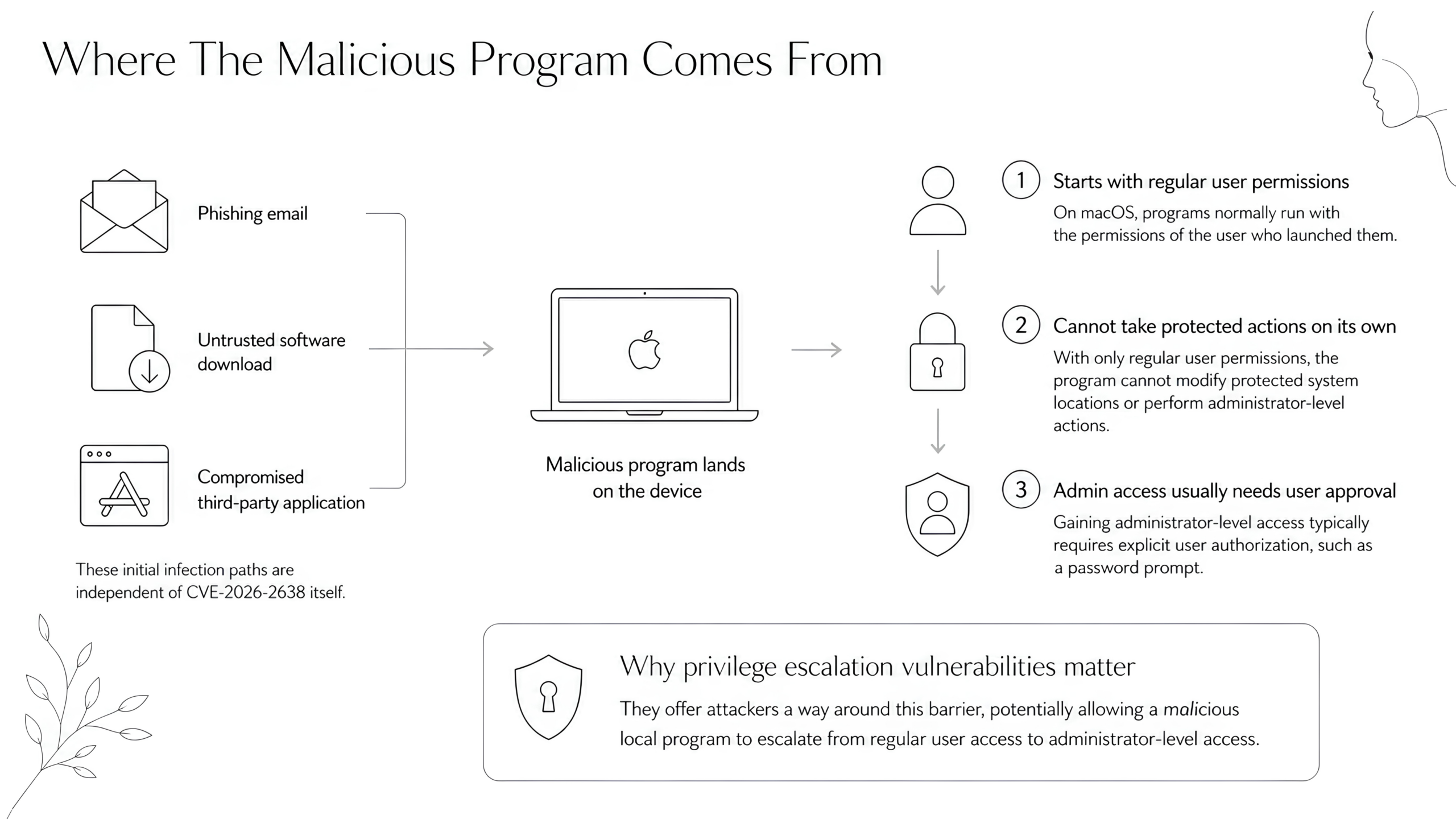
A malicious program could end up on a device through any of the usual means, for example, opening a phishing email, downloading and running software from an untrusted source, or installing a compromised third-party application. These initial infection paths are independent of CVE-2026-2638 itself.
On macOS, programs normally run with the permissions of the user who launched them. A malicious program installed through these channels would therefore start with only regular user permissions, it could not, on its own, modify protected system locations or take administrator-level actions. Gaining administrator-level access typically requires the user to explicitly authorize it (such as through a password prompt). This is why local privilege escalation vulnerabilities matter: they offer attackers a way around this barrier.
The Two Gaps That Made The Attack Possible
Gap 1: The Timing Gap (CWE-367: Time-Of-Check Time-Of-Use Race Condition)
- Download Protection checks a file at one stage and acts on it at a later stage. There is a brief moment between these two events. At that moment, a malicious program, using only the file-editing permissions every user already has, could swap the original file for a different one. Download Protection would then carry out its privileged step on the swapped file, not the file it had checked.
Gap 2: The Symbolic Link Gap (CWE-59: Improper Link Resolution Before File Access)
- macOS lets users create what is essentially a shortcut to another file, a “symbolic link.” It looks and behaves like a regular file, but when any program opens it, the system automatically redirects to whatever the shortcut is pointing at.
The vulnerability was that Download Protection did not check whether the file it was about to handle was actually a shortcut to somewhere else. A malicious program could plant such a shortcut where Download Protection was about to act, and have it point to an important file elsewhere on the system. Download Protection, which runs with administrator-level permissions, would then unknowingly perform its operation on that file instead, even though that file was never meant to be touched.
Why This Resulted In Privilege Escalation
In both cases, the malicious program itself did not directly gain new permissions. What it did was redirect a legitimate privileged operation, performed by Download Protection, to a file that the malicious program would otherwise have no ability to modify. By tricking Download Protection into writing to a system-protected location on its behalf, the malicious program could indirectly cause changes that only administrator-level processes are normally allowed to make.
This is what made CVE-2026-2638 a local privilege escalation: not by stealing administrator-level access, but by tricking a legitimate administrator-level operation into doing something it was never meant to do.
In practice, this means the malicious program could make changes to the device’s system-level behavior that should require administrator authorization.
What CVE-2026-2638 Is Not
- Not a breach of X-VPN servers
- Not a vulnerability in the VPN tunnel, encryption protocol, account system, or server infrastructure
- Not a remote attack, it requires local low-privilege access to the device
- Not applicable to other platforms or to the App Store version
How We Fixed It
X-VPN macOS website version 77.5.1 strengthens the download protection file restoration workflow. The main improvements include:
1. File Identity Consistency Checks
When a downloaded file is scanned by the protection layer, the file’s content fingerprint is now recorded. If the file later needs to be quarantined, X-VPN re-verifies whether the current file content still matches what was scanned.
If the file has been replaced, modified, or otherwise changed after scanning, the quarantine process is rejected.
2. Quarantine Integrity Validation
After a file enters quarantine, integrity information about its quarantined state is recorded. Before a user restores the file, X-VPN re-verifies that the quarantined file is still in its recorded quarantine state.
If the quarantined file has been replaced or modified, the restore operation is blocked.
3. Symbolic-Links Are Not Accepted in Critical Operations
The download protection workflow now refuses to scan or restore symbolic-link files. This prevents attackers from redirecting quarantine or restore operations to unintended files via path manipulation.
Overall, this fix no longer relies only on file paths to identify the file being operated on. Instead, X-VPN now uses multi-stage content integrity checks to verify that files have not been replaced or modified during the scan, quarantine, and restore stages. It also blocks symbolic-link redirection that could otherwise cause privileged restore operations to apply to unintended file locations.
Understanding the Severity
CVE-2026-2638 was rated with a CVSS v4.0 base score of 7.3 (High), with the vector string:
CVSS:4.0/AV:L/AC:L/AT:P/PR:L/UI:N/VC:H/VI:H/VA:H/SC:N/SI:N/SA:N
CVSS (Common Vulnerability Scoring System) is the industry-standard framework for rating the severity of security vulnerabilities. According to FIRST, the organization that maintains the CVSS standard, CVSS measures how serious a vulnerability could be if successfully exploited, not how likely that exploitation actually is in practice. A “High” rating therefore reflects how much damage the vulnerability could cause under successful exploitation, not a prediction of how likely it is to be exploited against real users.
The vector string above breaks down the score into multiple dimensions, such as where the attack must originate from, what conditions must be met to exploit it, and how seriously a successful attack could affect the system.
In practice, two attributes of the vector explain why exploiting CVE-2026-2638 is far from straightforward:
- AV:L (Attack Vector: Local). Exploitation requires local access to the device. The vulnerability cannot be triggered remotely over the internet.
- AT:P (Attack Requirements: Present). Specific conditions must be met for the attack to succeed, including the ability to interact with the affected download protection file restoration workflow and manipulate file handling within a narrow timing window.
Therefore, CVE-2026-2638 should be taken seriously, and users of affected macOS website versions should update to X-VPN macOS website version 77.5.1 or later. However, because exploitation requires local access and specific conditions, it does not place X-VPN users at immediate, broad-scale remote risk.
Affected Scope
The table below summarizes which X-VPN versions are affected by CVE-2026-2638:
Platforms & Version | Affected? |
|---|---|
X-VPN macOS website versions 77.0 to 77.5 (the standalone macOS version downloaded from xvpn.io) | ⚠️ Affected — please update immediately |
X-VPN macOS website, version 77.5.1 and later | ✅ Not affected (contains the fix) |
X-VPN Mac App Store version | ✅ Not affected |
X-VPN for Windows / Linux / iOS / Android / TV / Router / Chromebook/ Game Consoles/ Chrome Extension | ✅ Not affected |
Recommendations for Users
Update To The Latest Version Immediately
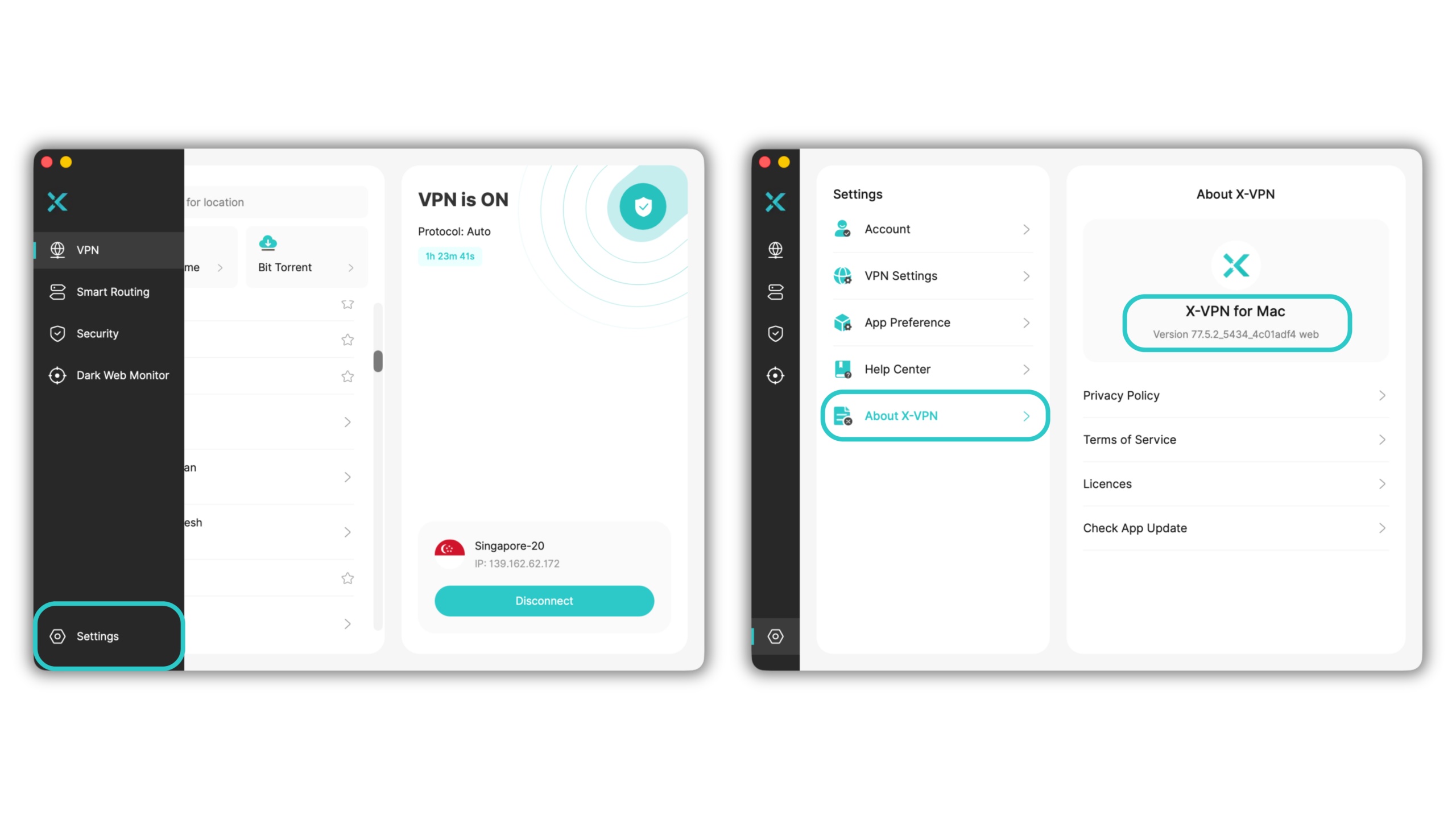
To check your current version:
- Open the X-VPN app on your MacBook.
- Click Settings in the bottom-left corner.
- Click About X-VPN.
- Your current version is shown under “X-VPN for Mac”.
If your version is between 77.0 and 77.5, update by downloading the latest version from our Mac Download page.
Next Steps & Contact
X-VPN remains committed to user security beyond this specific issue. As part of our ongoing security practices.
- Continuous code audits and vulnerability scans: We regularly review our codebase and run security checks to identify and address potential issues before they reach users.
- Bug Bounty Program: We welcome security researchers to submit responsible vulnerability reports through our Bug Bounty Program. Valid and reproducible findings are eligible for monetary rewards, helping us strengthen the security of every X-VPN client.
- Direct reporting channel: If you discover a security concern or suspect unusual behavior in X-VPN, please email security@xvpn.io. All reports are reviewed by our security team.
We thank Fluid Attacks for responsibly disclosing CVE-2026-2638 and for working with us through the coordinated disclosure process.
FAQs
Has this vulnerability been fixed?
Yes. The vulnerability has been fully resolved in X-VPN for macOS website version 77.5.1. Users on versions 77.0–77.5 should update immediately.
Am I at risk if I’m using X-VPN?
Only macOS users on directly-downloaded versions 77.0 through 77.5 are affected. If you’re on version 77.5.1 or later, on the App Store version, or on any other platform (Windows, iOS, Android, Linux, etc.), you are not affected.
Is Download Protection enabled by default on the X-VPN macOS website version?
No. Download Protection is disabled by default on the X-VPN macOS website version and must be manually enabled.
Because the vulnerable workflow only runs when Download Protection is active, only users who had explicitly enabled this feature on an affected macOS website version (77.0 through 77.5) were exposed to CVE-2026-2638. Users who had never enabled Download Protection were not exposed to the vulnerable code path.
Does this affect my VPN encryption or my data?
No. The vulnerability is a local privilege escalation issue on the user’s own device. It‘s not in X-VPN’s VPN tunnel, encryption protocol, account system, or server infrastructure.
Has anyone actually been attacked using this vulnerability?
We have observed no reports of this vulnerability being exploited in the wild. It was discovered and reported by Fluid Attacks through a responsible disclosure process, allowing us to fix it before any known exploitation.
Can the attack happen remotely over the internet?
No. Exploiting this vulnerability requires the attacker to already have local, low-privilege access to the user’s MacBook. It cannot be triggered remotely over the network or through a malicious website.
Where can I report security issues to X-VPN?
Please email security@xvpn.io or submit through our Bug Bounty Program. We welcome and reward responsible security disclosures.