When you turn on your VPN, you expect privacy, security, and a steady connection. That’s why it’s so frustrating when the tunnel drops without warning. A few seconds later, it might reconnect, but sometimes it stays down until you notice a problem and tap the button again.
That kind of interruption feels more serious than a normal Wi-Fi hiccup. It can break a video call, stop a stream halfway through, or make you wonder whether your traffic was briefly exposed while the connection failed. In reality, though, most VPN disconnects come from ordinary technical friction rather than a major failure.
The secure tunnel is only as stable as the connection carrying it. Once you understand where that friction usually comes from, the problem becomes much easier to fix.
Table of Contents
Why Your VPN Keeps Disconnecting
A virtual private network, or VPN, doesn’t replace your internet connection. It rides on top of it. If the underlying connection weakens, switches networks, or drops for even a moment, the VPN may have to rebuild the encrypted session before traffic can continue.
In most cases, the issue is caused by network instability, server load, protocol behavior, or device settings that interfere with background activity. A VPN disconnect is usually a symptom, not the root problem.
The problem can look different depending on when and where it happens. You might have trouble when you leave the house as your phone shifts from Wi-Fi to cellular data. It could show up on hotel Wi-Fi, on a crowded public network, or only when you connect to one specific server. The symptom looks the same, but the cause can change.
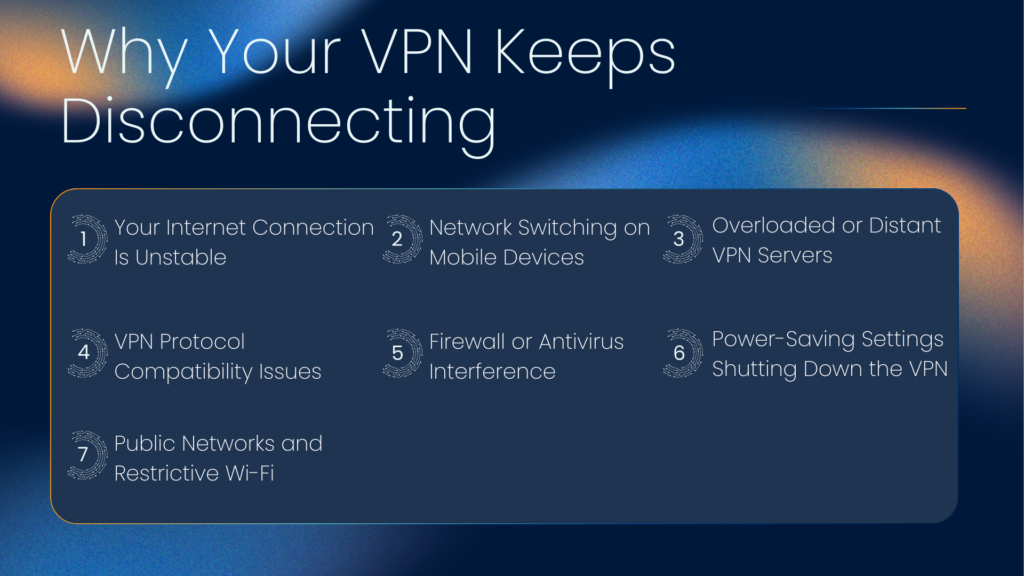
Your Internet Connection Is Unstable
A VPN depends on a steady connection underneath it. If your internet signal flickers, even briefly, the encrypted tunnel may collapse and reconnect. That can make VPN issues feel strangely dramatic, because a weak or unstable connection that might barely affect casual browsing can still interrupt a secure session.
This is especially common with weak Wi-Fi, crowded apartment networks, hotel internet, or routers placed far from where you’re using your device. Interference from walls, electronics, or simple congestion can all cause tiny breaks in connectivity.
X-VPN’s guide on how a VPN tunnel works provides a clearer picture of the mechanics. Once you understand that your traffic is being wrapped and routed through a secure tunnel, it makes more sense that even a small interruption can force a fresh connection.
A VPN isn’t unusually fragile compared to other network tools. It’s just more sensitive to brief instability than many everyday apps. When the connection beneath it wobbles, the tunnel has to rebuild before you can continue browsing or streaming.
Network Switching on Mobile Devices
Phones are constantly trying to keep you on the best available connection. That sounds useful, and it often is, but it can create a messy environment for VPN stability. Your phone may switch between Wi-Fi and mobile data, reconnect to a different access point, or react to changing signal strengths in the background without any obvious signs that the change is happening.
Mobile network handoffs are one of the most common reasons a VPN feels stable one moment and flaky the next. Every switch can interrupt the encrypted session. Some devices recover almost instantly, while others pause long enough to freeze a stream, stall a page load, or disconnect an app in the background.
Features like Wi-Fi Assist, smart network switching, and aggressive roaming can make this more common. It’s especially noticeable when you’re commuting, walking between rooms, or moving through buildings where signal strength changes quickly.
That doesn’t necessarily mean anything is wrong with the VPN app. It often means your phone is being a little too helpful in the background.
Overloaded or Distant VPN Servers
Not all VPN servers perform equally well. Some are lightly used and responsive, while others are handling heavier traffic. If a server is crowded, it may slow down before it drops, or it may reconnect repeatedly as conditions change.
Distance matters too. A server on another continent can still work well, but it introduces more routing complexity and more chances for delay. If your connection is already a bit unstable, that extra distance can push it over the edge.
This is one reason server choice matters more than many people realize. A large VPN helps distribute the load, and X-VPN’s 10,000 server locations unlock more connections. Switching to a nearby server is often the quickest test when a connection feels unreliable.
Sometimes people assume a disconnect means the service itself is failing, but the simpler explanation is often that one route is having a bad day. A closer, less congested server can stabilize a VPN connection almost immediately without any deeper troubleshooting.
VPN Protocol Compatibility Issues
A protocol is the set of rules that determines how the VPN tunnel is created and maintained. Each protocol makes different tradeoffs. Some prioritize speed, some reliability, and some focus on performance over restrictive or interference-prone networks.
That is why one protocol can feel perfect on your home internet and less steady on airport Wi-Fi or during network switching on a phone. WireGuard is fast and efficient, which makes it a favorite for many users. OpenVPN can feel a bit heavier, but it remains popular because of its broad compatibility and dependable behavior.
X-VPN’s Everest protocol is built around strong encryption and obfuscation, helping VPN traffic blend in more like ordinary encrypted traffic on networks that interfere with standard VPN patterns. That matters because some disconnect issues are sometimes compatibility issues in disguise.
If your VPN keeps dropping in just one situation, your protocol choice deserves a close look. The wrong protocol can turn a decent connection into an unstable one, while the right one can make the same network feel much smoother.
Firewall or Antivirus Interference
Security software is supposed to protect your connection, but it can sometimes get in the way of it instead. Firewalls, antivirus suites, and router-level security tools may treat encrypted VPN traffic as unusual or suspicious, particularly if several layers of protection are monitoring your phone or computer at once.
That can produce a frustrating pattern where the VPN connects, hesitates, and then drops again. From the outside, it looks like the VPN is unreliable. In reality, another security tool may be blocking or filtering traffic in a way the VPN doesn’t like. Sometimes the problem isn’t the VPN connection itself, but the software sitting beside it and second-guessing it.
This is more common on work devices, school-managed systems, and computers with multiple security products installed. A blocked port, an overactive web shield, or strict router filtering can all create instability. If conflicting software seems likely, the better solution is usually to allow the VPN app explicitly rather than turning off protection altogether.
Power-Saving Settings Shutting Down the VPN
Modern phones, tablets, and laptops are aggressive about conserving battery life. That’s usually a good thing, until the operating system decides your VPN app is just a standard background process that can be paused or restricted.
This tends to create a very specific pattern. Everything works while you’re actively using the laptops, phones, and tablets. The disconnects start after the screen turns off, after waking from sleep, or after sitting idle for a while. On mobile devices, battery optimization can be especially aggressive about limiting background network activity.
That means your VPN isn’t always dropping because of a poor internet connection. Sometimes battery savers interrupt the process that keeps the tunnel alive. Power management can quietly sabotage VPN stability, making connection problems feel random unless you notice they happen after sleep, screen lock, or idle time.
If the issue follows that pattern, changing background or battery settings is often more effective than switching servers over and over.
Public Networks and Restrictive Wi-Fi
Public Wi-Fi is convenient, but it’s rarely predictable. Hotels, airports, cafes, campuses, and shared workplaces often use captive portals that require logging in, bandwidth controls to prevent overuse, and filtering systems that sometimes interfere with VPN networks.
That helps explain why a VPN may work perfectly well at home, then become erratic when you travel. Sometimes the network requires browser-based sign-in before normal traffic flows. Sometimes it blocks or throttles traffic patterns it doesn’t recognize. In other cases, the network is simply overloaded and unstable before your VPN even connects. Restrictive networks can make a healthy VPN look broken.
When disconnects only happen in one place, that is a strong clue that the network environment is the real culprit. If you want a broader context, X-VPN’s overview of how a VPN works is useful, because it explains why some networks treat encrypted traffic as an exception instead of routine web activity.
Don’t be tempted to skip the VPN in this situation. It’s better to switch to mobile data or find another network, because you really need the protection of a VPN when using public Wi-Fi.

How to Stop Your VPN From Disconnecting
Once you have a rough idea of the cause, the practical fixes are usually straightforward. Start with the simplest changes first, because the right fix is often obvious once you test a few likely weak points.
When Disconnects Are Actually Protecting You
A disconnect isn’t always the failure it seems. Sometimes the interruption is the privacy feature doing exactly what it should. If the secure tunnel drops and the app blocks internet access until the connection is restored, you might think the VPN broke something. In practice, it may be stopping your device from quietly falling back to an ordinary, unprotected connection.
X-VPN’s kill switch is an excellent backup security system. It doesn’t stop disconnects from happening, but it does prevent those brief drops from exposing your real IP address or sending traffic outside the tunnel while you troubleshoot. A good fix isn’t just about staying connected, but also about staying protected during the moments when you aren’t.
Users might be tempted to disable this feature because they find it inconvenient, but blocking data transfer is essential in these moments. From a privacy standpoint, exposing your private information is often much worse than the brief pause of the kill switch doing its job.
Final Thoughts
A VPN that keeps disconnecting can be frustrating, but it usually doesn’t mean anything is broken. More often, the issue comes from unstable internet, aggressive network switching, an overloaded server, protocol conflicts, power management, or a restrictive network environment.
The good news is that these are all things you can test, notice, and improve. A closer server, a different protocol, better Wi-Fi, or one battery-setting change may be enough to make the connection feel steady again.
The bigger lesson is that a VPN is part of a system, not a magic button. The most dependable VPN experience comes from getting the whole chain working smoothly. Your device, your network, and your settings all affect how reliable that secure tunnel feels.
FAQs
Why does my VPN disconnect when I switch from Wi-Fi to mobile data?
Because the underlying network path changes. When that happens, the VPN often has to rebuild the encrypted session before traffic can continue normally.
Can weak Wi-Fi really cause a VPN to drop?
Yes. A VPN depends on a stable internet connection, so even a brief signal dip can be enough to interrupt the secure tunnel with timeouts, lost packets, and other network issues.
Does switching VPN servers actually help?
Often, yes. A closer or less crowded server can improve both stability and speed, especially when the problem is related to distance, routing, or load.