Privacy settings are reassuring, making it clear that your operating system and favorite apps are helping with security. A browser might have secure DNS, a phone could offer private DNS, a router may come with leak protection, and a VPN app promises encryption. They all sound like variations on the same idea, but they don’t protect the same things.
That’s where the confusion begins. DNS over HTTPS, often shortened to DoH, is a useful privacy upgrade, but it’s not a replacement for a VPN. It hides one important step in the browsing process: the domain name lookup. A VPN protects more of the connection by encrypting traffic between your device and a VPN server, while also changing the IP address that websites and apps see.
If you’re comparing DNS over HTTPS with a VPN, the simplest distinction is this: DoH protects the lookup, while a VPN protects the route. Both can improve privacy, but only one is designed to cover traffic across phones, tablets, and computers.
Table of Contents
What DNS Does Before a Site Loads
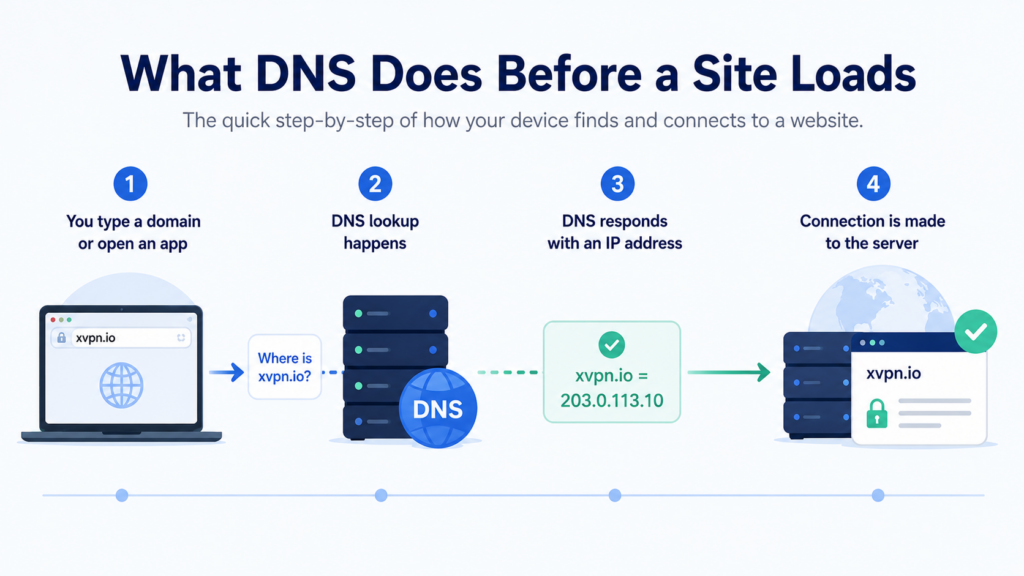
Before your browser can load a website, your device needs to know where that site is. Humans use names like xvpn.io, but computers communicate with numerical addresses. The Domain Name System (DNS) works like an address book, translating a website name into the IP address your device needs to reach the right server.
This happens constantly. Open a website, launch an app, refresh your email, or stream a video, and your device may need DNS to find the right destination. Most of the time, DNS works so quietly that you never notice it. That’s good for convenience, but it also makes DNS easy to overlook as a privacy concern.
Traditional DNS requests usually aren’t encrypted. That means your internet service provider (ISP), workplace, school, coffee shop Wi-Fi, or hotel network might be able to see which domains your device is trying to reach. They might not see the full contents of an encrypted HTTPS page, but DNS can still reveal a useful outline of your activity.
A DNS lookup doesn’t show every page you viewed, every search you made, or what you typed into a form. Still, a list of domains can expose habits, interests, work tools, health research, financial services, and entertainment choices. DNS doesn’t expose everything, but it’s still revealing, which is why encrypted DNS became a useful privacy feature.
What DNS Over HTTPS Hides
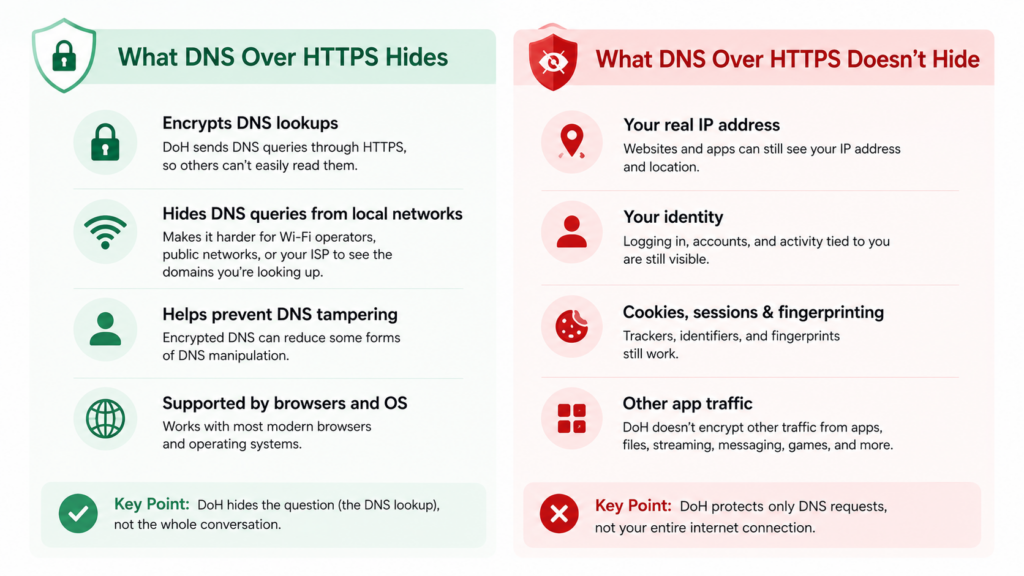
DoH sends DNS queries through the HTTPS protocol, the same encrypted web protocol used by secure websites. Your DNS lookup is wrapped in encryption before it leaves your device. Instead of sending a plain DNS request that says, “Where is this domain?” DoH sends that request through an encrypted connection to a DNS resolver that supports the standard.
That helps in everyday situations. If you’re on public Wi-Fi, DoH can make it harder for the local network operator to casually read your DNS requests. If your ISP normally handles your DNS, switching to a DoH resolver can prevent the ISP from seeing those lookups in the usual way. Most modern browsers and mobile operating systems support encrypted DNS, though the setting name varies. If a network tampers with domain name lookup results, encrypted DNS can also reduce some forms of manipulation.
DoH hides the question, not the whole conversation. It can stop some observers from seeing the domain lookup clearly, but it doesn’t turn your entire internet connection into an encrypted tunnel.
However, DoH’s strength is also its boundary. It protects DNS requests, not everything that happens afterward. Once your device learns the IP address it needs, the rest of the connection still follows its normal path unless another privacy tool changes that route.
What DNS Over HTTPS Doesn’t Hide
DNS over HTTPS can sound stronger than it is because “encrypted DNS” feels similar to “encrypted internet.” The difference matters. DoH doesn’t hide your real IP address from the websites, apps, or services you connect to. It also doesn’t make you appear to be in another city or country.
If you use DoH and visit a website, that website can still see the IP address your connection comes from. If you log into an account, the service knows it’s you. If your browser has cookies, saved sessions, advertising identifiers, or a recognizable fingerprint, DoH doesn’t erase those signals.
DoH also doesn’t protect every app unless it’s configured at the system level and the app respects that setting. A browser might use secure DNS while another app on the same device uses a different DNS path. Some apps also use their own network behavior, and device-level DNS settings don’t always align neatly with browser-level settings.
That’s why DoH can create a false sense of completeness. It can improve privacy for DNS queries, but it doesn’t protect file transfers, messaging app traffic, video calls, gaming connections, background sync, or streaming apps in the same broad way a VPN app can.
Your IP address is still exposed when DoH is the only privacy tool you use. For many people, that’s the detail they expected secure DNS to hide, and it simply doesn’t.
What a VPN Hides
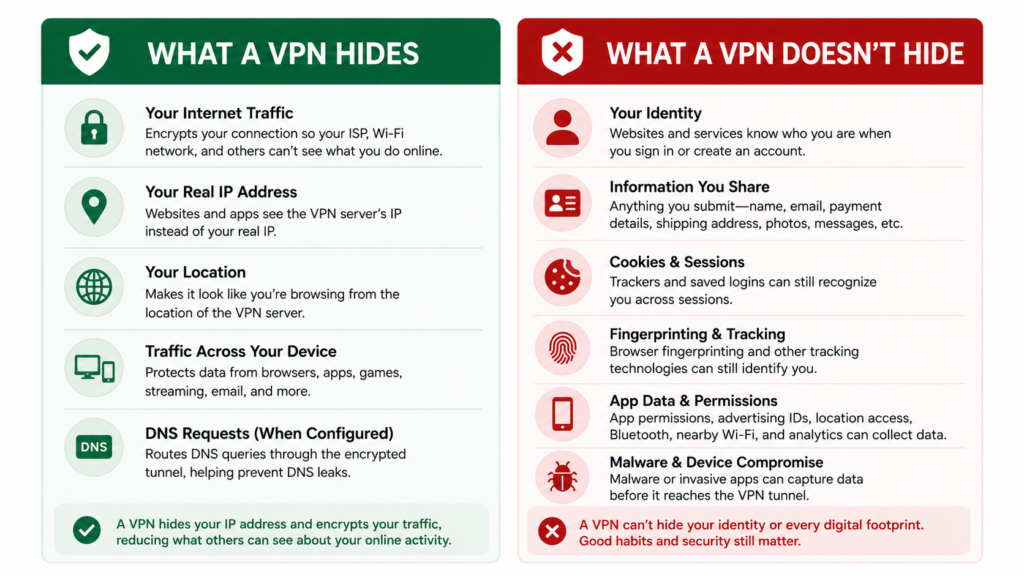
A VPN protects a different part of the journey. Instead of only encrypting DNS lookups, a VPN creates an encrypted tunnel between your device and a VPN server. Your internet traffic travels through that tunnel first, then exits to the wider internet from the VPN server.
X-VPN’s guide to how a VPN tunnel works explains this routing model in more detail, but the practical effect is straightforward. Your ISP or local Wi-Fi network sees an encrypted connection to the VPN server. It doesn’t get the same clear view of every site and service you’re contacting.
A VPN also changes the public IP address that websites and apps see. Instead of seeing your home or mobile carrier IP address, the destination sees the VPN server’s IP address. That can reduce location-based tracking, help avoid some ISP profiling, and make public Wi-Fi safer to use.
This is where a VPN becomes more useful than DoH for everyday privacy. A full VPN app can protect traffic from browsers, streaming apps, email clients, cloud backup tools, messaging apps, games, and background services. A VPN can also route DNS requests through the encrypted tunnel when configured properly, which is why a DNS leak test is useful.
A VPN covers more of the path, which is why it’s usually the better answer for public Wi-Fi, travel, location privacy, and device-wide protection.
What a VPN Doesn’t Hide
A VPN is more complete than DNS over HTTPS, but it still isn’t magic. It’s important to consider what a VPN hides without assuming your fully protected no matter what you do.
If you sign into a social network, email account, streaming service, or online store, that service still knows who you are. A VPN can hide your original IP address from that service, but it can’t make your login anonymous. The same applies to anything you submit directly, like your name, email address, payment details, shipping address, photos, or messages.
A VPN hides and encrypts your activity, but doesn’t disguise every footprint. You still need to maintain good habits to protect your digital identity.
Cookies and browser fingerprinting also remain important. Apps can create similar problems through advertising identifiers, app permissions, location access, Bluetooth scanning, nearby Wi-Fi names, and analytics kits. Malware is another hard limit because it can capture data before it reaches the VPN tunnel.
DoH vs VPN, Side by Side
The easiest way to compare DNS over HTTPS and a VPN is to separate DNS privacy from connection privacy. They overlap in one area, but they aren’t trying to solve the same whole problem.
Privacy challenge | DNS over HTTPS | VPN |
|---|---|---|
Does it encrypt DNS lookups? | Yes | Usually, when DNS is routed through the VPN |
Does it hide your real IP address from websites? | No | Yes, sites see the VPN server IP |
Does it encrypt traffic across apps? | No | Yes, with a full VPN app |
Does it help on public Wi-Fi? | Somewhat | Much more |
Does it change your apparent location? | No | Yes |
Does it stop account-based tracking? | No | No |
Does it block cookies or fingerprinting? | No | No |
DoH is like putting one sensitive question in a sealed envelope. A VPN is more like taking the whole trip through a private tunnel before reaching the public road again. The real difference between DoH and VPN security is the scope of protection. DNS over HTTPS protects one type of request, while a VPN protects the connection more broadly.
Can You Use DNS Over HTTPS and a VPN Together?
You can use DNS over HTTPS and a VPN together, but the best setup depends on how your device, browser, and VPN app handle DNS.
In many cases, the simplest choice is to let the VPN manage DNS. A good VPN app should route DNS requests through the encrypted tunnel so your ISP doesn’t receive them directly. That gives you DNS privacy as part of the VPN connection without requiring separate browser tweaks.
Using both DoH and VPN can work well, but only if DNS requests still travel through the path you expect.
Problems can appear when a browser uses its own DoH setting while the VPN tries to manage DNS system-wide. That doesn’t always break anything, but it can create confusion. You might think all DNS requests are going through the VPN, while the browser quietly sends its own encrypted DNS queries to a separate resolver.
This is where leak testing helps. After connecting to a VPN, run a DNS leak test. If the result shows your ISP’s DNS servers, something is wrong. If it shows DNS servers associated with your VPN connection, your setup is more likely working as intended.
When DNS Over HTTPS Is Enough
DNS over HTTPS can be enough when your main concern is basic DNS privacy in a browser. For example, someone using a trusted home network might turn on secure DNS to reduce plain-text DNS exposure without needing the extra location privacy or app-wide protection of a VPN.
It can also be helpful on networks where DNS filtering or DNS tampering is a concern. Since DoH sends DNS queries over HTTPS, it can make simple DNS inspection or manipulation harder. That doesn’t mean it bypasses every restriction, and it shouldn’t be treated as a censorship-proof tool, but it’s a meaningful improvement over plain DNS.
DoH is also lightweight. There’s no VPN server selection, no major routing change, and usually no noticeable effect on speed. DoH is a privacy setting, not a full privacy system. It’s useful, but it’s best understood as one layer.
When You Need a VPN Instead
A VPN is the better choice when you want protection across the whole device, not just DNS lookups. That includes public Wi-Fi in airports, hotels, schools, coworking spaces, cafes, and rental properties. On shared networks, you don’t know who controls the router, who else is connected, or whether someone is trying to intercept traffic.
A VPN also helps when you don’t want your ISP to build a profile from your browsing patterns. Even when HTTPS protects page contents, network metadata can still reveal useful patterns. A VPN reduces that visibility by sending traffic through an encrypted tunnel.
Travel is another strong VPN use case. When you’re away from home, a VPN can make your connection more consistent, protect you on unfamiliar networks, and let websites and services see the VPN server location instead of your temporary local connection.
Choose a VPN when the whole connection matters. That’s the difference between hiding a lookup and protecting your daily internet use.
Final Thoughts
DNS over HTTPS and VPNs are often mentioned in the same privacy conversations, but they’re different tools. DoH encrypts DNS lookups so observers have a harder time seeing which domains your device asks to find. That’s useful, especially compared with plain DNS.
A VPN goes further by encrypting traffic between your device and a VPN server, hiding your real IP address from destination sites, and protecting traffic across apps when you use a full VPN app. It can also handle DNS requests inside the tunnel, reducing the risk that your ISP sees them directly.
Neither tool makes you invisible. Accounts, cookies, fingerprints, app permissions, malware, and anything you share directly can still identify you. But that doesn’t make privacy tools pointless. It simply means each tool has a proper role.
The best privacy comes from knowing the boundary. DNS over HTTPS protects the address lookup. A VPN protects much more of the path your data travels.
FAQs
Is DNS over HTTPS the same as a VPN?
No. DNS over HTTPS encrypts domain name lookups, while a VPN encrypts all data that passes through the connection and hides your real IP address from websites and apps.
Should I use DNS over HTTPS if I already use a VPN?
Usually, it’s simplest to let your VPN handle DNS. If you turn on separate DoH settings in your browser, run a DNS leak test afterward to make sure your DNS requests still follow the path you expect.
Does DNS over HTTPS stop my ISP from seeing what websites I visit?
It can hide DNS lookups from your ISP in some setups, but that doesn’t guarantee the ISP learns nothing from other connection data. A VPN provides stronger protection because it encrypts the connection to the VPN server.