


The 2026–27 NBA regular season officially tips off on October 20 in the US, or October 21 in Australia.
If you are in Australia, you can watch live NBA games via Kayo Sports, Foxtel Now, Disney+, Prime Video, or NBA League Pass. However, not every platform broadcasts every game; check the options below to choose the platform that best suits your needs.
If you are an Australian currently overseas, you can download the free X-VPN app for iOS or Android and connect to a free Australian server (no X-VPN account required). For setup instructions, skip to the “How to Watch the NBA Games Outside Australia” section below.
Table of Contents
Where to Watch NBA Games in Australia
NBA fans in Australia have five main streaming options:
Platform | NBA Coverage | Price (AUD) |
|---|---|---|
Kayo Sports | Selected ESPN games, such as Celtics vs. Pistons (Oct. 21, AU). | – Standard: $29.99/month – Premium: $45.99/month |
Foxtel Now | Selected ESPN and ESPN2 games, including Celtics vs. Pistons (Oct. 21, AU). Requires a sports-inclusive bundle. | – Sports + Movies: $58/month for 12 months (normally $84/month) – 10-day free trial for eligible new users |
Disney+ | Selected NBA games on ESPN and ESPN2, with much of the same coverage as Kayo and Foxtel Now. | From $9.99/month (with ads) |
Prime Video | Knicks vs. Celtics and Rockets vs. Spurs (Oct. 24, AU), plus selected NBA Cup games. | $9.99/month or $79/year |
NBA League Pass | Every NBA regular-season game live in Australia, including games shown on other platforms. | $24.99/month or $174.99/season |
ESPN is a sports television network that broadcasts select NBA games. You can watch live ESPN broadcasts via Kayo Sports, Disney+, or Foxtel Now.
Since Kayo Sports, Foxtel Now, and Disney+ all carry ESPN’s NBA coverage, there is significant overlap in the games they broadcast. Prime Video, meanwhile, broadcasts a different selection of NBA games.
If you want to follow a specific team throughout the season, NBA League Pass is worth considering, as it offers live streams of every NBA regular-season game in Australia.
How to Watch NBA in Australia (Step by Step)
Watch NBA on Kayo Sports
Kayo Sports broadcasts an average of nine NBA regular-season games per week via ESPN. Here is how to watch:
Step 1. Sign up for or log in to a Kayo Sports account
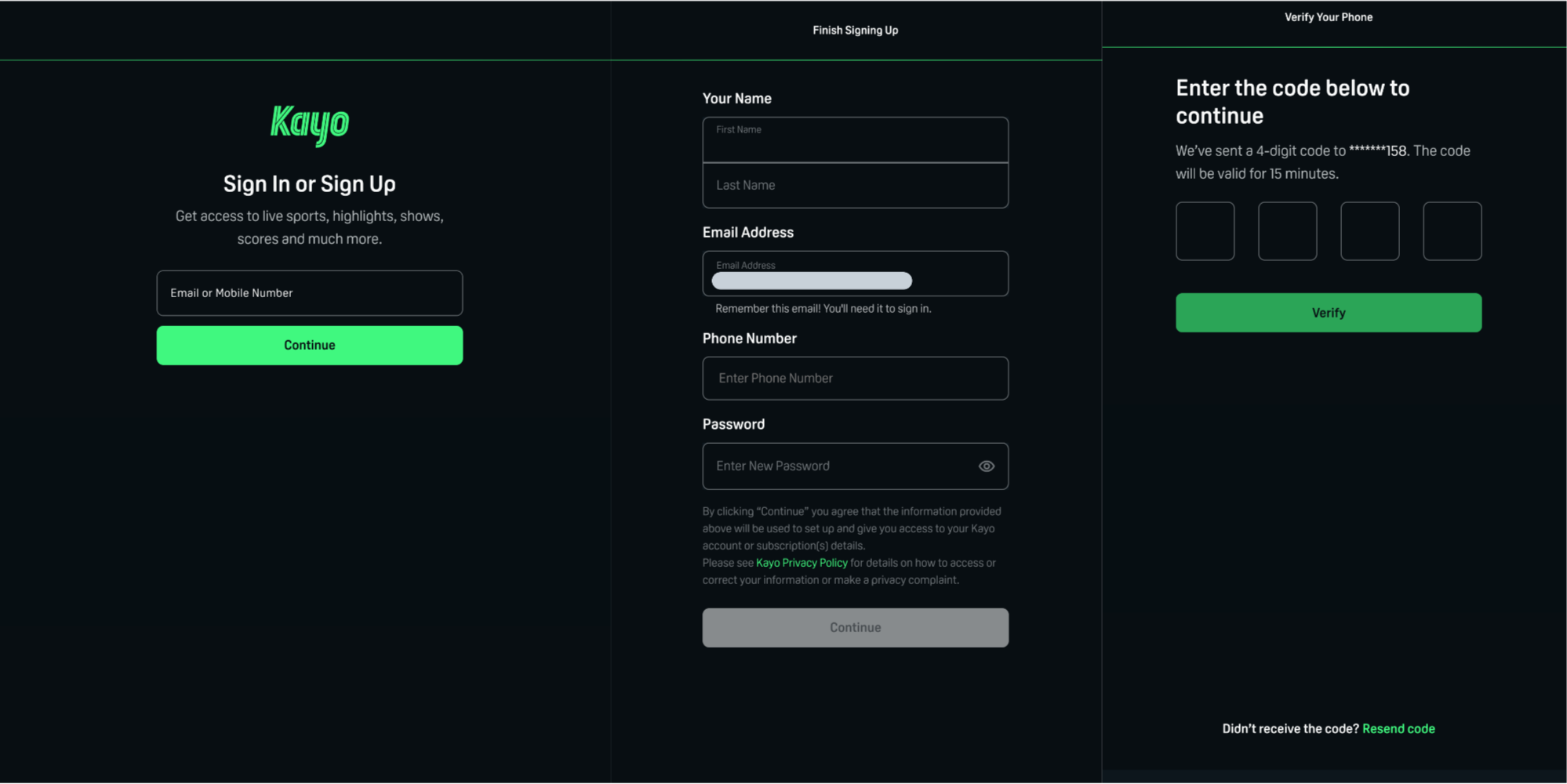
Visit the Kayo Sports website and click “Sign In” in the top-right corner. Enter your email address, then provide your name, a valid Australian mobile number, and a password. Kayo will send a 4-digit verification code to your mobile; enter this code to verify your number.
If you already have an account, simply log in using your existing Kayo Sports credentials.
Step 2. Choose a subscription plan
Kayo offers two subscription plans:
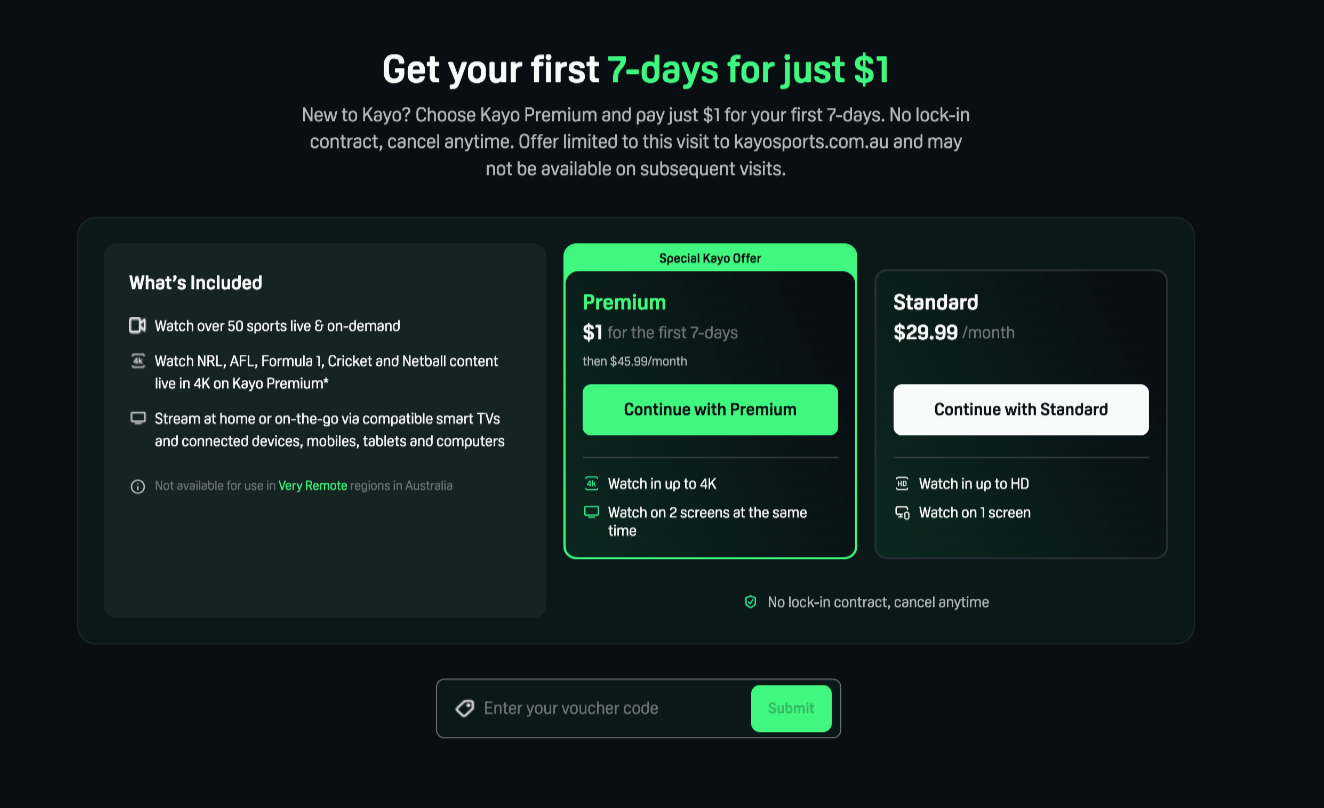
- Premium: Eligible new users pay just $1 for the first 7 days, followed by $45.99 per month. Supports 4K resolution and simultaneous viewing on two screens.
- Standard: $29.99 per month. Supports HD resolution and viewing on one screen only.
Select the plan that suits you and follow the on-screen prompts to activate your subscription.
Step 3. Start watching games
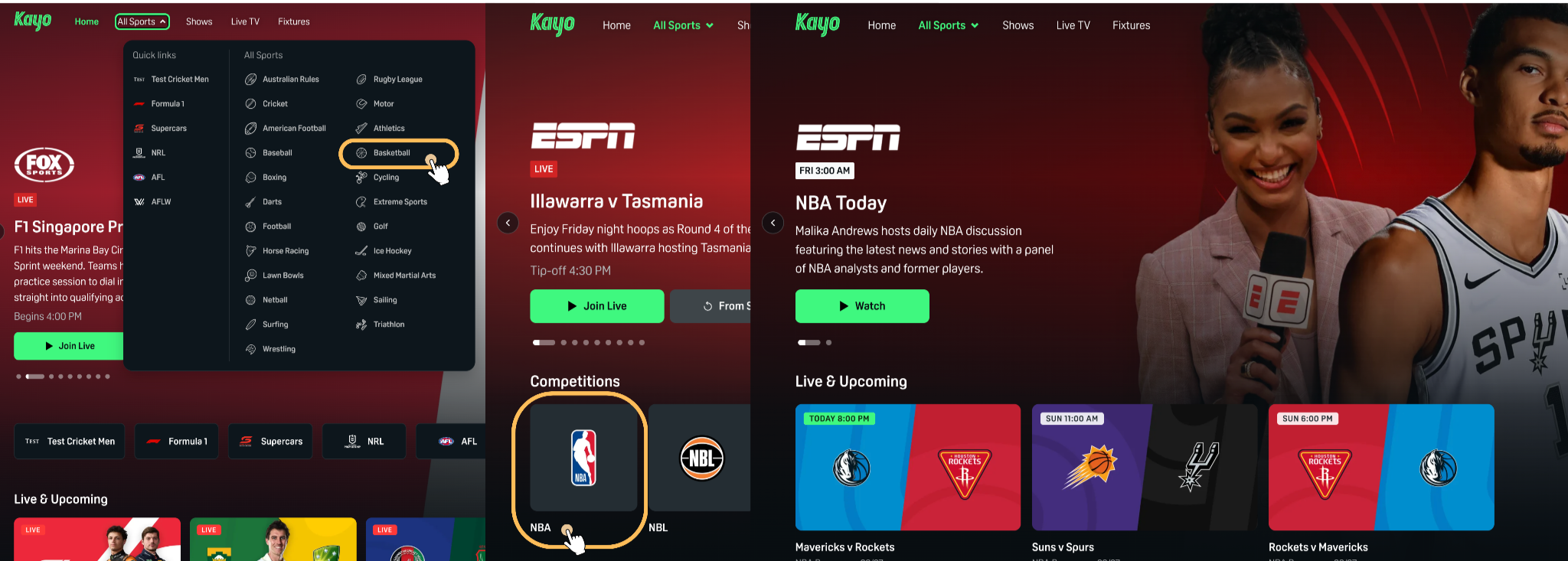
Click “All Sports” → “Basketball” in the top menu, then select “NBA” under the “Competitions” category. Choose the game you want to watch from the list of live or upcoming games.

💡 Tip: Kayo does not broadcast every NBA regular-season game. If you want to follow a specific team, it’s best to check the schedule in advance to confirm whether Kayo is broadcasting that particular game.
Watch NBA on Foxtel Now
Foxtel Now is another option for watching NBA games via ESPN. Here is how to do it:
Step 1. Choose a Foxtel Now plan
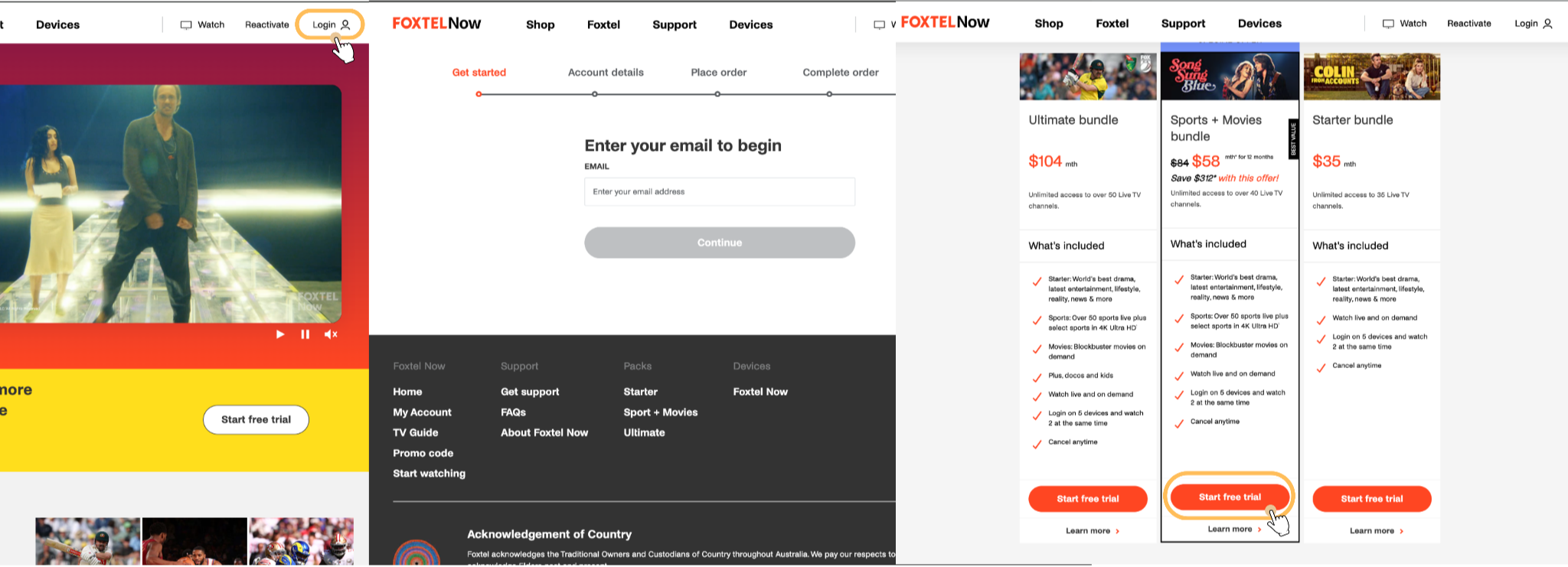
Visit the Foxtel Now website, click “Login” in the top-right corner, and then select “Get Started.” Enter your email address and click “Continue.”
Next, select the “Sports + Movies bundle” (which includes the ESPN and ESPN2 channels) and click “Start free trial.” New users are eligible for a 10-day free trial.
Step 2. Sign up for a Foxtel Now account
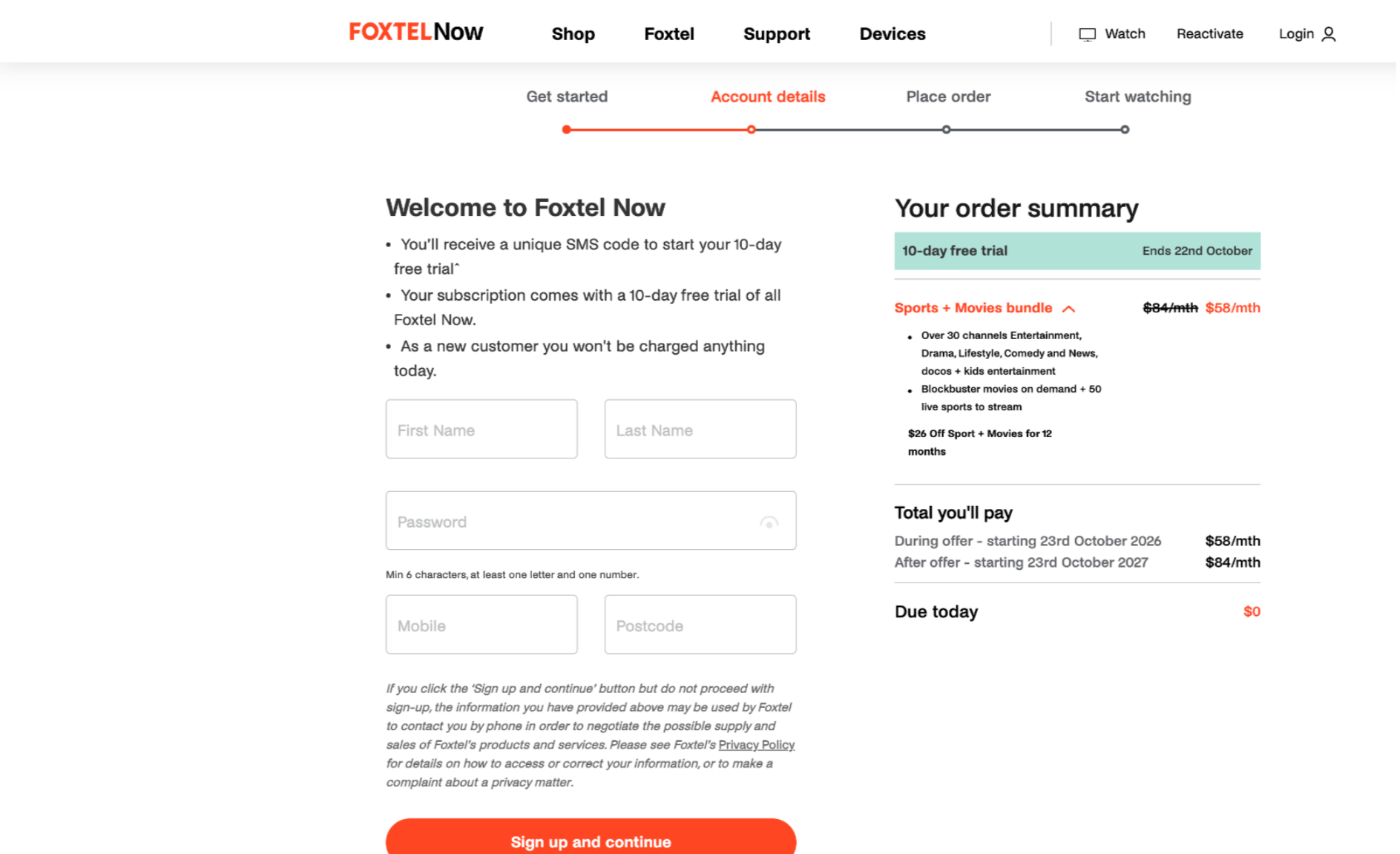
Proceed to the “Account details” page and enter your name, password, mobile number, and postcode.
Click “Sign up and continue,” then follow the prompts to verify your mobile number and confirm your order.
If you already have a Foxtel Now account with a sports subscription, simply log in.
Step 3. Find and watch NBA games
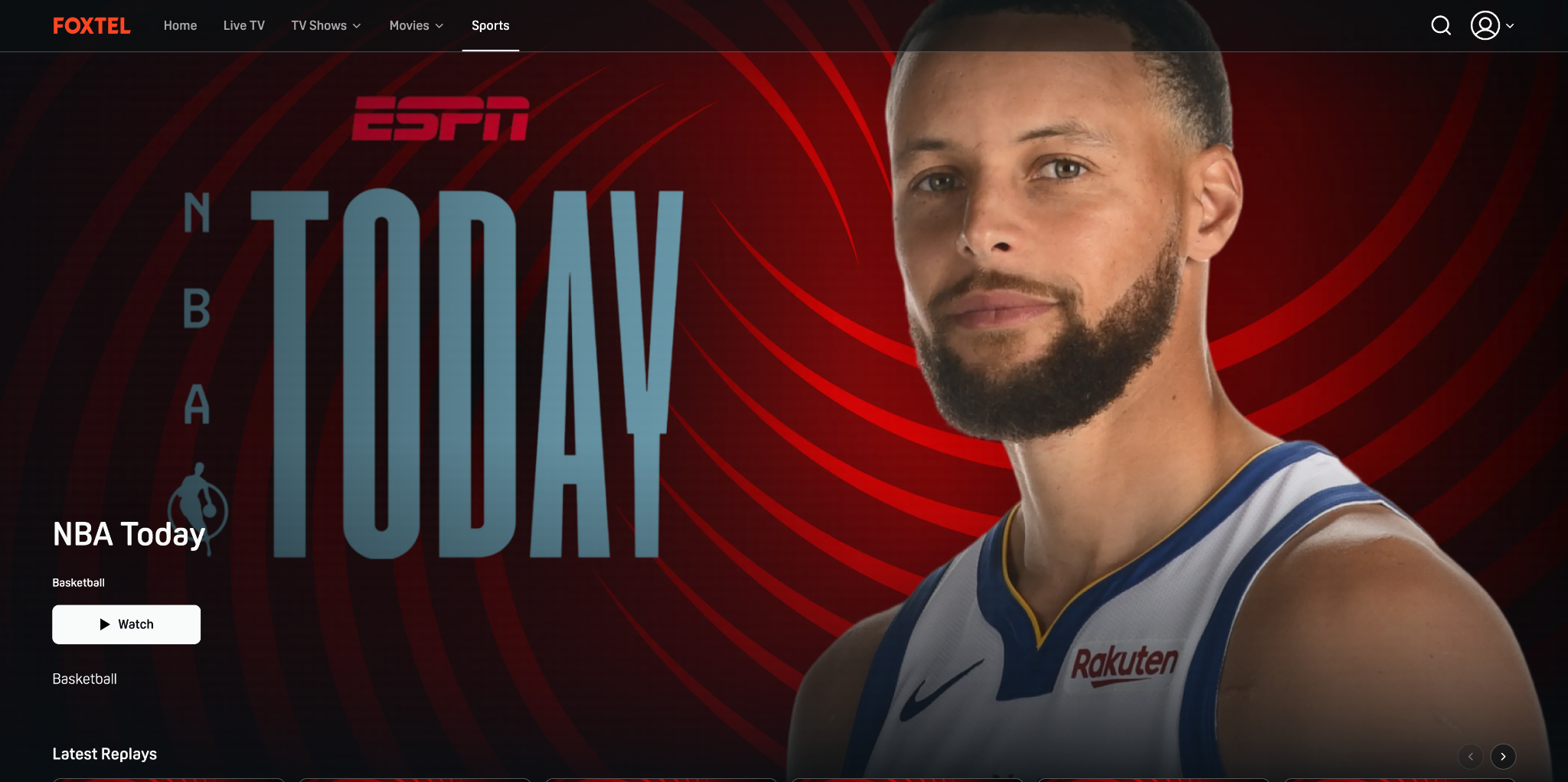
Once your account is ready, navigate to the “Sports” category or click the search icon to look for “NBA,” then select the game you wish to watch.
Other ways to watch
You can also watch NBA games on Disney+, Prime Video, or NBA League Pass. The process is similar: visit the platform’s website, sign up or log in, then find NBA to start watching. If you want to watch more games, you can subscribe to NBA League Pass and watch via the official NBA website or app.
How to Watch the NBA Games Outside Australia
If you are an Australian traveling or living abroad and want to use an Australian IP address during the NBA season, the free version of X-VPN offers Australian servers. On iOS and Android devices, free users can manually select an Australian server location without needing to create an X-VPN account.
Here are the steps:
Step 1. Download X-VPN. Download X-VPN on your iPhone & iPad, or Android device. If you are using a computer or TV, visit the X-VPN download page to find the version compatible with your device.
Step 2. Open X-VPN. You can use the free version immediately without creating an account.
Step 3. Open the server list and select Free → Australia.
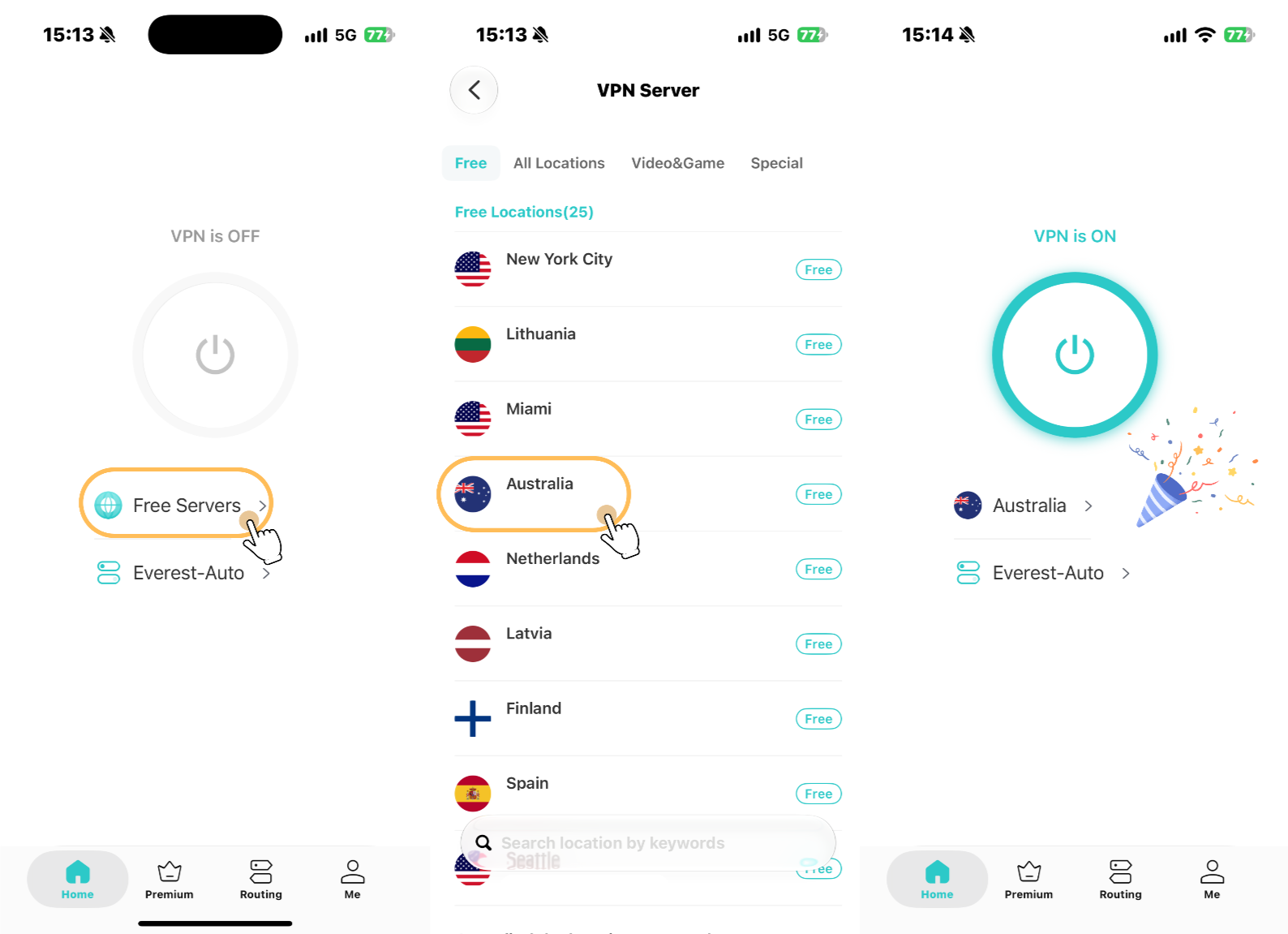
Step 4. Connect to the Australian server. Now you can enjoy NBA games!

When Does the 2026–27 NBA Games Start?
The 2026–27 NBA regular season begins on October 20, 2026 (US time). Due to the time difference, Australian fans will see the first games of the new season on Wednesday, October 21.
Here are the key details for the regular season:
Event | Date |
|---|---|
NBA regular season starts | October 20, 2026 (US) / October 21 (AU) |
NBA regular season ends | April 11, 2027 (US) |
Number of teams | 30 |
Regular-season games per team | 82 |
The NBA has released the full schedule, so you can plan ahead to watch your favorite teams play.
For the latest updates, check the official NBA pages:
- NBA Schedule: View upcoming games, dates, and tip-off times.
- NBA Scores: Check live scores, final results, and detailed game statistics.
- NBA Standings: View the latest team rankings for the Eastern and Western Conferences.
Game times vary across Australian time zones, so check the start time for your region before the game begins.
Final Thoughts
Watching the 2026–27 NBA regular season from Australia is easy once you know where to look. Kayo Sports, Disney+, and Foxtel Now all offer live broadcasts of NBA games via ESPN, while Prime Video airs select games. If you want to watch every game, NBA League Pass is the best option.
For Australians abroad, the free version of X-VPN offers Australian servers on iOS and Android, with no account required.
FAQ
Can I Watch NBA Games for Free in Australia?
Currently, there is no streaming platform in Australia that offers free, long-term live coverage of the entire NBA regular season.
Kayo Sports, Disney+, Foxtel Now, Prime Video, and NBA League Pass all require a paid subscription, though some platforms may offer free trials or promotional deals. If you simply want to keep up with the action, you can view scores, game recaps, and highlights for free via the official NBA website or app.
Does Kayo Sports Show Every NBA Game?
No. Kayo Sports broadcasts NBA games shown on ESPN, averaging about nine live regular-season games per week.
If your team’s game isn’t being broadcast on Kayo, you can check Prime Video or NBA League Pass. NBA League Pass offers live coverage of every NBA game in Australia.
How Many NBA Teams Are There?
There are 30 teams in the NBA: 15 in the Eastern Conference and 15 in the Western Conference.
Each team plays 82 games during the regular season, after which the league moves into the playoffs.