

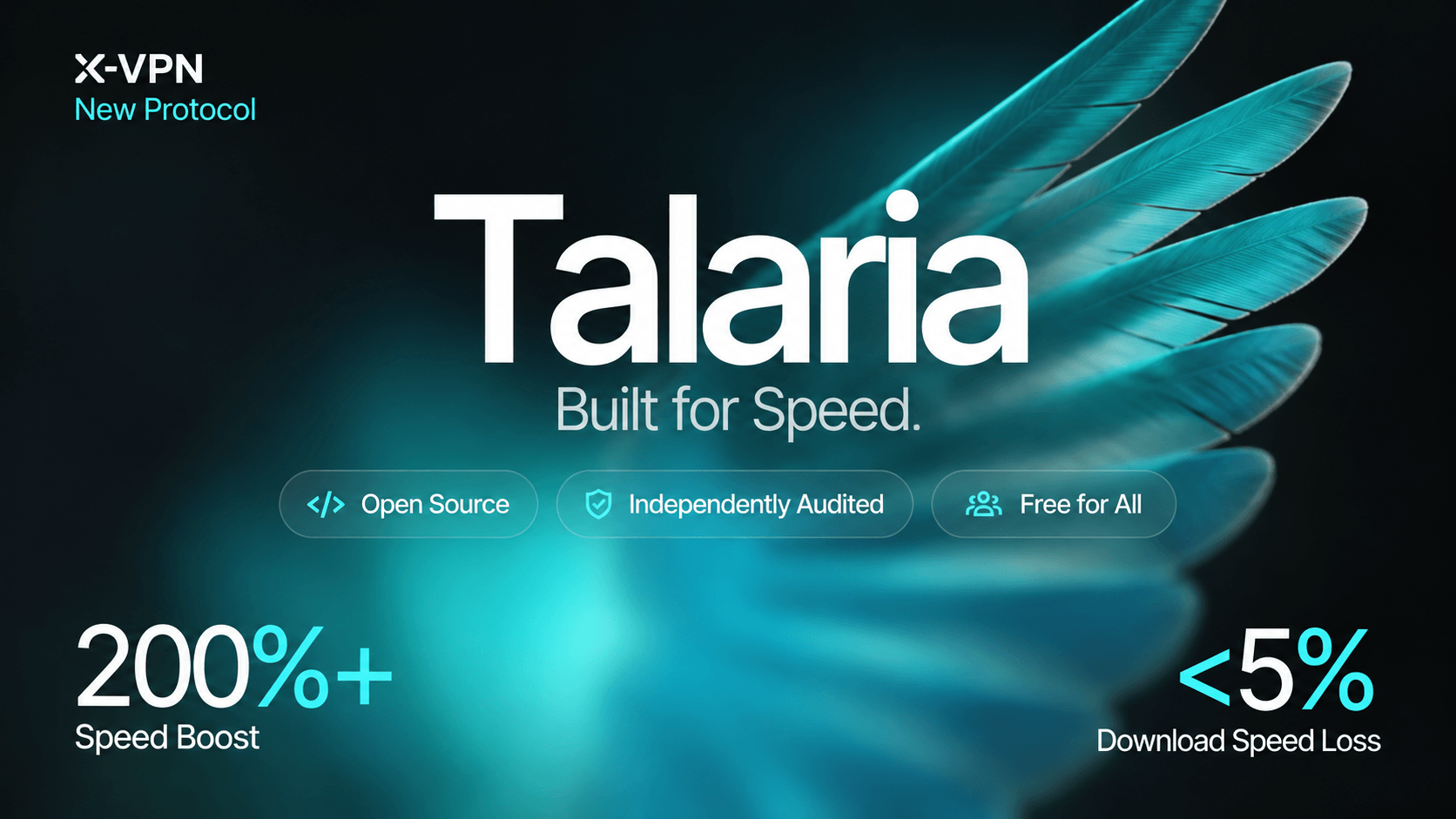
Talaria is officially here. We developed X-VPN’s new in-house VPN protocol to reduce speed loss and help you make better use of high-bandwidth connections.
To support greater transparency, we’ve published Talaria’s source code on GitHub for public review. The protocol’s security has been independently audited by Vantage Point Security.
Table of Contents
What Is Talaria?
Talaria is X-VPN’s in-house VPN protocol, developed for speed and security. Its design focuses on reducing the processing overhead that can limit VPN performance, helping you make better use of your available bandwidth.
Each app connection gets its own transport channel, allowing concurrent connections to be processed independently across multiple CPU cores. Talaria also handles data packets in batches to reduce repeated handoffs. On supported paths, it reconstructs packets from the same connection into a data stream for forwarding, reducing repeated packet-level processing.
These optimizations help reduce VPN-related speed loss and support faster downloads on high-bandwidth networks.
How Fast Is Talaria? What Our Tests Show
Our internal tests looked at two things: how much download speed Talaria retained with the VPN connected, and how it compared with X-VPN’s previous protocols.
Less Than 5% Download Speed Loss
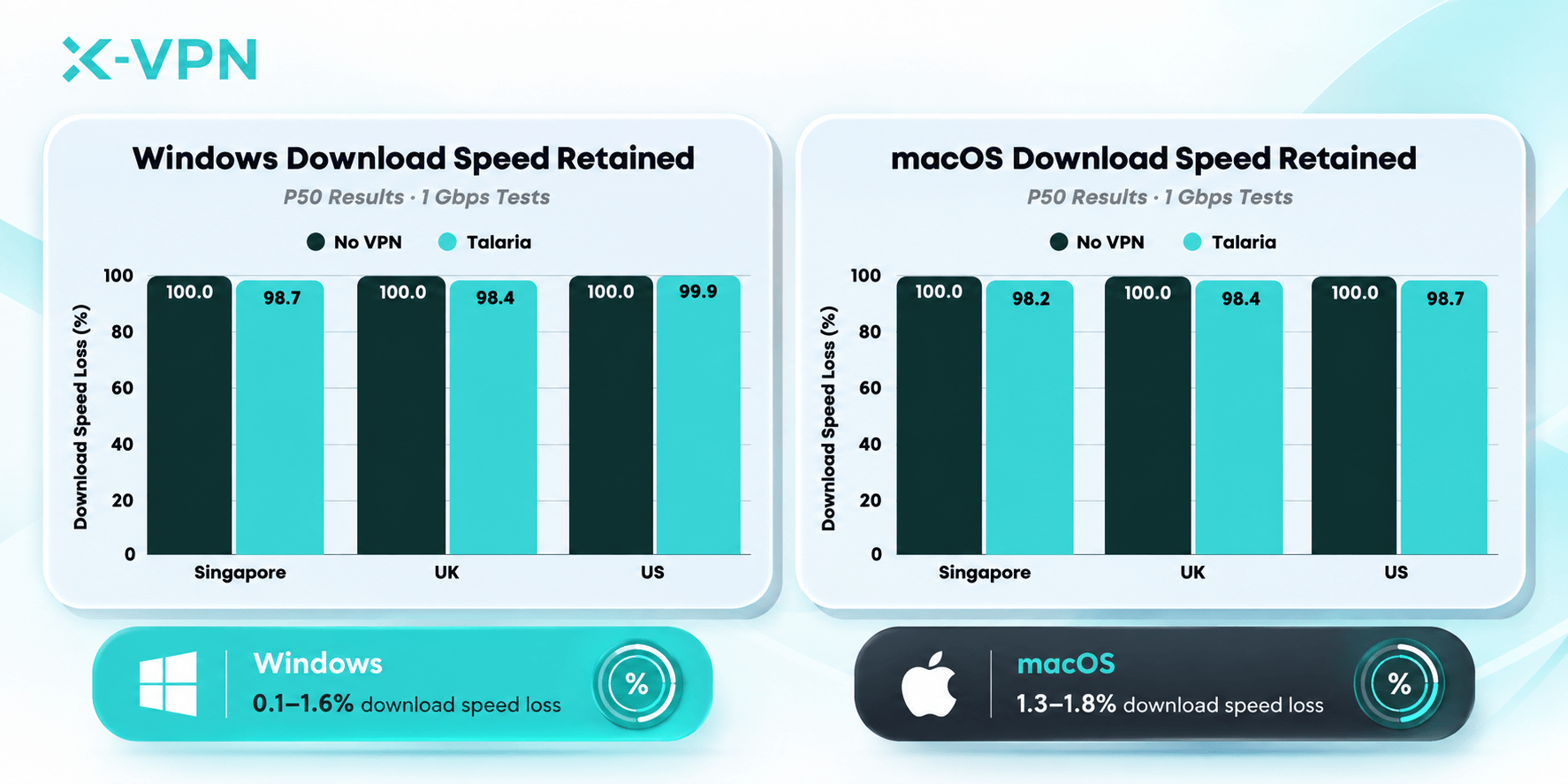
In our 1 Gbps and 100 Mbps tests on Windows and macOS, Talaria kept over 95% of the download speed measured without a VPN across the tested routes.
For a 20 GB file, the speeds recorded on our Windows Singapore-to-Singapore 1 Gbps route work out to an estimated 2 minutes 49 seconds without a VPN. With Talaria connected, the estimate is 2 minutes 51 seconds.*

Estimated transfer times use a 20 GB file (160,000 megabits) and recorded speeds of 946.7 Mbps without a VPN and 934.14 Mbps with Talaria, held constant throughout the calculation.
Over 200% Overall Speed Improvement
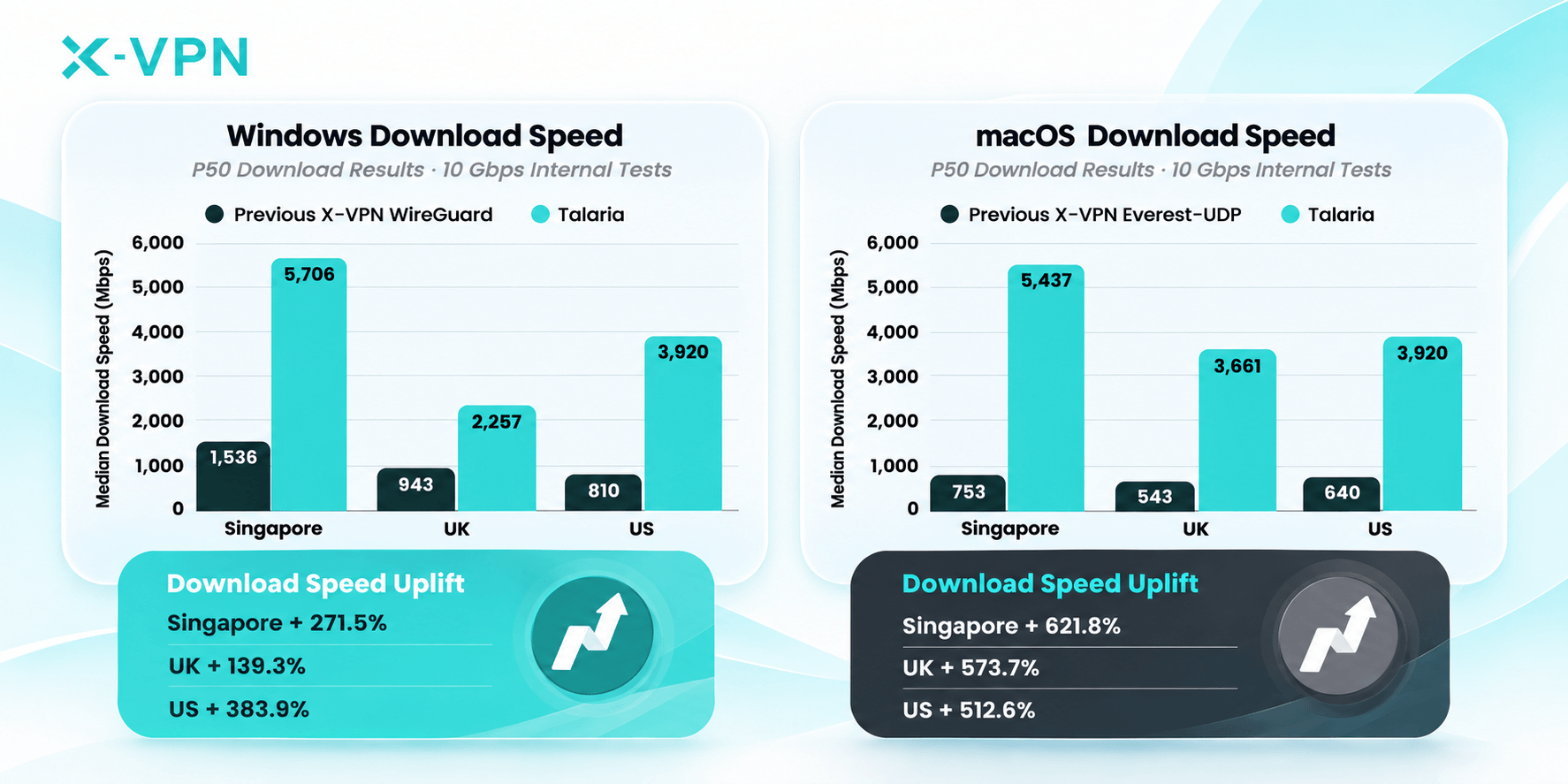
Our 10 Gbps internal tests showed an overall speed improvement of more than 200% over X-VPN’s previous best-performing protocols, including industry-standard WireGuard and protocols from our in-house Everest family.
On the Windows Singapore-to-Singapore route, Talaria reached a median (P50) download speed of 5,706 Mbps, or about 5.7 Gbps. For large files and game updates, Higher download speeds can mean shorter waits, especially when you have a high-bandwidth connection.
How We Tested Talaria
We ran 8,451 tests from Singapore to VPN servers in Singapore, the UK, and the US. Across the full test program, 6,590 samples met our criteria: a successful connection and a download speed above zero.
Desktop tests used wired connections on an AMD Ryzen 7 system running Windows 11 Pro and an Apple M4 Mac mini with 10 Gbps Ethernet. Both used Speedtest CLI 1.2.0.8.
Mobile tests ran over Wi-Fi. On Android, we used a Samsung SM-S931U (Android 15, Snapdragon 8 Elite) with Speedtest 7.0.7. For Apple devices, we used Speedtest 7.0.5 on an iPhone 17e running iOS 26.6.1 and a fourth-generation iPad Pro running iPadOS 26.6.1.
Beyond Speed: Security and Transparency
We developed Talaria for speed and security. By making its source code public and sharing the results of an independent security assessment, we’re opening the protocol to greater scrutiny.
Secure Connections by Design
Talaria uses TLS 1.3 and verifies the identity of X-VPN servers before sending your data.
For session key establishment, it uses hybrid post-quantum key exchange. This combines established cryptography with a post-quantum algorithm designed to resist future quantum attacks, helping protect the keys that secure your connection.
Open Source
We’ve published Talaria’s source code on GitHub under the GNU Affero General Public License v3.0 (AGPLv3).
Making the code public supports greater transparency. We welcome scrutiny from developers, security researchers, and users, giving the wider community a way to examine the protocol and assess its implementation independently.
Independent Security Audit
To bring an independent perspective to Talaria’s security, we worked with Vantage Point Security, a cybersecurity firm based in Singapore.
The assessment found no vulnerabilities of any severity within the reviewed scope. The review also found that Talaria’s cryptographic design and use aligned with security best practices.
We addressed all four informational observations raised during the assessment. Vantage Point Security verified those changes through retesting.
Check the security audit report for Talaria here.
How Talaria Improves Connection Performance
Talaria uses three key optimizations to reduce processing work and improve data transfer efficiency.
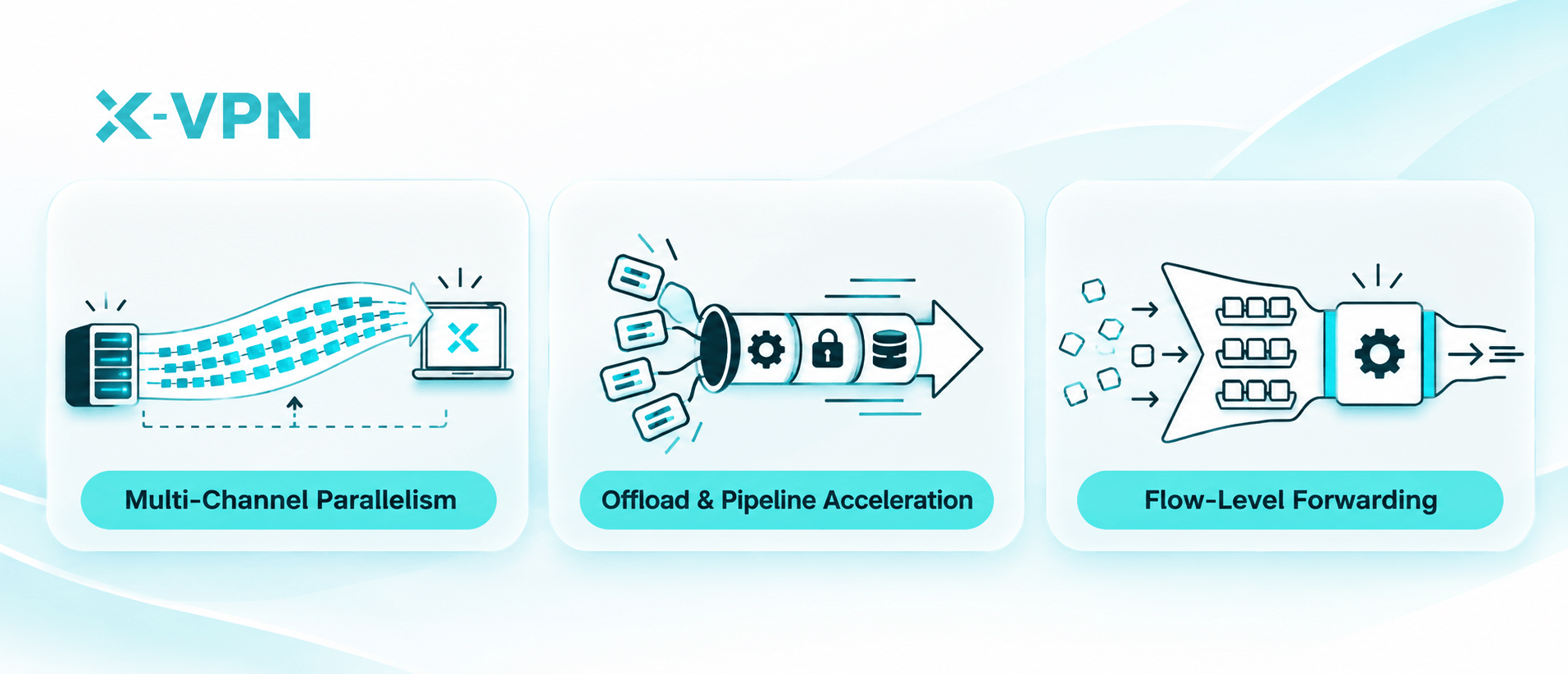
Multi-Channel Parallelism
Each app connection gets its own data channel. Talaria processes these connections in parallel across processor cores, helping browsing, streaming, and downloads run more smoothly together.
Offload & Pipeline Acceleration
Talaria handles multiple data packets in a single operation. This reduces repeated handoffs and processing work, freeing up computing power for data transfers.
Flow-Level Forwarding
On supported paths, Talaria reconstructs a continuous data stream from packets belonging to the same connection, then forwards it. This reduces repeated packet processing along the way.
Where Talaria Fits Into Your Everyday Use
Whether you’re streaming, downloading large files, or using a high-speed network, Talaria helps you make better use of your connection.
Streaming While Multitasking
Talaria handles multiple app connections in parallel, helping different online activities run more smoothly at the same time. You can enjoy your favorite content while keeping up with other tasks.

Faster Downloads on High-Bandwidth Networks
Talaria helps you download large files and software updates faster by making better use of available bandwidth. It reduces unnecessary data processing to improve transfer efficiency and minimize speed loss, especially on high-bandwidth networks and long-distance connections.

Faster Game Downloads and Loading
Talaria helps you spend less time waiting and more time gaming. By improving data transfer efficiency, it can help game downloads and updates finish faster, while making game store pages and lobbies load more quickly.

Unlock Next-Gen Speed with Talaria
Enjoy faster, more efficient connections on Windows, macOS, iOS, and Android with Talaria, X-VPN’s in-house protocol built for speed.
How to Use Talaria
Talaria is available in X-VPN on Windows, macOS, iOS, and Android. Start by getting the latest version of the app.
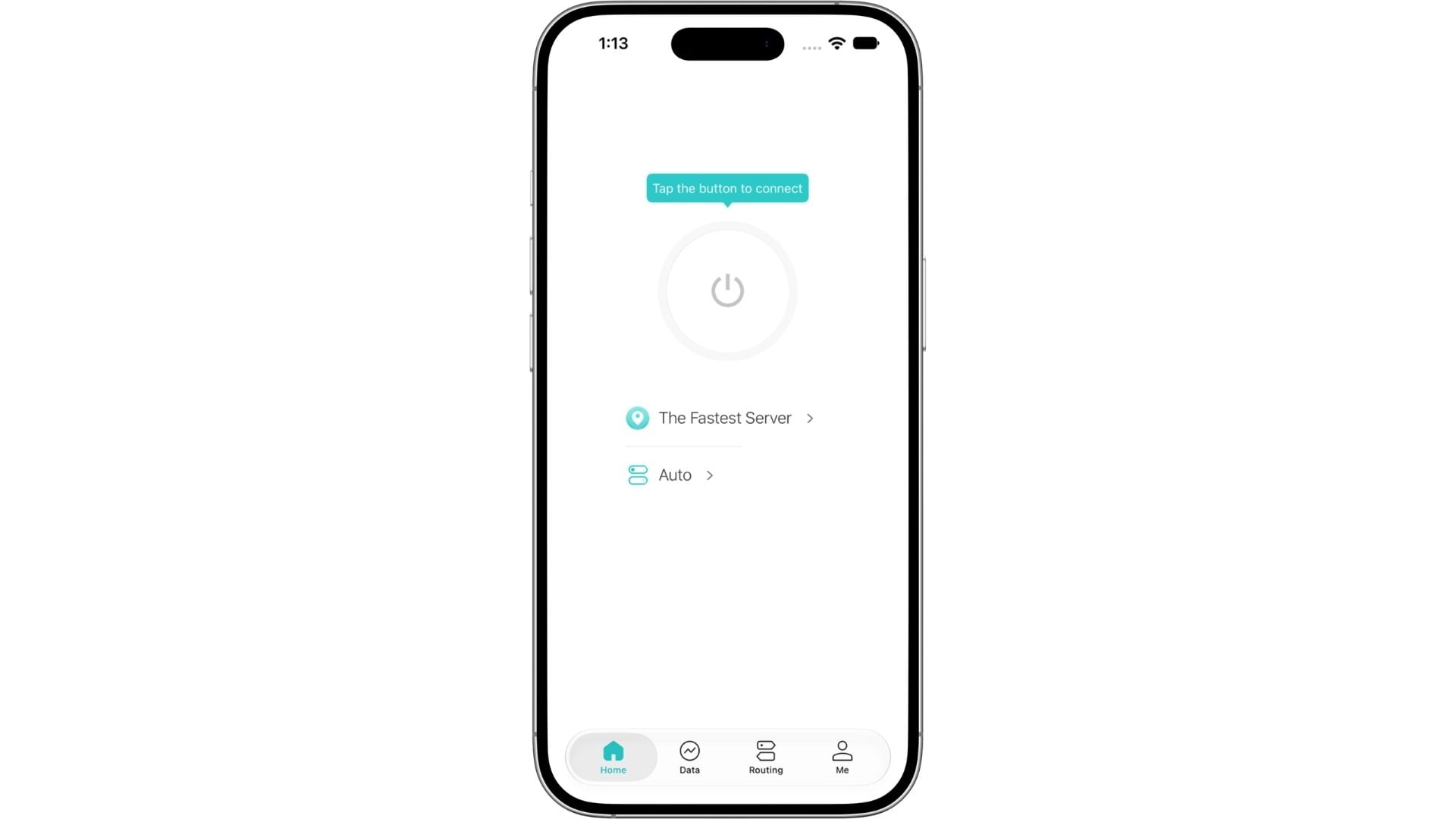
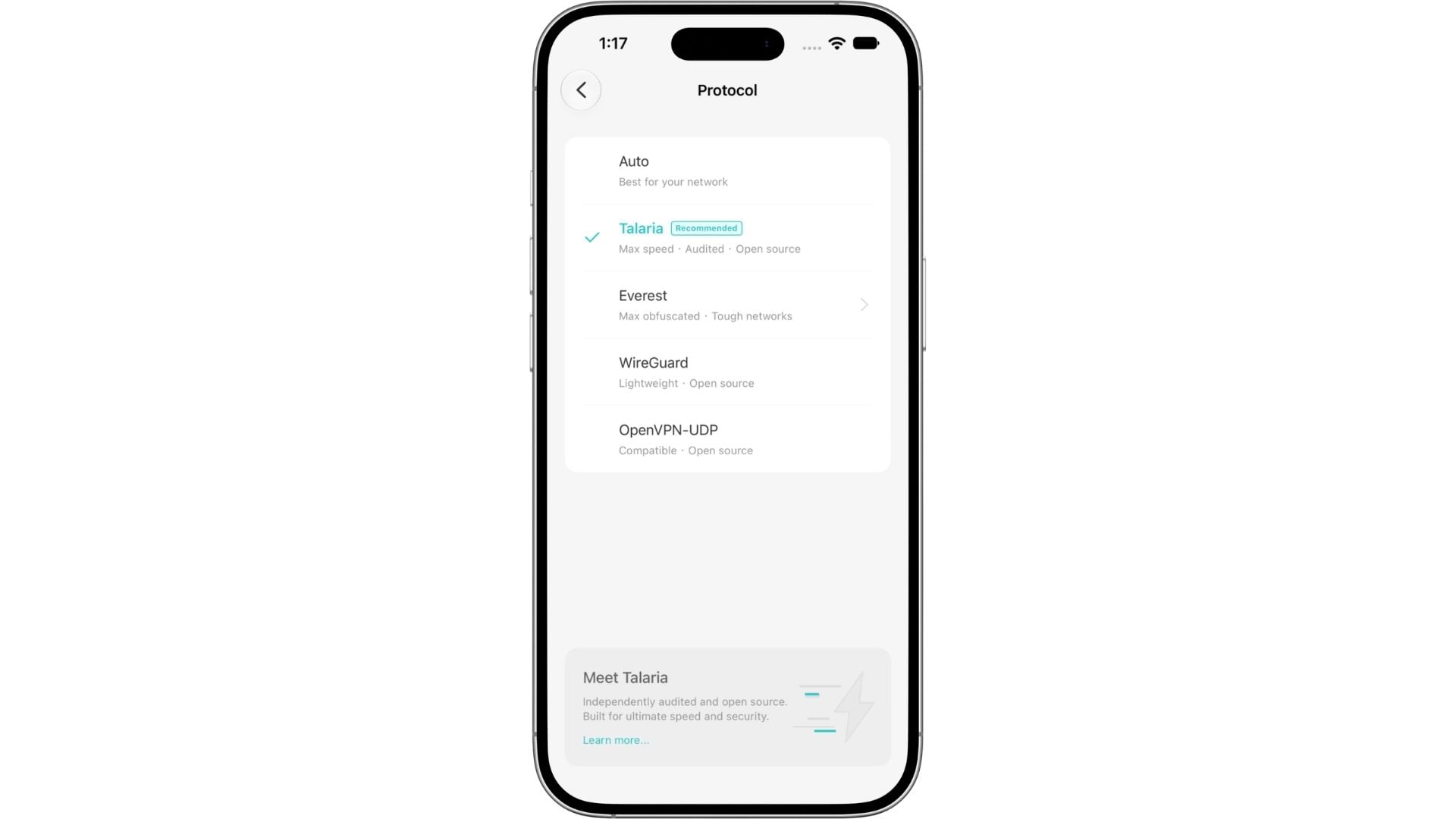
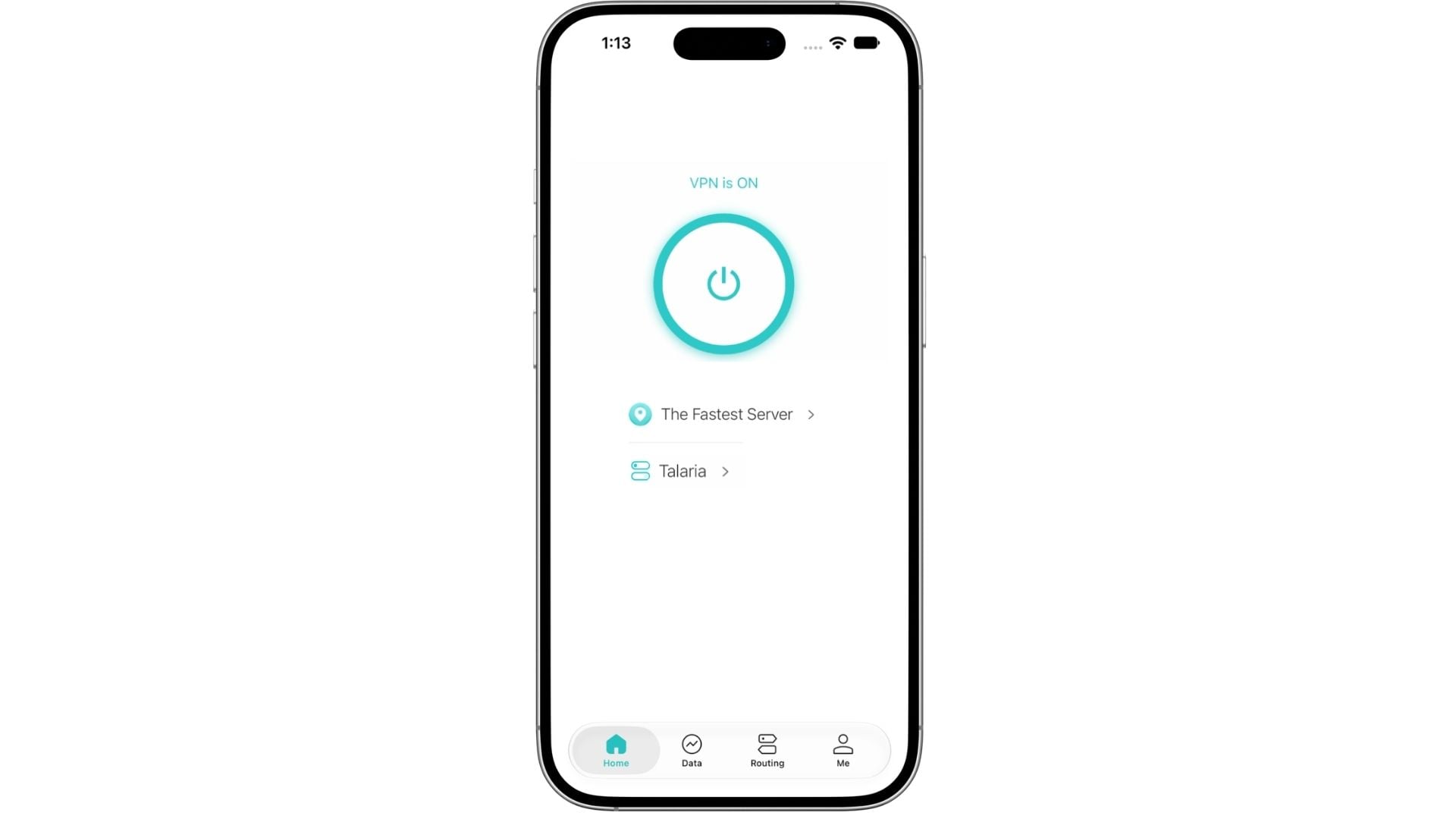
On mobile, you can switch to Talaria in 3 steps:
Step 1. Open X-VPN and tap Auto on the connection screen to access the protocol selection menu.
Step 2. Select Talaria from the protocol list.
Step 3. Once selected, you can start using Talaria.
On desktop, connect with Talaria in four easy steps:
Step 1. Click Settings in the bottom-left corner of the sidebar.
Step 2. Go to VPN Settings > Protocol.
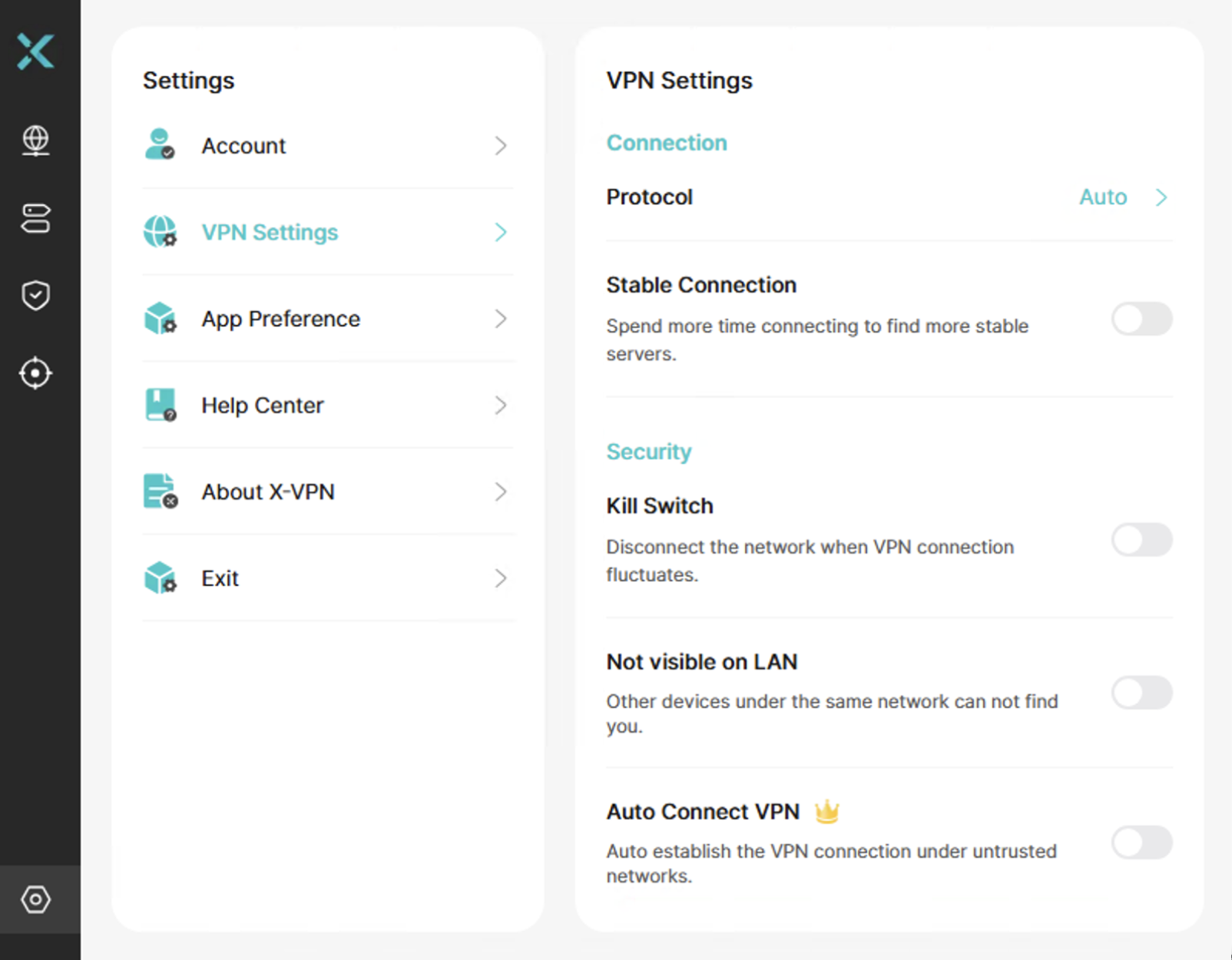
Step 3. Select Talaria from the protocol list.
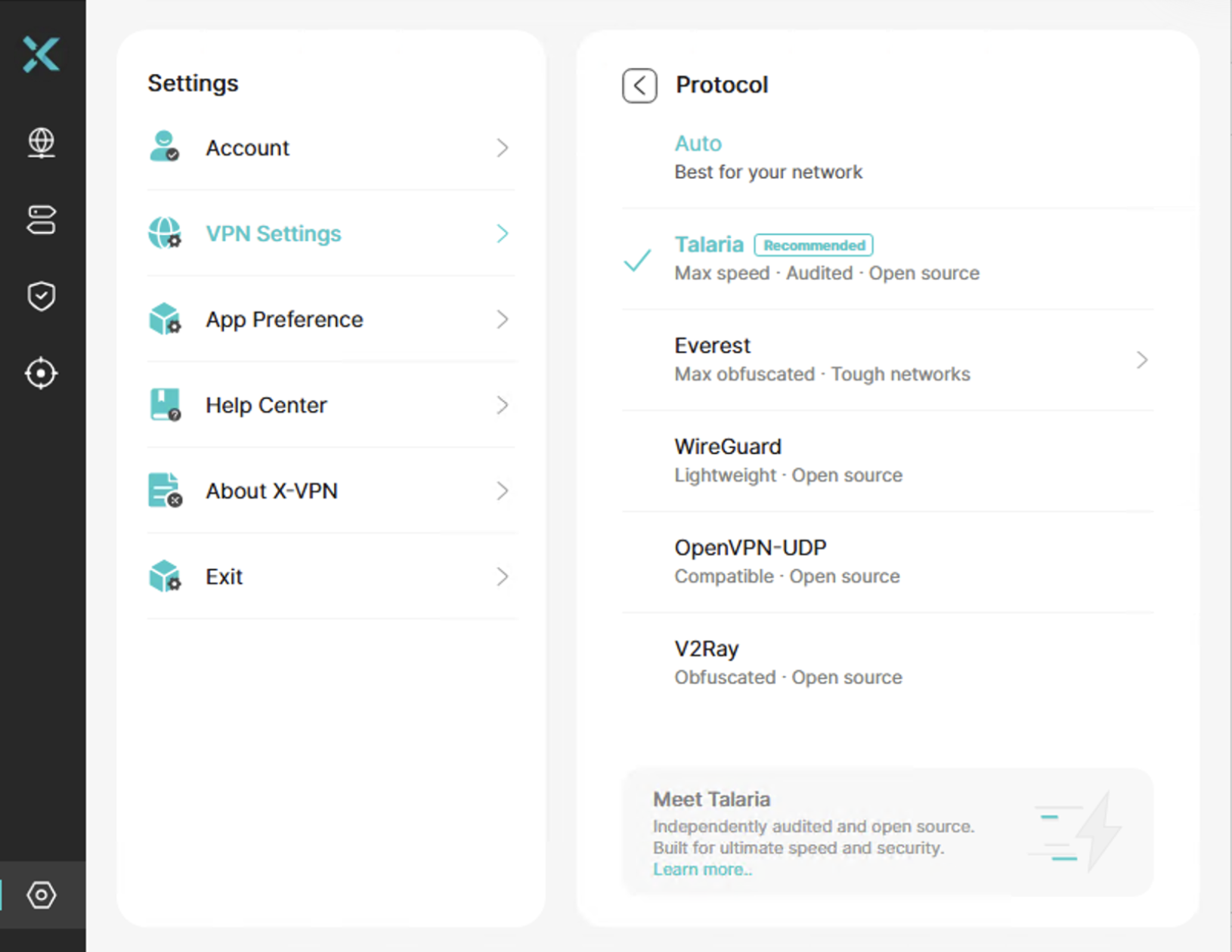
Step 4. Now you can enjoy lightning-fast speeds with Talaria!
When Should You Use Talaria?
We recommend Talaria when speed is your priority. It’s built to reduce VPN-related speed loss and help you make better use of your connection, whether you’re streaming, downloading large files, or installing game updates.
We offer a range of VPN protocols for different needs. Here are a few examples to help you choose:
Protocol | Speed | Stability | Compatibility | Unblock |
|---|---|---|---|---|
Talaria | Very strong | Moderate | Strong | Moderate |
Everest | Moderate | Strong | Very strong | Very strong |
WireGuard | Strong | Strong | Very strong | Limited |
OpenVPN | Limited | Moderate | Very strong | Very limited |
You can explore more available protocols anytime in X-VPN’s protocol settings.
Conclusion
Talaria brings faster, more efficient connections to everyday activities, from streaming to large downloads. Alongside these performance improvements, we’ve made its source code public and had its security independently assessed by Vantage Point Security. It’s another step forward in our efforts to make X-VPN faster, more secure, and more transparent.
FAQs
Which devices can I use Talaria on?
Talaria is available on Windows, macOS, iOS, and Android, except for Windows devices that use ARM processors. To access it, make sure you’re using the latest version of X-VPN.
Can I use Talaria for free?
Yes! Both X-VPN Free and Premium users can use Talaria. You can try it without upgrading to a paid plan.
How can I enable Talaria?
Mobile: Open X-VPN and tap the protocol option on the connection screen. Select Talaria, then connect.
Desktop: Open X-VPN and click Settings in the bottom-left sidebar. Go to VPN Settings > Protocol, select Talaria, and connect.
Will I always get faster speeds with Talaria?
Will I always get faster speeds with Talaria?
Talaria is built for speed, but actual performance depends on your device, network, and server. While our internal tests showed significant speed improvements, individual results may vary.
What makes Talaria different from other VPN protocols?
Talaria is X-VPN’s in-house VPN protocol, developed for speed and security. It is open source. Everest is designed for restrictive networks, while WireGuard and OpenVPN are widely used, industry-standard protocols.
Is Talaria secure to use?
Yes. Talaria uses TLS 1.3 for connection encryption and hybrid post-quantum key exchange to help protect against future quantum attacks. It also safeguards against replay attacks and data tampering. Vantage Point Security found no security vulnerabilities in its independent security assessment.
Has Talaria been audited independently?
Yes. Talaria’s security was assessed by Vantage Point Security, an independent cybersecurity firm based in Singapore. No vulnerabilities were found at any severity level, including critical, high, medium, or low. Only four informational observations were identified. All four have since been addressed, and Vantage Point Security has verified the fixes through retesting.
Is the Talaria protocol open source?
Yes. Talaria’s source code is available under the GNU Affero General Public License v3.0 (AGPLv3) on GitHub. You can explore it to see how the protocol works.