

We’re pleased to announce that X-VPN’s new in-house VPN protocol, Talaria, is now open source on GitHub and has completed an independent security assessment by Vantage Point Security.
Now, you can see how Talaria works instead of simply taking our word for it. The independent assessment gives you further reassurance, with no security vulnerabilities identified.
Table of Contents
What Is Talaria?
Talaria is X-VPN’s new in-house VPN protocol, built for your everyday online needs with speed, security, and privacy at its core. It processes multiple connections in parallel and reduces unnecessary data handling. This improves transfer efficiency, lowers CPU overhead, and makes better use of available bandwidth to deliver faster performance.
But speed isn’t everything. We’ve also built Talaria with modern encryption to protect your data. And to give you greater confidence in its security, we’ve made its code open source and put it through an independent security assessment. Now, anyone can view Talaria’s source code on GitHub and read the independent security assessment report by cybersecurity firm Vantage Point Security.
Why We Open-Sourced Talaria
A VPN protocol determines how your device connects to a VPN server and how your data is encrypted and transmitted. It plays a key role in the security and privacy of your VPN connection.
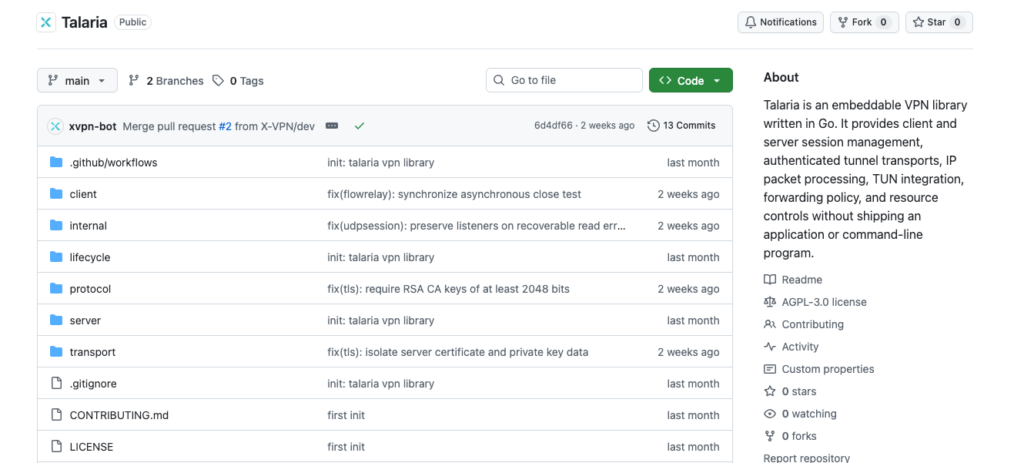
So, when it comes to your online privacy, we believe you should be able to see and verify the technology protecting it, not just take our word for it. That’s why, on October 16, 2026, we made Talaria’s source code publicly available on GitHub under the AGPL v3 license.
Now anyone can examine how Talaria works, while developers and security researchers can independently review its code, identify potential issues, and suggest improvements. We also welcome security researchers to report vulnerabilities through our Bug Bounty Program, where eligible findings may be rewarded.
For you, this means greater transparency into the technology protecting your connection, with ongoing opportunities for independent scrutiny and improvements to Talaria’s security over time.

Tip: Open-sourcing Talaria brings greater transparency, but it may also make the protocol easier for some networks to detect and block. If you have trouble connecting with Talaria, you can switch to Everest, our other in-house VPN protocol, as an alternative.
Talaria’s Independent Security Audit
Making Talaria’s code publicly available is one step toward greater transparency. But we also wanted independent security experts to put it to the test.
From September 8 to 24, 2026, Talaria underwent an independent security assessment by Vantage Point Security, a Singapore-based cybersecurity firm. The assessment combined white-box source code review and protocol-level penetration testing to evaluate Talaria’s security.
The assessment identified no security vulnerabilities at any severity level, including Critical, High, Medium, or Low, and noted only four informational observations, which were recommendations to further strengthen Talaria’s security.
We took all four observations seriously and implemented the recommended improvements, then invited Vantage Point Security to independently retest the changes, which confirmed that all four observations had been resolved.
In its final report, Vantage Point Security concluded:
“Subject to the stated scope and testing limitations, the assessment did not identify a demonstrated flaw that undermines the security design of the Talaria VPN protocol or its underlying cryptographic primitives, and the reviewed design and use of cryptography were found to be aligned with security best practices.“
You can read the full security assessment report to explore the findings and conclusions for yourself.
To learn more about X-VPN’s independent verification, visit our Audit Center.
About Vantage Point Security
For Talaria’s security assessment, we wanted to work with an independent team with proven expertise and recognized industry credentials. That’s why we chose Vantage Point Security, a Singapore-based cybersecurity firm founded in 2014, specializing in penetration testing, source code reviews, and application security assessments.
The firm holds a penetration testing licence from Singapore’s Cybersecurity Services Regulation Office (CSRO) and CREST accreditation, alongside ISO/IEC 27001 certification and SOC 2 Type 2 attestation. These credentials gave us confidence in the team’s expertise and professional standards.
We appreciated Vantage Point Security’s thorough approach and constructive feedback throughout the assessment. We believe working with independent security experts like them is an important part of continuously improving our technology and giving you greater confidence in its security.
Our Commitment Goes Beyond One Audit
Open-sourcing Talaria and completing an independent security assessment are important milestones, but our commitment doesn’t stop here. We’ve always believed in ongoing transparency, continuous verification, and responding to your concerns with action. From our independent No-Logs audit to Talaria’s open-source release, we’ve continued to make our technology more transparent and open to public scrutiny. Moving forward, we’ll keep strengthening our security through regular internal testing and independent assessments, while listening to your feedback and making meaningful improvements.
Ultimately, we believe everyone has the right to privacy and security online. As a VPN provider, our responsibility is not only to help protect those rights, but also to give you confidence in the technology you rely on. We’re grateful for the trust you place in X-VPN, and we’ll continue to honor it through our actions.
FAQs
How can I read Talaria’s security assessment report?
The full report is publicly available to everyone, not just X-VPN users or Premium subscribers. You can read the report directly here without signing in, or find it on the Account Page after logging in to the X-VPN website.
What were the four observations, and did they affect my security?
No. These observations were suggestions for further strengthening Talaria’s security, rather than confirmed vulnerabilities. Think of the password strength indicator you see when creating a password. That doesn’t mean your password has been compromised, just that there’s room to improve its security.
Similarly, the four observations focused on refining data validation, strengthening TLS configuration safeguards, improving certificate strength requirements, and standardizing session credential checks. None were classified as confirmed security vulnerabilities.
We’ve addressed all four, and Vantage Point Security has independently verified the fixes, with no outstanding findings.
For more technical details, you can review the findings and fixes in the full assessment report.
Is Talaria available to all X-VPN users?
Yes! Talaria is available to both X-VPN Free and Premium users on supported devices, with no additional payment required. You can enjoy Talaria’s speed and security benefits without upgrading to Premium.
Who is Talaria best suited for?
Talaria is designed for almost everyone who wants a fast, secure, and private VPN connection. Whether you’re browsing, streaming, gaming, or downloading files, Talaria is built to meet your everyday online needs.
Which devices support Talaria?
Talaria is available on X-VPN for Windows, macOS, iOS, and Android. Please note that Talaria is not currently supported on Windows ARM devices.
How do I use Talaria in X-VPN?
You can easily switch to Talaria in your X-VPN settings. Just follow these steps based on your device:
· Desktop (Windows & macOS): Go to Settings > VPN Settings > Protocol, then select Talaria.
· Mobile (iOS & Android): Go to Me > VPN Settings > Protocol, then select Talaria.
Once selected, return to the main screen and connect to a VPN server to start using Talaria.