


TL;DR
How to delete TikTok account? Just open the app, then go to your profile → ☰ → Settings and privacy → Account → Deactivate or delete account → Delete account permanently.
After you submit the request, TikTok will suspend the account for 30 days, during which time it will be invisible to the public. You can reactivate the account within 30 days to cancel the deletion; after 30 days, the account and data will be permanently deleted. If you log in during these 30 days, TikTok will first ask if you want to reactivate. To let the deletion go through, do not click “Reactivate.”

💡 Tip: According to Sensor Tower data cited by CNBC, after TikTok’s US joint venture took over operations in January 2026, the number of US users uninstalling TikTok daily increased by nearly 150% compared with the previous three months.
Table of Contents
How to Delete Your TikTok Account
On iPhone or Android
The steps for both devices are the same.
Step 1. Open TikTok → Tap the ☰ menu at the top → Settings & Privacy → Account → Deactivate or delete account.
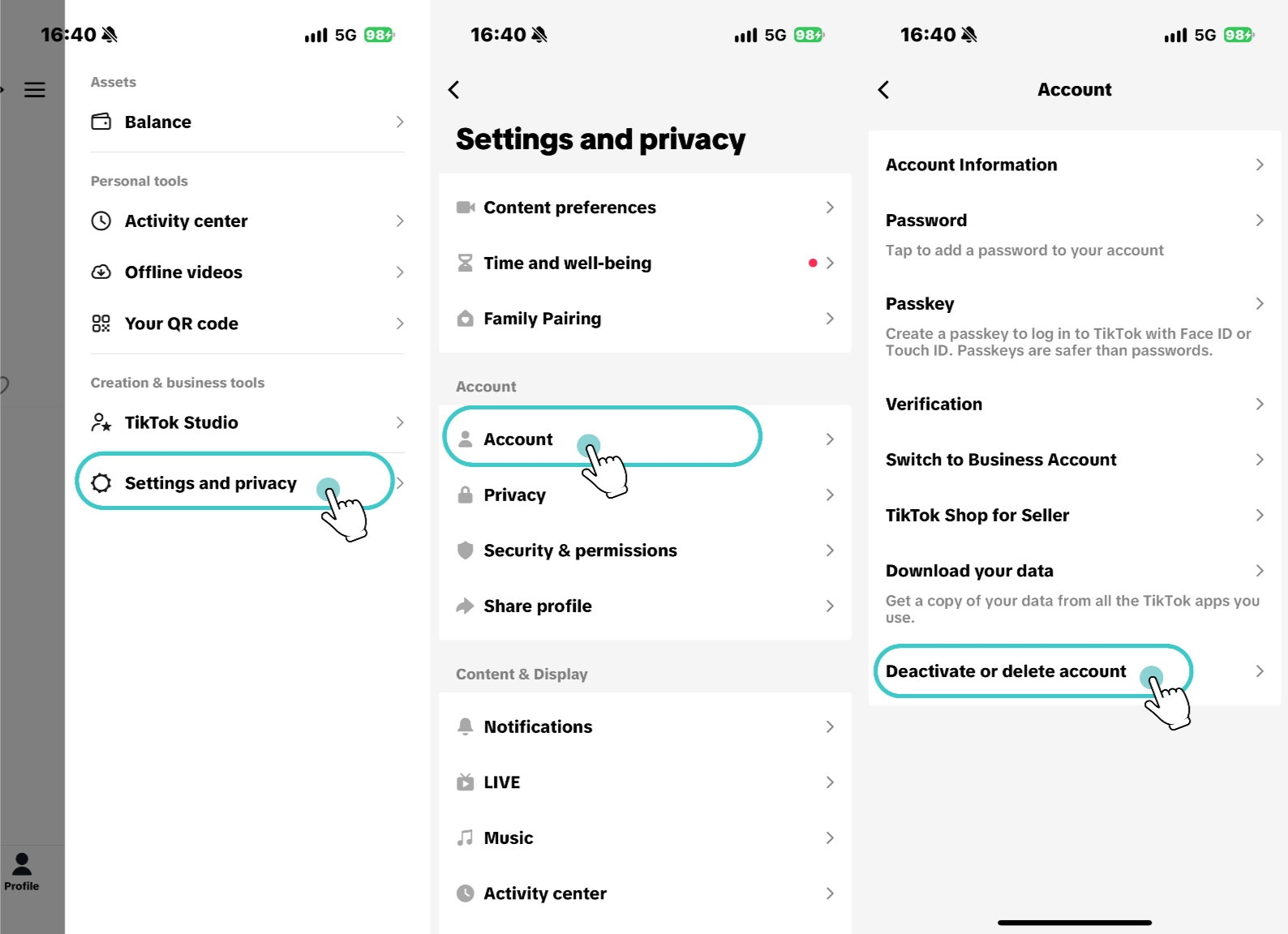
Step 2. Delete or deactivate? → Choose Delete account permanently → Before you go, can we help? → Select a reason and tap Continue, or simply tap Skip in the upper right corner.
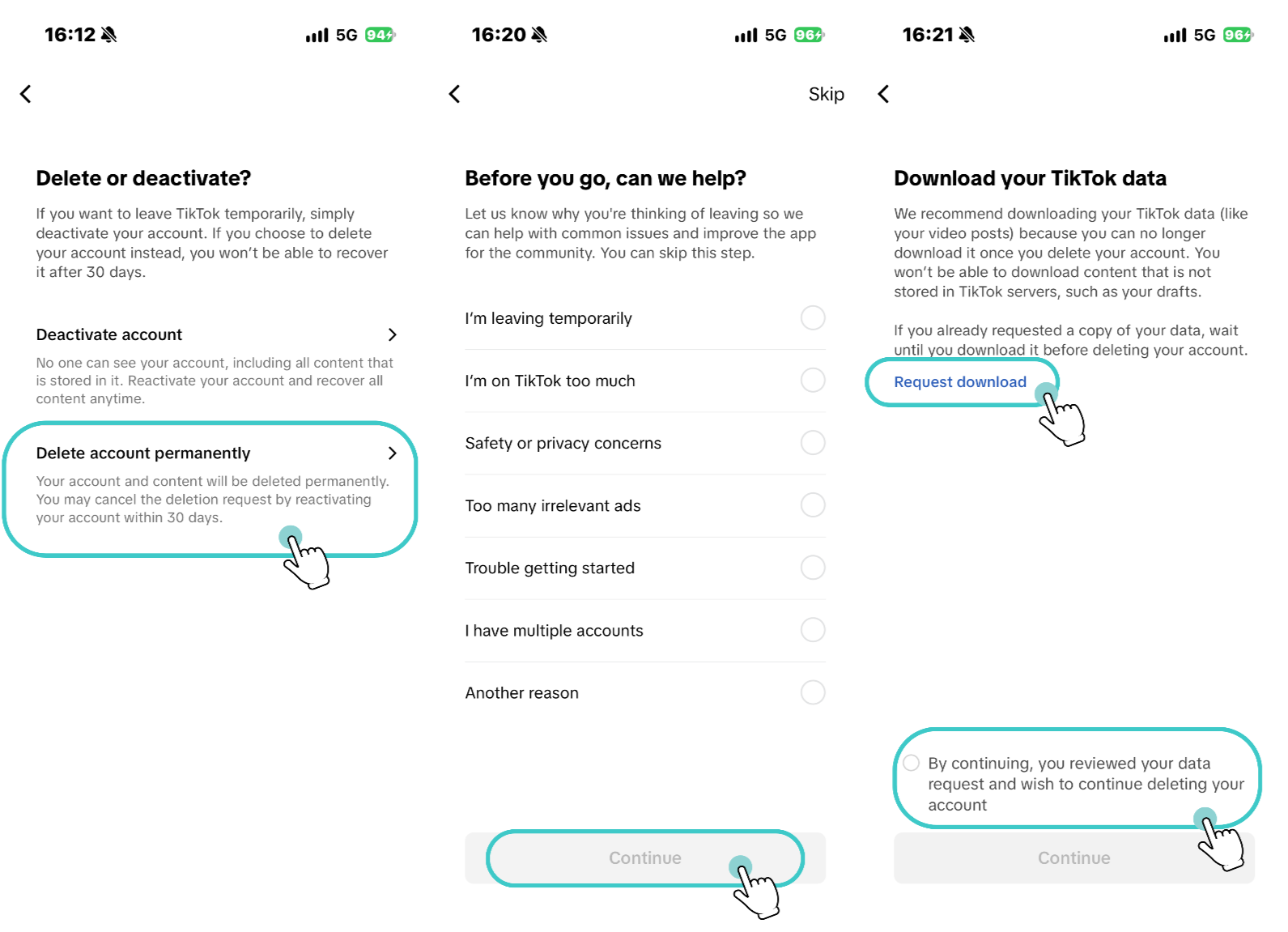
Step 3. Next, you’ll see the “Download your TikTok data” page → If needed, tap “Request download” to request the data package → Check the confirmation box at the bottom of the page and tap “Continue.”
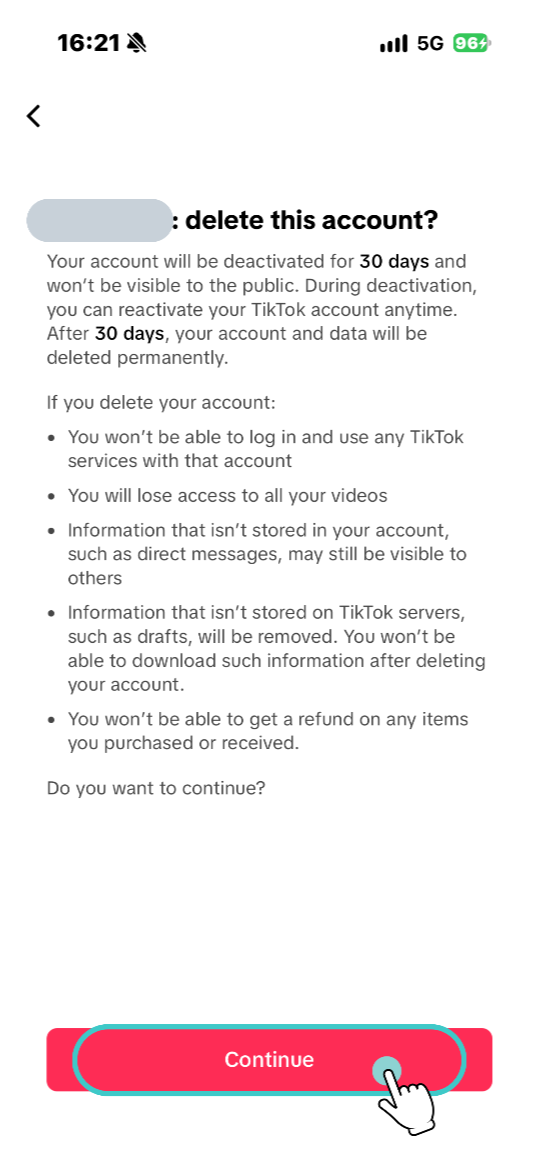
Step 4. TikTok will display a confirmation page titled “[Your Username]: delete this account?”, listing the consequences of deletion → After confirming everything is correct, tap Continue.
Step 5. Enter the 6-digit verification code and tap “Delete account.” → A pop-up will ask again, “Delete [your username]?” Tap Delete.
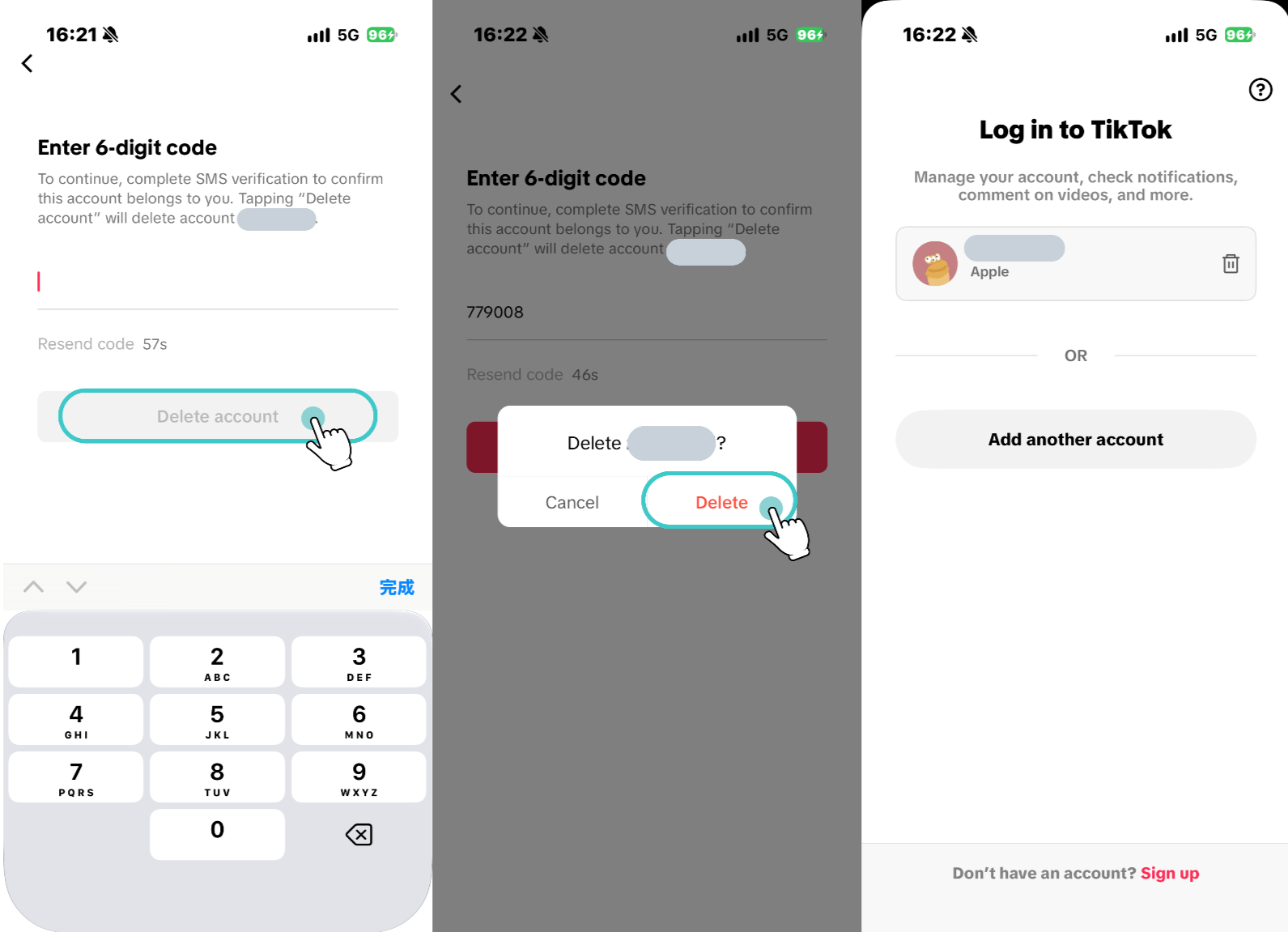
💡 During our test, we received an SMS verification code. If you don’t receive it, you can tap “Resend code” to resend it after the countdown ends.
Step 6. Once the process is complete, you will be logged out and returned to the TikTok homepage.
If the verification code is sent to an email address or phone number that you no longer use, stop here. Repeatedly trying won’t get you a code you can access. Skip to the section “Can’t delete your TikTok account? Start here”.
On a Computer
The TikTok Help Center only outlines the steps for the app, but you can also delete your account in a browser:
Step 1. Open tiktok.com in your browser and log in → Click More in the left-hand menu → Under Settings, click General → Access the Manage account page.
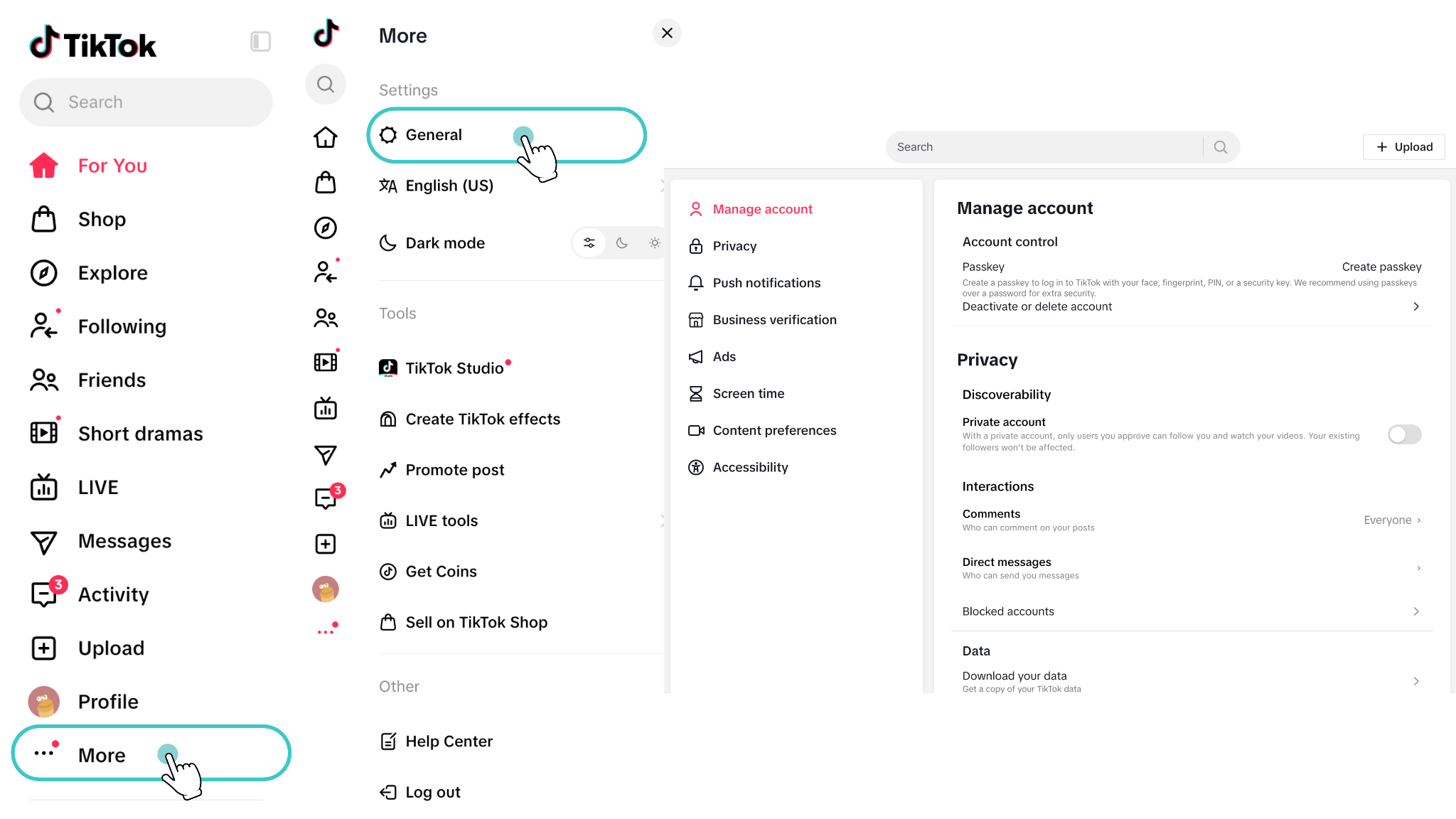
Step 2. Under Account control → Click Deactivate or delete account → Choose Delete account permanently.
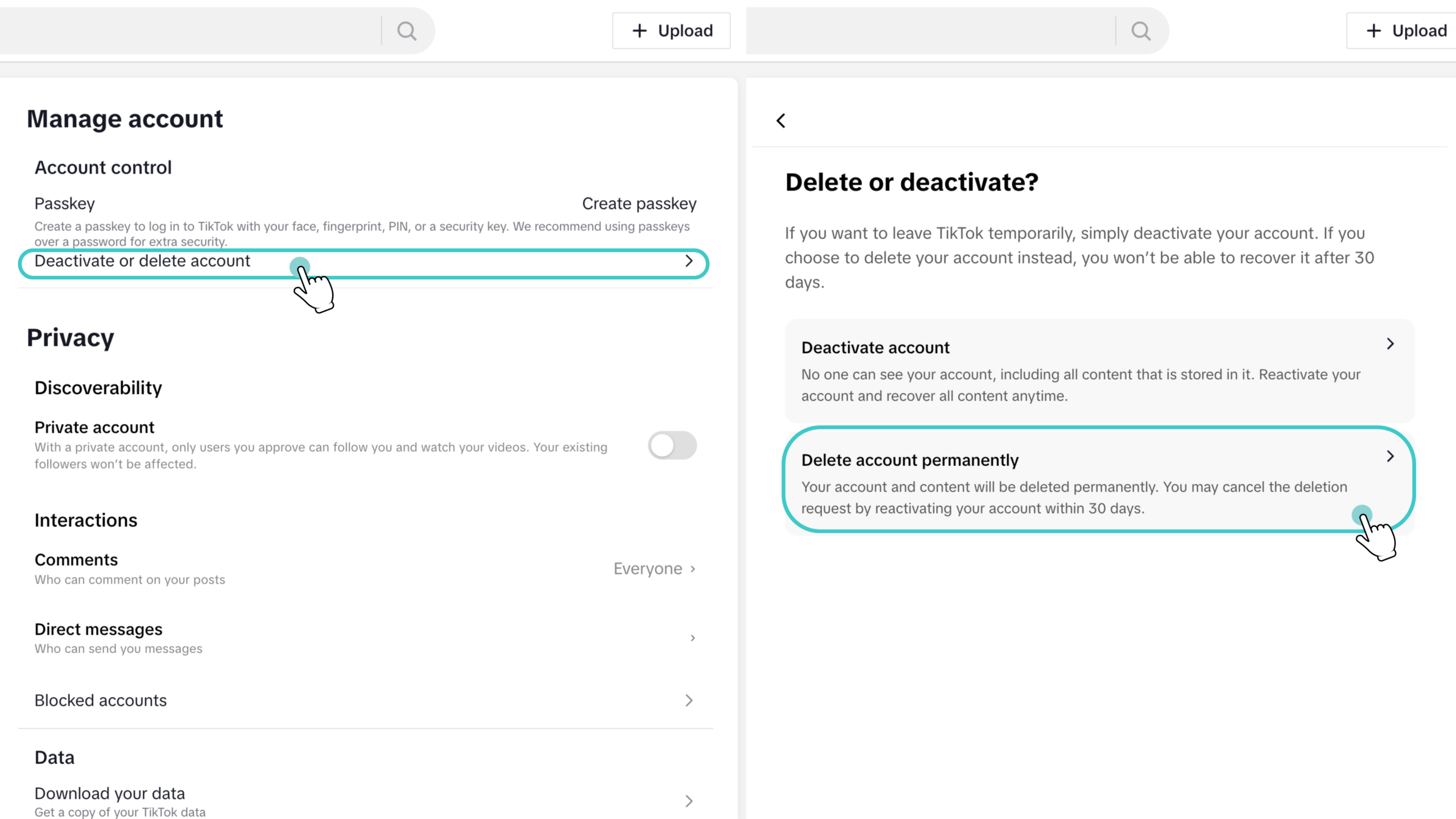
Step 3. The subsequent steps are the same as on the mobile version: the “Before you go” page, data download page, confirmation page, and finally, entering the verification code. The only difference is that the Skip button on the web version’s “Before you go” page is located at the bottom of the page.
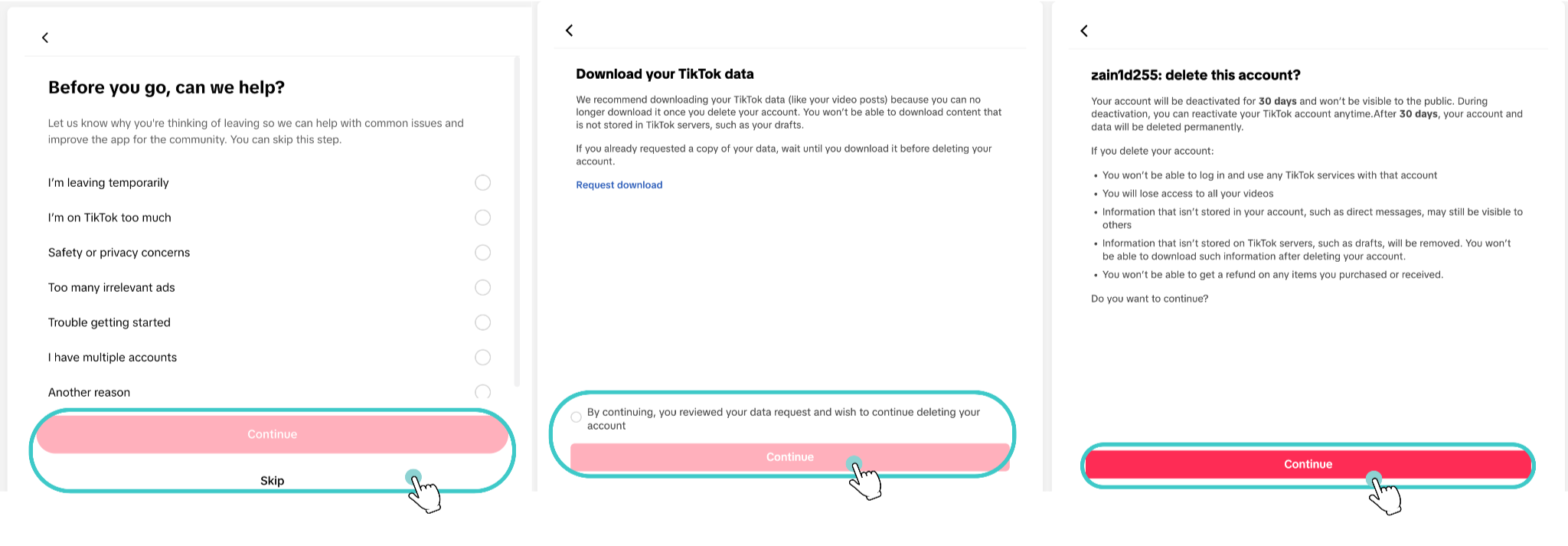
The web version can be used as a backup. If the app keeps you stuck on a page that you can’t continue from, the browser version may behave differently.
What to Save Before Your TikTok Account Is Gone
Before you delete your account, there are a few things you may want to keep, including your videos, drafts, account data, and any remaining balance or earnings.
Already clicked delete? It’s not too late. Log in and reactivate your account within 30 days, take care of anything you want to keep, and then delete it again. The 30-day countdown will restart.
Here’s what to check first.
Your Videos
In TikTok’s data files, the content you post is provided as text links, not as direct video files; after your account is deleted, these links will likely no longer be usable.
Your Data File
TikTok lets you download a copy of some of the data associated with your account, such as your username, watch history, comment history, and privacy settings. To request it, go to Settings and privacy → Account → Download your data. The file can take several days to prepare and is available for up to four days once it’s ready, so request and download it before deleting your account.
Your Draft
The draft is saved locally on your phone. Publish or save your draft before deleting your account or uninstalling the app. [PENDING: Confirm whether the draft will appear in the data files]
Coins and Earnings
TikTok’s deletion confirmation page states that once an account is deleted, purchased or received items are non-refundable. Therefore, use any remaining coins first, and withdraw any creator earnings first.
What Happens After You Delete Your TikTok Account
Deleting an account actually starts a countdown. Below, you can see what will happen to your account content after you confirm the deletion:
Item | What happens after deletion? |
|---|---|
Account and profile | The account will be suspended and hidden for 30 days. Then permanently deleted with its data. |
Videos | Deleted along with the account. |
Private messages you sent | They may still be visible to others (the original confirmation page has been removed). |
Duets and Stitches related to your videos | They may still be visible. |
Drafts | Removed and unavailable for download. |
Items purchased or received | No refunds. |
Data held by TikTok | Retention time varies depending on the data type and purpose. |
Copies already saved by others | No longer under your control. |
TikTok’s deletion confirmation page states that “accounts and data” will be permanently deleted after 30 days. However, the wording of its privacy policy is more cautious. TikTok’s US privacy policy (updated July 15, 2026) states that different types of information and purposes of use have different data retention periods; TikTok also reserves the right to retain some information to fulfill legal and contractual obligations, legitimate business interests, and legal claims.

Can You Deactivate TikTok Instead?
Sure. Let’s say you’re going abroad for an exchange semester and just don’t want to use TikTok for the time being, but want to continue using it after you return. In that case, deleting your account directly would be going too far. TikTok itself thinks so too: on the “Before you go” page of the deletion process, if you select “I’m leaving temporarily,” TikTok will directly suggest that you deactivate the account instead and provide an option to do so.
How to Deactivate Your TikTok Account
Step 1. Tap your profile at the bottom of the app.
Step 2. Tap the ☰ menu.
Step 3. Tap Settings & Privacy.
Step 4. Tap Account, then select Deactivate or delete account.
Step 5. Tap Deactivate account and follow the prompts.
According to the TikTok Help Center, after deactivating an account:
- You will no longer be able to access this account, but TikTok will retain your data so you can reactivate it;
- Others cannot see your profile page or content;
- Messages you previously sent may still be visible to the recipient;
- Duets or Stitches created using your video may still be visible.
If you want to come back, log in using the same login information and then tap Reactivate.
You can also deactivate it via the web: follow the steps to delete it on your computer, go to the “Delete or deactivate?” page, and select Deactivate account.
Deactivate vs. Delete
Some tutorials say that deactivated accounts will also be deleted after 30 days. TikTok doesn’t say that. But why do people get confused? A quick look at the deletion confirmation page makes it clear: TikTok states that your account will be “deactivated” for 30 days, and you can “reactivate” it at any time during the deactivation period.
In other words, TikTok uses the same set of words to describe two completely different states: one is a deactivation you actively choose, and the other is a 30-day waiting period after submitting a deletion request. The same button is used to restore both states. The real difference lies only in the timeframe: active deactivation has no time limit, while the deactivation that follows a deletion request lasts only 30 days.
Deactivate | Delete | |
|---|---|---|
Can others still see your profile? | No | No |
Will your data be retained? | Yes | Deleted after 30 days |
Can I come back? | Anytime | Within 30 days |
Is there a time limit? | No (the app says “anytime”). | 30 days |
How can I switch to a different state? | Log in → Reactivate → Delete | Reactivate within 30 days to cancel deletion. |
Already Deactivated and Now Want to Delete?
A deactivated account cannot be deleted directly. You need to log in first, click “Reactivate,” and then follow the previous steps to delete the account.
US users who haven’t opened TikTok since January will likely encounter a new Terms of Service page when logging back in. This will be explained in detail below. If you’re certain you won’t be returning, deleting your account now will save you the trouble of dealing with it again later.
Can’t Delete Your TikTok Account? Start Here
Which path you take next depends on what you can still access. Find the one that best reflects your situation.
You Forgot Your Password but Still Have Your Email or Phone
This is the simplest case.
After entering your username on the login page, there is a “Need help logging in?” link below the password field. Click on it and select “Reset password with phone” or “Reset password with email” to reset your password using your phone number or email address. After logging in, you can delete your account normally.
You Can Log In, but the Code Goes to an Old Email or Phone
Try updating your contact information first. Go to Settings & Privacy → Account → Account Information, click Change email, and change it to an email address you can currently access.
If you are asked to verify your old email address when changing your email address, and you are not receiving the notification, use TikTok’s feedback form and select the account deletion option.
You Signed Up With Apple and Can’t Receive the Code
Unsure how you registered? After logging out, the registration method, such as “Apple,” will be displayed below your username on the login page.
Here’s some good news: registering with Apple doesn’t necessarily mean you’ll get stuck. Our test used an Apple account that was already linked to a phone number; when deleting it, TikTok sent a verification code via SMS, and the whole process was smooth. The real problem often arises with accounts that are only linked to a hidden Apple email address and not a phone number.
If you chose to hide your email address during registration, TikTok will only know the forwarding email address generated by Apple for you.
For accounts that use “Sign in with Apple” and hide their real email address, Apple creates an address ending in @privaterelay.appleid.com. Your TikTok username might also look like @appleuser followed by a string of numbers.
Step 1. Write down your username now. First, check this forwarding email address.
Step 2. On your iPhone, open Settings, tap your name, go to iCloud → Hide email address, select the corresponding app, and view its Forward To settings.
Step 3. Ensure that email forwarding for TikTok is enabled, and then check which email address it is being forwarded to.
Step 4. You can change the forwarding email to any email address linked to your Apple account. But do not disconnect “Sign in with Apple” itself.
Apple warns that if you stop using “Sign in with Apple” for an app, you may need to create a new account the next time you sign in.
For someone trying to delete their account, this could mean losing the only way to log in to their old account.
Still not receiving the verification code? Use the feedback form. In the Contact Email field, enter a regular email address that you check regularly, not a Private Relay address.
Users who encounter this situation generally report that customer service responses are slow and the responses are often repetitive. Therefore, please try to keep the account information you provide consistent each time you submit a support ticket.
You Can’t Access the Account, Email, or Phone at All
This is where most people get stuck because they can only guess.
Before submitting a request, try to find the information first. For example, to find the phone model, find an old photo taken years ago and then view the photo details. Photo metadata usually records the device used to take the photo.
You can only submit one ticket per account.
Customer service responses are often slow and highly templated. No one can guarantee that the problem will eventually be resolved, nor can anyone guarantee how long it will take, and we won’t pretend we can.
Another option is a data deletion request. TikTok’s US privacy policy states that users can request the deletion of personal information collected by TikTok through a privacy request form.
However, this route also requires identity verification. The policy clearly states that TikTok will require you to send the request from the email address linked to your account, or provide information that verifies your account. It’s not a shortcut to bypass identity verification, but it’s a formal data rights channel that can serve as a second option alongside the feedback form.
Users in the EU and other regions also have similar deletion rights under local laws, and can specify in their request that they are exercising this right.
You’re in the US and the New Terms Pop-Up Won’t Go Away
TikTok’s new terms of service and privacy policy took effect on January 22, 2026, and logging in implies acceptance of these terms.
Here’s the problem:
If you want to delete your account, you must log in.
Currently, online feedback regarding the web version is inconsistent.
Some people said they could bypass the pop-up and enter the settings without accepting the terms; others said the web version, like the app, completely blocked subsequent operations.
The method described by those who succeeded is essentially to restart the app repeatedly until the pop-up loads late enough to get past it.
This relies on luck, not a reliable method.
If neither the app nor the website works, use the feedback form and state directly that you want your account deleted without accepting the new terms.
TikTok says “Try Again Later”
Update the app first.
Then close the app completely and reopen it.
Still not working? Try switching to the web version or another device, then wait a few hours before trying again.
If the error persists, report it to TikTok via the feedback form.
Things That Don’t Delete Your Account
- Uninstalling the app. Your account will remain unchanged.
- Switching your account to private. This will only change who can see your posts.
- Consistently refusing to accept the new terms of service. Your account remains unchanged.
- Getting the account banned. A Reddit user’s old account disappeared from search results after contacting customer service about a ban. She felt the problem was solved, but being banned only makes the account invisible; it does not mean the data has been deleted. TikTok’s privacy policy also states that for users removed for violating the rules, TikTok may retain relevant information for further action.
- Asking your friends to collectively report the account. This has the same problem as getting the account banned, but the outcome is even more unpredictable.
How to Cancel a TikTok Account Deletion
Changed your mind within 30 days? The deleted account will still appear on TikTok’s login page. After you log in, TikTok will display the “Reactivate your TikTok account” page. Click Reactivate, and all content will be restored within minutes.
There’s also a “Log out” button at the bottom of this page. This means that simply logging in won’t automatically restore your account. If you log in by accident, just click “Log out” to exit.
What you really need to be careful about is shared devices. That old iPad in the drawer might still have your account on the login page. Someone could click on it, then click Reactivate and cancel the deletion.
So before deleting, go to Settings & Privacy → Security & permissions → Manage devices. This lists all the devices logged into your account. Don’t forget any old phones or tablets; log out of each one.
After submitting the deletion request, you can also uninstall the app directly to avoid accidentally canceling the deletion by opening TikTok out of habit.
Once 30 days have passed, the account cannot be recovered.
Wrap It Up
Deleting TikTok is simple if you still have access to your account.
If you can no longer log in, what you really need to do is stop repeatedly clicking the delete button and prove that this account belongs to you.
Focusing your efforts on TikTok’s official support channels is more worthwhile than constantly retrying the deletion process.
Deleting an account involves removing content stored on the platform under that account.
Your network connection is a separate layer.
Every website you visit can still see your IP address, and the IP address is enough to roughly determine your location.
If you also care about this, then a VPN like X-VPN can help hide your real IP address when you browse the web.
As for the account itself, that’s the part this guide addresses. Now you know how to handle it.
FAQ
How do I delete my TikTok account?
Open TikTok and go to:
Profile → ☰ → Settings & Privacy → Account → Deactivate or Delete Account → Delete Account
Enter the verification code sent to you by TikTok.
The account will be permanently deleted after 30 days.
How long does TikTok take to permanently delete an account?
30 days. TikTok’s deletion confirmation page states that the account will be inactive and invisible to the public for 30 days, after which the account and data will be permanently deleted. Reactivation during this period will cancel the deletion.
Can I delete my TikTok account right away without waiting 30 days?
No. TikTok does not offer a way to skip the waiting period.
Does uninstalling TikTok delete my account?
No. Your profile page and videos will remain until you officially delete your account in settings.
Can I delete TikTok without a password?
If you can still use the linked email address or phone number, you can reset the password first and then delete it normally.
If you cannot access the account via email or phone number, use TikTok’s feedback form and be prepared to prove that the account belongs to you.
Can a deleted TikTok account be recovered?
Yes, within 30 days. Log in to your account, then click Reactivate. Not after 30 days.
Will people still see my messages after I delete or deactivate TikTok?
Possibly. TikTok states on its deletion confirmation page and in its deactivation instructions that private messages you’ve already sent may still be visible to others.
Can I deactivate TikTok on a computer?
Yes. Log in to tiktok.com in your browser, click More → General → Manage account → Deactivate or delete account → Deactivate account on the left.
Can I use the same email or phone number again after deleting TikTok?
TikTok has not made a public statement on this. The phone number or email address will remain linked to the original account for at least 30 days after deletion.