


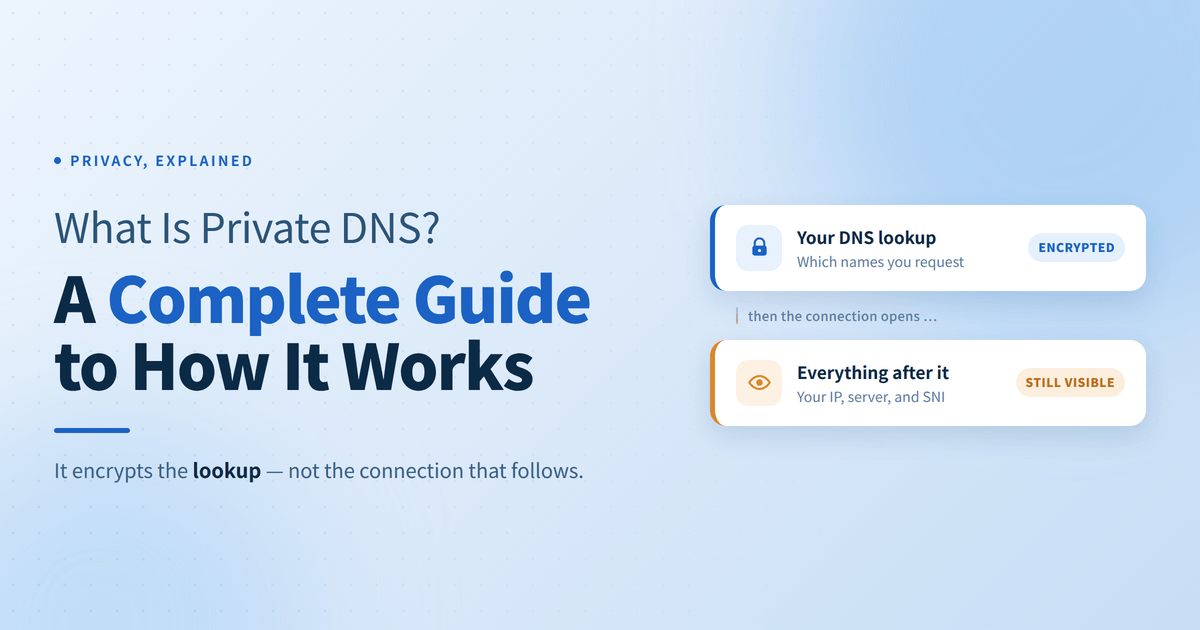
Every time you load a website, your device translates that human-friendly domain into a numerical IP address. Traditional DNS performs this lookup in plain text, exposing your browsing history to ISPs, public Wi-Fi operators, and network eavesdroppers. Private DNS fixes this security gap by encrypting your lookup requests before they leave your device, making it harder for third parties to monitor your queries or redirect you to spoofed sites.
While Private DNS provides a fast, zero-cost boost to your baseline privacy, it secures the address lookup phase rather than your actual web traffic. This guide breaks down how Private DNS works under the hood, compares its core protocols, and clarifies its exact security boundaries to help you build a smarter privacy strategy.
Table of Contents
What Is DNS?
DNS functions as the internet’s address book. Because network infrastructure relies entirely on numerical IP addresses (such as 192.0.2.1) to route traffic, humans use memorable domain names instead. Whenever you enter a URL, your device sends a request to a DNS resolver to translate that human-friendly domain into its corresponding IP address. Only after obtaining this IP address can your device establish a connection to the host server.
The Structural Flaws of Traditional DNS
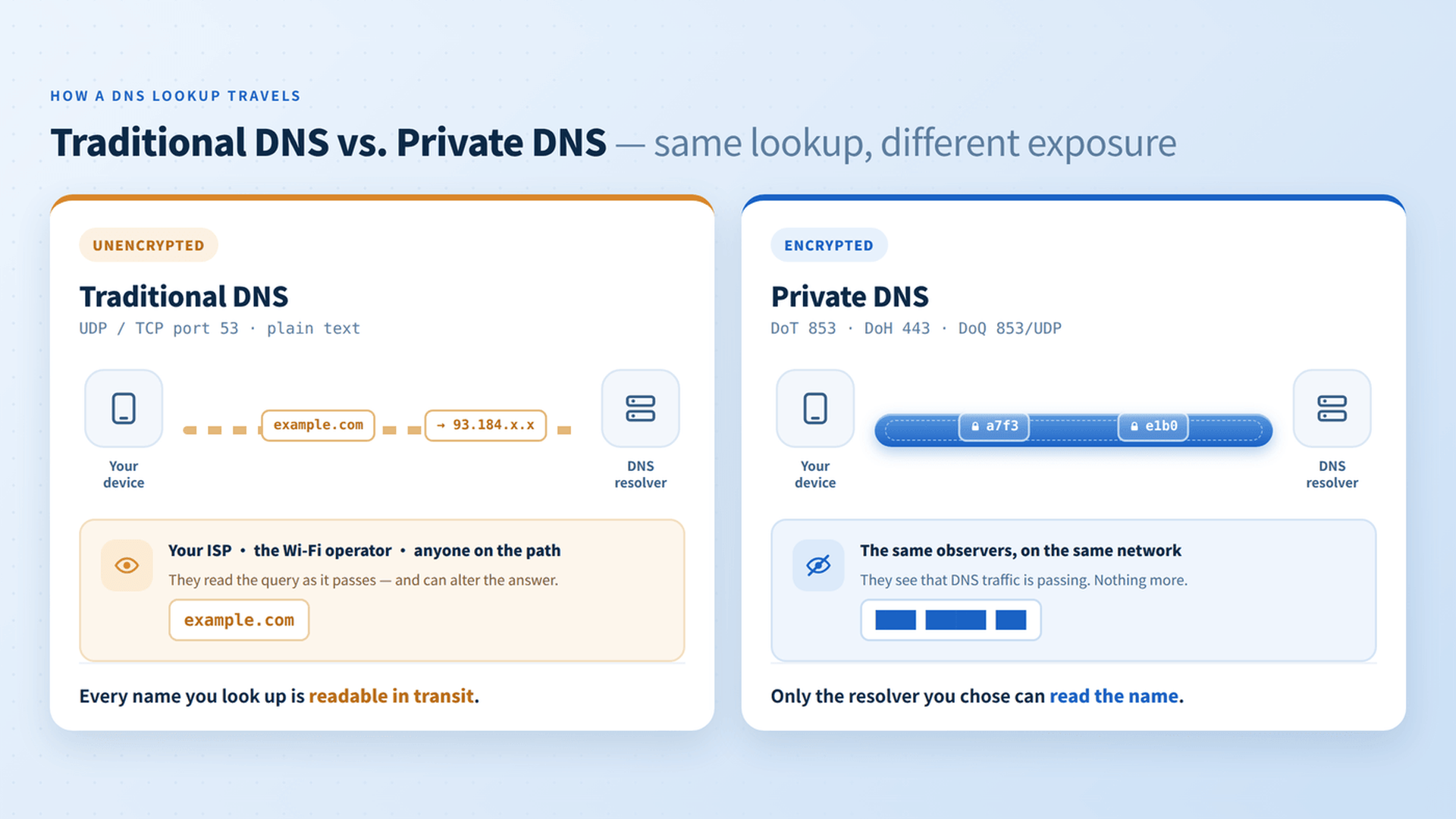
By default, traditional DNS operates over Port 53 using unencrypted, plain-text transmissions. This legacy design creates two significant security vulnerabilities:
- Pervasive Surveillance: Because lookup requests travel in plain text, your Internet Service Provider (ISP), network administrators, and eavesdroppers on public Wi-Fi can record every domain request you make. This enables third parties to log your browsing history, build detailed behavioral profiles, or sell your activity data.
- Data Tampering and Spoofing: Plain-text DNS lacks built-in authentication mechanisms. Attackers on your local network or along the transit route can intercept DNS requests and forge the response—a process known as DNS cache poisoning or DNS hijacking—secretly redirecting you to phishing or malware-infected websites.
What Is Private DNS and How Does It Work?
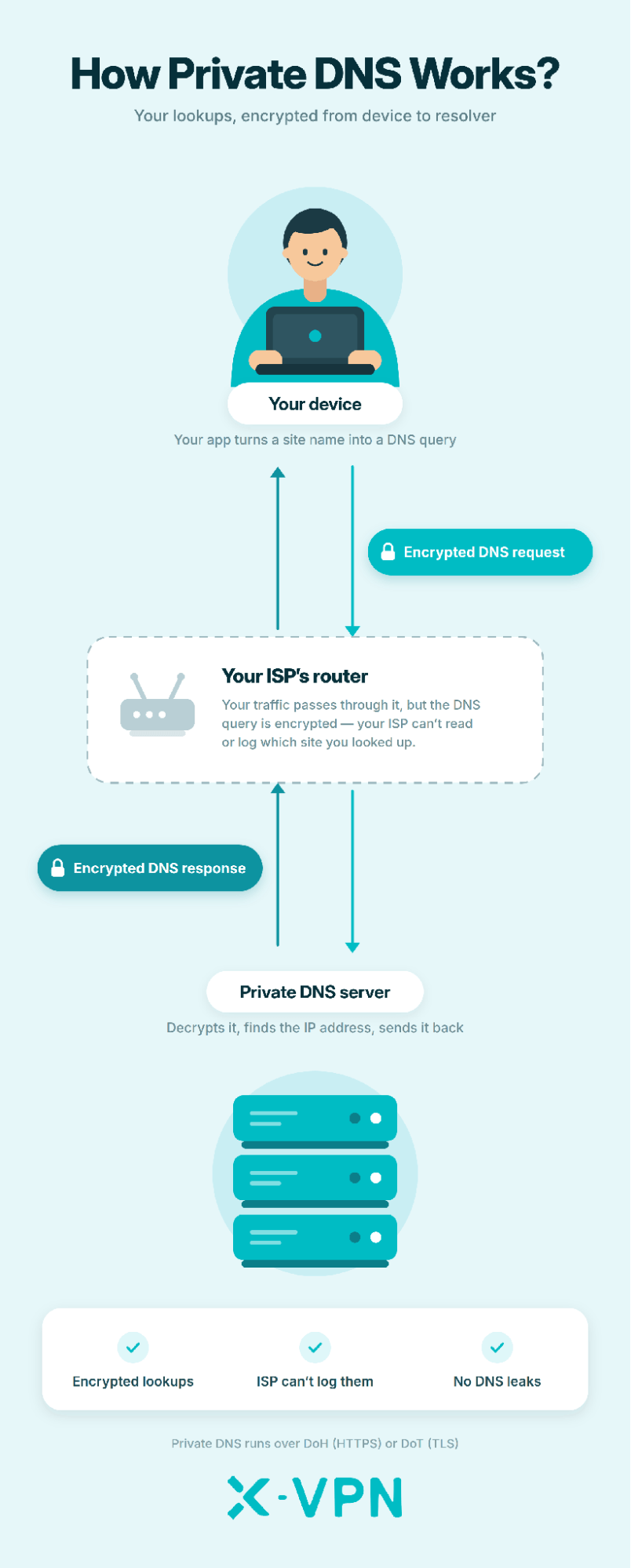
Private DNS fixes the vulnerabilities of traditional DNS by wrapping lookup requests inside encrypted transport protocols before they leave your device. Instead of broadcasting domain queries in plain text over Port 53, your operating system or browser establishes a secure, encrypted tunnel directly to a trusted DNS resolver.
This process achieves two primary security objectives during the address lookup phase:
- Transit Encryption: Encrypting the query payload converts domain names into unreadable ciphertext. This prevents local Wi-Fi eavesdroppers, network administrators, and ISPs from viewing or logging which websites you are looking up.
- Cryptographic Authentication: Private DNS validates the resolver’s identity using SSL/TLS certificates. This guarantees that the IP address returned to your device comes from an authenticated server and has not been intercepted, altered, or spoofed along the way.
Under the hood, “Private DNS” is an umbrella term rather than a single technology. It relies on specific encrypted protocols—such as DNS over TLS (DoT) and DNS over HTTPS (DoH)—each utilizing different network ports and transport layers to secure your connection.
What Private DNS Can’t Protect You from
Private DNS protection ends the moment your device receives an IP address—it secures the lookup, not the actual connection. To build realistic expectations, understand these critical limitations:
- Exposed Destination IPs: Private DNS encrypts the initial query (“What is the IP for example.com?”). Once answered, your device sends network packets directly to that destination IP, allowing your ISP and network administrators to see which server you are contacting.
- Plain Text SNI Leakage: Even when visiting HTTPS websites, your browser sends a plain text parameter called Server Name Indication during the initial TLS handshake to specify the hostname. This means your ISP can still intercept the domain name unless Encrypted Client Hello (ECH, RFC 9849) is supported and enabled across your browser, the DNS resolver, and the target server.
- Unprotected Web Content & Non-DNS Tracking: Private DNS does not encrypt the content of your web traffic (which relies on HTTPS) or defend against non-DNS tracking vectors like tracking cookies, browser fingerprinting, and account-based tracking.

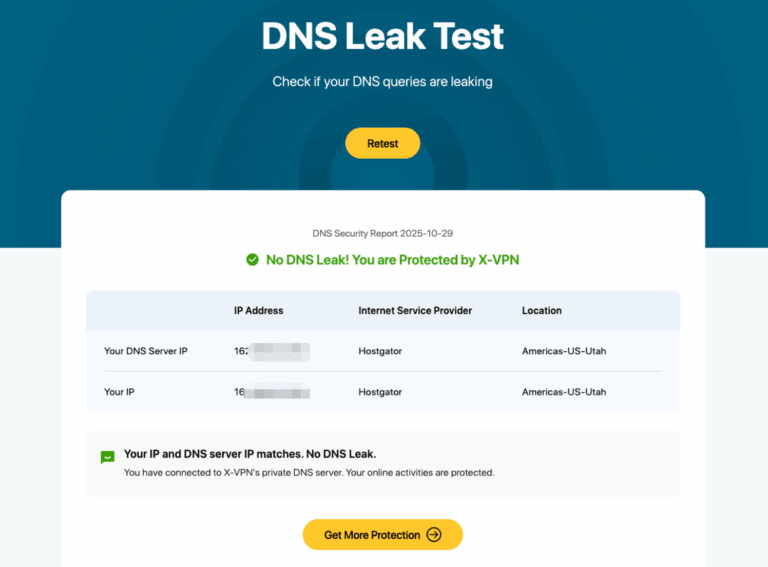
Private DNS encrypts where you ask to go, but plain text SNI and destination IPs can still reveal where you actually go. You can instantly run a free DNS Leak Test to verify if your current browser and network settings are exposing your queries.Tips Content
Does Private DNS Replace a VPN?
No, Private DNS does not replace a VPN. While both tools enhance online privacy, Private DNS only encrypts your domain lookup requests, whereas a VPN can encrypt all of your device’s network traffic, mask your real IP, and stop IP leaks.
When to Use Private DNS
- Everyday Home & Mobile Browsing: Ideal for daily use on trusted networks when you want a low-latency, lightweight defense to stop your ISP from logging search queries and protect against local DNS hijacking.
When to Use a VPN
- Untrusted Public Wi-Fi: Essential in airports, cafes, or hotels to prevent attackers on the same network from sniffing your unencrypted web traffic or intercepting plain text SNI headers.
- Optimizing Network Connectivity:Facilitates smooth video streaming, access to compliant overseas services, and improved connection quality under specific network constraints.
- Network Privacy: Necessary when you need to mask your real IP address, hide destination IPs from your ISP, and encrypt all device activity—including background apps and non-web traffic.
Private DNS vs. X-VPN
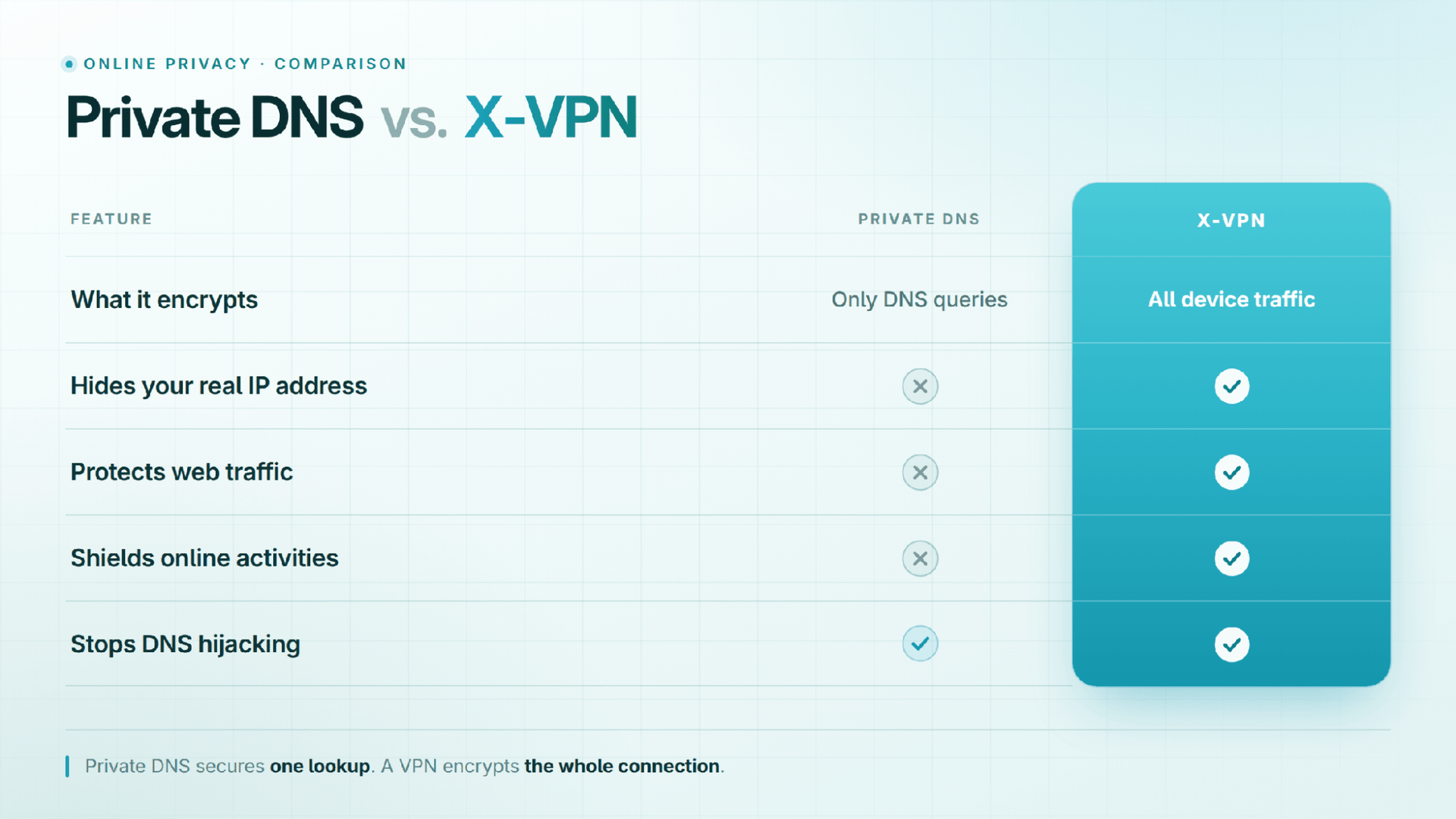
Private DNS provides a solid baseline for securing domain lookups, but it leaves your actual connections, destination IPs, and app data exposed once the lookup is complete. When your online routine takes you to high-risk environments or requires unrestricted access to global content, encrypted lookups alone aren’t enough.
For complete digital coverage, X-VPN picks up where Private DNS leaves off. By wrapping your internet connection in an encrypted tunnel, X-VPN hides your real IP address and improve cross-regional content connectivity.
Conclusion
Private DNS is an essential, zero-cost baseline for everyday internet privacy, but it is not a silver bullet. By encrypting domain name lookups, it effectively prevents ISPs and local network eavesdroppers from logging your domain lookups or hijacking your queries. However, because it leaves destination IP addresses visible and does not encrypt overall internet traffic, it cannot provide total online anonymity.
To build a truly resilient privacy strategy, view Private DNS as the foundational layer rather than the entire fortress. Use it daily to secure your standard connections, enable Encrypted Client Hello (ECH) in your browser to close the SNI leak vulnerability, and activate a reliable VPN whenever you require complete traffic encryption and location masking.
FAQ
What is Private DNS, and what does it do?
It encrypts the DNS lookup requests made by your device, preventing your Internet Service Provider (ISP) or local network eavesdroppers from viewing the domain names you query and protecting results from being tampered with or hijacked.
Does Private DNS hide my IP address?
No. It only encrypts the process of looking up an IP address. It cannot hide the real IP address your device uses to connect to the target server afterwards. You must use a VPN to hide your IP address.
Can Private DNS completely stop my ISP from seeing which sites I visit?
Only partially. While it hides the DNS lookup process, your ISP can still see the destination IP address you connect to. Furthermore, unless Encrypted Client Hello (ECH) is active on both your browser and the destination server, your ISP can still intercept the domain name via plain text SNI during the TLS handshake.
Is Private DNS the same as a VPN?
No. Private DNS only encrypts DNS domain lookups, whereas a VPN encrypts all network traffic leaving your device and masks your real IP address.
Should I use Private DNS together with a VPN?
Generally, no. Premium VPN applications automatically handle, reroute, and encrypt all DNS requests within their secure tunnel by default, making system-level Private DNS redundant.
How VPNs handle DNS: Once connected, a reputable VPN overrides your OS settings to handle DNS queries directly through its private, encrypted DNS servers—preventing external tracking and DNS leaks.
Why conflicts occur: Manually forcing a third-party Private DNS hostname while running a VPN can conflict with the VPN’s TAP/TUN drivers. This can cause network connectivity drops or unintentionally force DNS traffic outside the encrypted tunnel (causing DNS leaks).
Best practice: Rely on your VPN’s built-in DNS protection when connected. Use Private DNS as your primary baseline defense only when you are not running a VPN.
Does Private DNS slow down my connection?
Barely. The encryption overhead is usually negligible. If you select a nearby, high-performance resolver (such as Cloudflare or Quad9), resolution speeds may even feel faster than your ISP’s default DNS.
Is it safe to leave Private DNS on all the time?
Yes, with one exception. On public Wi-Fi networks (such as at airports or hotels), strict Private DNS settings can block captive portal login pages from loading. In those cases, temporarily disable Private DNS to sign in, then switch it back on.
What hostname do I use for Private DNS on Android?
Enter the hostname of an encrypted resolver (not an IP address). For example: one.one.one.one for Cloudflare, or dns.quad9.net for Quad9.