

Security advice can get confusing fast. One app tells you to save a passkey and another warns you to install antivirus protection, while a VPN promises private browsing. They all sound important, but it isn’t always obvious which you need or which problem each tool solves.
The simple answer is that these tools protect different layers, and all work together to safeguard different aspects of your digital life. Passkeys and password managers help secure account access. Antivirus watches for malware and suspicious behavior on your device. A VPN protects the connection between your device and the internet. The strongest setup combines those layers instead of expecting one tool to do everything.
The difference matters. If you expect a VPN to stop malware, you might ignore a dangerous download. If you think antivirus keeps your accounts safe, you might reuse weak passwords. If you think a passkey makes you completely scam-proof, you might approve a fake login request without thinking twice. Understanding the boundaries makes each tool more useful.
Table of Contents
Passkeys protect your login
Passkeys are designed to solve one of the oldest security problems on the internet: passwords are easy to steal, reuse, guess, or accidentally hand to a fake website. Instead of typing a password, you confirm your identity with something like your phone, fingerprint, face scan, screen lock, or hardware security key.
The important change is that a passkey doesn’t send a reusable secret to the website. With a password, the same string of characters can unlock your account anywhere it’s accepted. If someone steals it through phishing, malware, or a breach, they can try it later. A passkey works differently. It uses cryptographic proof tied to the real website or app, so a fake login page can’t simply collect the secret and replay it somewhere else.
That makes passkeys excellent against many phishing attacks. If a scammer sends you to a convincing fake version of your bank, email provider, or shopping account, a passkey should refuse to work because the domain doesn’t match. That’s a big improvement over passwords, which depend on you noticing every tiny difference in a web address.
Passkeys also reduce the damage from database breaches. If a company leaks password hashes, attackers may try to crack them or test related passwords elsewhere. With passkeys, there isn’t a traditional password to expose in the same way. The service stores a public key, while the private key stays with your device or passkey provider.
Still, passkeys don’t protect everything. They don’t remove malware, scan downloads, encrypt public Wi-Fi, or stop a website from tracking you after you log in. They also don’t protect accounts that lack passkey support. That’s why password managers still matter.
A password manager fills the gap for accounts that still use passwords. It creates long, unique passwords, stores them securely, and fills them only on matching websites.
In practice, passkeys and password managers work well together. Use passkeys where they’re available, and let a password manager handle everything else. Passkeys protect the login, while a VPN protects the connection around it. For that second layer, it helps to understand how a VPN tunnel works, since encrypted routing is what protects data in transit.
Antivirus protects the device
Antivirus has evolved into a much wider category of protection than the name implies. Modern security tools don’t just look for traditional viruses. They can detect malware, ransomware, spyware, suspicious downloads, unsafe scripts, malicious browser extensions, and behavior that looks like an attack in progress.
That makes antivirus, or anti-malware protection, the device layer. It helps answer a different question from passkeys. Instead of checking if it’s really you signing in, it assesses whether something harmful is trying to run on your phone, tablet, or computer.
Device security is essential because account protection can fail if the operating system or local apps are compromised. A passkey can protect against fake login pages, but it can’t clean an infected laptop. A password manager can create perfect passwords, but it can’t help much if spyware is recording keystrokes, screenshots, clipboard contents, or session cookies. A VPN can encrypt traffic, but it doesn’t know whether the file you downloaded is safe.
Ransomware shows why device protection matters. It doesn’t need to steal your password to ruin your day. It can encrypt your files and demand payment before you can access your own data. Antivirus may detect and block some ransomware behavior, but backups are still essential because no security tool catches everything.
Antivirus looks for known threats and suspicious behavior, but there are limits. Antivirus won’t make public Wi-Fi private. It won’t hide your IP address. For that, you need a VPN, and it helps to understand what a VPN hides, since hiding connection details isn’t the same as protecting the device itself.
Antivirus also won’t fix every bad decision. If you deliberately approve a scam payment, share a recovery code, or give a remote-access scammer control of your computer, antivirus may not save you. The safest approach is to keep built-in protections turned on, enable automatic operating system security updates, and be careful with downloads.
A clean device is the foundation everything else depends on, but every layer of protection counts.
A VPN protects the connection
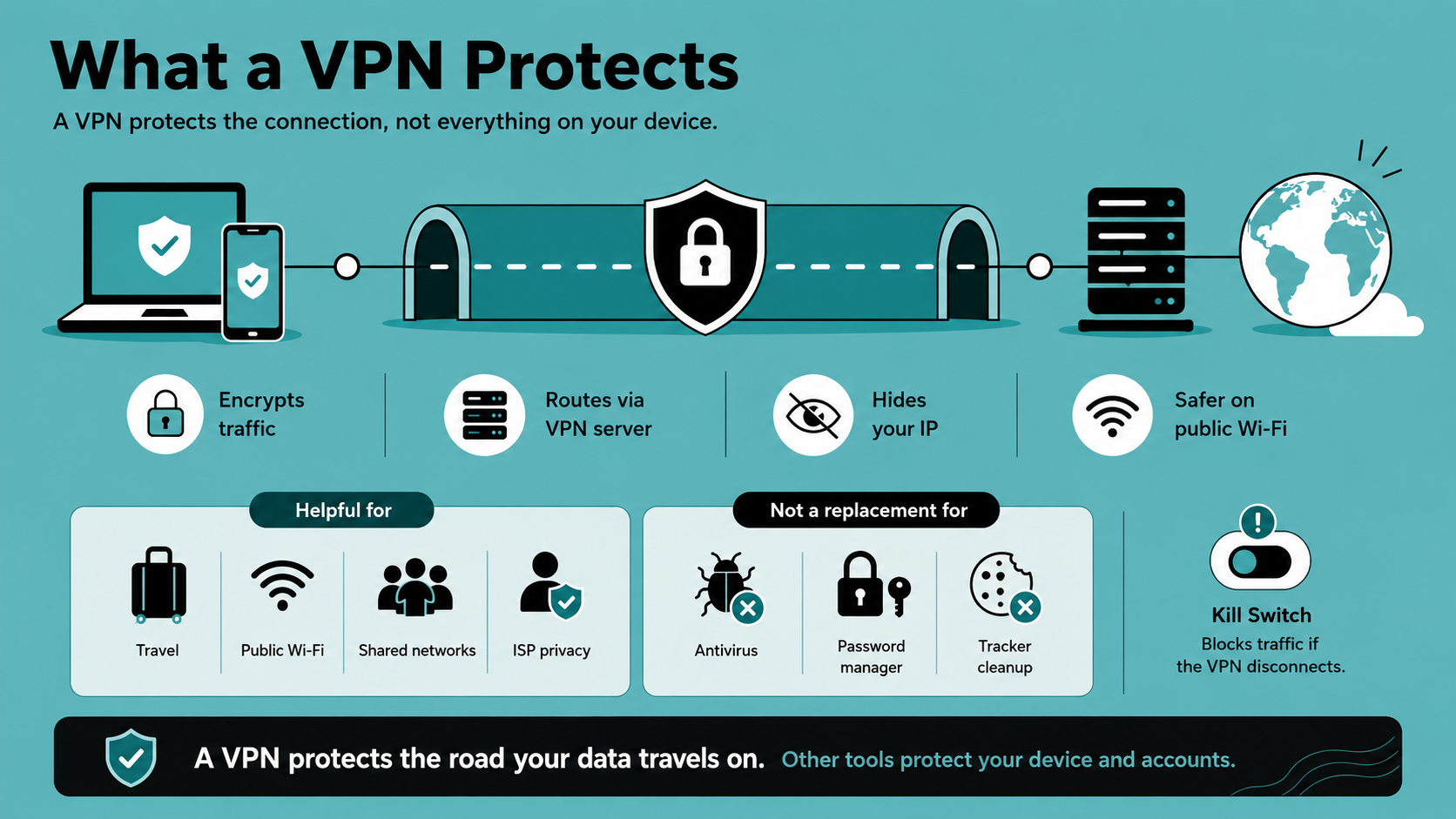
A VPN protects the path your data takes across the internet. When you connect to a VPN, your traffic is encrypted and routed through a VPN server. That helps hide your activity from local network operators, public Wi-Fi snoops, and your internet service provider. It also replaces your visible IP address with the VPN server’s IP address.
That helps in everyday situations. A VPN helps safeguard your data on public Wi-Fi at an airport, hotel, cafe, school, or coworking space. The encrypted tunnel of a VPN makes it much harder for someone on that same network to inspect or interfere with your traffic. At home, it can reduce internet service provider tracking and make browsing feel less exposed. When traveling, it can help you maintain a more consistent connection to familiar websites and services.
The key is to remember what a VPN sees and what it doesn’t. A VPN protects data in transit. It doesn’t protect data before it leaves your device, and it doesn’t erase what you reveal after you arrive at a website. If you sign into a social network, that company still knows it’s you. If your browser has tracking cookies, a VPN doesn’t delete them. If your computer is infected with spyware, the spyware may capture information before encryption ever starts.
That’s why a VPN can’t replace antivirus software. It doesn’t scan every file for malware, quarantine suspicious apps, or remove spyware that’s already installed. It also can’t replace passkeys or a password manager. A VPN protects the connection you use to reach a login page, but it can’t decide whether the login request itself is trustworthy.
A good VPN should also include safeguards for the moments when the tunnel breaks. For example, X-VPN’s kill switch can block traffic if the VPN disconnects, helping prevent your real IP address or unencrypted traffic from leaking during a network hiccup. That’s particularly useful on unstable hotel Wi-Fi or when your phone jumps between Wi-Fi and cellular data.
Use a VPN when the network matters. Public Wi-Fi, travel, shared networks, location-based restrictions, and internet provider privacy are all VPN territory. A VPN protects the road your data travels on, while other tools protect the account and device layers.
Where the protections overlap
These tools overlap just enough to make them easy to confuse. That isn’t a bad thing. Some overlap is useful because real attacks don’t respect neat categories.
Imagine a fake delivery message that asks you to click a link. Your browser might warn you. Antivirus or safe browsing protection might flag the page. A password manager might refuse to fill your login because the domain doesn’t match. A passkey might fail because the fake site isn’t the real service. A VPN might protect the connection if you’re on public Wi-Fi, but it won’t verify the delivery message for you.
Combining passkeys, antivirus, and VPN is layered defense. One tool might catch the problem early. Another might catch it later. The more layers you have, the less likely a single mistake turns into a full account takeover.
The same is true for malware. A VPN can reduce network-level snooping, but if you download a fake app, antivirus is the tool that might catch it. A password manager can limit the damage by ensuring you don’t reuse passwords. Passkeys can make stolen passwords less useful on supported accounts. Backups can help if ransomware gets through.
There’s overlap in phishing protection too. Passkeys are strong against fake login pages because they’re tied to legitimate services. Password managers can also help by refusing to autofill on the wrong site. Antivirus and browser protections may block known malicious pages. A VPN can protect the connection, but phishing usually attacks your trust, not just your network.
That difference is important. Many modern scams don’t need to break encryption. They convince you to approve something. You might scan a QR code, tap a deep link, approve a multifactor authentication (MFA) prompt, or authorize a new device. None of these tools can fully replace careful judgment.
The safest mindset is to treat alerts and prompts as decisions, rather than chores. Don’t approve a login you didn’t start. Don’t install software because a pop-up says your computer is infected. Don’t enter a recovery code unless you know exactly why it’s needed. Security tools buy time and reduce risk, but they don’t remove every decision.
The best everyday setup
Your goal probably isn’t extreme lockdown. You want your device and online experience safe without becoming a burden. You need a sensible setup that protects phones, tablets, and computers without making daily life miserable. The good news is that a strong baseline doesn’t require much fuss once it’s in place.
Start with accounts. Use passkeys wherever important services support them, especially for email, banking, cloud storage, password managers, and social media. For everything else, use a password manager to create and store long, unique passwords. Add MFA when passkeys aren’t available, preferably with an authenticator app or hardware security key rather than text messages when possible.
Then protect the device. Keep automatic updates on for your operating system, browser, and important apps. Leave built-in security protection enabled unless you have a specific reason to use another reputable tool. Be careful with installers, browser extensions, cracked software, and unknown attachments. On phones and tablets, review app permissions and remove apps you no longer use.
Next, protect the connection. Use a VPN on public Wi-Fi, while traveling, and whenever you want more privacy from a network or internet provider. Make sure the VPN is active before signing into sensitive accounts on shared networks. Turn on the kill switch where available, and use leak tests occasionally if privacy is important for a particular situation.
Here’s a quick summary.
To protect | Use these methods |
|---|---|
Accounts | Passkeys, passwords, MFA |
Devices | OS and app updates, antivirus, cautious downloads, backups |
Connections | VPN service, kill switch, leak tests |
The best setup is the one you’ll actually maintain. Don’t create a system so complicated that you turn it off.
What none of these tools can do
Even with passkeys, antivirus, and a VPN, some risks remain. That doesn’t make the tools weak. It just means digital security includes habits, backups, privacy settings, and common sense.
No tool can make a bad habit safe. Password managers help, but only if you let them create unique logins. The best antivirus can’t guarantee every download is harmless, since attackers constantly change tactics. No VPN can hide your identity from a website after you sign in with your real account.
These tools also don’t erase your data from companies that already have it. A VPN can hide your IP address from a website, but it can’t delete your shopping history. A passkey can secure your email account, but it can’t stop a company from using data you voluntarily shared. Antivirus can protect a device, but it can’t remove information already leaked in an old breach.
Backups deserve special attention. They aren’t as exciting as passkeys or VPNs, but they’re one of the best protections against ransomware, device failure, accidental deletion, theft, and disasters. A clean backup turns a crisis into a recovery project. Without one, even a small mistake can become expensive.
Privacy settings matter too. Apps may collect location, contacts, camera access, microphone access, and advertising identifiers. A VPN can hide your IP address, but it can’t stop an app from using permission you already granted. Review permissions occasionally, especially for apps you installed quickly and forgot about weeks later.
Finally, watch for scams that target your attention rather than your software. Urgency is a warning sign. So are unexpected security alerts, payment problems, prizes, delivery issues, account locks, and messages asking you to move quickly. The more rushed a message feels, the more critical it is to slow down. If you’ve been hacked or your computer is infected, the damage is already done and careful, deliberate steps are more important than speed.
The realistic goal isn’t perfect safety. It’s reducing the number of easy paths into your accounts, devices, and private activity.
Final thoughts
Passkeys, antivirus, and VPNs all protect you, but they don’t protect the same thing. Passkeys secure account access. Antivirus helps keep malware away from your phones, tablets, and computers. A VPN protects your connection, hides your IP address, and makes public or shared networks safer to use.
That is why the question isn’t which security tool you need or which one matters most. Your need depends on the threat, and all these tools play a role in safeguarding your accounts, devices, and data.
The strongest everyday security setup is layered, practical, and boring in the best way. You shouldn’t have to think about it constantly. Once the right tools are in place, they quietly reduce risk while you browse, work, stream, shop, travel, and sign in. Each tool protects a different weak point, and together they make your digital life much harder to attack.
FAQ
Do I need antivirus if I use a VPN?
Yes. A VPN protects your internet connection, but it doesn’t replace antivirus or anti-malware protection. Antivirus helps detect malicious files, suspicious apps, ransomware, spyware, and other threats on your device. A VPN helps protect the traffic leaving your device, especially on public or shared networks.
Do passkeys mean I don’t need a password manager?
Not yet. Passkeys are excellent where they’re supported, but many accounts still rely on passwords. A password manager helps create and store strong, unique passwords for those accounts. It can also store recovery codes, secure notes, and other sensitive login details.
Which should I set up first?
Start with your most important accounts. Secure email, banking, cloud storage, and password manager accounts with passkeys or passwords with MFA. Then make sure your device protection and updates are active. After that, use a VPN for privacy, public Wi-Fi, travel, and shared networks.