If you’re wondering whether X-VPN Free is enough—or whether X-VPN Premium is worth upgrading to—this guide breaks it down in the simplest way.
Both versions provide core VPN protection, but the difference becomes clear in everyday use—especially in ads, connection experience, server coverage, and advanced features.
Free vs Paid X-VPN: Quick Summary
Choose X-VPN Free (Guest Connect) if you:
- want to start instantly (no sign-up)
- use a VPN casually
- don’t need a wide range of server locations
Choose X-VPN Premium if you want:
- An ad-free experience
- More location choices
- Better streaming performance
- Advanced VPN features like Kill Switch and Split Tunneling
- Add-on services such as an Ad Blocker or Dark Web Monitor
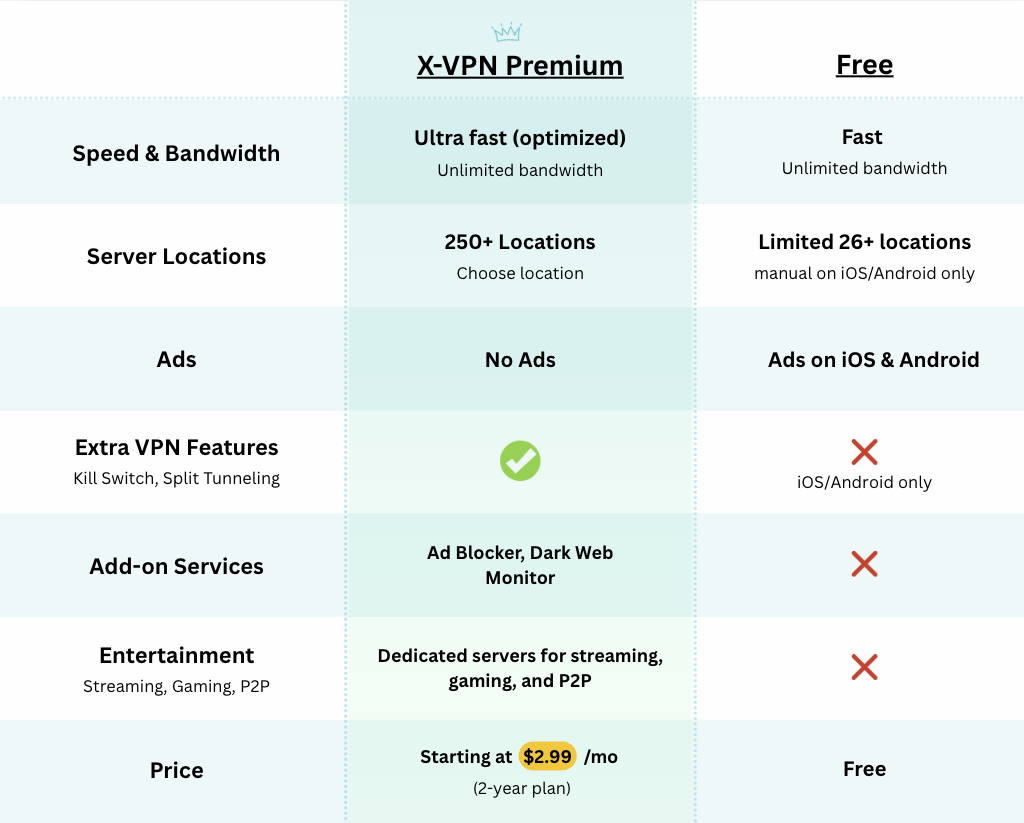
X-VPN Free vs Premium: What You Get
X-VPN Free
- Guest Connect (no account required)
- Fast for browsing and privacy
- Ads on iOS and Android only
- 15+ countries and 26–50 server locations (varies by platform)
- Unlimited bandwidth
X-VPN Premium
- Login required (to access Premium benefits)
- Ad-free on all platforms
- Ultra-fast, optimized performance
- 80+ countries and 250+ server locations
- Special servers for smoother streaming
- Advanced VPN features on all devices (Kill Switch is also available on iOS and Android in the free version)
- Add-on services like Ad Blocker and Dark Web Monitor
Why does X-VPN offer both a Free and a Paid plan?
A VPN is a live service, not just an app you download once. Every time you connect, your traffic is routed through VPN servers. That requires ongoing resources—server infrastructure, bandwidth, security updates, and customer support—and those costs continue every day.
If you’re new to VPNs, here’s a quick explanation of what a VPN is.
Start in seconds with Guest Connect—no account required.
That’s why the Free and Premium experiences are designed differently:
- X-VPN Free (Guest Connect) is built to help anyone start quickly. To support the Free experience, it may include differences such as ads on specific platforms and a smaller set of location choices.
- Premium (subscription) is supported by subscriptions. That funding helps enable broader server coverage, more optimization, and the continued development of advanced features.
Free and Premium are built for different needs.
The key differences between Free and Premium X-VPN
1) Getting started: Guest Connect vs Member Login
Signing up is often the first barrier—especially if you simply want to test a VPN first.
- With X-VPN Free, you can install the app and Guest Connect immediately—no account required.
- With X-VPN Premium, you’ll log in because Premium benefits are tied to your subscription.

2) Ads: Free has ads on iOS/Android only, Premium is ad-free
Here’s the clear rule:
- X-VPN Free: ads appear only on iOS and Android
- X-VPN Premium: no ads

X-VPN works with reputable advertising partners through established ad networks (such as Google AdMob). To learn how a free VPN can support its service while protecting user privacy, see: How Free VPNs Make Money Without Selling Your Data
If you use VPN occasionally, ads may not matter much. If you use VPN daily on your phone, an ad-free experience can feel significantly smoother.
The image below shows how ads may appear on X-VPN Free (iOS/Android only) and how Premium stays ad-free.

X-VPN Free supports Guest Connect and shows ads only on iOS/Android. X-VPN Premium requires login and is ad-free.
3) Speed and stability: Free is fast, Premium is ultra fast
It’s important to be clear here:
- X-VPN Free is fast for everyday VPN use.
- X-VPN Premium is ultra fast, built for an even more optimized experience.
Most users don’t feel the difference as a single “speed test number.” They feel it in how smooth the experience stays when they:
- use VPN more frequently
- switch regions more often
- stream video regularly

X-VPN Free is fast for everyday use. X-VPN Premium is ultra fast for a more optimized experience.
4) Server locations: how many countries and locations you can choose
Location choice matters more than people expect. Even if you’re not constantly switching countries, more options can help you:
- find a nearby location more easily
- switch when you want an alternative
- choose a specific region when you need it
Here’s the difference:
X-VPN Free
- 15+ countries covered
- 26–50 server locations (varies by platform)
- Manual server selection is available on iOS and Android only. On other platforms, X-VPN automatically selects the best server for you.
X-VPN Premium
- 80+ countries covered
- 250 server locations
- Special servers optimized for smoother streaming performance

Free covers 15+ countries across 26–50 locations. Premium covers 80+ countries across 250 locations, with additional servers optimized for smoother streaming performance.
Streaming: what “streaming-optimized servers” means
X-VPN Premium includes special servers optimized for streaming performance. In plain terms, these servers are designed to support a smoother viewing experience by focusing on stability and speed during video streaming.
Streaming platforms and network conditions can change over time, so performance may vary. But if streaming is a regular part of how you use a VPN, Premium is typically a better fit because it combines:
- more location choices
- more server options
- streaming-performance optimization
Premium advanced features: Kill Switch and Split Tunneling
If you’re upgrading, advanced features should feel practical—not technical.
Kill Switch
Kill Switch helps reduce accidental exposure if your VPN connection drops, by helping prevent your traffic from switching back to your regular connection during a drop.
Split Tunneling
Split Tunneling lets you choose which apps use the VPN and which apps use your normal connection. For example, you can route a streaming app through the VPN while keeping other apps on your regular connection.
Note: Kill Switch is available in the free version on iOS and Android only. It is not supported on other devices.
If you want to set it up step by step, see our X-VPN Split Multi Tunneling how-to guide.
X-VPN Premium: Advanced Features

X-VPN Premium adds advanced controls like Kill Switch and Split Tunneling for more privacy and flexibility.
Which one should you choose?
Choose X-VPN Free if you:
- want to start instantly with Guest Connect
- use a VPN occasionally for everyday browsing or public Wi-Fi
- don’t need many server location choices
- are okay with ads on iOS/Android
Choose X-VPN Premium if you:
- want an ad-free experience
- want a more optimized ultra fast experience
- want more choices (80+ countries and 250 server locations)
- want servers optimized for smoother streaming performance
- want advanced controls like Kill Switch and Split Tunneling
A practical approach for many users is simple: start with Free using Guest Connect, then upgrade when you want no ads, more locations, streaming-performance optimization, or advanced controls.
Download X-VPN Free Today
If you’re just getting started, the easiest way to try X-VPN is to download the Free version and use Guest Connect.

- Android users can download X-VPN from Google Play or the X-VPN Android download page.
- iOS users can download X-VPN from the App Store or the X-VPN iPhone/iPad download page.
- X-VPN is also available on other major platforms—visit the X-VPN download page to find the right version for your device.
Conclusion
X-VPN Free and X-VPN Premium are built for different needs.
Free is fast and easy to start—especially because you can Guest Connect without an account. Premium removes ads, expands server coverage significantly, adds servers optimized for smoother streaming performance, and unlocks advanced features like Kill Switch and Split Tunneling.
If you want to start quickly, Free is a strong option. If you use VPN often and want a more seamless experience with more choices and more control, Premium is the natural upgrade.
FAQs
Do I need an account to use X-VPN Free?
No. X-VPN Free supports Guest Connect, so you can connect without signing up or logging in.
Does X-VPN Free have ads?
Yes, but only on iOS and Android. X-VPN Premium is ad-free.
Is X-VPN Free fast enough?
Yes. X-VPN Free is fast for everyday VPN use. Premium is designed to be ultra fast with a more optimized experience for heavier use.
How many countries and server locations do Free vs Premium include?
Free: 15+ countries covered across 26–50 server locations (varies by platform).
Premium: 80+ countries covered across 250 server locations, plus servers optimized for smoother streaming performance.
What does Kill Switch do?
Kill Switch helps reduce accidental exposure if the VPN connection drops by helping prevent your traffic from switching back to your regular connection during a drop.
What is Split Tunneling?
Split Tunneling lets you choose which apps go through the VPN and which apps use your normal connection.