


Most guides on deleting a Telegram account assume you can still log in normally. This one doesn’t. Along with the standard deletion method, this article also covers what to do if a verification code is sent to a Telegram login session you can no longer access.
TL;DR
To delete your Telegram account immediately, you have two options:
- On iPhone: Go to Settings → Privacy and Security → If Away For → Delete Account Now, then follow the prompts to confirm.
- On other devices: Go to my.telegram.org/auth, enter the phone number linked to the Telegram account you want to delete, and then confirm. A verification code will be sent to you in the Telegram app.
If your account has 2FA enabled, you may also need to enter your 2FA password. If you’ve forgotten your password, skip to the Forgot Your 2FA Password? section before using Reset Account.

💡 One thing to clear up first: uninstalling the Telegram app will not delete your account. Your account, along with all the content stored in Telegram’s cloud, will remain intact on Telegram’s servers.
Table of Contents
Before You Delete: 7 Things to Handle First
Once your account is deleted, some of these options will no longer be available. We recommend checking these seven items first.
1. Delete Anything You Don’t Want Other People To Keep
While your account is still active, you can select “Delete for me and the other person” when deleting messages from a private chat to remove them from the other person’s chat history as well. If this matters to you, do it before deleting your account.
2. Export your Chat History
This feature is only available through Telegram Desktop (you need to download the Telegram app on your computer, since the web version does not support it).
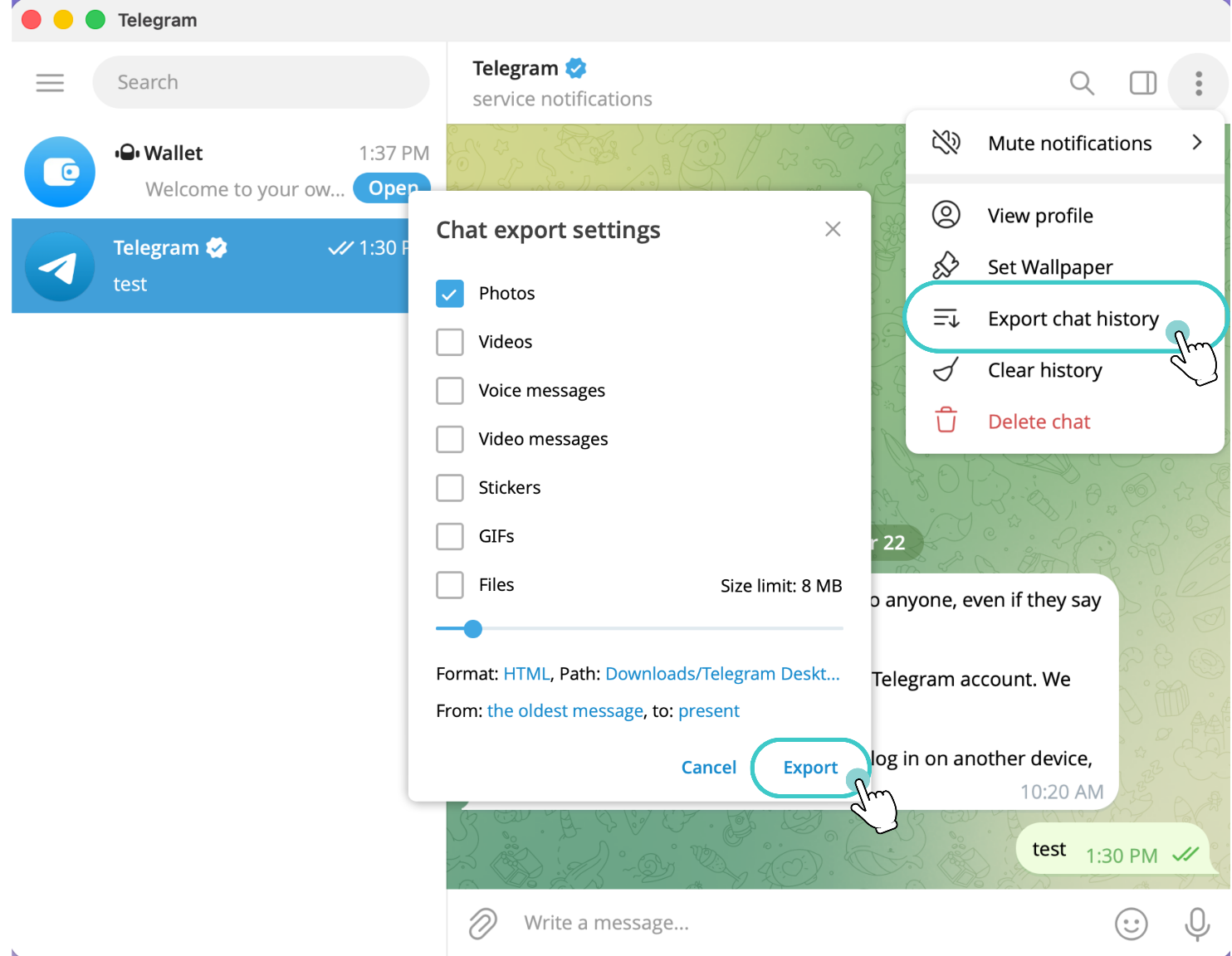
Open the chat you want to back up, click the ⋮ in the upper-right corner, select Export chat history, then select the data you need, such as photos, videos, voice messages, files, etc., and choose:
- HTML: Best if you want to read it later.
- JSON: Better for programmatic processing or data analysis.
Choose the time period you want to export, and then click Export. If your account has been used for many years and contains a lot of media files, the export may take some time, so it’s best to start early.
3. Check The Groups And Channels You Created
Groups and channels will not be deleted along with your account. They will continue to exist without their creator, and existing administrators will keep their permissions. If you want a specific person to continue managing a group or channel, transfer ownership before deleting your account.
4. Cancel Telegram Premium Separately
If you subscribed to Telegram Premium through the App Store or Google Play, deleting your Telegram account will not stop billing. You will need to manually cancel it in your Apple or Google subscription settings. However, if you subscribed through @PremiumBot, deleting the account will automatically cancel the renewal.
5. Deal With Fragment Usernames, Collectible Gifts, And Stars, If You Have Any
These are all linked to the account. Transfer or use them before deleting the account.
6. Check What You Use Telegram To Log In To
Check which services you currently use Telegram to log in to. Those logins will also stop working as soon as the account is deleted.
7. Tell People Where To Find You
Your contacts will only see a blank profile labeled “Deleted Account,” with no explanation.
How to Delete Telegram Account on Each Device
Platform | Delete in the app immediately? | How to delete immediately |
|---|---|---|
iPhone / iOS | Yes | – Open the app, tap Settings → Privacy and Security → If Away For → Delete Account Now – You can also use the official Deactivation Page |
Android | No | Use the official Telegram Deactivation Page |
Windows / macOS desktop | No | Open the official Telegram Deactivation Page in your browser. |
Web / Browser | No | Use the official Telegram Deactivation Page |

Quick Answer
To delete your account now, iPhone users can do so directly within the app. On other devices, use the official Telegram Deactivation Page. To schedule automatic account deletion, use “Delete my account if away for…” to set an inactivity period.
How to Delete a Telegram Account Immediately
Delete Telegram Account via the Official Deactivation Page
This method works on any device and in any browser. The official Telegram FAQ also points users to this method.
Step 1. Go to the Telegram deactivation page.
Step 2. Enter your phone number in international format, including the country/region code.
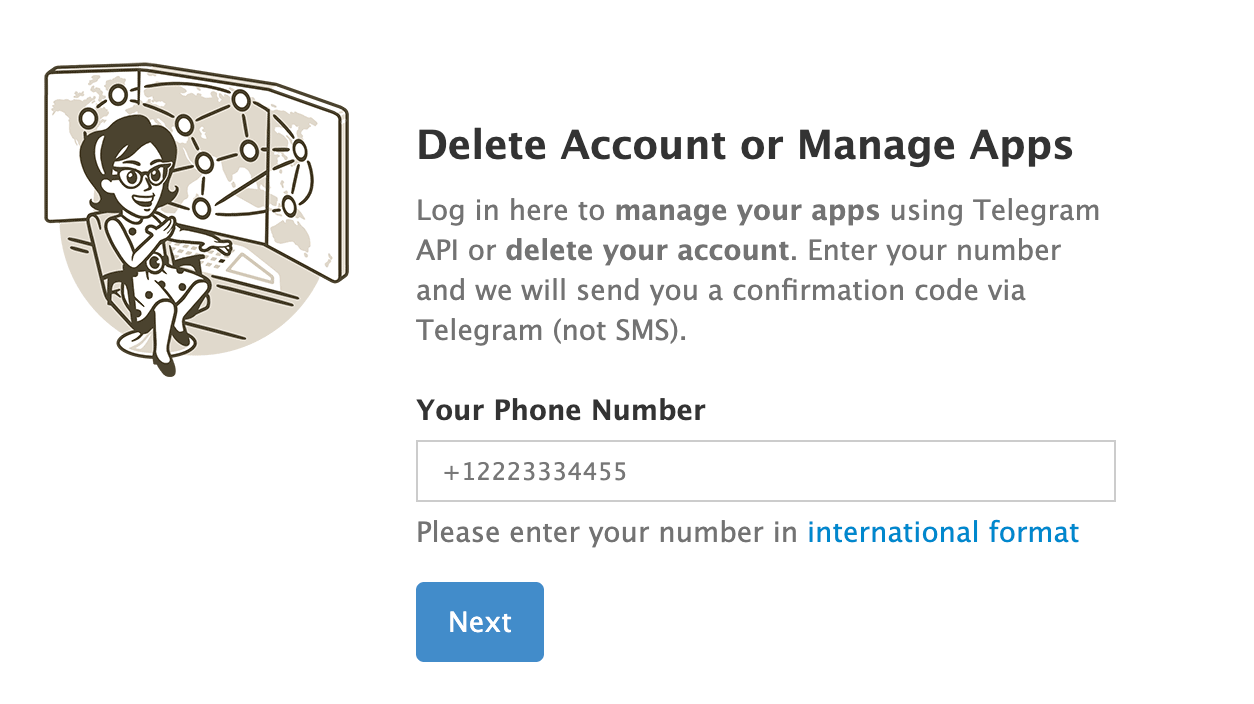
Step 3. Open Telegram to get the Deactivation Code (the Deactivation Code will be sent as a message within the Telegram app).
Step 4. Enter the Deactivation Code in your browser.
Step 5. Select Delete account.
Step 6. If your account has 2FA enabled, enter your 2FA password. This is a separate password you set yourself, not the verification code you just received. If you have forgotten this password, read the “Forgot 2FA Password” section below.
Step 7. If you wish, you can enter a reason for deleting the account, or leave it blank.
Step 8. Confirm the deletion.
💡 One thing to remember: The Deactivation Code will be sent to Telegram, not your SMS inbox. This is a common point of confusion when deleting an account for the first time.
Didn’t Get the Deactivation Code?
If the code doesn’t arrive, check all devices that are still logged in: your old phone, tablet, Telegram Desktop on your computer, or web.telegram.org in your browser.
If you can no longer access any logged-in session, don’t keep retrying, and don’t log out of any working sessions just to request a new verification code via SMS. Skip to the “Can’t Log In” section and determine your next step based on what access you still have.
Delete Telegram Account Directly on iPhone
The Telegram iOS app allows you to complete the entire account deletion process directly within the app.
Step 1. Go to Settings → Privacy and Security → If Away For → Delete Account Now
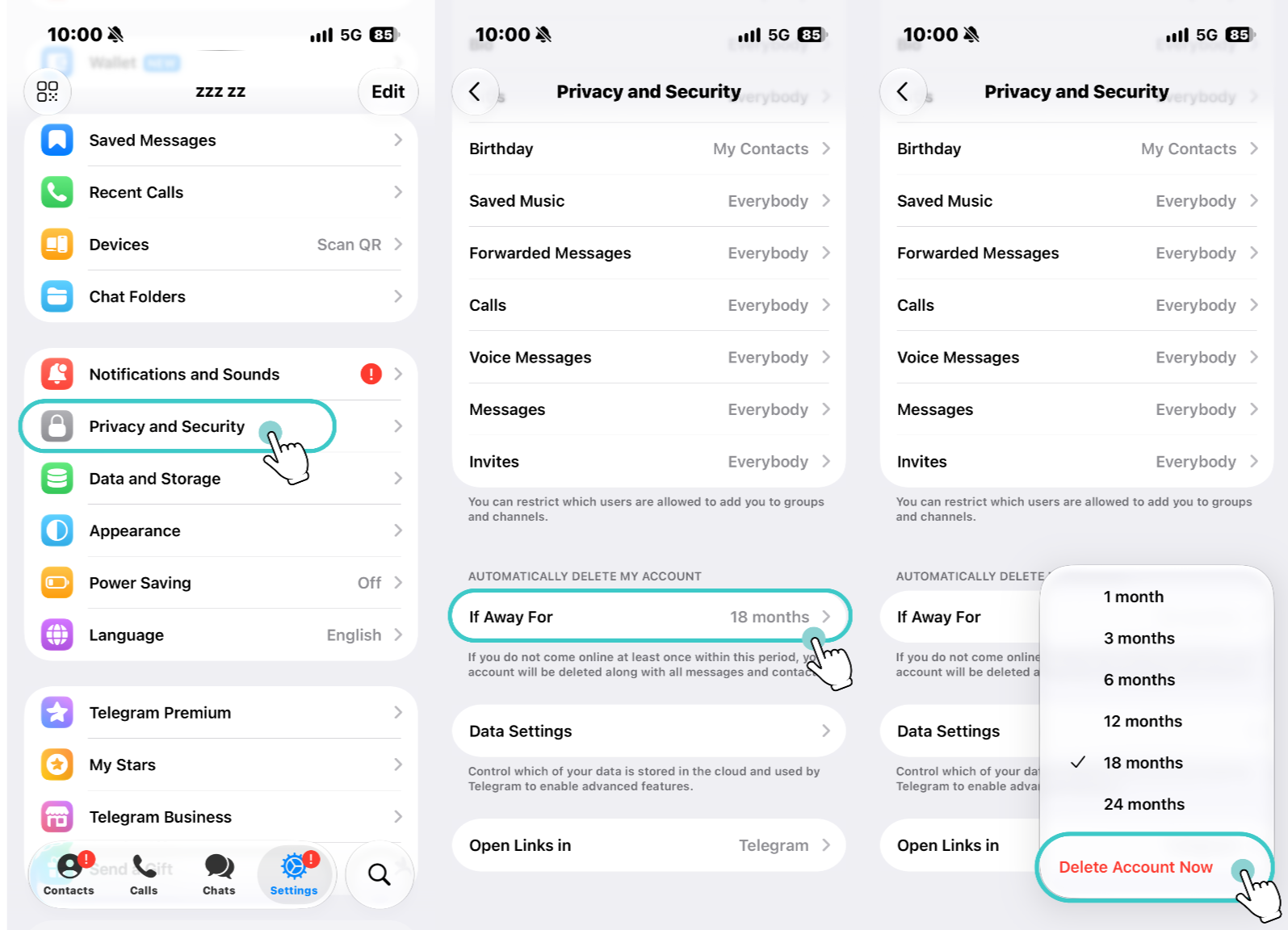
Step 2. Alternative Options page → Delete My Account → Tap Continue when prompted
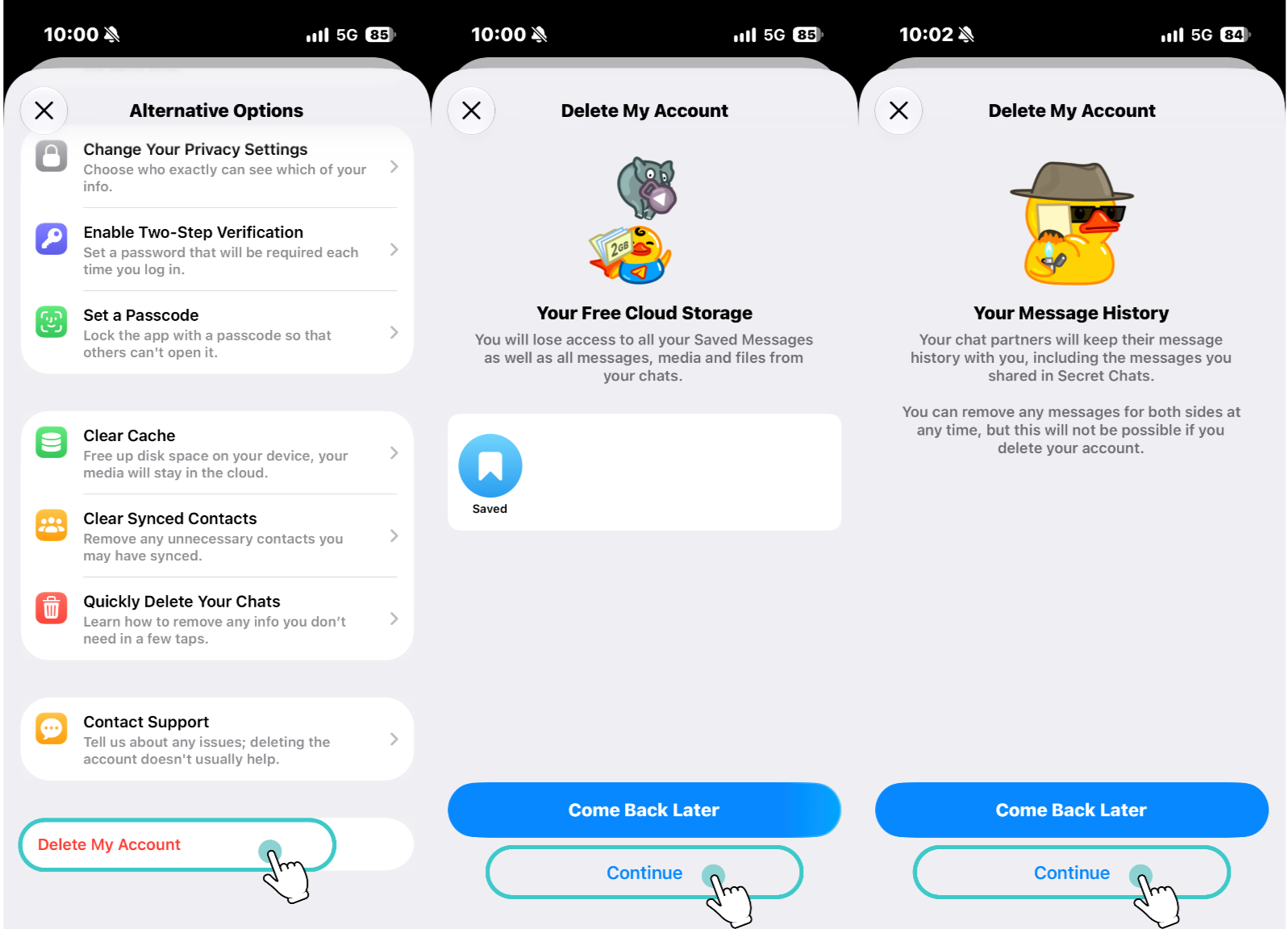
Step 3. Re-enter the phone number linked to the Telegram account → Delete My Account
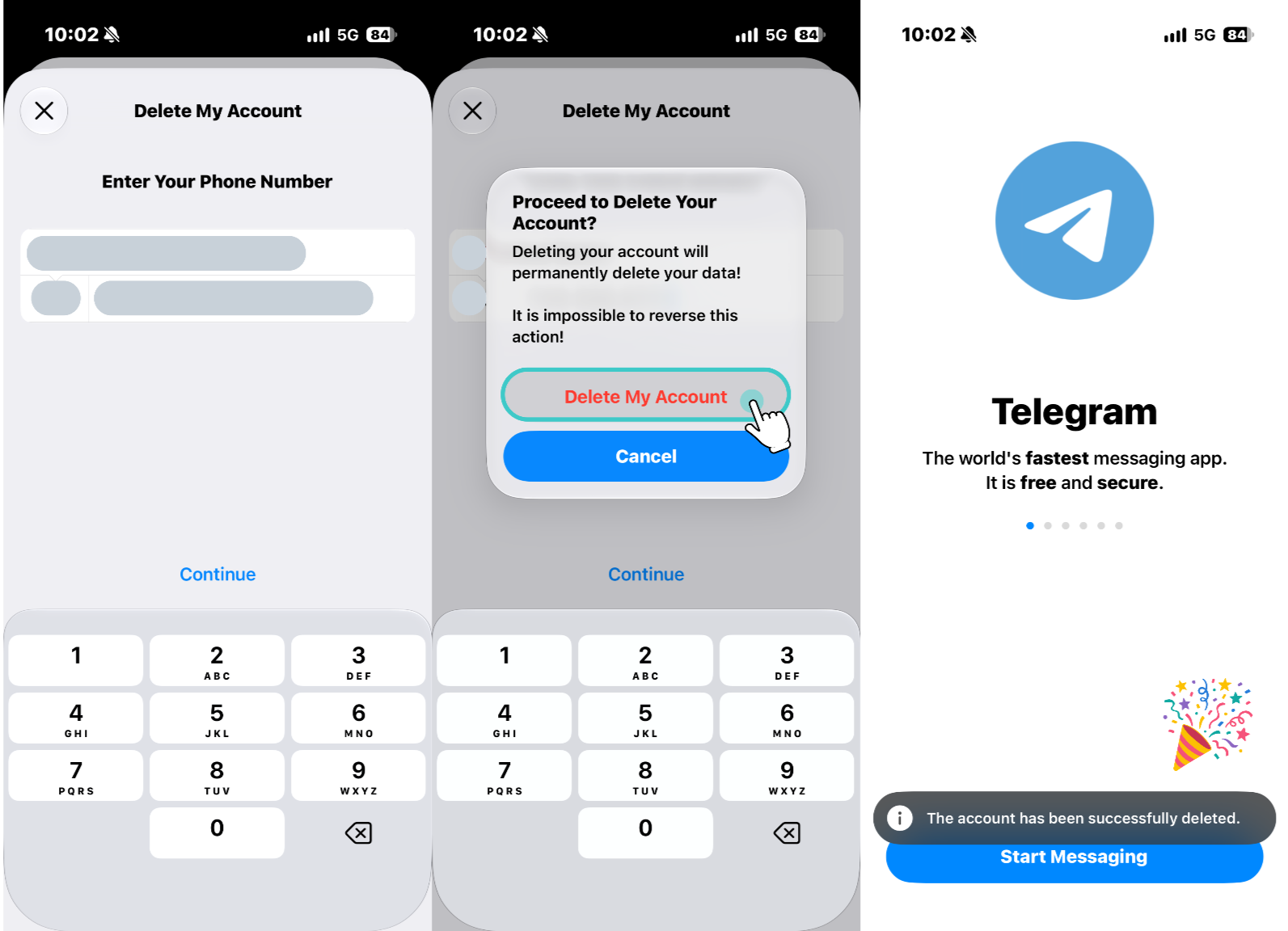
Step 4. Delete My Account. Your account will then be deleted.
How to Automatically Delete Your Telegram Account
If you don’t need to delete your account immediately, you can set up Telegram to automatically delete it after a period of inactivity. This only happens if you do not log in or use Telegram during the selected period.
In the Telegram app, go to:
Settings → Privacy and Security → If away for…
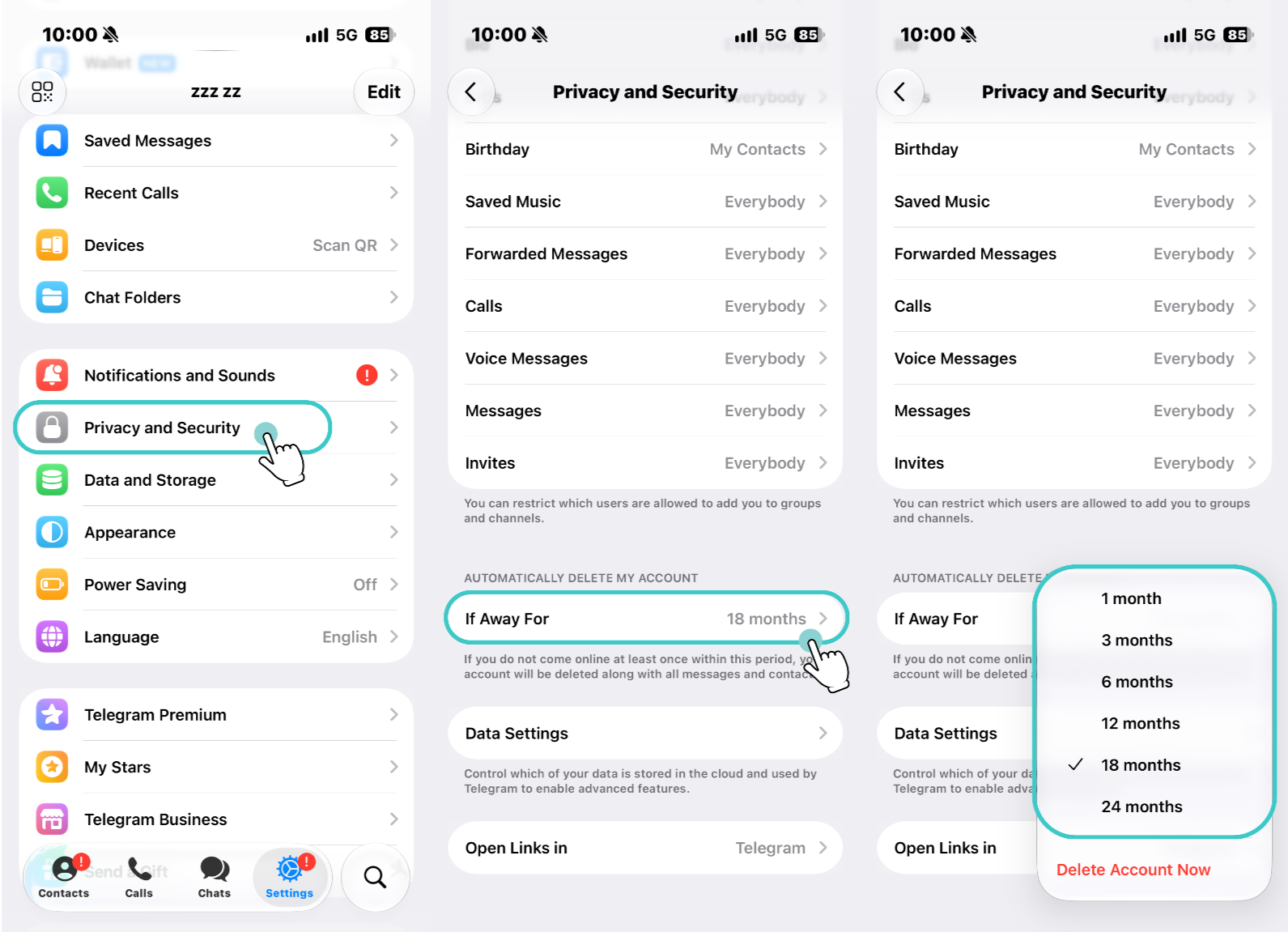
Then select your desired inactivity period. Telegram’s current default inactivity period is 18 months, but you can also choose 1, 3, 6, 12, 18, or 24 months.
Once it’s set:
- If you log back in before the deadline, your account will not be deleted.
- If you stay inactive for the selected period, Telegram will automatically delete your account, along with your messages, media, contacts, and other account data stored in Telegram’s cloud.
All of these methods assume you can still access your Telegram account normally.
However, if you are unable to log in to Telegram, the verification code is being sent to a Telegram session you cannot access, you have forgotten your 2FA password, or you have lost your original phone number, the normal deletion process may not work.
In that case, don’t keep retrying the same deletion steps. What you can do next depends on what access you still have.
Can’t Log In to Telegram? Here’s What You Can Do
Find the situation below that matches yours.
Forgot Your 2FA Password
After entering the verification code, Telegram may ask for a 2FA password you can’t remember. Don’t click any buttons labeled “Reset” until you read the recovery methods below. Two of the three options will save your account, while the other will delete it.
You No Longer Have Access To Your Number
Contact your mobile carrier to see if you can get your number back. If that doesn’t work and you aren’t logged in on another device, Telegram has no other way to verify your identity. You may have to wait for the 18-month inactivity period to expire, so Telegram automatically deletes your account.
Your Account Is Frozen Or Restricted
This is not the same as having your account deleted. Deleting your account won’t fix this. You need to go through the appeal process first.
You Keep Hitting “Too Many Attempts.”
This is a rate limit. Stop and wait for a while. Repeated attempts will extend the lockout. Then try deleting the account again.
After reinstalling Telegram, I was asked to purchase Premium when I tried to log in
This isn’t a fee for deleting your account. Deleting a Telegram account is always free. In some countries and with certain mobile carriers, Telegram may require a Premium subscription before sending an SMS login code when SMS costs are too high. This can interrupt the normal login flow.
In that case, don’t keep trying the same step. If you have another session where you’re still logged in, the verification code will be sent directly to that session, bypassing SMS. If you don’t have any active sessions, see the “Forgot Your 2FA Password” section below.
If none of that works, Telegram provides an in-app help section: Settings → Ask a Question. For those unable to log in, Telegram’s official website also offers a support form.
Forgot Your 2FA Password? Read This Before You Touch “Reset Account”
Telegram’s Password Reset and Reset Account are not the same thing. Password Reset lets you keep your account, while Reset Account will eventually delete your existing account.
First, check what you still have access to:
What else can you access now? | What can be done? | Result |
|---|---|---|
A device that is still logged in to Telegram | Password Reset | Reset your 2FA password; account retained. |
Your recovery email | Email Recovery | Recover your password via email; account retained. |
Neither of these, but Telegram login verification is still possible | Reset Account | Delete the original account and then register a new one. |
Which path you choose depends on what access you still have. Check your logged-in devices, then your recovery email. Only consider Reset Account if neither recovery method is available.
Reset Account Does Not Recover Your Account
Although the button says “Reset Account,” it actually deletes the existing Telegram account.
After deletion, the original account’s chat history, contacts, and saved messages will not be restored. Even if you register again with the same phone number, you will start with a new account.
In short:
- Password Reset: Resets the password while retaining the account information.
- Email Recovery: Recover your account via email.
- Reset Account: Delete the old account.
Why Can Resetting Your Account Take 7 Days?
If you start the Reset Account process without knowing your 2FA password, Telegram might add a 7-day security waiting period to prevent others from deleting your account immediately. The delay is a security feature that could help save your account.
During the Reset Account waiting period, Telegram will notify the existing account about the pending deletion. If the account holder can complete Telegram’s required verification, the deletion can be canceled.
What Actually Happens When You Delete Telegram Account
Deletion is often immediate and irreversible, but the scope of “deletion” is narrower than most people think. The table below shows what actually happens.
Item | After deletion |
|---|---|
Your account | Permanently deleted |
Cloud chat history, media files, saved messages | Deleted |
Your contacts | Removed from your account |
Your username | Released; someone else can register it |
Groups and channels you created | Continue to exist, just without their creator |
Existing administrators of groups and channels | Keep their permissions |
Copies of messages that others have already received | May still be retained |
Registering again using the same phone number | Treated as a brand-new account; old data will not be restored |
Registering again immediately with the same phone number | You may need to wait a few days |
Deleting a Telegram account only deletes the account itself and its associated cloud data. It doesn’t delete information that has already left Telegram. For example, saved copies of chats, screenshots, photos, or files downloaded to a device will not automatically disappear when you delete the account.
Similarly, Telegram cannot delete data that other services have already stored. If you have shared information through bots, third-party websites, or other services, whether that information is retained depends on those services’ own policies.
For a broader look at what privacy tools can and can’t protect, see our guide to protecting sensitive personal data online.
So deleting a Telegram account does not mean that all of your past activity has “disappeared from the internet.”

Wrap It Up
Deleting a Telegram account itself isn’t difficult when you can still log in. The hard part is deleting it when something has already gone wrong. If you can still log in normally, take care of anything you need to first: export the records you want to keep, transfer groups and channels, delete chat history, and cancel separately billed subscriptions.
Also remember that account deletion only affects the account itself. It doesn’t remove copies other people already have, data stored by other services, or metadata retained by Telegram under its own rules.
FAQ
Can I delete my Telegram account without logging in?
There’s only one exception. If you’re still receiving login verification codes but can’t get past the 2FA password prompt, have no other logged-in sessions, and don’t have access to your recovery email, the Reset Account process will delete the account. If you no longer have that phone number, Telegram has no other way to verify your identity.
What is the difference between Reset Password and Reset Account?
Reset Password will keep your account and allow you to set a new two-step verification password. Reset Account will permanently delete your account. Telegram only offers the former option if you still have a device logged in, so it’s important to check whether your old device is still logged in before clicking anything.
Can I delete my Telegram account without entering a verification code?
No. Every deletion method requires some form of identity verification. The only difference is whether an in-app verification code, SMS, or email verification is used.
Why do I have to wait 7 days?
There are two different processes that involve a 7-day waiting period, so you need to figure out which one applies to you. A password reset takes 7 days, after which you can regain control of your account. The other scenario is requesting account deletion without providing a 2FA password. If this password was set more than a week ago and the account has been active within the past week, there will be a 7-day waiting period before the account is deleted.
Can a stolen Telegram account be deleted?
If you can still receive login verification codes at that phone number, you may still be able to proceed, even if the attacker has changed the password and recovery email. If you can still access your account, terminate other active login sessions first.
Can a deleted Telegram account be recovered?
No. Deletion is permanent. Even if you register again using the same phone number, you will start with a completely new, blank account.
Can I continue using the same phone number to get a Telegram account?
Yes, but it may not be usable immediately. You may need to wait a few days, and the new account will not contain any old data.
Will deleting my Telegram account automatically cancel my Telegram Premium subscription?
If you paid through the App Store or Google Play, no. You’ll need to cancel separately on that platform. Premium subscriptions through @PremiumBot will end when the account is deleted.
Will deleting a Telegram account delete all messages from everyone?
Your messages will be deleted, but copies saved by others may still exist. You can use “Delete for both sides” before deleting your account.
Will uninstalling Telegram delete my account?
No. It will only remove the app from one device. The account itself will remain.
Will my Telegram account become untraceable after I delete it?
No. Deleting your account only removes the account and its cloud data. It will not affect records already held by your ISP, records on your device, data held by others, or information that was previously disclosed under legitimate legal requests.